The brief
What the best digital budget planner has to do
A digital budget planner is a planner PDF, built with tappable links, that you load onto an e-ink tablet and fill in by hand. The job it does is easy to state and easy to get wrong: it has to show your month at a glance, take you from a yearly overview to a single category in one tap, and give you somewhere to log income, bills, and what you actually spent, all in one file you reopen every week. A spreadsheet can do some of that, but it pulls you to a screen full of notifications, and writing a number down by hand makes you feel it in a way that typing into a cell never does. The best digital budget planner sits between the rigid spreadsheet and the messy notebook, and the rest of this guide is how to choose one that fits your tablet and your money habits rather than one that looks neat in a screenshot and goes unopened by February. That February drop-off has a structural cause more often than a motivational one; our ADHD planner guide goes through the layout decisions behind it.
Three things separate a budget planner you keep from one you abandon. It has to be hyperlinked, so moving from the year view to a single month is a tap and not a scroll. It has to be dated to a real year, so the months and weeks are built for you. And it has to carry the pages money actually needs, which is a shorter list than most templates admit. Get those three right and the tablet becomes the one place your numbers live.
- Hyperlinked: tap from the year to a month to a category, and jump straight to savings goals or the debt tracker
- Dated: the year mapped for you, ideally two years so the habit carries forward
- Pen-ready: ruled money columns sized for handwriting, not just typed entry
- Focused: a monthly budget, a bill tracker, savings goals, a debt payoff page, and little filler beyond that
Tablet first
Match the budget planner to your tablet
The most common mistake is choosing a planner before checking it suits the tablet in your bag. A file built for a 10-inch writing surface can feel cramped on a 6-inch reader, and money columns made for one pen can ignore the pressure and palm rejection of another. So start from the hardware. If you already own a reMarkable, a Kindle Scribe, or a writing-capable Boox, the budget planner has to be made or sized for it, because the link spacing, column widths, and margins are all tuned to a screen. A planner sold per device exists for exactly this reason, and a generic one that claims to fit everything usually fits none of them well.
This is also where a cross-device household wins or loses. If one partner tracks on a reMarkable and the other on a Kindle Scribe, you want the same planner sized for each, so the numbers line up rather than living in two layouts. The short version is that all three brands write well on e-ink; the difference is software and ecosystem, not whether the budget planner will run. Decide the device, then buy the planner built for it, not the other way around.
| Device | Best for | Writing money columns | App flexibility |
|---|---|---|---|
| reMarkable | Calm, distraction-free budgeting | Excellent, paper-like pen feel | Closed, focused |
| Kindle Scribe | Budgeting plus reading in one device | Strong on the writable PDF | Limited, reading-led |
| Boox | Budgeting plus any finance app you like | Good, with adjustable tools | Open Android |
The pages
The pages a budget planner actually needs
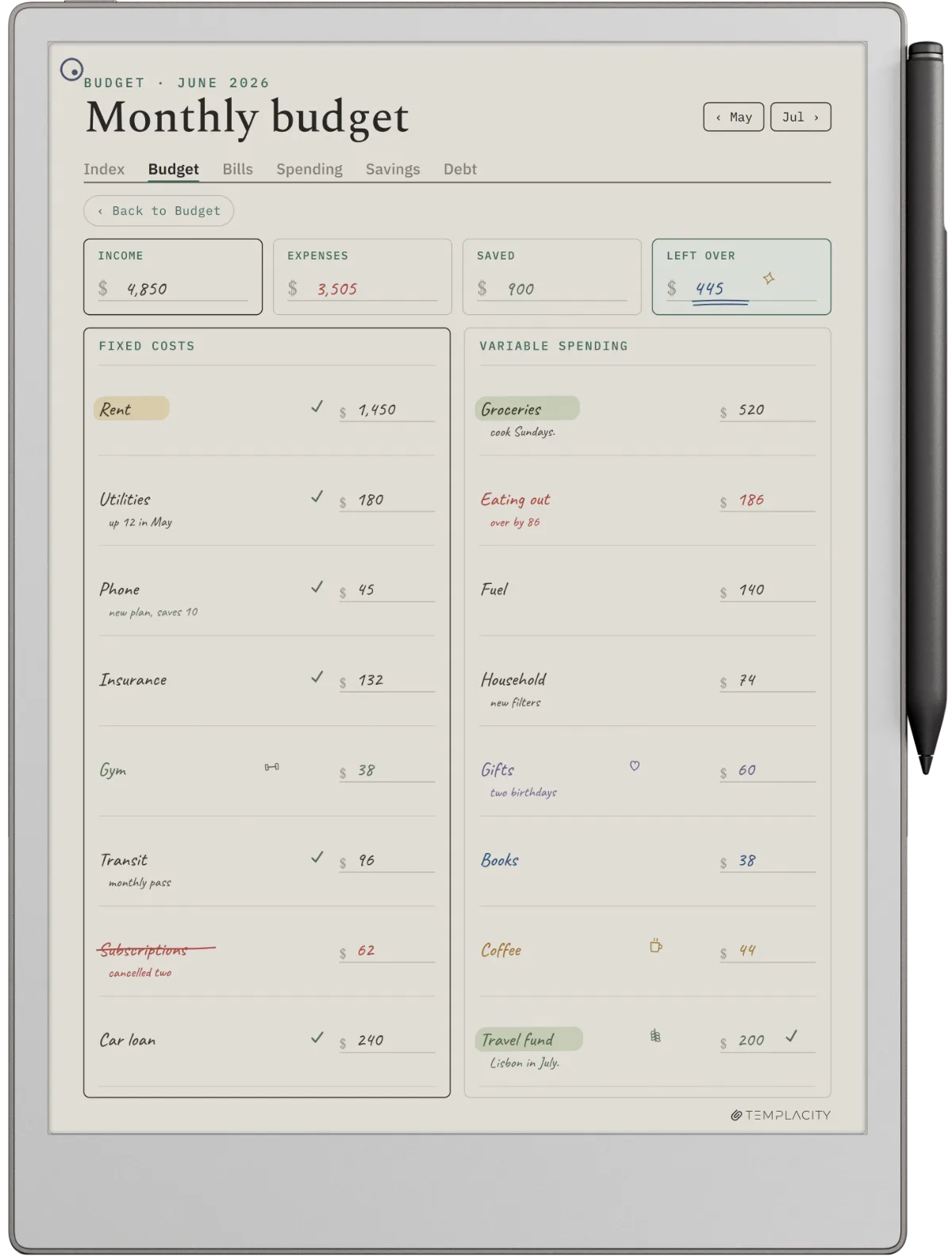
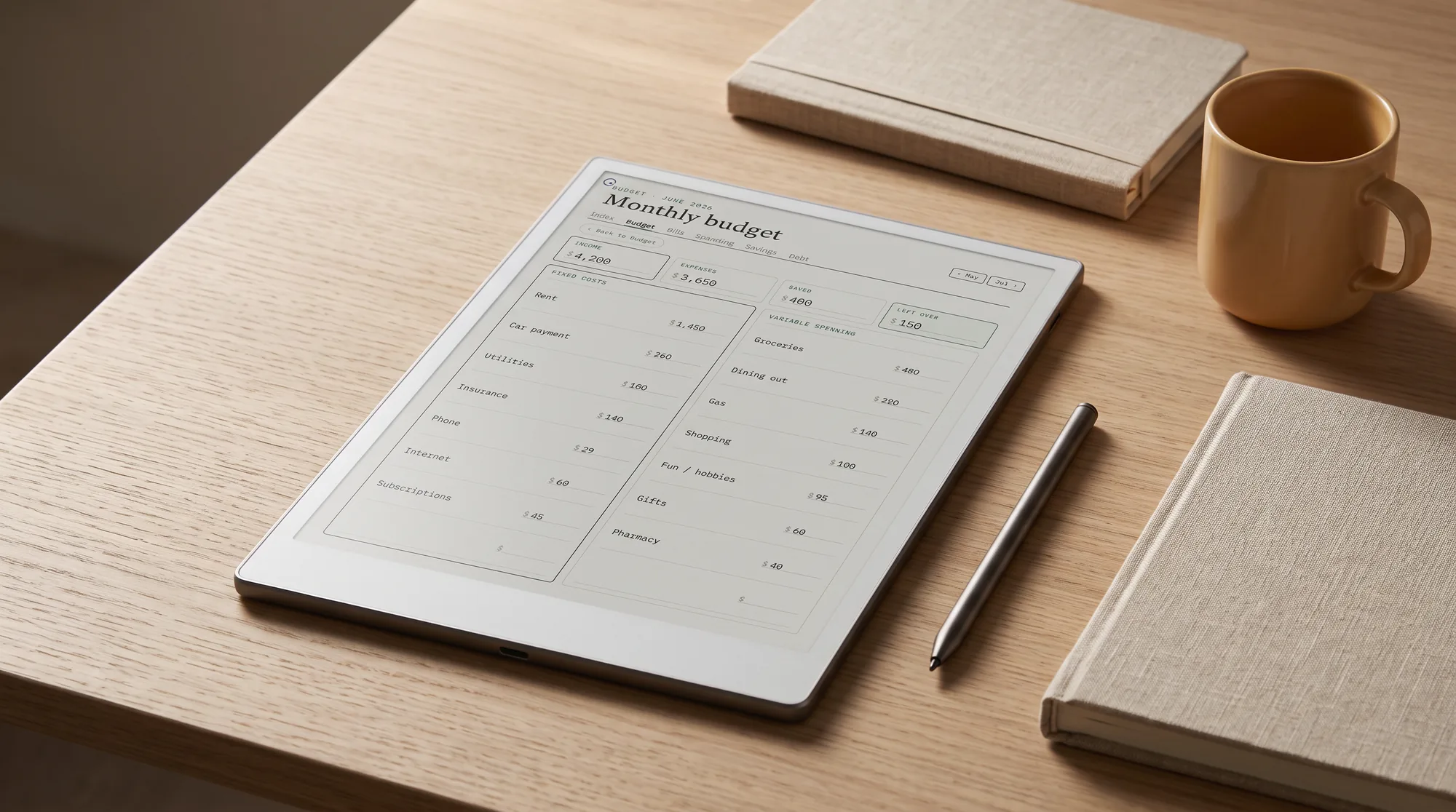
A budget planner does not need forty page types; it needs the few that map to where money actually leaks. The backbone is a monthly budget, income at the top and categories beneath, so a single page tells you what came in and where it is meant to go. Under that sit a bill tracker for recurring due dates, a savings goals page so progress is visible rather than vague, and a debt payoff tracker if you are carrying a balance. A weekly spending log catches the small purchases that a monthly view hides. Almost everything past that is filler.
Most overspending is not a budget problem, it is a tracking problem, and the right page closes the gap for the right pain. The matrix below maps the money habit you keep slipping on to the single page that fixes it, which is a faster way to judge a planner than counting its features.
| If money keeps slipping on | The page that closes it | Why it works |
|---|---|---|
| Overspending mid-month | Weekly spending log | Small buys are visible before the month ends, not after |
| Surprise annual bills | Sinking funds tracker | You set aside a little each month so the bill is already covered |
| Savings that never grow | Savings goals page | A target with a running tally turns intention into progress |
| Debt that will not shrink | Debt payoff tracker | Each balance and payment in one view keeps the plan honest |
| No idea where it goes | Monthly category budget | Every dollar gets a job before the month starts |
When you weigh a digital budget planner, count the pages you would open every week and ignore the rest of the page count. A tidy file you actually fill in beats a sprawling one you do not. If you want a framework to fill those pages against, the CFPB budgeting guide is a plain, free starting point for splitting income across needs, wants, and savings.
Device fit
reMarkable, Kindle Scribe, or Boox for budgeting
All three write well on e-ink, so the choice comes down to how each fits the way you handle money. If budgeting is a quiet weekly ritual and you want nothing pulling your attention toward a shopping app, reMarkable is the calm pick, and a budget planner pairs with it the way our reMarkable planner guide lays out. If you read as much as you budget and want one device for the library and the ledger, Kindle Scribe writes on the same screen you read on, and our Kindle planner guide covers how a planner runs on it. If you want to keep a banking app or a finance tool one swipe from your planner, a writing-capable Boox gives you open Android. None is wrong; they suit different money styles.
There is one honest caveat worth stating. An e-ink budget planner is a place to plan and review, not a live bank feed; it will not auto-import transactions the way an app does. That is the trade you make for a calm, handwritten page, and for most people the few minutes of entering numbers by hand is the part that actually changes behaviour. If you need automatic syncing above all, an app on a Boox is the closer fit; if you want the numbers to land, the handwriting is the feature.
Dated or not
Why a dated budget planner beats an undated one
Budgeting is a habit measured in months, and a dated file is what makes the habit visible. A budget planner dated 2026 and 2027 lays the months out for you, numbers the weeks, and opens to the current page, so you sit down and write rather than ruling up a grid first. An undated planner asks you to date every page yourself before you have logged a single bill, which is busywork you will quietly stop doing by spring. The dated file does the opposite: it carries you from one year into the next without a second purchase, so the record of what you earned and spent compounds instead of resetting.
That two-year span matters more for money than for almost anything else, because the lessons only show up over time. Seeing this December next to last December, or a savings goal that finally closes after eleven months, is the payoff, and it only exists if the planner spans the years rather than expiring on the 31st. A planner that covers 2026 and 2027 is a tool you grow into, not a book you have to set up first.
An undated planner asks you to date every page yourself before you have logged a single bill, which is busywork you will quietly stop doing by spring.Why dated wins
In practice
Setting up a digital budget planner that sticks
Once the planner is loaded, a few habits decide whether it lasts past January. Set the monthly budget up in the first sitting, listing every recurring bill and its date, so the file is live before the spending starts. Pick one weekly slot, ten quiet minutes, to enter the week’s spending and check it against the plan, because a budget you review beats a budget you only write. Keep savings goals and debt payoff on their own pages so progress stays in view rather than buried in a month. Back the file up to cloud storage, because a budget planner is a single PDF and a lost tablet should never mean a lost year of records. And resist collecting page types you will not open; a digital budget planner works because it is one focused file, and every extra tab is one more thing between you and the number you came to write. The same discipline applies if you keep the numbers on a computer instead: our Excel budget template is one workbook with five tabs and a free download, rather than a folder of twenty.
A budget planner only proves itself over a real year, so if you have run one through a few months, tell us in the comments which pages you open every week and which you never touched. The honest list of what people actually use is worth more to the next reader than any feature count, and it helps us shape the Budget pages around how money really moves.
FAQ
Common questions, answered briefly
What is a digital budget planner?
Which tablet is best for a digital budget planner?
Should a budget planner be dated or undated?
Does a digital budget planner sync with my bank?
Can I use a digital budget planner on a Kindle Scribe?
If yours isn’t above, drop the question in the comments and we’ll add it.
People also ask