This is a Planning Hub guide. It pairs with week numbers explained, which is where the Monday-versus-Sunday problem below comes from.
Start here
Where to find a Google Sheets weekly schedule template
There are two honest routes to a Google Sheets weekly schedule template, and the one you want depends on whether you plan to edit it later. The first is Google’s own Template Gallery, which you reach from the Sheets home screen or through File, New, From template gallery; Google’s support documentation covers the route and notes that selecting a template opens a copy for you automatically. The second is a spreadsheet somebody has published to the web with sharing left open, which you take by opening File, Make a copy. That second route is how most of the schedules circulating on forums are passed around.
Both are free in the sense that matters here. Google states that anyone with a Google Account can create in Sheets, and that Sheets can be edited without an internet connection, though some features are reserved for paid Workspace plans. So the cost question is settled before you start, and the real question is which grid you will still be using in March.
Our answer, after looking at what people actually complain about in these threads, is that copying is fine for a look you like and bad for a system you intend to keep. A copied sheet hides its own wiring. When it breaks, and it will, you are debugging someone else’s formulas on a Sunday night.
Build it
Building the grid yourself in about ten minutes
A week is seven consecutive dates. Once you let a formula generate them instead of typing them, the sheet becomes reusable forever, because changing one cell rolls the whole week forward.
=SEQUENCE(7,1,A1,1)
Seven dates in a column, starting from the date in A1. Change A1 and the whole week moves.
- Put the week’s start date in one cell, say
A1. This is the only cell you will ever edit to move weeks. - Generate the seven dates with
=SEQUENCE(7,1,A1,1). That returns a column of seven dates beginning at whateverA1holds. Put it across a row instead with=SEQUENCE(1,7,A1,1). - Add readable day names next to them with
=TEXT(A2,"ddd"), which turns a date into Mon, Tue, Wed. Use"dddd"if you want the day spelled out. - Label the week with
=ISOWEEKNUM(A1), so the sheet tells you which week of the year you are looking at rather than making you count. - Highlight today with conditional formatting on a custom formula of
=$A2=TODAY(), so the current day finds you instead of the other way round.
That is the whole engine. Everything else, the time column down the left, the colour bands, the notes row at the bottom, is decoration you can add to taste without touching the dates. If the week lives on paper rather than in a spreadsheet, a printable weekly planner does the same job on one sheet.
Monday or Sunday
The week-start setting that breaks shared schedules
This is the part almost every schedule template skips, and it is the one that causes real arguments. There is no universal agreement on which day a week starts, or on which week counts as the first of the year.
- ISO 8601, used across most of the world and in business reporting, starts weeks on Monday and makes week 1 the week containing the year’s first Thursday.
- The common North American convention starts weeks on Sunday and simply calls the week holding the 1st of January week 1.
In a spreadsheet this stops being trivia. ISOWEEKNUM follows the first rule. The older WEEKNUM follows the second unless you pass it a second argument. Two colleagues can therefore look at the same Tuesday in early January, both be correct, and be a full week apart in what they call it. If you want the Monday that owns any given date, =A2-WEEKDAY(A2,3) gets it, because that third argument counts Monday as zero.
Two colleagues can look at the same Tuesday in early January, both be correct, and be a full week apart in what they call it.
Pick one convention, write it in a cell at the top of the sheet, and stop guessing. If you share the schedule outside your own household, ISO is the safer default because it is what the rest of the reporting world assumes. Our note on week numbers has the full rule, and how many weeks in a year explains why some years get a 53rd.
What breaks
Why free schedule templates stop working in week three
The complaint that recurs on forums about free spreadsheet templates is not that they are ugly. It is that they quietly stop adding up. Three causes account for most of it, and all three are avoidable in the version you build.
- Fixed ranges. A sum written as
=SUM(C2:C47)ignores anything you add at row 48. Written as=SUM(C:C), or against a named range, it keeps counting. This single habit is the difference between a sheet that survives edits and one that lies to you. - Typed dates. Seven hardcoded dates means the template is really a screenshot of one particular week. Next week it is wrong, and nothing warns you.
- Protected cells and add-ons. A copied template that asks for script authorisation on first open is a template you cannot fully inspect or fix. There is no reason a weekly grid needs permissions.
If you are auditing a template someone sent you, click any summed cell and look at what it points at. That one check tells you more about whether it will last than any amount of formatting.
Off the screen
When a spreadsheet is the wrong place for your week
A spreadsheet is very good at a week you calculate: shift rotas, billable hours, anything you add up at the end. It is less good at a week you think in. Sheets lives in a browser tab next to everything else competing for the same attention, and a schedule you only see when you go looking for it tends to drift.
The honest test is what you want the week for. If the answer involves arithmetic, stay in Sheets and use the formulas above. If the answer is that you want to see the shape of the week and write on it, the file format is the problem, not the layout. Our guide to picking a digital planner covers the alternatives without assuming you want to buy anything.
If the week you are planning is a job search, the arithmetic is replies rather than hours. Our job application tracker for Google Sheets guide flags every application whose follow-up date has passed and counts responses by source, which tells you where to send the next one. The finished file is our Job Application Tracker Spreadsheet.
Whichever way you go, build the dates rather than type them, and decide your week start before anyone else opens the file. Those two choices do more for a weekly schedule than any template you can download. Tell us in the comments which convention your team runs on, Monday or Sunday, because we are curious how evenly it splits.
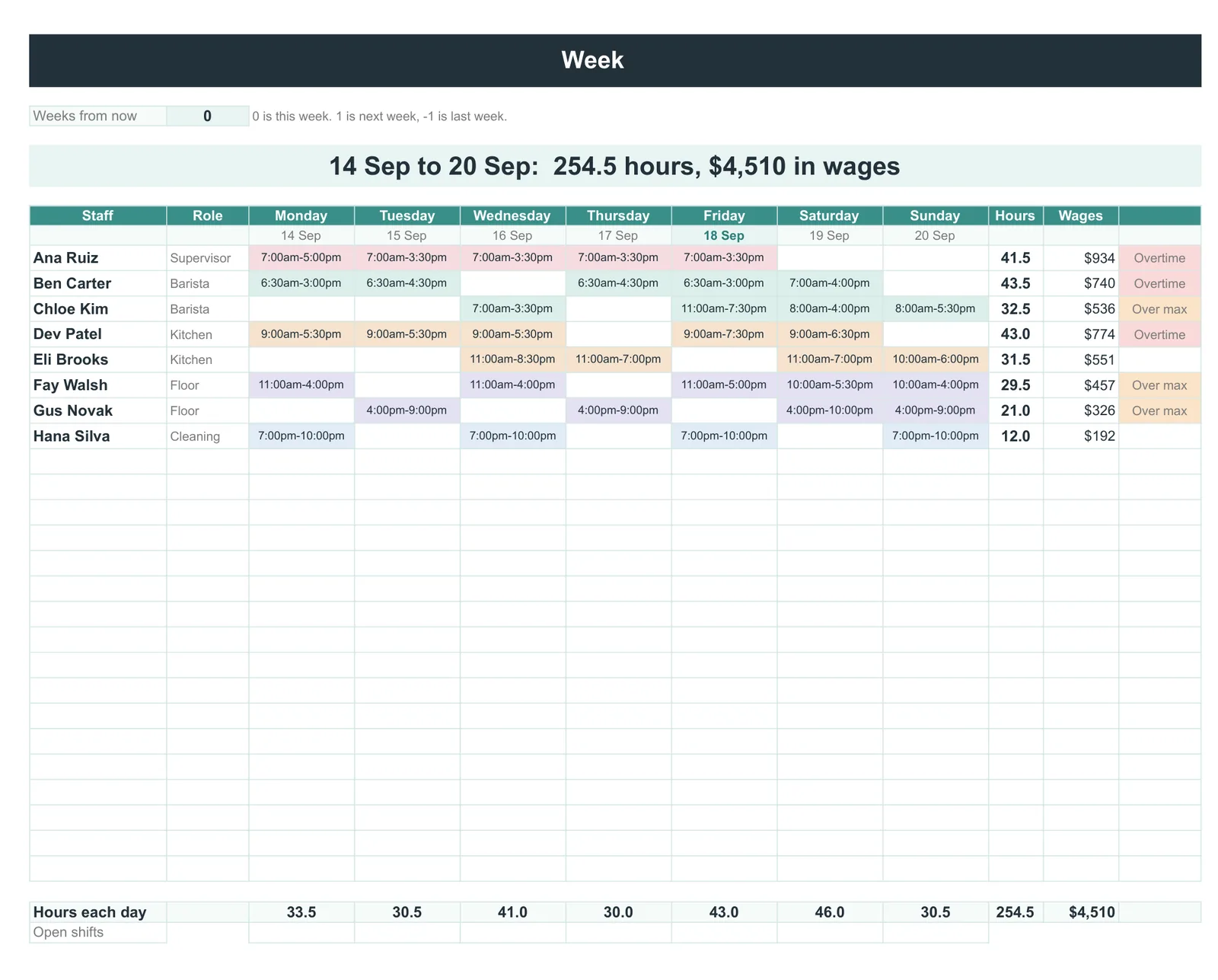
If the schedule you are building is a staff rota rather than your own week, our Staff Schedule & Timesheet ($39, Google Sheets and Excel) builds it, records the hours actually worked and shows pay for any pay period, with open shifts shown and overtime flagged.
FAQ
Common questions, answered briefly
Does Google Sheets have a weekly schedule template?
=SEQUENCE(7,1,A1,1) takes about ten minutes to build and is easier to repair later.Is Google Sheets free to use for a schedule?
How do I make the week start on Monday?
=A2-WEEKDAY(A2,3) to return the Monday of whatever week a date falls in, because the third argument counts Monday as zero. For week numbering, ISOWEEKNUM already assumes Monday, while WEEKNUM assumes Sunday unless you give it a second argument.Why does my schedule template stop adding up correctly?
=SUM(C2:C47). Anything added below row 47 is silently ignored. Switching to a whole-column range like =SUM(C:C), or to a named range, fixes it permanently.People also ask