The row
What a job application tracker should record
One row per application, with the company, the role, the date you applied, the source, the current status and a next step. Keep a link to the job listing too, because listings disappear, and you will want to reread the description before an interview.
Most templates stop at company, role and status. That is enough to avoid applying twice, and not much more. The column that makes a job application tracker useful is the one most of them leave out: where the application came from.
The source
Response rate by source
Mark each application with how you found or sent it: a referral, the company’s own careers page, a job board, a recruiter. Then a small summary counts applications and responses for each source. In Google Sheets that is one COUNTIFS per cell, which Google describes as returning “the count of a range depending on multiple criteria”.
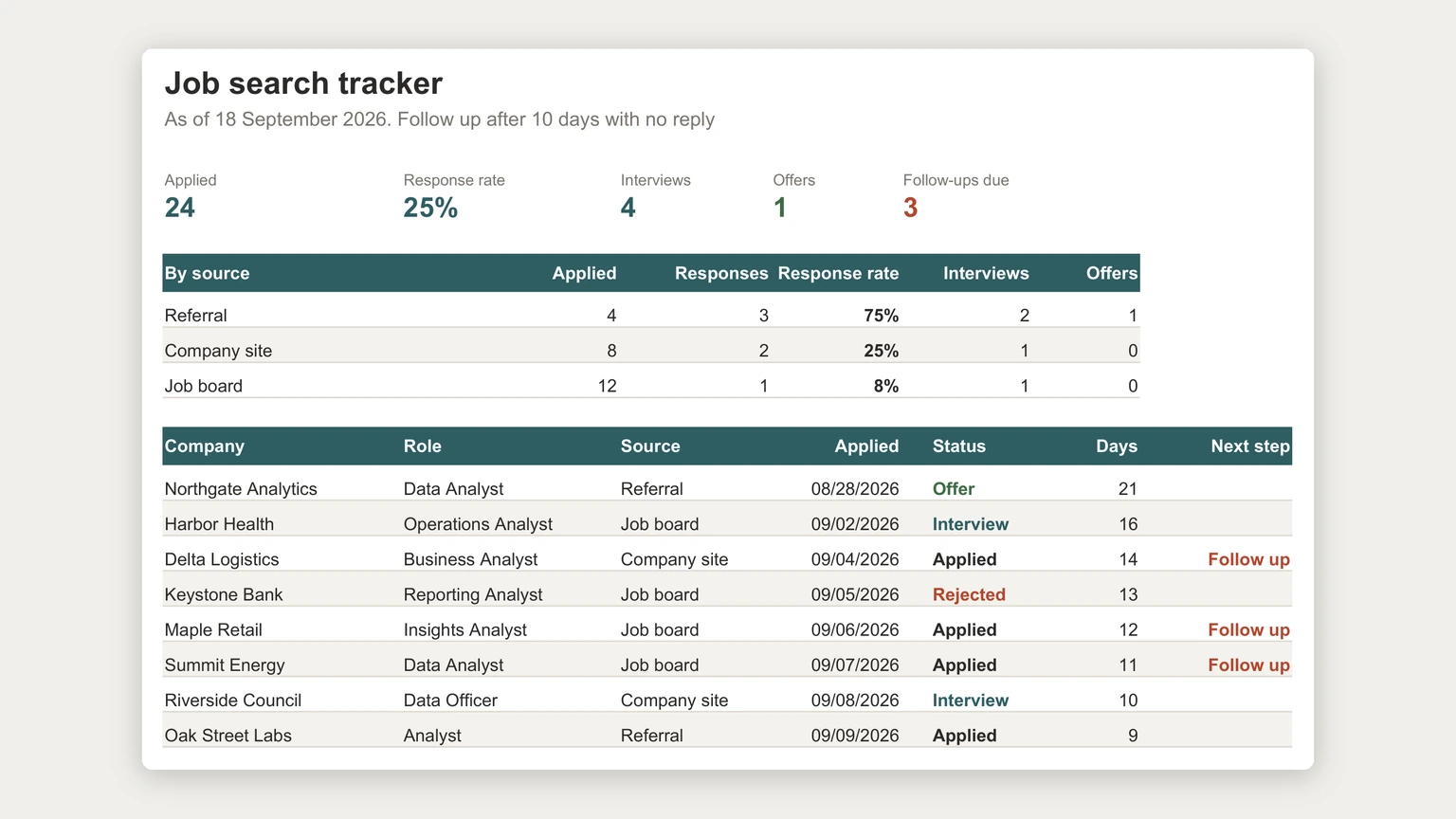
In the example at the top of this page, a fictional search of 24 applications, the overall response rate is 25 percent. By source it looks very different: referrals got a reply three times out of four, company sites one in four, and job boards one in twelve. Twelve of the 24 applications, half the effort, went through the channel with the lowest rate.
Stages
Stages, as a dropdown
Keep the status column to a short fixed list: applied, interview, offer, rejected, withdrawn. A dropdown stops the list drifting into “waiting”, “pending” and “heard back?”, which breaks every count. Google’s help page on dropdown lists in Google Sheets gives the route, Insert then Dropdown.
It is the same shape as a sales pipeline, and for the same reason: each application is a deal moving through stages, and most of the useful numbers come from how many move from one stage to the next. Our sales tracker spreadsheet guide covers the idea from the other side of the table.
Follow-ups
Days since applied, and when to follow up
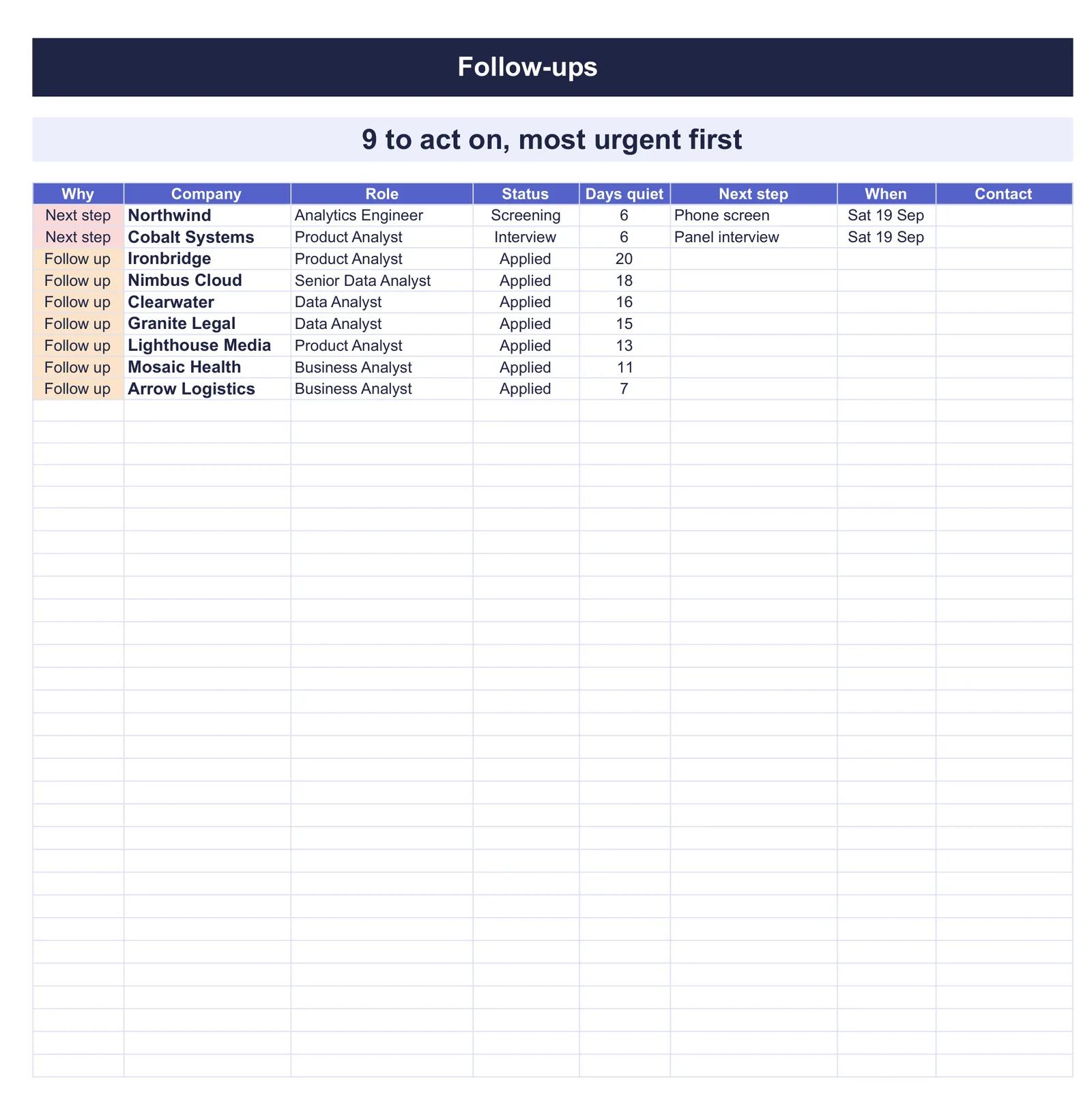
Add a column that counts days since you applied, and a rule for when an application with no reply gets a follow-up. The example uses ten days; pick what feels right for your field and write it at the top of the sheet. A formula then puts “follow up” beside every application that has passed it.
In the example, three applications are past ten days with no answer. That short list is the day’s work, and it takes minutes. Treating the tracker as a to-do list rather than a record is the habit our Google Sheets to-do list template guide builds for everything else.
Twelve of the 24 applications, half the effort, went through the channel with the lowest rate.
Rejections
Keep rejections, and note the stage
Do not delete rejected applications. Mark them, and note the stage they reached. Rejections before any interview say something about the application or the source; rejections after interviews say something about interviews. A tracker that only keeps live applications cannot tell those two problems apart.
Offers
Interviews and offers on their own tab
Once an application reaches interview, give it room on a second tab: interviewer names, questions asked, what you said you would follow up on, and dates. When offers arrive, a small comparison table of salary, benefits, location and start date keeps the decision on facts. Blocking out interview preparation in a weekly schedule in Google Sheets helps when several processes run at once. More templates are on our Google Sheets hub.
If you would rather start from a finished file, our Job Application Tracker Spreadsheet ($29, Google Sheets and Excel) works out how many days each application has gone quiet and flags the ones to follow up, most urgent first. A dashboard shows how far your applications get and which sources actually answer.
A job application tracker with a source column tells you something new every week of a search. Tell us in the comments which source has worked best for you, and how long you wait before following up; we read every reply.
FAQ
Common questions, answered briefly
What should a job application tracker include?
Why track the source of each application?
How long should I wait before following up on an application?
Should I keep rejected applications in the tracker?
People also ask