A job search that tells you who to chase.
Log each application and the days gone quiet and the follow-up flag fill themselves, with a dashboard of how far applications get and which sources answer.
Google Sheets · Excel .xlsx · Blank + filled example
Language
Instant download. Permanent link in your account.
Instant download. Permanent link in your account. Yours forever, no subscription.
You apply. It remembers.
Everything on the right is a formula you never have to touch, in Google Sheets and in Excel alike.
You type
- Each application, once
- Status changes as they happen
- How many days before you follow up
It works out
- Days quiet, for every application
- A follow-up list, most urgent first
- Response rate by source
- Applications a week against your goal
Open any tab. These are the real ones.
Tap a tab, then the picture to read every figure full size.
Dashboard
The Dashboard tab.
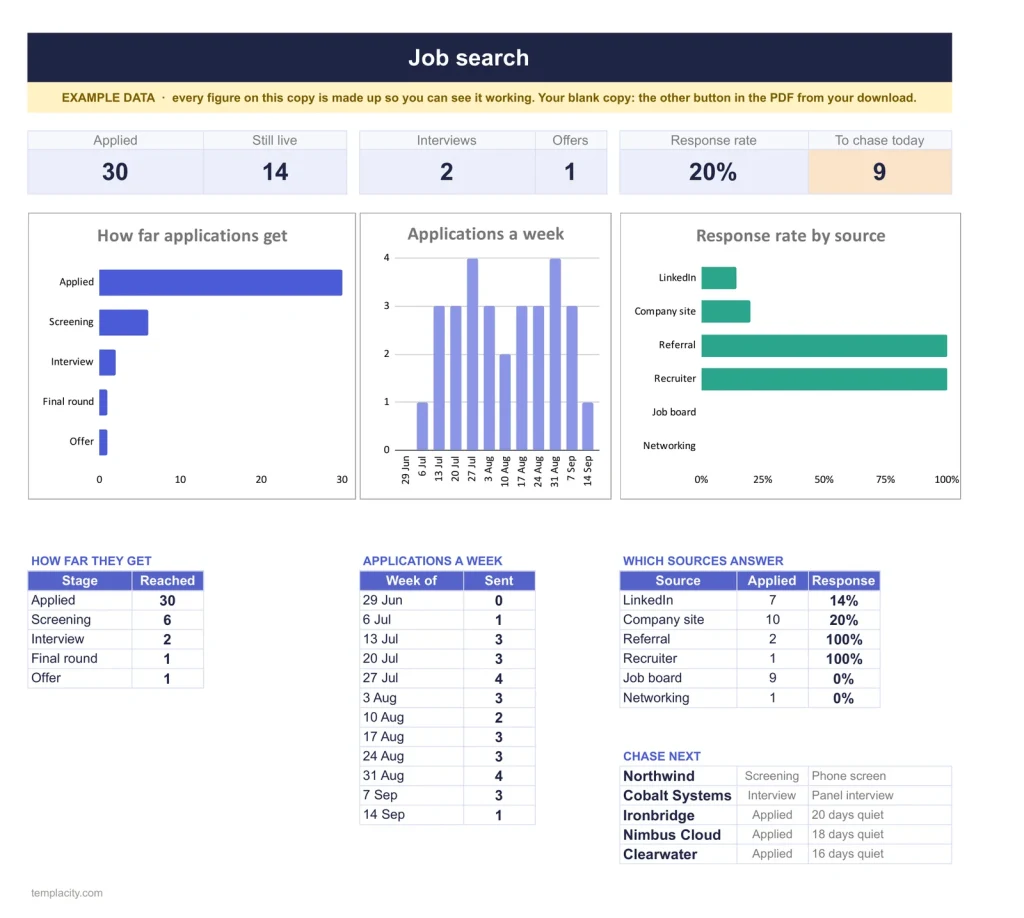
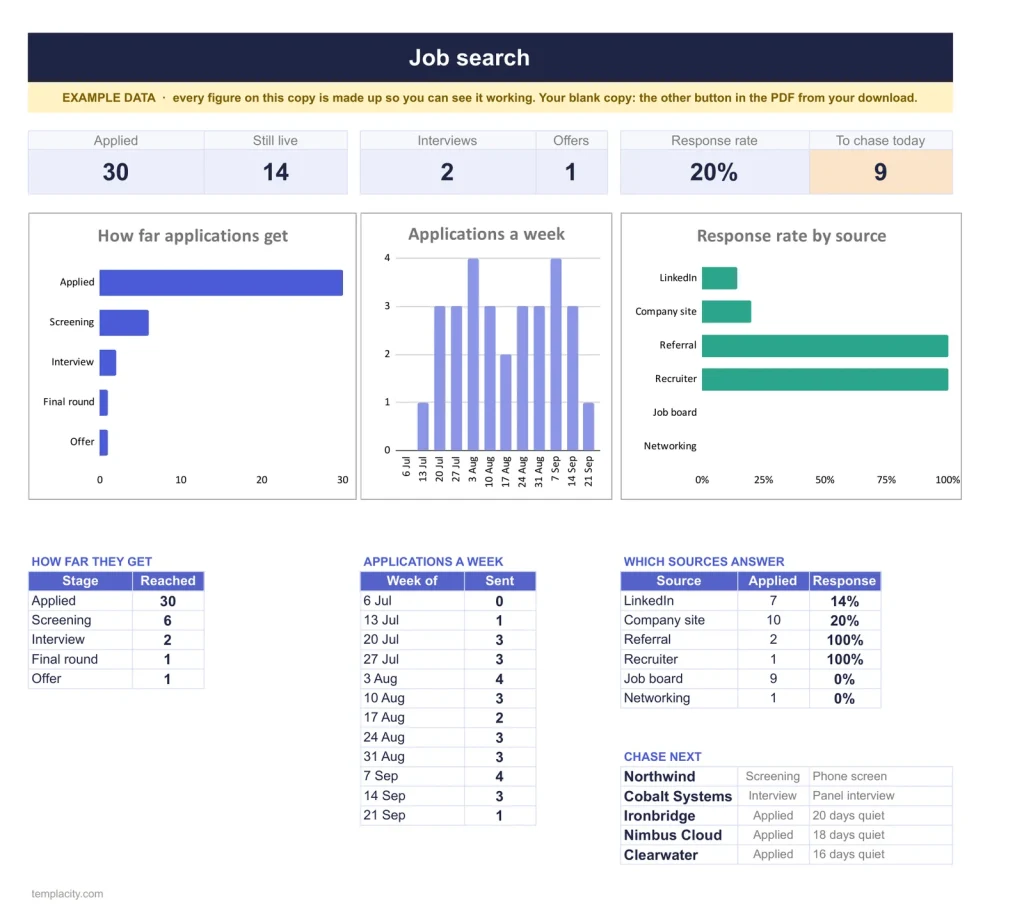
The dashboard: how far applications get, which sources answer, and who to chase next.
Applications
Every application in one list.
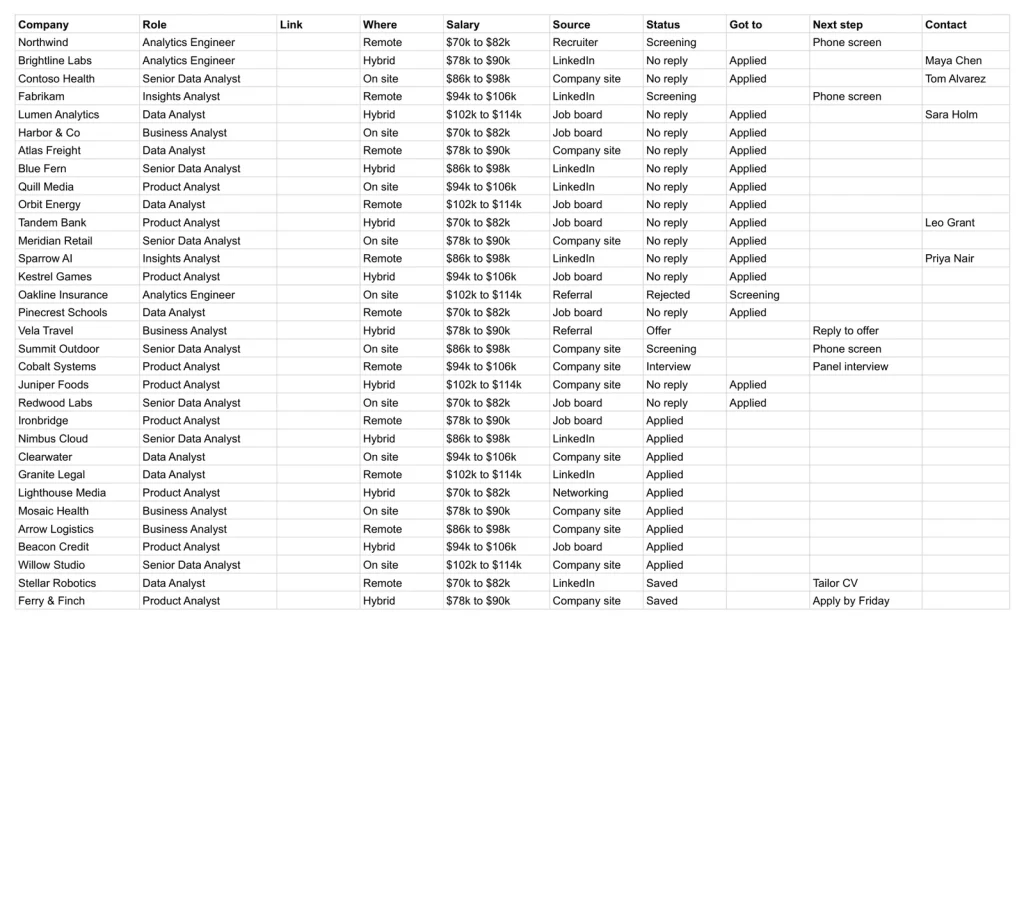
Company, role, source, dates, status and the next step, one row each.
Follow-ups
The ones gone quiet, most urgent first.
Every live application that has gone quiet too long or has a next step coming, sorted so the one to chase today is on top.
A plain spreadsheet, and this one.
On the left, the plain application list most people keep. On the right, the Dashboard tab. Drag the line.
Google Sheets or Excel. You do not have to choose.
The download carries both: the Sheets copy link and the native .xlsx. Every formula is chosen to work identically in the two, and we test the round trip on every build.
Your first five minutes.
-
1
Buy it once.
$29, no subscription. Your order email and your account both carry the download, permanently.
-
2
Copy it into your Drive.
One click and it is yours, in your own Google account, forever. We keep no access to your copy and nothing in it phones home.
-
3
Start in the example.
The filled copy shows every tab already working. Poke it, break it, then open your blank and type your own.
№ · Who to chase, and when
A job application tracker spreadsheet that flags every application gone quiet
The Job Application Tracker is for a job search with more applications than you can hold in your head. Each one gets a row on Applications as soon as you find it: company, role, the link, remote, hybrid or on site, salary, where you found it, the date you applied, its status, your last contact, the next step and its date, the person you deal with, and how excited you are about it, one to five stars.
When to follow up
Set how many quiet days you allow on Settings, seven to start. A follow-up falls due that many days after your last contact or, if there has been none, the day you applied. Follow-ups lists every live application that has gone quiet too long or has a next step coming, most urgent first, so each day starts there.
What the Dashboard counts
Statuses run in order, Saved, Applied, Screening, Interview, Final round, Offer, Accepted, and an application ends as Rejected, Withdrawn or No reply. When one ends, note how far it got, so the funnel still counts it. The response rate counts every application that reached a screening call or beyond, and the source chart (LinkedIn, company sites, referrals, recruiters, job boards, networking, or your own) shows where your time pays off. A weekly goal, five to start, tracks how many go out each week. Link a recruiter or referral from Contacts and their card counts their applications.
The download is a short PDF with two Google Sheets buttons, one for a blank copy in your own Drive and one for a copy filled with an example, plus the same workbook as blank and example Excel files.
The questions we actually get
When does it tell me to follow up?
After the number of quiet days you set on Settings, seven to start, counted from your last contact or, if there has been none, from the day you applied. Those applications appear on Follow-ups, most urgent first.
How is the response rate worked out?
Any application that reached a screening call or further counts as a response. The source chart breaks it down by where you found the role.
What do I do with a rejection?
Set the status to Rejected, Withdrawn or No reply and pick how far it got. It leaves your follow-ups but stays in the funnel, so the numbers keep their history.
Can I add my own job sources?
Yes. LinkedIn, company sites, referrals, recruiters, job boards and networking are the starting list on Settings, with spare rows for your own.
Does it work in Excel?
Yes. The download carries native .xlsx files, one blank and one filled with an example, for Excel 2010 and later, Excel for Mac and Microsoft 365. Every formula is ordinary Excel, with no macros to enable.
Is there a year printed in it?
No. No year is printed anywhere in the files, so it starts the day you do and keeps working next year.
Nobody left unchased.
Applications, follow-ups and contacts, in Google Sheets and Excel, no subscription, no year baked in.
Get the tracker · $29Still deciding? Open it live, read‑only. Not the sheet you need? See every spreadsheet template or ask at Templacity Hall.
Be the first to say something.
Nobody has written about this one yet. If it is on your device, yours is the first thing the next person reads.
Instant download.
Your file is in your account the moment you check out, yours to re-download any time. A receipt lands in your inbox, too.
One-time purchase.
No subscription, no annual renewal, no upgrade nags. Pay once and the file is yours.
Quiet, secure checkout.
Stripe. Apple Pay. No spam, no “partners,” no reselling your details. Receipt, file, done.


