Every client, every deal, every follow-up. One notebook.
A real CRM structure built natively in OneNote, for freelancers and small service businesses. Four companies already built, each with its people and its projects linked both ways, so you rename one and the whole client structure is there before you type a word.
Instant download. Permanent link in your account.
Eleven working pages, a four-company pack, and a sticker section.
Thirty-nine pages in one section called Your CRM. Every record page is a table with a worked row showing the shape, and every page that should point at another one already does.
Dashboard
Every open deal, every company by last touch and how long ago, and three numbers you type once a month: invoiced, next decision due, biggest single deal.
Companies, four already built
Each Company page carries three Person pages and three Project pages underneath it, linked both ways. Rename one to a real client and its people and projects come with it.
People
Name, where, what they do, last spoken to. Anyone who can say yes, anyone who can say no, and anyone who will still be there next year. Nobody else.
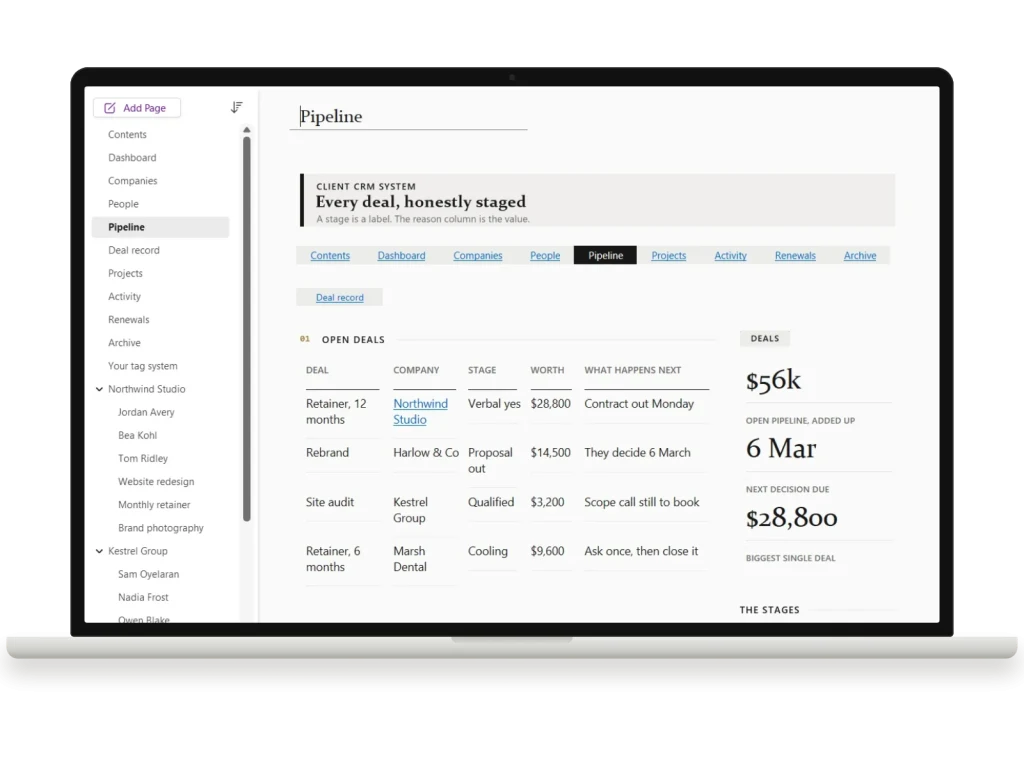
Pipeline
One table of every open deal: company, stage, worth, what happens next. Below it, the real reason each one is stuck and what would move it.
Deal record
One page per deal that matters: who decides, what has to be true for it to close, and a dated log of what happened and what you did next.
Projects
The work you actually won: client, contact, due date, and where it really is, not where the plan says it should be.
Activity
When, who, how, what came out of it, and what you now owe them. One line, written before you put the phone down, because later is never.
Renewals and Archive
What renews, when, and what has to be true first, with the conversation booked four weeks out. Archive keeps every won and lost deal with the honest reason why.
The three pages you will actually live in.
Real pages, real labels, every one of them editable. Here is how the system works in practice.
A client is a page with its people and projects underneath.
Four companies are already built, each with three Person pages and three Project pages under it, every one linked to the others before you type anything. You open a company and tap through to the two people there and the project you owe them, without searching. That is what turns a list of clients into a CRM.
- Rename Company 1 to a real client and its people and projects come with it.
- Need a fifth? Collapse a company, right click, Copy, Paste. The whole group copies, links and all.
- Every record page is a table with one worked row showing the shape. Type over it.
- Person 1A
- Head of ops
- Person 1B
- Finance
- Person 1C
- Day to day
- Project 1A
- In flight
- Project 1B
- Scoping
- Project 1C
- Closed
Every open deal on one page, with the real reason it is where it is.
The pipeline is one table: deal, company, stage, worth, what happens next. The stage is a word you type, so it can be whatever your work calls it. Under the table sits a second one for the reason each deal is really stuck and what would move it, and a deal that matters gets its own Deal record page with a dated log.
- Four honest stages to start from: qualified, proposal out, verbal yes, cooling.
- Open pipeline added up, next decision due and biggest single deal, typed once a week.
- Won and lost deals move to Archive with why, honestly, in the last column.
The line you write before you put the phone down.
Activity is one row per conversation: when, who, how, what came out of it, and what you now owe them. Renewals holds what renews, when, and what has to be true first, so the conversation happens four weeks before the date. On the date it is a renegotiation. Four weeks out it is a conversation.
- Four real OneNote tags, To Do, Critical, Question and Important, that Find Tags rolls up across the notebook.
- A Contents page that gets you from import to your first renamed company in about twenty minutes.
- A Stickers section beside it: drawn marks, banners, plates and progress bars, so a page you change still matches the rest.
Built by someone who read the complaints.
Cheap OneNote templates look good and fall apart after a week. Expensive ones are thorough and look like a 2009 intranet. This sits in the gap.
Honest about what OneNote cannot do
No formulas, no auto-totals, no lead scoring, no pipeline maths. OneNote has none of that, and templates promising it are selling you a screenshot. This is built on what OneNote is genuinely excellent at: structure, links, tags, search, ink and sync that actually works offline.
Linked, not blank
Four companies arrive already built, each with three people and three projects under it and every link between them in place. You never make a link by hand, and you see the shape of a working client before you commit your own data to it, which is the difference between using a template and abandoning one.
A Contents page that assumes nothing
The most common complaint about premium OneNote templates is that installing them is a mystery. The Contents page is four numbered steps with a time on each, what every kind of row means, and a short guide to how the whole system is meant to be used. The download also carries an illustrated install guide, which starts with the one requirement worth knowing before you buy: the package installs in OneNote for Windows, and syncs to Mac, iPad, Android and the web once it is in.
Yours to tear apart
Rename the companies, retype the stages, delete the pages you do not need, add your own. Nothing is locked, nothing is protected, nothing phones home. It is a notebook, and after you import it, it is entirely yours.
From download to your first client in about twenty minutes.
Import once in OneNote for Windows, then it syncs everywhere: Mac, web, tablet and phone, on a free Microsoft account.
Download
An instant download with the notebook package, a full PDF of every page, and a short illustrated setup guide.
Import into OneNote
Open the package in the free OneNote desktop app and the whole CRM appears as a ready notebook, pages, links and stickers included.
Rename Company 1
Open Companies, rename Company 1 to a real client, and type its people and projects over the worked rows. The links are already there.
Add the rest of the set.
All four goes in as OneNote Templates for Work at $89, not four separate items. You keep $27.
Frequently asked.
Is this a real CRM?
Which version of OneNote do I need?
Can I change the pipeline stages, or add more companies?
Does it work on my phone and tablet?
How is this different from your other OneNote templates?
Stop running your business from memory.
Every client, every deal and every follow-up in one notebook you already know how to use. Import once in OneNote for Windows and it is on every device you sign in on.
Most people running a freelance or small service business track clients in three places at once: a notes app, a spreadsheet, and their memory. This is one notebook that holds all of it.
It is a real CRM structure, built natively in OneNote, and the part that makes it work day to day is the four-company pack: a Company page with three Person pages and three Project pages underneath it, ready to copy whole for each new client. You are never building a client’s structure while you are trying to talk to them.
What is inside
- The spine. Contents, Dashboard, and Your tag system.
- The records. Companies, People, Projects, Activity.
- The money. Pipeline, Deal record, Renewals.
- The four-company pack, copied per client: Company, three Person pages, three Project pages.
- Archive, so closed work leaves the working view without being deleted.
- A six page sticker set: banners and rules, plates and marks, progress bars, the tag set, and a page on how to use them, so a page you have changed still looks like the rest of the book.
Honest about what OneNote does
OneNote is an organiser, not a spreadsheet. There are no formulas, no auto-totals and no lead scoring in this template, because OneNote cannot do them and templates that promise otherwise are not telling you the truth. What it does brilliantly is structure, search, tags, ink and true cross-device sync. This template is built around those strengths.
The notebook package installs in OneNote for Windows. Once it is installed and saved to OneDrive it opens and syncs on Mac, iPad, Android, phone and the web, but it cannot be installed from an iPad or a Mac on its own. One purchase, no subscription.
The rest of the OneNote line
We make six OneNote notebooks, each built for one job, and they sit side by side in the same notebook stack:
- OneNote project management template: projects, the kanban board and the registers behind them.
- OneNote meeting notes template: agendas, decisions and actions.
- OneNote dashboard template: a one-page view of where everything stands.
- OneNote calendar template: undated day, week, month and year pages.
- Kindle Scribe OneNote template: notes exported from a Kindle Scribe.
This one also comes in OneNote Templates for Work, together with the project management, meeting notes, dashboard and calendar templates: five notebooks for less than buying them one at a time.
Be the first to say something.
Nobody has written about this one yet. If it is on your device, yours is the first thing the next person reads.
Instant download.
Your file is in your account the moment you check out, yours to re-download any time. A receipt lands in your inbox, too.
One-time purchase.
No subscription, no annual renewal, no upgrade nags. Pay once and the file is yours.
Quiet, secure checkout.
Stripe. Apple Pay. No spam, no “partners,” no reselling your details. Receipt, file, done.


