The bill
What you actually pay YNAB for
Most people looking for a YNAB alternative are not unhappy with the method. They are looking at the renewal. On its own pricing page YNAB charges $14.99 a month or $109 a year, both in US dollars and plus tax where it applies, after a 34-day free trial that needs no card when you sign up directly. College students get a 365-day trial, and one subscription can be shared with up to six people.
So it helps to separate the two things that subscription bundles together. One is the method: decide what every dollar you already have is for, before you spend it, and adjust the plan when life changes it. The other is the software around the method, and that is where the money goes. YNAB’s features page lists connecting your bank so transactions import on their own, syncing across computer, phone and tablet, saving targets, a loan planner for paying debt down faster, and spending and net worth reports.
The method is free and always was. The software is not, and the honest question is which parts of it you would miss. Bank import is the big one, and YNAB’s own FAQ notes that direct import covers select banks in the US, Canada, the UK and the EU, with file import for everyone else. If your bank is not on that list, part of what you are paying for already comes down to downloading a file and importing it, which a spreadsheet can also do.
The split
What a YNAB alternative spreadsheet copies, and what it cannot
Here is the comparison we wish every roundup on this question opened with. YNAB, Aspire (the best-known free budgeting spreadsheet, built around the same envelope idea) and our two Google Sheets, side by side on the things that decide whether you will still be budgeting in March.
| YNAB$109 a year | Aspire$0 core | Our free Monthly Budget$0 | Our Budget & Money Planner$39 once | |
|---|---|---|---|---|
| Pulls transactions from your bank | Yes, select US, Canada, UK and EU banks | Bank CSV import in the paid Turbo add-on | No, typed in or pasted | No, typed in or pasted |
| Unspent money carries into next month | Yes | Yes, category balances | No, each month stands alone | No, a sinking funds tab holds money for later |
| Plan against actual, every category | Yes | Yes | Yes | Yes, by month and by paycheck |
| Debt payoff plan | Loan planner | Not checked | A debt line in the plan | Snowball and avalanche side by side, with the debt-free date |
| On your phone | Native apps, synced | Aspire Mobile | Google Sheets app | Google Sheets app, or Excel |
| Where your data lives | YNAB’s servers | Your Google Drive | Your Google Drive | Your Drive, or an Excel file on your computer |
Two rows decide it for most people. The first is bank import. YNAB’s import is the reason a lot of people stick with budgeting at all, because the transactions are already waiting when you open the app and all you do is approve them. Every spreadsheet asks you to type or paste. Google Sheets will import a CSV file from your bank through File, Import, and can append the rows to an existing sheet, but it is still a step you take, not one taken for you.
The second is rollover. In YNAB, $40 you did not spend on clothes in March is still sitting in the clothes category in April. Aspire copies that with running category balances. Our sheets do not: each month is a plan against what happened, and money you mean to keep for later goes into a named savings or sinking-funds line on purpose. That is a real difference, and if rollover is the part of YNAB you love, Aspire is the closer copy.
The method
The YNAB method works in any spreadsheet
Giving every dollar a job is a rule about the plan, not about the software. In a spreadsheet it comes down to one habit: keep adding to your categories until what you have planned to spend and save equals what you actually have. Whatever is left unplanned is money without a job, and the point is to make that number zero on purpose rather than by accident.
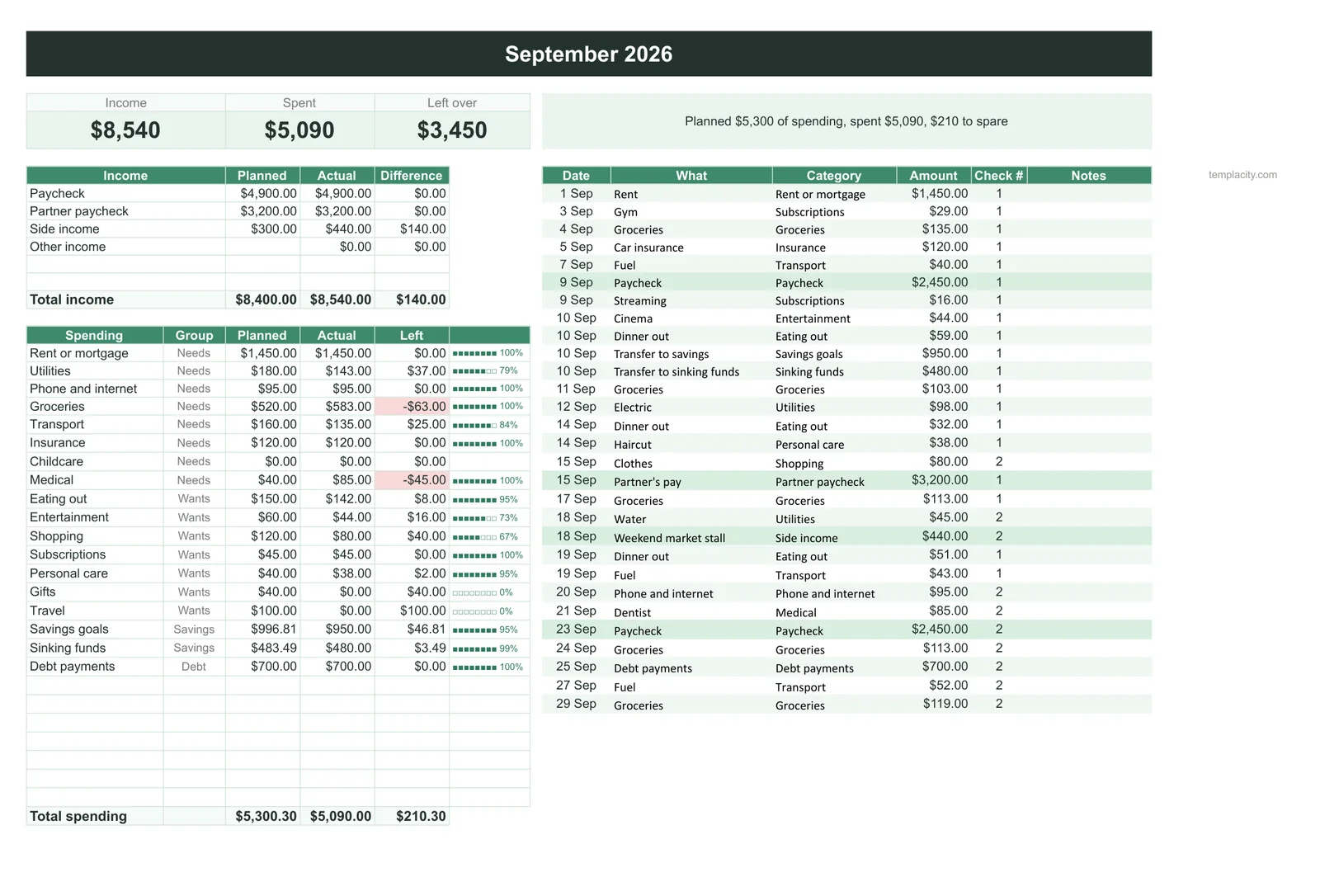
Our free Monthly Budget is built the way most people already think about money. You list your categories once on the Plan tab, each with an amount and a group (needs, wants or savings), and you log spending on the Transactions tab with a dropdown for the category. The Dashboard then shows money in, money out, what is left of the plan and every category planned against actual for whichever month you pick. To run it the YNAB way, plan from the money you have this month rather than from a hoped-for salary, and treat savings lines as jobs too, not as whatever is left over.
The method is free and always was. The software is not, and the honest question is which parts of it you would miss.
Irregular bills are where spreadsheets usually fail, and where the YNAB habit of saving for them a little each month matters most. Car insurance once a year, a birthday in June, the dentist: give each one a savings line and a monthly amount. In the free sheet that is a category in the savings group. In the paid planner there is a Sinking Funds tab that works out the monthly amount from the bill and its date, and that figure flows into every month’s plan on its own.
The arithmetic
Three years of each, in dollars
A subscription is easiest to judge over the time you will actually use it. Budgeting is a habit you hope to keep for years, so here is three years of each option at today’s listed prices, before tax.
Cost over three years (US dollars, before tax)
That gap is the price of automatic import, phone apps and support, and for some people it is money well spent. YNAB says one subscription covers up to six people, so a household sharing one plan splits the bill, and a couple who would otherwise argue about who forgot to log the groceries may find that worth more than the difference. Be honest about which household you are.
The honest call
Who should stay on YNAB
Budgets rarely fail because the plan was wrong. They fail because the log falls behind, a week of unrecorded spending becomes a month, and the plan stops meaning anything. That is the problem bank import solves, and it is why we would not tell everyone to switch.
Stay on YNAB if you have tried typing your spending before and stopped within a month, if you and a partner both spend from shared accounts and need the same numbers on two phones, or if you lean on the loan planner and reports week to week. Switch to a spreadsheet if you already check your bank every few days anyway, if you mostly pay from one or two accounts, if you want your numbers in a file you own, or if you are outside the countries where YNAB’s direct import works and are importing files already.
Other free options
If you need rollover or bank sync without the subscription
Two free options copy the parts of YNAB our sheets deliberately leave out, and if those parts are what you need, they will suit you better than we will.
Aspire is a Google Sheets budget that its maker describes as $0 for the core budget, with no account and no card. It is built to plan every available dollar and track category balances, which is the rollover behaviour YNAB users miss most. A paid add-on, Aspire Turbo, imports a bank CSV and categorises it from your history. The trade-off is a more involved sheet that takes an evening to learn.
Actual Budget is an open-source app under the MIT licence, built on envelope budgeting where you can only budget cash you have on hand. It syncs across devices, offers bank sync through GoCardless in the EU and UK and SimpleFIN in the US and Canada, and has built-in importers that bring your YNAB history with you. The catch is setup: it runs on a server you host yourself or rent from a host such as PikaPods, so it suits someone comfortable with that.
Where we fit
A whole year in one file, without the monthly fee
Our sheets are for the person who wants the YNAB discipline without an app to keep paying for: plan the month, log what happens, and see in one glance where you are over and where you have room. Start with the free Google Sheets budget template if one month at a time is enough. Our bill tracker for Google Sheets covers the recurring side, and the expense tracker template is the lighter choice if you only want to see where money went. In Excel, the same plan is in our Excel budget template.
If you want the parts of YNAB that are about the year rather than the month, our Budget & Money Planner ($39, Google Sheets and Excel) has twelve month tabs with plan against actual, a Paychecks tab that shows the bills due before your next pay and what is left to spend, a bills calendar that turns green as you pay, snowball and avalanche debt payoff side by side with your debt-free date, sinking funds, savings goals and net worth. If debt is the main job, our guide to a debt payoff tracker explains the two orders in plain terms.
Whichever way you go, the habit matters more than the tool: a plan made before the month starts, and ten minutes a week to bring it up to date. If you have switched from YNAB to a spreadsheet, or tried and gone back, tell us in the comments what made the difference. Those answers are more useful to the next reader than anything we can write.
FAQ
Common questions, answered briefly
Is there a free YNAB alternative?
Can I use the YNAB method in Google Sheets?
Can a budget spreadsheet import my bank transactions?
How much does YNAB cost?
People also ask