
The primitive
Why a content calendar template Google Sheets stops being used
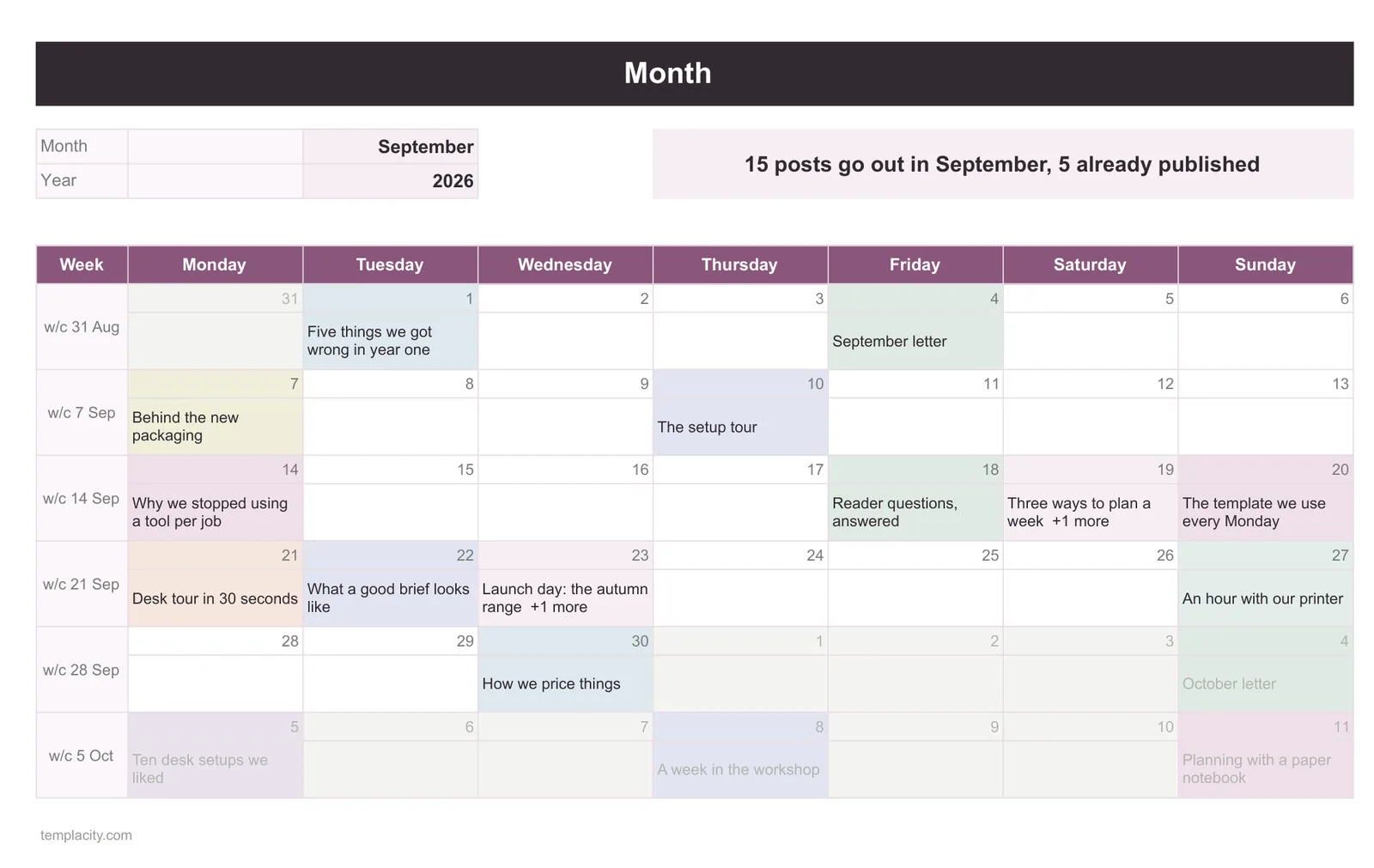
The usual build is a month laid out as a grid, cells filled with what goes out when. It looks like the thing it is named after, it is satisfying to fill in, and it is abandoned within a quarter by nearly everyone who builds one.
The reason is structural rather than a matter of discipline. The question you actually ask a content system is not “what goes out on the 14th”. It is “what is stuck, and where”. A piece waiting on a review, or an image, or a decision, has no publication date yet, which means in a date grid it has nowhere to be. The single most useful thing the document could tell you is the one thing its layout cannot represent.
So the calendar is not the system. It is one view of a system, and it is not the view you need most days.
The pipeline
Store the pipeline, render the calendar
Build one tab where every row is a piece of content and every column is a fact about it: title, owner, format, status, and the dates. Nothing is arranged by date. The rows are just a list, and the list is the truth.
Status is the column doing the work, and it should be a small closed set: idea, drafting, in review, scheduled, published, dropped. Six is plenty. Make it a dropdown, which Google puts under Data, then Data validation, built from a range or a typed list, with non-matching entries rejected by default and a “Show a warning” option under Advanced options if you want it softer. Rejection is right here: a status of “in-review” alongside “In Review” quietly splits every count you will ever run.
If you still want the month view, generate it rather than storing it. A second tab reading from the list gives you a calendar that cannot fall out of step, because there is only one place the data lives. The general principle is the same one behind treating stock as a computed balance rather than a typed number, which our Google Sheets inventory template guide works through in its own setting.
The dates
The four dates that get merged into one
Nearly every template ships a single column called Date. In practice it holds four different facts depending on who typed it and when: the day the idea arrived, the day a draft is due, the day it is scheduled to go out, and the day it actually went out.
One column called Date holds four different facts, and which one it holds depends on who typed it.
The cost is that you can never filter on any of them honestly. “What is due this week” and “what went out last month” are both unanswerable, because the column means different things on different rows and nothing marks which.
Give them separate columns. Most rows will have blanks in most of them, and that is the point: a blank published date is exactly how you find everything that has not gone out. The difference between the due date and the published date is also the only honest measure of whether the process is working, and it is free once the two are separate.
The channels
The channel trap
The second structural mistake appears as soon as one piece goes to more than one place. The obvious move is a row per channel, so a post going to a blog, a newsletter and two social accounts becomes four rows. Now the piece has no single identity, four rows have to be edited when the title changes, and three of them will not be.
Split it. The pieces tab holds one row per piece with an id in the first column. A second tab holds one row per channel placement: the piece id, the channel, the scheduled date, the status of that placement. A piece is one thing; going out somewhere is a different thing that happens to it.
This sounds like more work and is less, because the repeated editing goes away. It also makes the two natural questions separable: what are we making, and where is it going. Those get confused constantly in a single flat sheet.
Seeing it
Making the stuck work visible
Once status and dates are separate, one conditional formatting rule turns the list into something you can read at a glance. Google documents the feature under Format, then Conditional formatting, with the advanced version under “Custom formula is”.
-
1
Flag anything overdue and unpublished
A custom formula comparing the due date against today, and only where the published date is blank. Two conditions, one rule, and the backlog stops being invisible.
-
2
Order your rules deliberately
Google states that “rules are evaluated in the order listed. The first rule found to be true will define the format of the cell or range”. So put the most urgent rule first, or a milder one will win and hide it.
-
3
Keep the rules on one sheet
Conditional formatting formulas “can only reference the same sheet”, and reaching another needs INDIRECT. Simplest to keep the pieces list and its rules together.
-
4
Count by status somewhere visible
A small block of counts, one per status, against whole columns. Six numbers tell you more about the state of the pipeline than any month grid ever does.
The rhythm
What makes one survive past the first busy month
Content calendars die during the week everything goes wrong, which is exactly the week they would have been most useful. Two habits carry them through. Update status rather than dates when things slip, because a moved date hides the slip and a status of “in review” for three weeks does not. And never delete a dropped idea; set its status to dropped, so the record of what you decided against survives and you stop re-proposing it every quarter.
If six statuses turn out to be five more than you need, you are describing a list rather than a pipeline, and our Google Sheets to do list template guide covers the simpler shape and the one decision that keeps it usable.
Keep it plain, too. A sheet with sixteen columns and colour on all of them is a sheet nobody opens on a Monday. Google notes that anyone with a Google Account can create in Sheets, which is why this shape works for a group where not everyone has a licence for anything else, and that same accessibility is wasted if the file is intimidating.
For work with a genuine start and finish rather than a recurring flow, a timeline is the better view, and our gantt chart guide covers building one that updates itself. For the recurring weekly rhythm around the content, the weekly schedule guide is the neighbour. The finished file is our Project Tracker with Gantt Chart.
Store the pipeline, split the dates, separate the channels, and let the calendar be a view. That is the difference between a document that tells you what is stuck and one that only tells you what you already planned. Tell us in the comments how many statuses you ended up with, because the number that survives is almost always smaller than the one people start with.
If you would rather start from a finished file, our Content Calendar Spreadsheet ($39, Google Sheets and Excel) plans every post once and shows it everywhere: a weekly view, a month calendar coloured by platform, an idea bank that scores itself, and a dashboard that flags late drafts and stuck posts.
FAQ
Common questions, answered briefly
Why does a calendar grid fail as a content system?
How many status values should a content calendar have?
Should each channel get its own row?
How do I highlight overdue content?
People also ask