The decision
Where finished items go, and why it decides everything
Almost every guide to building a Google Sheets to do list template is about layout: which columns, what order, how to colour it. Layout is not what kills these files. What kills them is that they fill up with things that are already done, and nobody decided in advance what should happen to those.
There are three options and they have genuinely different consequences. Delete finished items, and the list stays short but you lose any record of what you did, which matters more than people expect when somebody asks what happened in March. Strike them through, and you keep everything at the cost of scrolling past four months of history to reach today. Or move them to a second tab, which keeps both and costs one extra action.
Moving to a Done tab is usually right, and the reason is not tidiness. It separates two things that want different treatment: an open list you read every day and want short, and a record you consult rarely and want whole.
The checkbox
Use a checkbox, because it can be counted
A typed x is a character. A checkbox is a value. That difference sounds pedantic and decides whether your list can ever tell you anything about itself.
Google’s path is straightforward: “Select the cells you want to have checkboxes. In the menu at the top, click Insert and then Checkbox.” Once they are there, the column can be counted, filtered and summed without anybody having to agree whether a lowercase x, a capital X or a tick character means the same thing.
Google also documents custom values, noting that “you can add checkboxes with custom values. For example, the custom checked value could be ‘Yes,’ and the unchecked value could be ‘No.’”, set under Data, Data validation, Checkbox, and Use custom cell values. That is worth knowing if the sheet feeds something else that expects particular words, and worth ignoring otherwise.
Priority
Why priority labels stop meaning anything
Open any task list more than a month old with a High, Medium, Low column and count the highs. There will be far too many. This is not a discipline failure, it is a design one.
Priority is relative and a label is absolute, so every new urgent thing gets a High and nothing ever gets demoted.
The moment you add a task, it feels important; that is why you added it. Nothing in the design ever forces a comparison against what is already there, so the labels ratchet upwards and stop distinguishing anything. Medium and Low become “not really” and “no”.
Two replacements work. A numeric rank forces comparison, because two things cannot both be 3. Or, simpler and better for most people, a single flag marking the small number of things that are next, with everything else unflagged. One column, one meaning, and it stays true because a flag on everything is visibly absurd in a way that a column of Highs is not.
If you want statuses richer than done and not done, that is a pipeline rather than a list, and our content calendar guide covers how to build one that shows what is stuck.
A list of deals is the clearest case, since every row moves through stages toward won or lost. Our sales tracker spreadsheet guide weights each deal by its stage, so the pipeline becomes a forecast you can plan against.
A job search is another list that is really a pipeline. Our job application tracker for Google Sheets guide gives each application one row, a status from a fixed list and a follow-up date, and adds the column most trackers skip: where the application came from.
The build
The columns that earn their place
Five, and each of them survives contact with a busy week.
-
i.
Done
CheckboxFirst column, so it is where the eye and the thumb land. A value rather than a character, so the sheet can count it.
-
ii.
The task, written as an action
Starting with a verb. “Insurance” is a topic you will re-read four times without acting; “call insurer about renewal” is a thing you can do.
-
iii.
Next
The flag that replaces priority. Blank for almost everything, marked for the handful you intend to do imminently.
-
iv.
Due, only when a date is real
A deadline somebody else set. Inventing due dates for things without them teaches you to ignore the column, and then you ignore the real ones too.
-
v.
Context or project
A dropdown, not free text. This is the column that lets you filter to what is actionable where you currently are, which is most of the value a list has over memory.
Keep the context list short and make it a dropdown, which Google puts under Data, then Data validation, built from a range or a typed list, with non-matching entries rejected by default. Free text here produces “Home”, “home” and “House” within a fortnight, and a filter that misses a third of the rows.
A wedding is the classic shared, structured list, with a status column that matters for every row. Our wedding guest list template for Google Sheets applies the same rules to invitations, replies and meals.
Honesty
When a spreadsheet is the wrong tool for this
Worth saying plainly, because most articles on this topic are quietly selling something. A dedicated task app beats a spreadsheet on capture, on reminders and on being in your pocket without thinking about it. If what you need is to add a task in three seconds while walking, use one.
If that is the side you land on, Get Organized HQ has a practical roundup of digital planning tools and apps, written by someone who still plans on paper and uses apps alongside it. It covers Todoist, Any.do, TeuxDeux, Things and Cozi, and says plainly which does what well.
A spreadsheet wins on three things and they are real. It is shared without anybody buying a licence, since Google states that anyone with a Google Account can create in Sheets. It holds columns a task app will never offer, such as a cost, a supplier or a reference number. And it can be reshaped by whoever needs it rather than by whoever built the app.
So the honest use is a shared or structured list rather than a personal inbox. A household running a renovation, a small team tracking who owes what, a list where each row carries data as well as an intention: those are cases where the spreadsheet is genuinely the better instrument, and the design above is what keeps it that way.
For a personal list you would rather tick with a pen, our printable to-do checklist covers the paper side: which layout suits which kind of day, and how to print it so it lasts the week.
Upkeep
The weekly pass that keeps it alive
Ten minutes, once a week, and it is the same three moves each time. Move everything ticked to the Done tab, so the open list is genuinely open. Clear the next flags and set new ones, which is the moment the comparison actually happens. And delete anything you have carried for two months without doing, because a task you have declined to do eight times is a decision you have already made and have not written down.
That last one is the hardest and does the most. Lists lose authority through accumulation rather than through poor design, and the only cure is removal. If the list is really about time rather than tasks, the weekly schedule guide is the better shape, and if items have quantities and movements attached, our inventory template guide covers the log-based version of this idea.
Decide where done items go before you need to, use a checkbox rather than a character, and replace the priority column with a flag. Tell us in the comments how many items were marked High on the last list you abandoned, because the number is usually most of them.
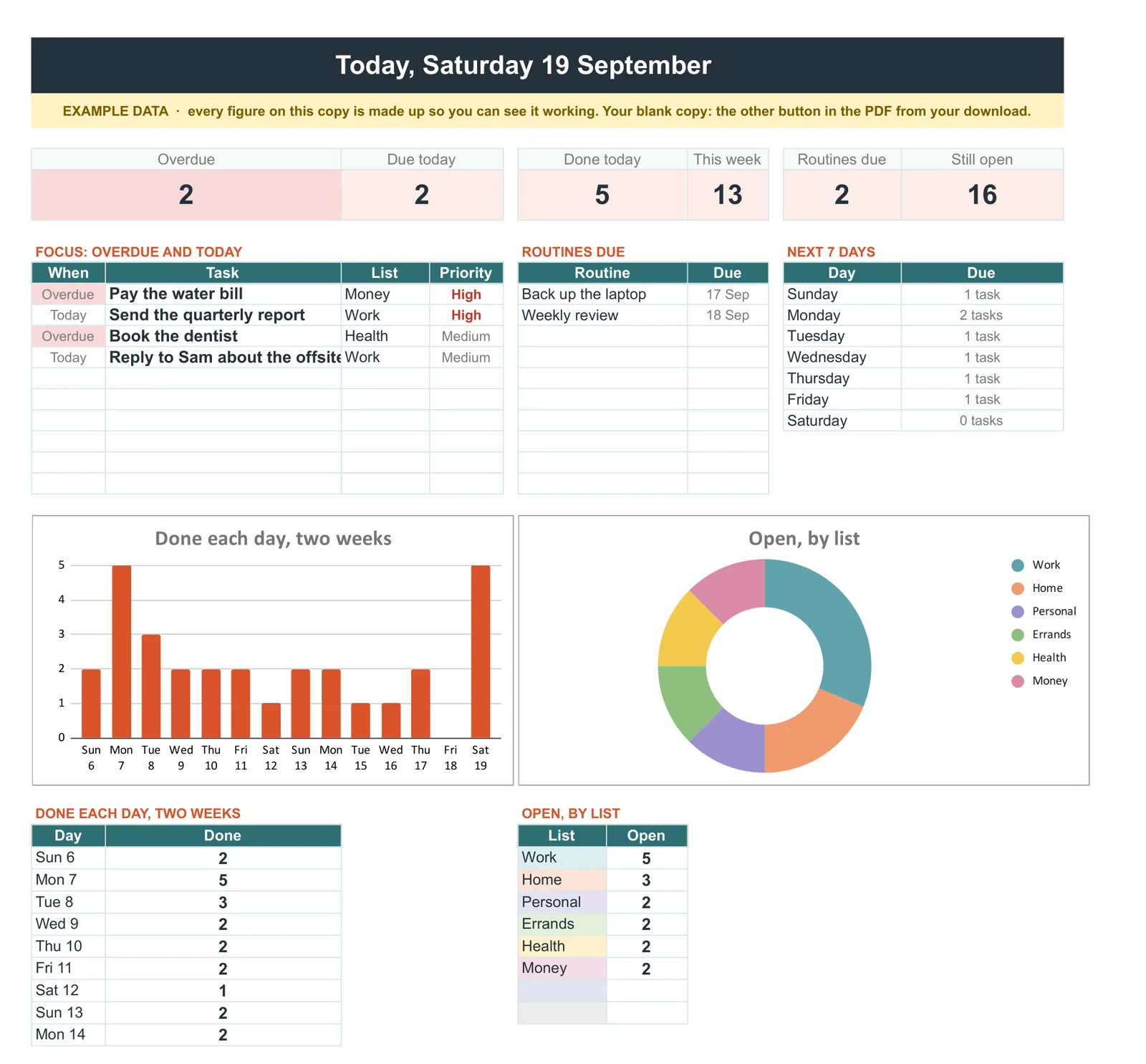
If you would rather start from a finished file, our To-Do List & Task Tracker ($29, Google Sheets and Excel) adds a Today page that puts overdue and due work first, a week view coloured by list, and routines that tell you when they are due again.
New to working from a template? Our guide to using spreadsheet templates covers making your own copy and adjusting the columns and dropdowns before you add your first task.
FAQ
Common questions, answered briefly
What should happen to finished tasks?
How do I add checkboxes in Google Sheets?
Why does everything end up marked high priority?
Is a spreadsheet better than a task app?
People also ask