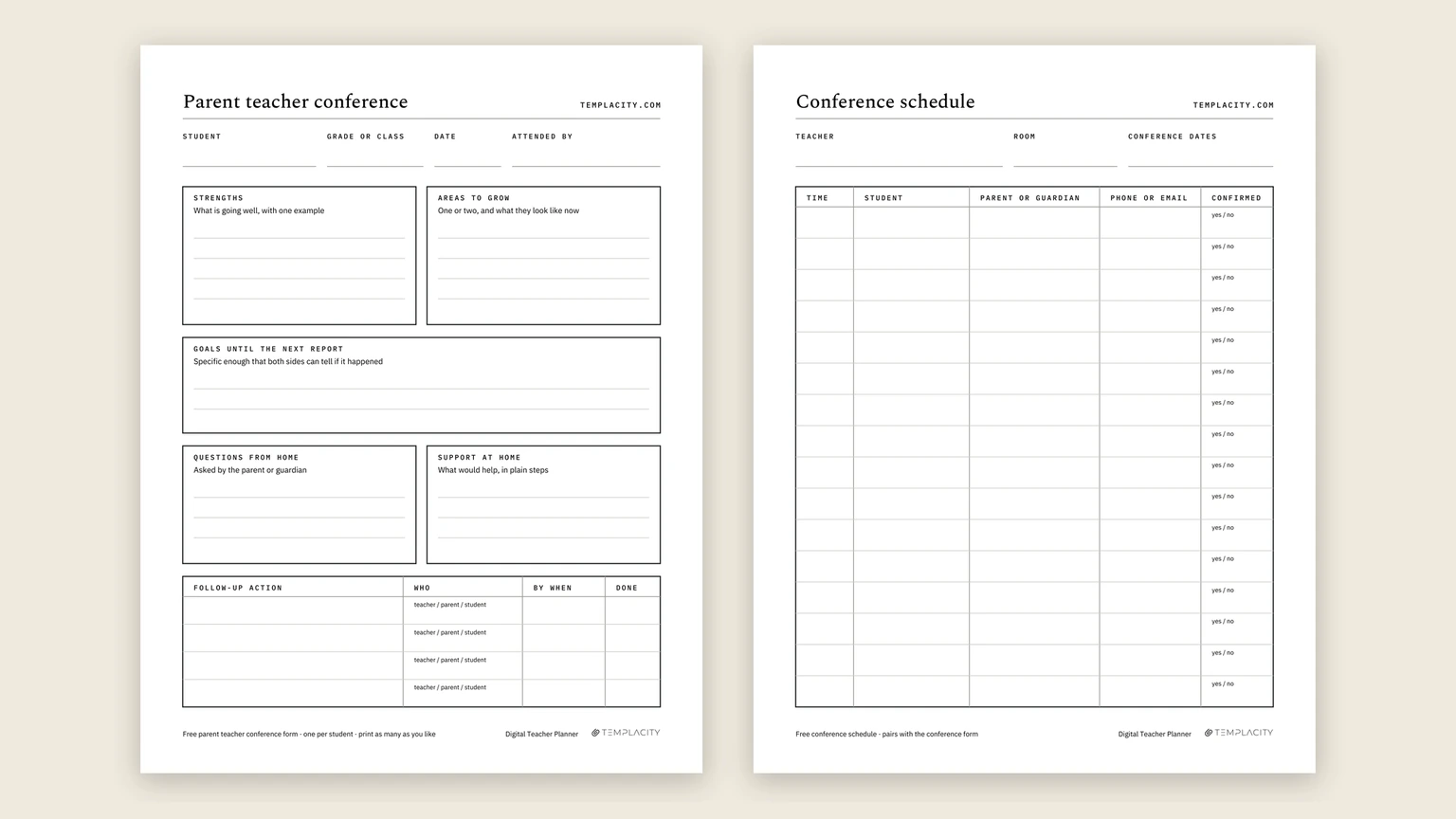
This is a free parent teacher conference form, and the files come first because that is what you came for. Below them: what each box is for, how to use one sheet before, during and after the meeting, the questions families ask most, the schedule page for booking the evening, and the invitation and reminder notes to send home.
| Format | Paper | Pages | Get it |
|---|---|---|---|
| PDF, print-ready | Letter, 8.5 × 11 in | 2, form and schedule | Download the Letter PDF |
| PDF, print-ready | A4, 210 × 297 mm | 2, form and schedule | Download the A4 PDF |
| Word .docx, editable | Letter, 8.5 × 11 in | 1, the form | Download the Letter .docx |
| Word .docx, editable | A4, 210 × 297 mm | 1, the form | Download the A4 .docx |
| Google Doc, editable | Your own copy | The form | Make a copy in Google Docs |
Everything is undated, so the same stack works for the fall round and the spring one. There is no watermark beyond our name along the top and no limit on how many copies you print. The Google Doc link asks you to sign in to a Google account first, because it makes a copy in your own Drive rather than letting you edit ours.
The form
What is on the parent teacher conference form
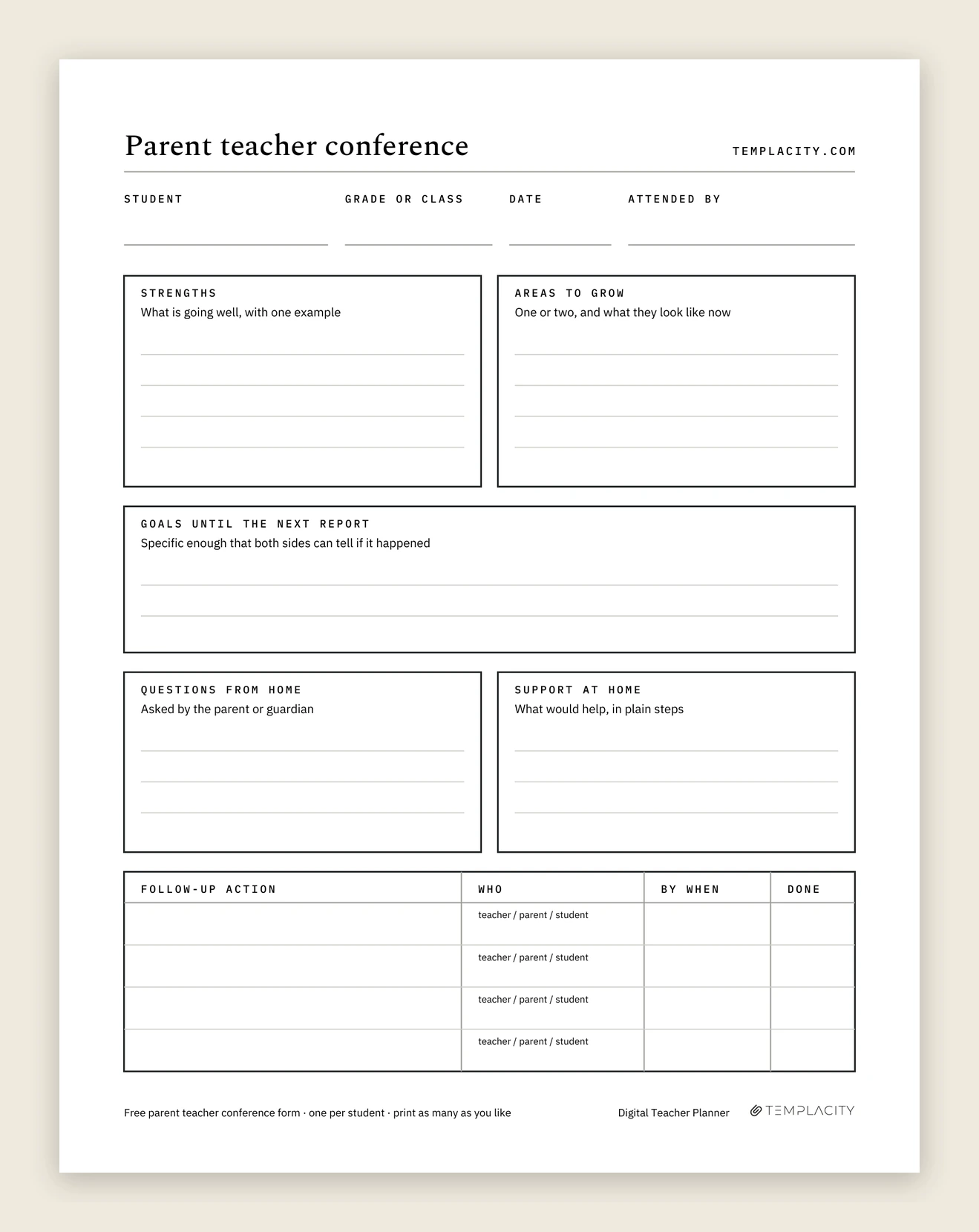
Page one is the form itself, one per student. Along the top sit four lines: the student, the grade or class, the date, and who attended. That last line earns its place later, when you need to remember whether both parents heard the same thing or only one of them did.
Under it, five boxes, each with a short prompt so the box gets used the way it is meant to be:
- Strengths: what is going well, with one example. The example is the part families remember.
- Areas to grow: one or two, and what they look like now. Two is the ceiling; a list of six reads as a verdict.
- Goals until the next report: specific enough that both sides can tell if it happened.
- Questions from home: asked by the parent or guardian, written down as they ask them.
- Support at home: what would help, in plain steps a tired family can follow on a Tuesday night.
At the bottom is a follow-up table with four rows: the action, who owns it (teacher, parent or student), by when, and a done box. Most free forms stop at notes. This one ends with a to-do list that has names on it.
How to use it
One form, used three times: before, during and after
The common mistake with any parent teacher conference template is treating it as something you fill in during the meeting. By then you are talking, listening and watching the clock at the same time. Split the work across three passes instead.
Before: fill the top half at your desk.
Name, class and date, then strengths and areas to grow from your own records, with the example already chosen. Pencil in one draft goal. This is ten quiet minutes per student, done the week before, not in the corridor.
During: write down what the family brings.
Open with the strength, then the areas to grow, then hand the conversation over. Questions from home and support at home get filled while they talk. Agree the goal together and rewrite your draft if theirs is better.
After: turn the notes into owned actions.
Before the next family sits down, fill the follow-up rows with a name and a date on each. Then check the done column two weeks later, and again at the next report, which is exactly what the goals box points to.
Doing it this way changes the meeting itself. You arrive with the hard part written, so the time goes on listening, and the family leaves knowing what happens next and who is doing it.
Questions
Parent teacher conference questions to be ready for
Families tend to ask versions of the same handful of questions, and a teacher who has an answer ready for each one sounds prepared rather than defensive. Jot a line for each on the back of the form, or in the questions box, before they arrive.
- Is my child where they should be for this grade? Have one concrete piece of work to point to, not just a level or a score.
- How are they getting on with other children? Friendships, group work, and what lunch and recess look like from where you stand.
- What can we do at home? One or two things, specific enough to start tonight. This is what the support at home box is for.
- Is there anything we should be worried about? Answer honestly and say what you are already doing about it.
- What is the best way to reach you? Email, a note in the bag, or the school app, and how quickly you usually reply.
It works in the other direction too. The most useful questions for a teacher to ask are open ones: what does homework time look like at your house, what does your child say about school, and is there anything happening at home you would like us to know about. The answers often explain what you have been seeing in class.
A form you only fill during the meeting is a transcript, not a plan.How to use it
Sign-ups
Booking the evening: sign-up sheet, invitation and reminder
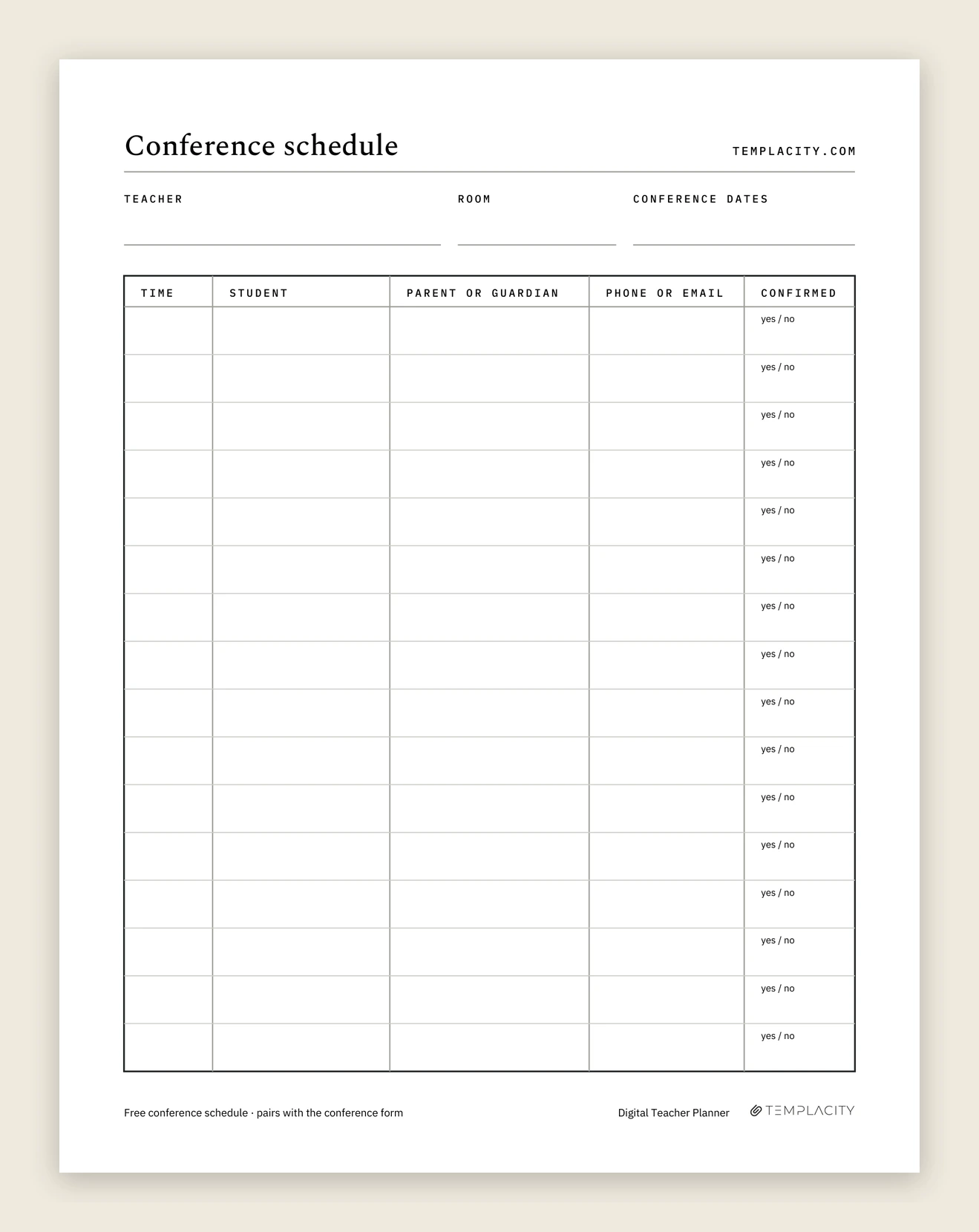
Page two of the PDF is a conference schedule, and it is the page most one-sheet forms leave out. Teacher, room and conference dates along the top, then sixteen rows with five columns: time, student, parent or guardian, phone or email, and confirmed.
You can use it as a parent teacher conference sign up sheet pinned outside the classroom, or keep it on your desk and fill it from replies. Either way the confirmed column is the one that saves the evening. Circle yes or no the day before, and a family that has not confirmed gets one reminder instead of a gap in your schedule.
If the sheet goes on a door, think about what it shows. A phone number or email next to a child’s name is not something every family wants on public view, so on a posted copy ask for the time and the student only, and collect contact details privately.
The sheet only fills if families know the evening is coming, and the slot only holds if they remember it. Two short notes do both jobs: an invitation two weeks out, sent home in the folder or by email, and a reminder the day before to every family on the schedule. A third covers the family who never replied, which is the one most worth the effort.
Copy and send, conference notes home
The invitation, the reminder, the nudge
Change the names, dates, times and room; leave the shape.
Invitation letter, sent home two weeks before
Dear families,
Parent teacher conferences for Room 12 are on Thursday, November 5 and Friday, November 6, and I would like to see every family for fifteen minutes. We will look at your child’s work together, talk about what is going well and what comes next, and agree one goal for the rest of the term.
Please choose a time on the sign-up sheet outside our classroom, or reply to this note with two times that suit you. If neither day works, tell me and we will find another, by phone or video if that is easier.
Thank you, and I look forward to meeting you.
Ms. Rivera
Why this works: it says how long, what the time is for, and gives a family who cannot make the evening a way in before they have to ask.
Reminder, the day before
Hello, a quick reminder that your conference about Daniel is tomorrow, Thursday, at 4:40 in Room 12. It runs fifteen minutes.
If there is a question you would like us to cover, reply with it tonight and I will have an answer ready. If the time no longer works, let me know and I will offer the next open slot.
Why this works: day, time, room and length in the first two lines, then an invitation to send the hard question early, which is the one that otherwise arrives at minute fourteen.
Nudge for a family who has not booked
Hello, we have not found a conference time for Leo yet, and I would like to see you before the end of term.
Two slots are still open: Thursday at 5:20 and Friday at 3:30. Reply with the one that suits you, or suggest another time and we will make it work.
Why this works: two concrete times are easier to answer than an open question, and the last line keeps the door open without chasing.
Wording written 14 October 2026
Once a family confirms, circle yes in the confirmed column on the schedule page. That column is where the reminder list comes from the day before: every yes gets the reminder, every blank gets the nudge.
Printing
Which file to take, and how to print it
Paper size is decided by your printer, not your preference: Letter in the United States and Canada, A4 nearly everywhere else. Print at actual size (100 percent) rather than fit to page. Scaling shrinks the writing lines, and the follow-up table at the bottom is the first thing to get cramped.
Take the PDF if you write by hand; it carries both pages. Take the .docx or the Google Doc if you would rather type, or if your school wants its name and logo along the top. Both editable versions hold the form only, so print the schedule from the PDF. For a form you fill on a tablet, the PDF also opens in most annotation apps, and the boxes are sized for handwriting either way.
Conferences are one sheet of a teacher’s year. For planning the week itself, our free weekly lesson plan template ships the same way: a print-ready PDF at Letter and A4, an editable Word file, a Google Doc you can copy, and no email.
Afterwards
Where the notes go after the conference
A filled form is a record about a child, so it deserves the same care as anything else you keep on a student. Store it where your school expects such records to live, and check the school’s policy before photographing it onto a personal phone. Keep the follow-up table somewhere you will actually see it, because a done column nobody reopens does nothing.
Conferences are also only one kind of contact. The call in November and the email in February matter just as much when a question comes up in spring about what was agreed. Our teacher planner examples show a parent contact log filled in, with a follow-up checkbox on every line, which is the same habit this form builds, kept for the whole year.
If you are still deciding between paper, software and a tablet for the rest of the year, our best teacher planner comparison ranks them on what decides whether a planner lasts to June.
FAQ
Common questions, answered briefly
Is this parent teacher conference form free?
What should a parent teacher conference form include?
Can I edit the form?
Is there a sign up sheet for parent teacher conferences?
What do you write in a parent teacher conference reminder?
What should a parent teacher conference agenda look like?
If yours isn’t above, drop the question in the comments and we’ll add it.
People also ask
Other questions, briefly answered
If your school runs conferences in a way this form does not fit, student-led, online, or ten minutes flat, tell us in the comments what you changed. The prompts on this sheet came from exactly that kind of question, and the next version can too.