The job
What a Google Sheets bookkeeping template has to do
Most small business books start as one long tab: a date, a description, an amount, maybe a minus sign for money going out. It feels like bookkeeping until tax time, when you need the year’s spending on materials, or the profit for March, and the only way to get either is to scroll and add by hand. The list held every number and answered no questions.
A Google Sheets bookkeeping template that earns its keep does three jobs, and only the first one is typing:
- Record: one row per payment, in or out, with a category.
- Sort: add up those rows by category and by month without anyone touching a calculator.
- Report: show what came in, what it cost to deliver, what the business spent besides, and what was left.
The IRS does not require any particular format. Its recordkeeping page says you “may choose any recordkeeping system suited to your business that clearly shows your income and expenses.” A spreadsheet qualifies, as long as it is kept, and kept the same way every month.
The tabs
The four tabs of a bookkeeping spreadsheet
Two tabs are typed, two are worked out. Keep the typed ones narrow: the fewer columns there are to fill, the more likely the log is still current in June.
| Tab | Columns | Typed? |
|---|---|---|
| Categories | A Category, B Type (Income, Cost of sales, Operating) | Once, at setup |
| Income | A Date, B From, C Category, D Amount, E Paid by, F Status | Every payment |
| Expenses | A Date, B Paid to, C Category, D Amount, E Paid by, F Receipt | Every payment |
| P&L | A row per category, a column per month | Never: formulas |
The Category column on both logs is a dropdown fed from the Categories tab, so “Shipping” and “shipping costs” can never become two lines on the report. Status on Income is Paid or Unpaid, which turns the log into your list of who still owes you. Receipt on Expenses holds a link to the photo of the receipt in Drive, so the proof sits one click from the number it proves. This is all a ledger template in Google Sheets needs to be: a dated list, one row per payment, nothing summed by hand.
Categories
A chart of accounts small enough to keep
The Categories tab is a chart of accounts with the jargon taken out. Three to five income lines (product sales, services, wholesale) and fifteen or so expense lines cover most small businesses. Forty categories feel thorough and get used badly, because every receipt becomes a small decision and half of them land in “Other”.
The Type column is what makes the report readable. Cost of sales is what it takes to make or deliver what you sell: materials, packaging, shipping, a subcontractor on a client job. Operating is everything you would pay even in a month with no sales: rent, software, phone, insurance, bank fees. Splitting them gives you gross profit, which tells you whether each sale makes money, before net profit tells you whether the business does. A shop with healthy gross profit and a thin net has an overhead problem; a thin gross means the prices or the materials are wrong. Our profit and loss template guide walks through that line order and why money you take out for yourself is not an expense.
Match your categories to the lines your tax return asks for where you can, and your accountant reads the year in minutes instead of re-sorting it.
The formula
One formula writes the whole P&L
On the P&L tab, put the categories down column A in the same groups (income, then cost of sales, then operating) and the first day of each month across row 3. Every cell in the grid is then the same SUMIFS, which returns the sum of a range filtered by several conditions: this category, on or after the first of the month, on or before its last day. EOMONTH finds that last day, so February and leap years take care of themselves.
=SUMIFS(Expenses!$D:$D,Expenses!$C:$C,$A5,Expenses!$A:$A,">="&B$3,Expenses!$A:$A,"<="&EOMONTH(B$3,0))
The expense category in A5, the first of the month in B3 (a real date, formatted to show “Jan”). Fill it right and down. For income rows, point it at the Income tab and add Income!$F:$F,"Paid" so unpaid invoices stay off the report until the money lands.
Formula reviewed 1 November 2026
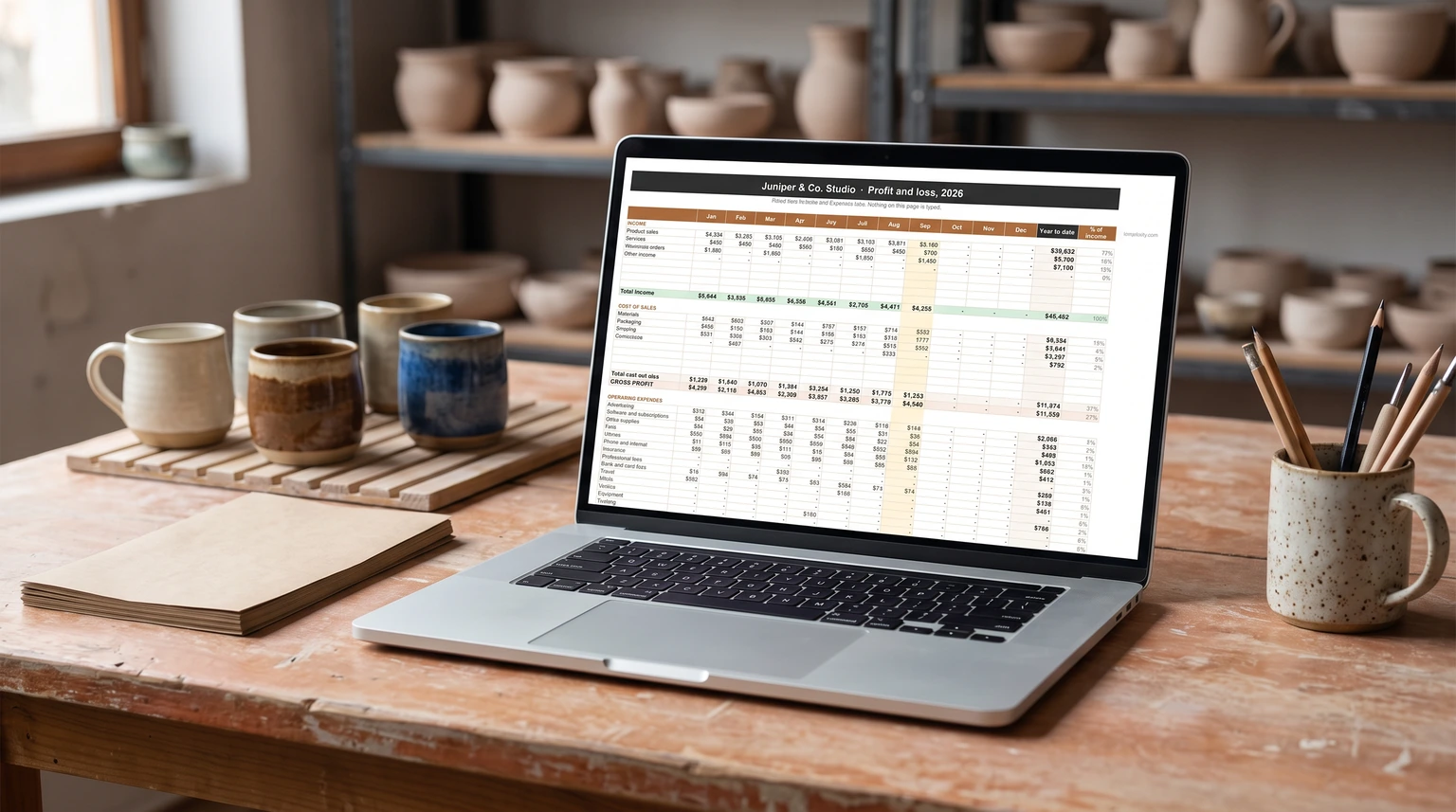
Subtotals are plain sums of each block: income, cost of sales, gross profit as the first minus the second, then operating expenses and net profit. Margin is net profit divided by income. A year-to-date column sums the twelve months. Nothing on the page is typed, so nothing on it can drift from the logs.
The unpaid list is one more line on its own tab: =IFERROR(FILTER(Income!A2:D,Income!F2:F="Unpaid"),"Nothing owed"). It shows every invoice still out, oldest first if your log is in date order. When a client pays, change the row to Paid and set the date to the day the money arrived; the sale moves onto that month’s P&L by itself. If you send invoices from a sheet too, our Google Sheets invoice template guide covers numbering and due dates.
Nothing on the page is typed, so nothing on it can drift from the logs.
The habit
The monthly check and the receipts
A bookkeeping spreadsheet is only as true as its logs, and logs miss things: a card payment nobody wrote down, a refund, a bank fee. Once a month, open the bank statement next to the two tabs and tick every line off against a row. Add a checkbox column if it helps. Anything on the statement with no row gets one; anything in the sheet with no statement line is a typo or a payment that never cleared. Twenty minutes a month here saves a lost weekend in March. Logging every card payment by hand is the slow part, and our Google Sheets expense tracker template guide shows how to import a bank CSV instead.
Keep the paperwork behind the rows. The IRS notes that purchases, sales and payroll “generate supporting documents”, and its page on how long to keep records sets three years as the usual period, six if income goes unreported, and seven for a claim on worthless securities or a bad debt. A Drive folder per year, with the receipt link in the Expenses row, covers it without a shoebox.
Ready-made
A ready-made small business bookkeeping spreadsheet
If you would rather start from a finished file, our Small Business Bookkeeping Spreadsheet ($39, Google Sheets and Excel) is this design built out. You name your business and check the categories on Settings, each expense set as cost of sales or operating, then log money in and money out one row per payment. The Monthly P&L fills itself from the two logs: income, cost of sales, gross profit, operating expenses, net profit and margin, month by month and year to date. Mark an invoice Unpaid and the Dashboard lists what is still owed. The logs keep every year, and you get a blank copy and a filled example for each app, with a one-page Quick Start.
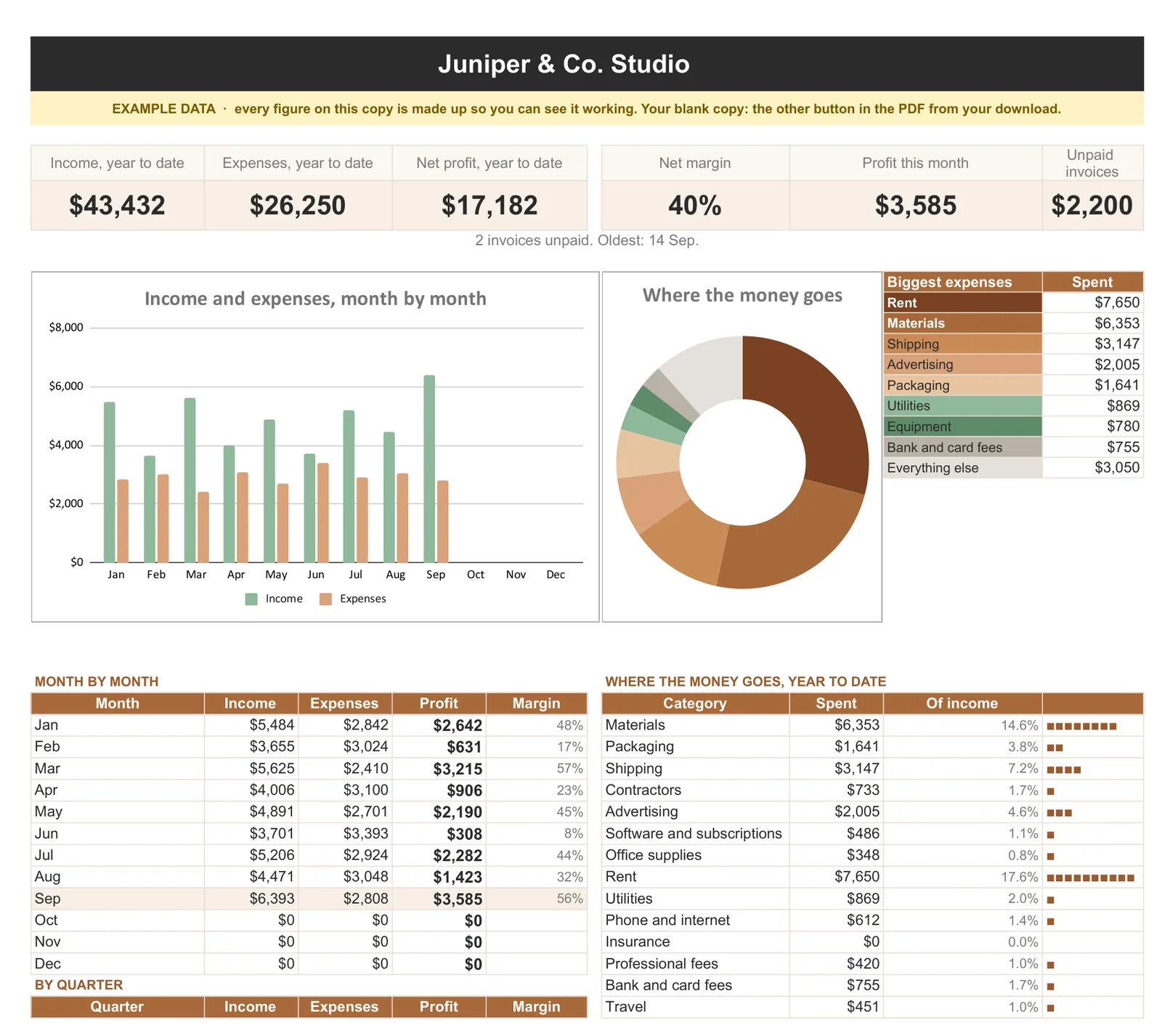
Running the whole business from spreadsheets? Bookkeeping also comes inside our Small Business Operations Spreadsheet Kit with the Sales CRM, the Project Tracker and the Cash Flow Forecast: all four for $129, against $186 bought one by one. Profit and cash are not the same thing, and the forecast is the half that tells you whether the bank account survives a slow month; our cash flow forecast template guide explains the gap.
The limit
When a spreadsheet stops being enough
Be clear about what this design is. It is single-entry bookkeeping: it records income and expenses, and nothing else. It does not track what the business owns or owes, so it produces no balance sheet. It has no idea about loan principal, equipment you write off over several years, stock sitting on a shelf, or payroll. It does not pull transactions from the bank, and it files nothing.
For a freelancer, a maker or a small service business paid by a few dozen payments a month, that is usually the right trade: nothing to learn, no subscription, and a file your accountant can open. Accounting software earns its cost when you run payroll, hold inventory, carry loans, owe sales tax in more than one place, or have more transactions than you can tick off in an evening. Ask your accountant before you cross that line, not after a year of workarounds. The rest of our spreadsheet guides are on the Google Sheets hub.
Whatever Google Sheets bookkeeping template you build or buy, start the logs on the first of the month and do the bank check before the month is out; the habit matters more than the file. Tell us in the comments which category your business could not do without that we did not mention.
FAQ
Common questions, answered briefly
Can you do bookkeeping in Google Sheets?
What should a bookkeeping spreadsheet include?
What is the difference between a ledger and a profit and loss?
How long should I keep bookkeeping records?
People also ask