The structure
An excel monthly budget template is really one decision about tabs
Before any category list, any colour scheme and any dashboard, every monthly budget workbook makes one structural choice, and everything else follows from it. Either the file holds twelve sheets, one per month, or it holds a single transaction log with a date on every row and a summary that filters it by month. Most of the free files you will find take the first route. It is the wrong one for almost everybody, and the reason is maintenance rather than taste.
Twelve monthly tabs means twelve copies of every formula. Add a category in March and you have eleven more sheets to fix, or eleven months that disagree with March. Discover a mistake in the totals row in August and you have already carried it through seven sheets. Nobody does that work, so what actually happens is that the file stays correct until the first change and slowly diverges from itself after it.
| Structure | What it gets right | What it costs |
|---|---|---|
| Twelve monthly tabs | Each month is visually self-contained, and printing one month is a single sheet. Easy to understand on first open. | Every change is twelve changes. Comparing March to September means reading two sheets side by side, and a full-year figure needs a formula that reaches across all twelve. |
| One log, filtered by month | One place to type, one set of formulas, and any month, quarter or year is a filter rather than a new sheet. Trends fall out for free. | You have to trust a summary you cannot see being calculated, and the log looks intimidating in year two when it is four thousand rows long. |
The second structure has one requirement, and Excel already meets it. A summary cell adds up only the rows matching the month you picked, which is what SUMIFS is for. Microsoft describes it as a function that “adds all of its arguments that meet multiple criteria”, with the shape SUMIFS(sum_range, criteria_range1, criteria1, ...). One formula, written once, that answers “groceries, in September” and then answers it again in October without being touched.
The blind spot
The bills that do not arrive every month
This is the failure that makes people give up on monthly budgeting, and it has nothing to do with spreadsheets. A monthly budget records what happened this month. Car insurance, the annual road tax, a yearly subscription, the dentist, birthdays and the whole of December do not happen this month. So for eleven months the budget says you are comfortably in surplus, and in the twelfth it says you are four hundred dollars under and you have no idea why.
The budget was never wrong in the twelfth month. It was wrong in the eleven before it, by exactly the amount it was quietly not setting aside.
The fix is a line item that exists every month and gets spent almost never. Add up every non-monthly cost you can remember from last year, divide by twelve, and give that number a category of its own. Some people call it a sinking fund, some call it the annual pot, and the name matters far less than the fact that it appears in the same list as groceries and is treated as just as compulsory. When the insurance renewal lands, the money is already there and the month it lands in looks like any other.
The boundary
Where your month actually ends
Downloaded templates assume the calendar. Your bank does not. If you are paid on the 25th, then the money that has to last until the next payday is split across two of the workbook’s months, and every month shows a huge deficit in its first week and a surplus in its last. The numbers are all correct and the picture they paint is useless.
There are two honest ways out and they suit different people. The first is to keep the calendar month and simply accept that the balance carries, which works if you have a buffer sitting in the account and are not budgeting down to the last dollar. The second is to define your own month, running from payday to the day before the next one, and to label rows with that period rather than with their calendar date. In a single-log workbook this costs one extra column, and every summary then follows the boundary you actually live by.
The numbers are all correct and the picture they paint is useless.
If you do stay on the calendar, one function saves a surprising amount of arithmetic. Microsoft documents EOMONTH as returning “the serial number for the last day of the month that is the indicated number of months before or after start_date”, which is the clean way to ask a workbook for the end of the current month, or of the one before it, without hard-coding 28, 30 or 31 anywhere. Anything that hard-codes a month length is a February bug waiting for its turn.
Rollover
What happens to the money you did not spend
Most free monthly templates simply do not answer this, and it is the question that decides whether the second month feels like progress or like starting again. You budgeted ninety for fuel and spent sixty. Where does the thirty go?
- Reset to zero. Every month starts from the plan, and the leftover is simply absorbed into savings or into the account balance. Simple, and it suits anyone whose income is steady and whose real goal is a monthly number to stay under.
- Carry the category forward. The thirty stays with fuel, so next month’s fuel budget is a hundred and twenty. This is the right model for categories that genuinely lump: car repairs, clothes, gifts, anything you underspend for four months and then overspend once.
- Carry the whole balance, not the category. The thirty goes into next month’s whole pot without belonging to anything. It is the most forgiving and the least informative, and it is what most people do by accident when they have no rule at all.
Pick one and write it down somewhere in the file, because the failure mode here is not choosing the wrong model, it is applying a different one each month depending on whether the news is good. A workbook that carries a surplus forward and quietly forgets a deficit will always tell you that you are doing fine.
Uneven income
Budgeting a month you cannot predict
Freelance work, commission, shift patterns and seasonal jobs all break the assumption that a monthly plan starts with a known income figure. The usual advice is to average the year, which is arithmetically neat and psychologically terrible: a thin month spent against an average is a month spent on money that has not arrived.
The version that survives is to budget this month against last month’s actual income. It is always a real number, it is always already in the account, and it self-corrects: a strong month funds a generous one after it, a thin month tightens the one after that, and nothing is ever spent in advance. In a single-log workbook this is one more SUMIFS pointed at the previous month, which is why the structure at the top of this page keeps paying off.
Two habits go with it. Keep a floor: a minimum version of the budget covering only rent, food, transport and the annual pot, so a bad month has a plan rather than a panic. And keep the category count low. Eight to twelve is plenty, and every extra category is a decision you have signed up to make several hundred times a year.
The file
The free monthly budget workbook we publish
Ours is a direct download with no email address, no account and no sign-up form in the way. It takes the single-log structure described above, and the parts that matter are the ones you cannot see in a screenshot.
One thing to do to it in the first five minutes, and it runs against the advice above on purpose. The plan tab arrives with a long category list rather than a short one, because deleting a row you do not need is quick and inventing a category you forgot is not. Cut it back to the eight or ten that describe your month, and the dropdown on the log follows the moment you do.
One note on how it is built, because it changes what to expect. The Transactions log is a real Excel Table, and Microsoft’s documentation is direct about what that gets you, since “to add a row at the bottom of the table, start typing in a cell below the last table row. The table expands to include the new row.” The totals also use whole-column ranges, so the protection is doubled rather than traded.
You do not need a subscription to open it. Microsoft states that you get free access to Word, Excel and PowerPoint through Microsoft 365 for the web with a free account and 5 GB of storage, so the browser version will run this workbook at no cost. If bills rather than spending are the part that keeps slipping, the bill tracker workbook is free on the same terms, and our bill tracker layouts do the same job on paper.
For the wider question of which budget file to keep at all, the Excel budget template page covers the platform side: fixed ranges, Excel Tables and where a workbook opens. If you would rather build from nothing, making a budget in Excel walks the whole thing, and the Google Sheets budget template is the same system for anyone who needs two people in the file at once. And if you would rather see one filled in before committing an evening to it, the worked budget spreadsheet example shows every row with numbers in it.
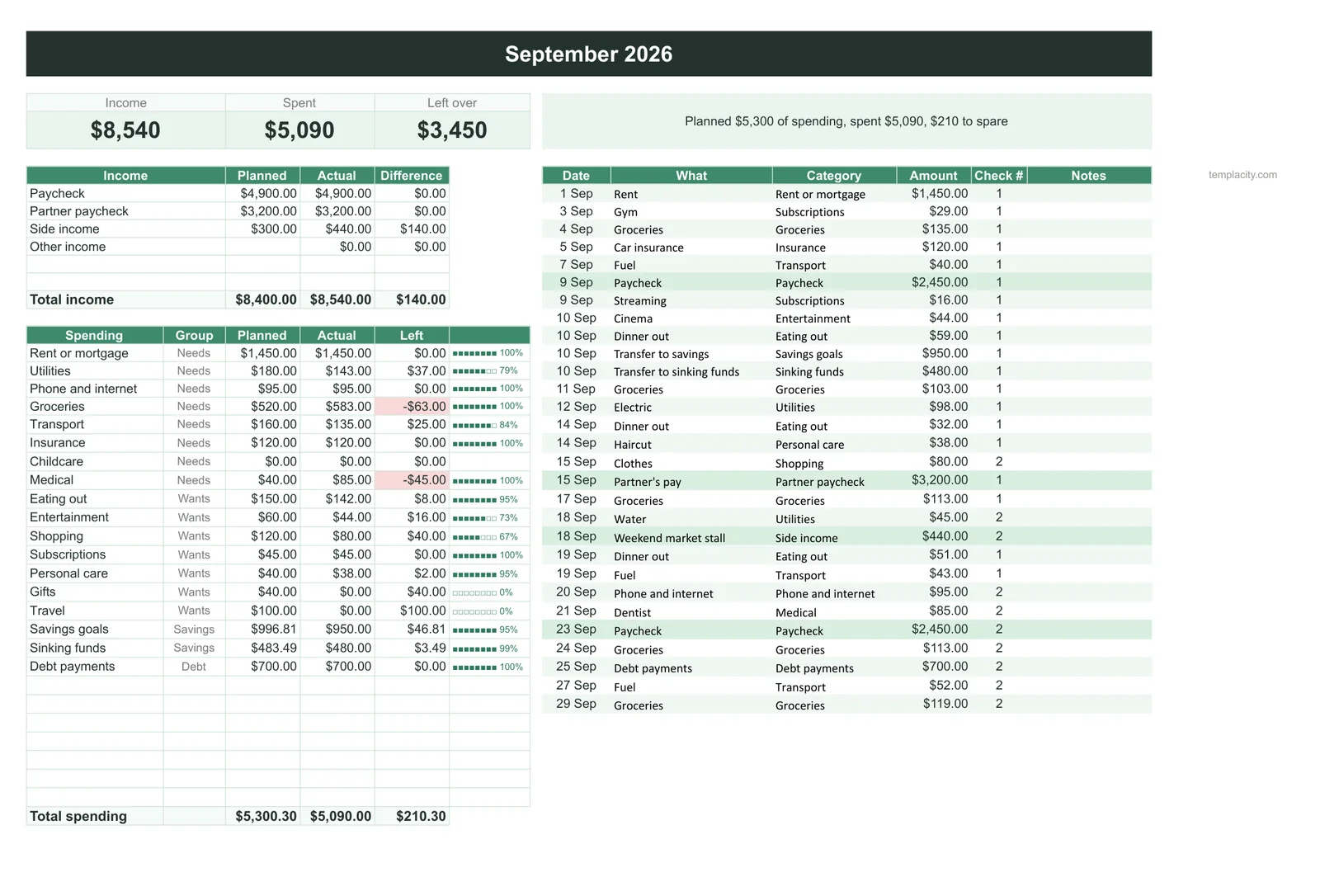
Our free workbook does one month well. The Budget & Money Planner ($39, Google Sheets and Excel) runs twelve of them in one file, each with income by paycheck, planned against actual per category, and a line at the top that says what the plan has left: on its example September it reads “Planned $5,300 of spending, spent $5,090, $210 to spare.” The months then roll up into a year page, next to bills, debt payoff, sinking funds, savings goals and net worth.
FAQ
Common questions, answered briefly
Should a monthly budget use one tab per month?
SUMIFS, keeps one set of formulas and turns any month, quarter or year into a filter.How do I handle annual bills in a monthly budget?
What if I get paid on the 25th rather than the 1st?
Do I need Microsoft 365 to use a monthly budget template?
People also ask
Other questions, briefly answered
If you rewire any of this into something better, we would like to see it. More of our spreadsheet work, free files included, sits on the spreadsheets hub, and most of the good ideas in those files came from readers rather than from us.