The page
What goes on a contractor estimate template
A client reads an estimate to decide two things: whether to hire you, and what they are agreeing to. A good contractor estimate template carries your business block and license or insurance line, the client and the job address, numbered line items (description, quantity, unit, unit price), subtotals for materials, labor and other costs, your markup, tax, the amount due, a valid-until date and a signature line.
The line that saves the most arguments is the scope. Our example estimate is a fictional re-roof for 22 squares, and its scope says what is in (permit, tear-off to the deck, up to three sheets of damaged decking, new flashing, clean-up), what is out (the detached garage), and what happens if the deck is worse than expected: rotten decking beyond three sheets at $85 a sheet. That one sentence is the difference between a change order and a dispute.
The free sheet
How the free estimate template works
It has three working tabs. Your Business holds your name, contact details, license or insurance line, how many days an estimate stays valid, your usual markup and your tax rate, typed once. Items by Trade lists nine trades with eight or nine usual items each, their units and whether each is materials, labor or other. Estimate is the page you send: pick a trade and the lines fill in, then type quantities and overwrite anything that does not fit the job.
In the example, the roofing preset prices 22 squares of tear-off and 22 squares of roofing labor, 24 squares of shingles, underlayment, ice and water shield, drip edge, ridge vent and a dumpster. Materials come to $4,861, labor to $6,050 and the dumpster to $450. A 15% markup adds $1,704.15, and the estimate reads $13,065.15. The blank edition ships the same items with the prices empty on purpose: the example’s prices are made up, and yours depend on your suppliers, your crew and your area.
The trade field is an ordinary drop-down, which is why the file works the same in Excel; Microsoft’s guide to creating a drop-down list shows the route, the Data tab, then Data Validation, if you want to add a trade of your own.
The math
Markup is not margin
Markup is what you add on top of cost. Margin is the share of the price you keep. They are different numbers, and pricing a job with one while thinking in the other is the most common way an estimate looks profitable and is not.
Take a fictional kitchen remodel from our paid sheet’s example. Its twelve lines cost $22,866: crew hours at the carpenter’s rate, cabinets, quartz counters from a fabricator, plumbing and electrical subcontractors, flooring, paint, a dumpster and the permit. Each type carries its own markup: 35% on labor, 20% on materials and equipment, 15% on subcontracts and nothing on the permit, which passes through at cost. The price comes to $27,808.50. That is a 21.6% markup on cost, but a margin of only 17.8%, because the $4,942.50 you keep is measured against the bigger number.
The quick conversions are worth knowing by heart. A 25% markup is a 20% margin. A 50% markup is a 33% margin. And a 20% markup, the number many people mean when they say they want twenty percent, keeps only 16.7%.
By trade
Estimate lines by trade
Each trade prices in its own units, and an estimate template that forces everything into hours makes some trades guess. These are the lines and units the free sheet’s presets use, so a roofing estimate template and a handyman one start from the right place.
| Trade | Usual lines in the preset | Priced by |
|---|---|---|
| Roofing | Tear-off, shingles, underlayment, ice and water shield, drip edge, ridge vent, labor, dumpster | Square, roll, each |
| Landscaping | Design, sod, mulch, shrubs, topsoil, planting, edging, haul-away | Hour, sq ft, cu yd, load |
| Painting | Prep and patching, paint, primer, walls, ceilings, trim and doors, masking, clean-up | Sq ft, gallon, each |
| Electrical | Service call, labor, outlets, GFCI, fixtures, new circuit, panel inspection, permit | Hour, each |
| Plumbing | Service call, labor, faucet, toilet install, water heater, valves, PEX, drain clearing | Hour, each, lot |
| Remodeling | Demolition, framing, drywall, cabinets, countertop, tile, carpentry, permit, dumpster | Sq ft, linear ft, hour |
| HVAC | Diagnostic, tune-up, refrigerant, capacitor, filter, thermostat, ductwork, install labor | Each, lb, hour |
| Handyman | Minimum charge, labor, TV mount, assembly, drywall patch, door adjustment, caulk, materials run | Each, hour |
| Flooring | Removal, vinyl plank, underlayment, install, levelling, baseboard, transitions, furniture moving | Sq ft, linear ft, room |
Two habits carry across every trade. Order more material than the area, as the example does with 24 squares of shingles for a 22-square roof, and say so on the line. And keep a minimum charge or service call line for small jobs, so a one-hour visit still pays for the drive.
After the signature
Estimate against actual: what the job really clears
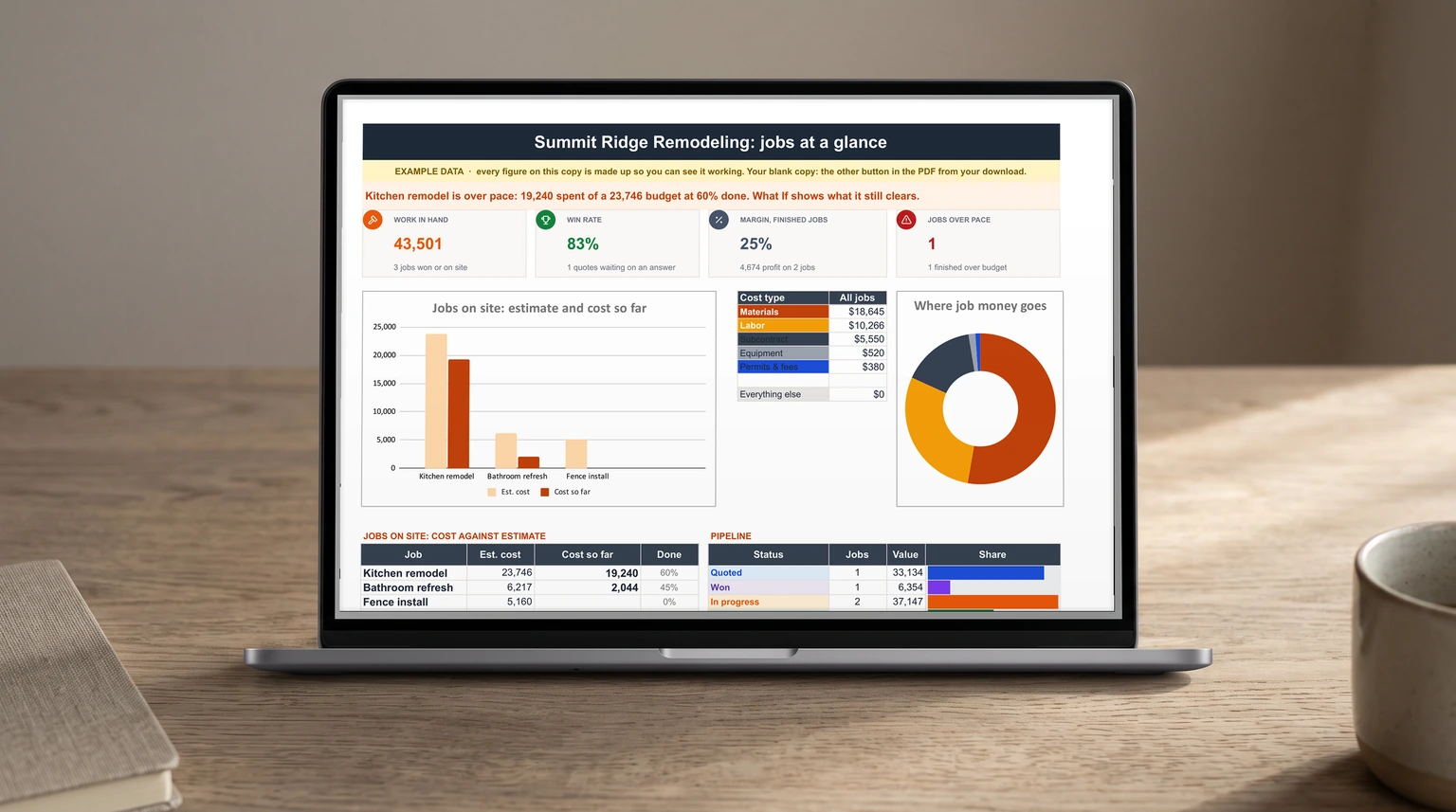
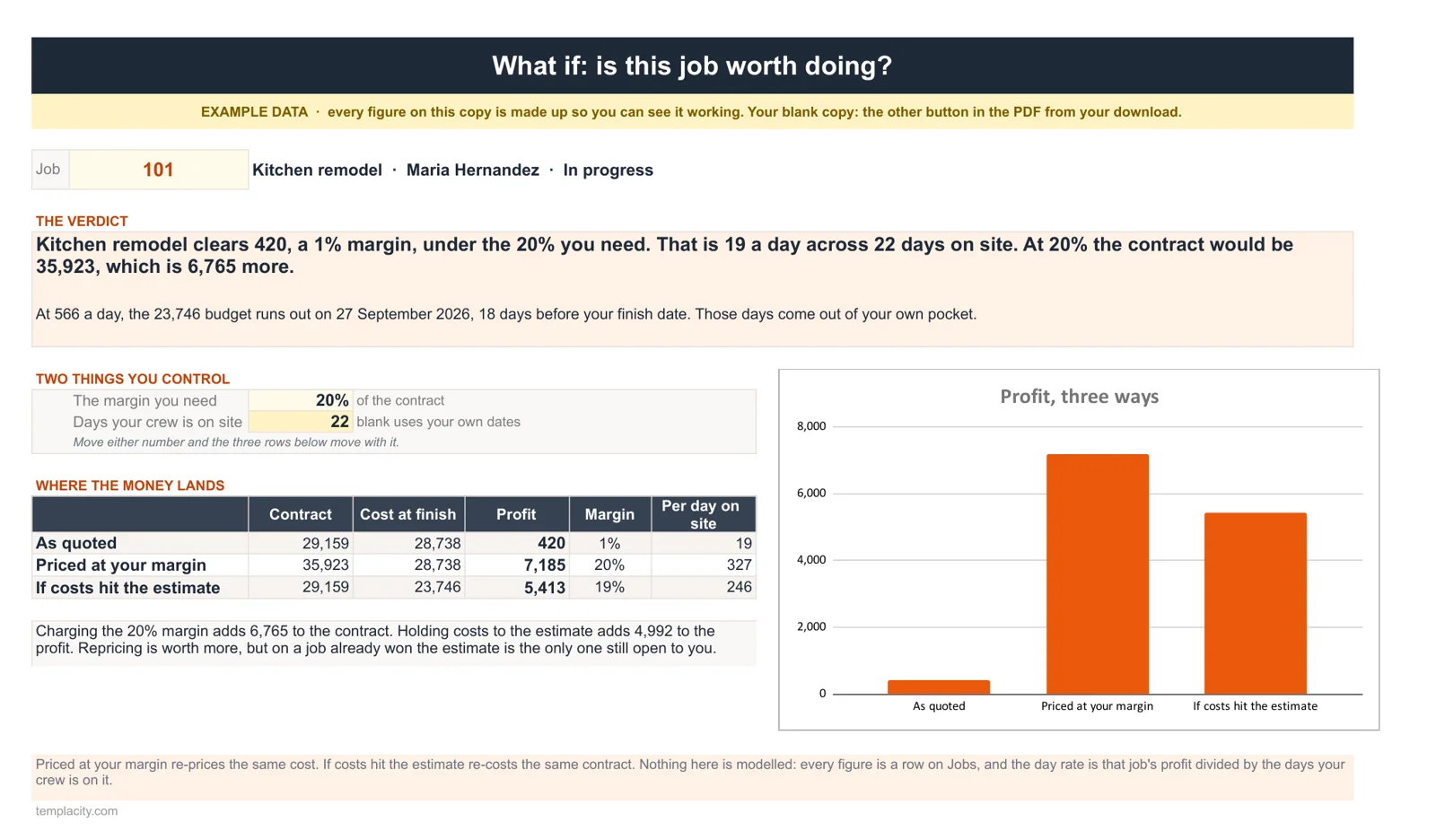
An estimate is a forecast, and the only way to know whether it was right is to log what the job actually costs against it. The kitchen remodel shows why. With one approved change order, pantry pull-outs priced at $1,350, the contract stands at $29,159 and the budget at $23,746. But crew hours and bills are running at $566 a day, so the budget runs out 18 days before the finish date, and the job is on course to cost $28,738.
The estimate was not greedy and the price was not low. The costs simply ran past the estimate, and nobody saw it until the budget was gone.
At that pace the kitchen clears $420, a 1% margin, which is $19 for each of the 22 days the crew is on site. The estimate was not greedy and the price was not low. The costs simply ran past the estimate, and nobody saw it until the budget was gone. Held to the estimate, the same contract would clear $5,413.
That is what our Contractor Estimate & Job Costing Spreadsheet ($59, Google Sheets and Excel) is for. You build each estimate from crew hours at your rates and unit costs, with markup by cost type, and the client quote prints from it without ever showing your cost or markup. Every crew hour and bill is then logged against its job, change orders join the contract once approved, and a What If tab says what each job clears, what that is per day on site and the day its budget runs out.
If you also order materials, roster a crew and keep the books, the Contractor & Trades Spreadsheet Kit puts the estimate sheet beside our Quote & Purchase Order, Staff Schedule & Timesheet and Small Business Bookkeeping sheets: all four for $129, against $176 bought one by one.
Sending it
Sending the estimate and what comes after
Send estimates as PDFs, never as an editable file. In Google Sheets, open the Estimate tab and use File, Download, PDF; Google’s help page on downloading a copy of a file lists the formats. Give every estimate a number and keep the valid-until date honest, because material prices move and a three-month-old estimate is a promise you may not want to keep.
Once the client signs, the paperwork moves on. Materials ordered against the job belong on numbered purchase orders, which our purchase order template guide sets up. Deposits and the final bill go on an invoice: our free invoice generator makes one in the browser, and our Google Sheets invoice template guide covers the log that tracks who has paid. Crew hours fit a timesheet like the one in our Excel timesheet template guide, and a big job that pays suppliers before the client pays you is the gap our cash flow forecast template guide plans for. More business templates are on our Excel hub.
A contractor estimate template that knows its margin, and a job sheet that knows its costs, turn pricing from a gut call into a number you can defend. Tell us in the comments what trade you work in and which line on your estimates goes wrong most often; we read every reply.
FAQ
Common questions, answered briefly
What should a contractor estimate include?
What is the difference between markup and margin?
Is there a free contractor estimate template for Excel?
Can I make an estimate in Google Docs instead?
People also ask