The point
What a purchase order is actually for
A purchase order is a decision written down before money moves. You agree the item, the quantity, the price and the delivery date with the supplier, and you give that agreement a number. Everything that follows, the delivery, the invoice, the payment, is checked against that number.
That is why a purchase order template in Excel is only half the job. The form records one order. The value comes from a log of all of them, which tells you what you have committed to, what has turned up, and whether the bill matches what you agreed.
The form
The fields a purchase order template needs
Keep the form short and unambiguous. It needs a PO number and date, your business name and billing address, the supplier’s name and address, a ship-to address if it differs, and the delivery date you expect. Then the lines: item or description, quantity, unit price, and a line amount that multiplies the two. Under the lines, a subtotal, any tax or shipping, and the order amount. Close with the payment terms and the name of whoever approved it.
Two details save arguments later. Put the unit of measure on every line, because “10 boxes” and “10 units” are different orders. And print the PO number where the supplier will copy it onto the invoice, since an invoice that quotes the PO number is one you can match in seconds.
Numbering
PO numbers: sequential, never reused
Number POs in one unbroken sequence, and let the log hand out the next number rather than whoever is filling in the form. The simplest rule is the highest number in the log plus one. A cancelled order keeps its number and its row, with a status of cancelled, so a gap in the sequence always means something is missing rather than something was deleted.
Commitments
The log shows money you have already spent
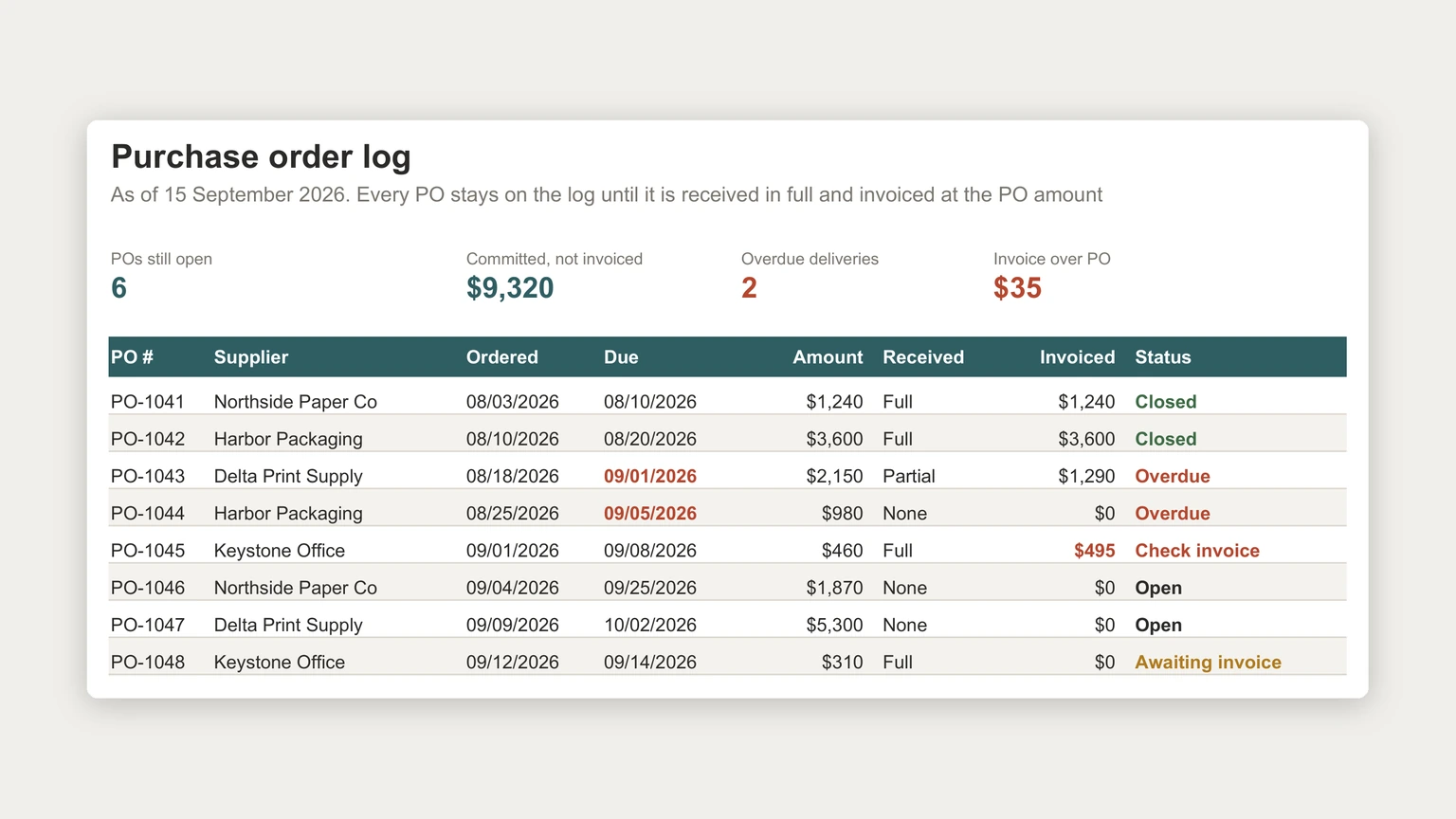
Once a PO is sent, the money is spoken for even though it has not left the account. The log at the top of this page adds up what is committed but not yet invoiced on every open order: $9,320, most of it a single $5,300 order due in early October. None of that shows in the bank balance or on a profit and loss statement yet.
That makes committed spend one of the most useful numbers a small business can keep. Put it next to the bank balance before approving the next large order, and feed it into the payments side of a forecast, the way our cash flow forecast template guide lays out cash going out by the month it actually leaves.
Once a PO is sent, the money is spoken for even though it has not left the account.
Matching
Matching the PO, the delivery and the invoice
Before an invoice is paid, check it against two things: what the PO agreed, and what actually arrived. Accountants call this a three-way match, and a log with a received column and an invoiced column does most of it for you.
The example shows both kinds of mismatch. PO-1045 was for $460, everything arrived, and the invoice came in at $495, so the log marks it to check before paying the extra $35. PO-1043 is the quieter case: only part of the order has arrived and the supplier has invoiced $1,290 of the $2,150, which is fine as long as the invoiced share matches the received share, and worth a call if it does not.
Received goods also belong in stock, which is where our Google Sheets inventory template guide picks up. And the invoice, once matched and paid, becomes a cost line on the Excel profit and loss template.
Status
Status as a formula, not a typed word
Let the status column work itself out from the other columns, in a fixed order where the first match wins: invoiced above the PO amount means check invoice; received in full and invoiced at the PO amount means closed; not fully received and past the due date means overdue; received in full but not invoiced means awaiting invoice; partly received means part received; anything else is open. In the example that turns the list into two closed orders, two overdue, one to check, two open and one awaiting its invoice, without anyone deciding which is which.
For that to work, the received column has to hold exactly three values. Microsoft’s own help page explains how to “use data validation to restrict the type of data or the values that users enter into a cell, like a dropdown list”, under Data, then Data Validation. Keep the log as an Excel table so the status formula follows new rows: Microsoft notes that “by entering a formula in one cell in a table column, you can create a calculated column in which that formula is instantly applied to all other cells in that table column”.
From quote to PO
From supplier quote to purchase order
A PO usually starts life as a quote. When you ask several suppliers for prices, keep their quotes in a small table beside the log, and write the winning quote’s reference onto the PO it becomes. Six months later, when someone asks why you paid that price, the answer is one row away. More files in the same shape are on our Excel templates hub.
If you would rather start from a finished file, our Quote & Purchase Order Spreadsheet ($39, Google Sheets and Excel) fills the paperwork in for you: pick a supplier and the products, and prices, tax, totals and the next PO number fill themselves. The PO log tracks every order with its status, days late and next step, and an overview shows late deliveries and each supplier’s on-time rate. It writes the quotes you send, too.
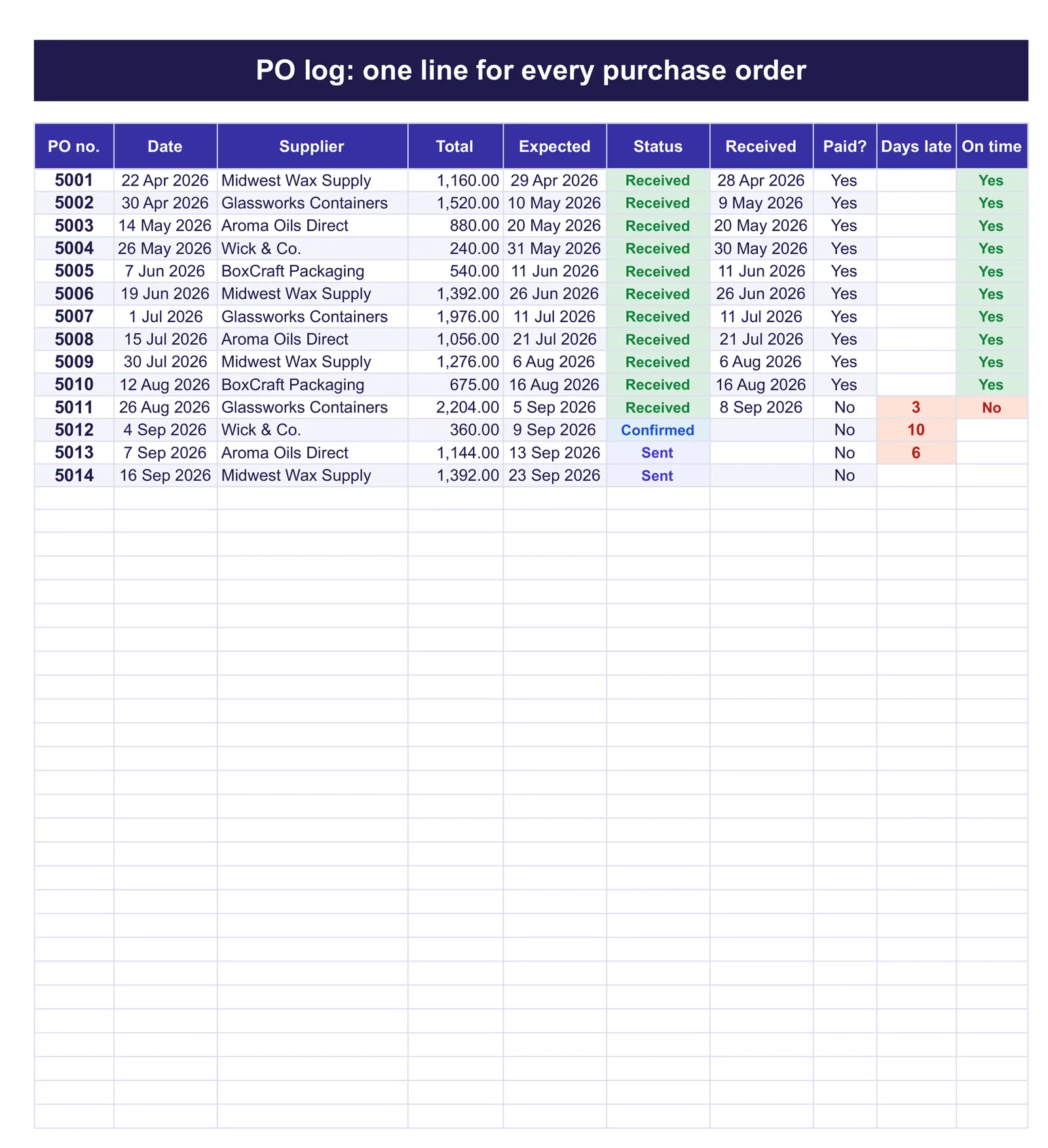
A purchase order log takes a minute per order to keep and turns a pile of paperwork into three numbers you can act on: what is committed, what is late, and what does not match. Tell us in the comments how many POs you raise in a month and what goes wrong most often; we read every reply.
FAQ
Common questions, answered briefly
What should a purchase order template include?
How should purchase orders be numbered?
What is a three-way match?
Why keep a purchase order log as well as the form?
People also ask