OneNote Templates for Work: The Complete Business System
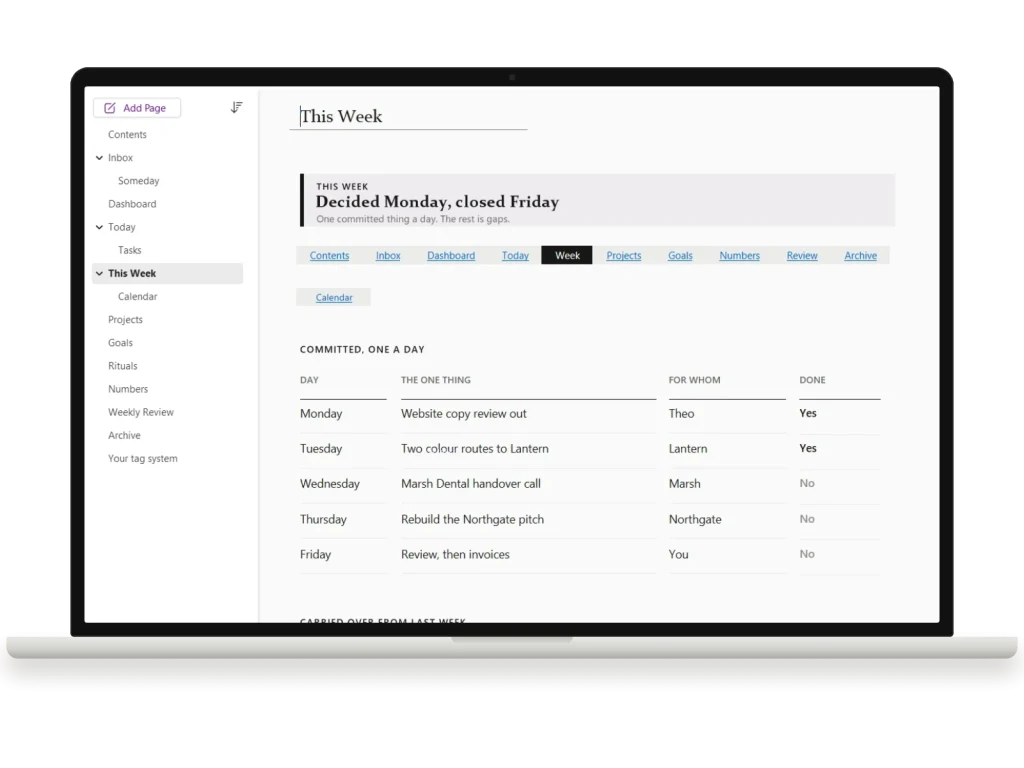
Five OneNote systems in one stack: the project management template, the client CRM, the meeting notes system, the dashboard and the calendar. $145 of templates for $89, each with its own install guide and a full PDF copy.
- Windows, Mac, iPad, web
- Instant digital download
- Re-download any time from your account
What you’re getting
Sections, pages, and hyperlinks pre-built. Import once.
Works on Windows, Mac, iPad, and the web.
Headers, dividers, and link styles ready to use.
OneNote package in your account immediately.
About this template
Five OneNote systems that were built to sit in the same notebook stack: the project management template, the client CRM, the meeting notes system, the dashboard and the calendar. Bought separately they come to $145. Together they are $89.
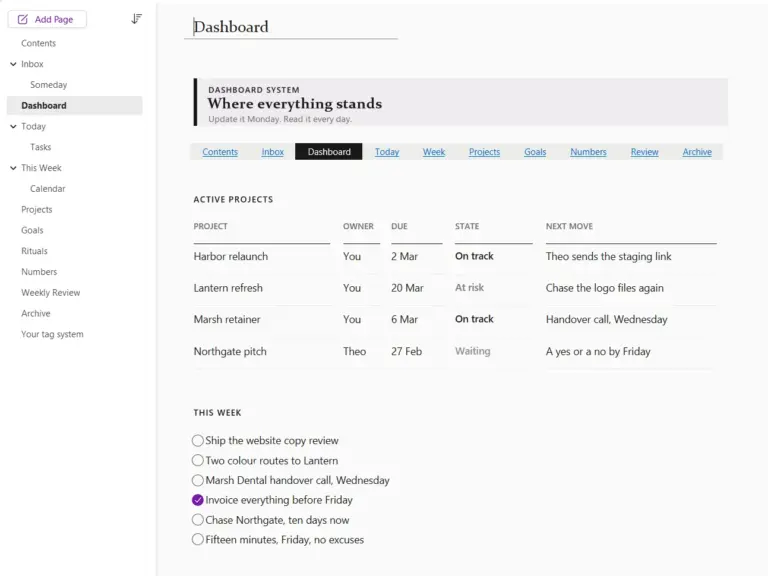
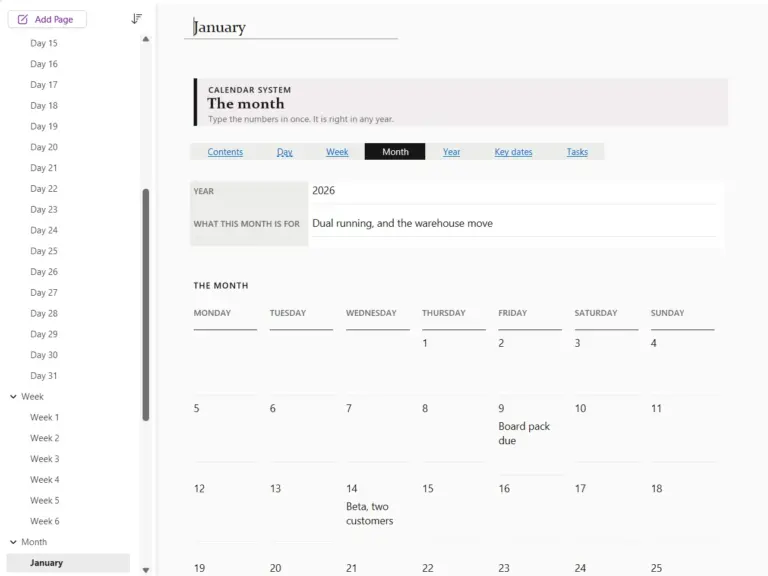
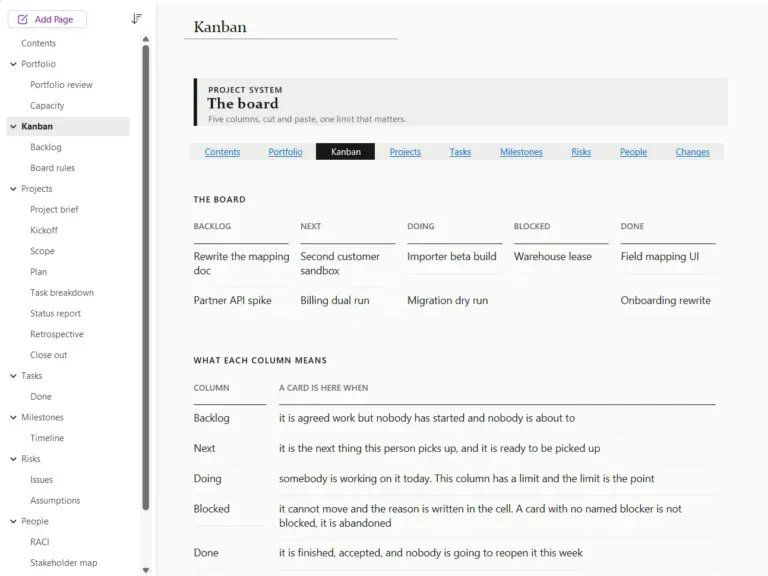
They are not five copies of the same idea. The project template handles the board, the per-project pack and the registers behind them. The CRM handles people and deals. Meetings handles the hour you spend in a room and the decisions that come out of it. The dashboard is the front page you read on a Monday to see where all of it stands. The calendar holds the time itself: undated day, week and month pages you fill in, so it never runs out.
What is in it
- OneNote Project Management Template, 29 pages in four layers: a kanban board with a backlog and board rules, a portfolio and capacity view, a per-project pack you copy once per project (brief, kickoff, scope, plan, task breakdown, status report, retrospective, close out), and the registers behind them (tasks, done, milestones, timeline, risks, issues, assumptions, people, RACI, stakeholder map, comms plan, changes).
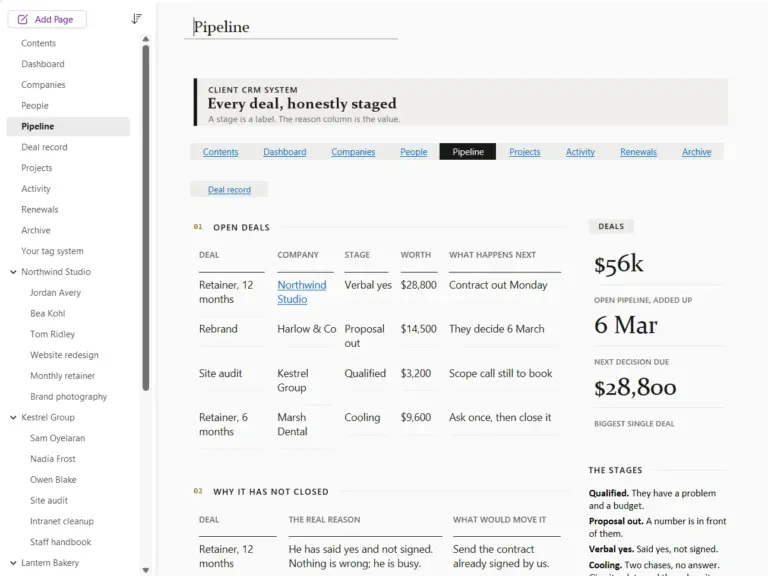
- Client CRM, 39 pages: companies, people, a pipeline you read in one table, deal records, projects, activity, renewals and an archive, plus a four-company pack you copy per client.
- Meeting Notes System, 36 pages: 26 ready agendas in five groups (team, one to ones, hiring, growth, leadership), a decisions log and tag-driven action roll-ups. The default is General meeting.
- Dashboard System, 15 pages: an undated calendar, tasks, someday, today, this week, projects, goals, rituals, numbers, and the weekly review that keeps it true.
- OneNote Calendar Template, 58 pages: twelve undated month grids, six week sheets, 31 day pages, a year page, key dates, and tasks with a done list. No date is printed anywhere, so it never expires.
All five notebooks were built or rebuilt in September 2026, and each one carries its own six page sticker section, so a page you have changed still matches the rest.
The honest part
OneNote has no formulas and no rollups. Nothing in this bundle calculates a total, updates itself, or reminds you of anything. Find Tags is a query you re-run rather than a screen that stays current, and every number on a dashboard page is typed by a human on purpose. What OneNote does have is tags, search that genuinely works, offline access and sync to every device you own, and all five systems are built on those rather than on features it does not have.
What you get
Every notebook as a OneNote package, each with its own install guide, plus a full PDF copy of every page. The package format installs in OneNote for Windows and cannot be installed from an iPad or a Mac on its own; the guides walk Mac, iPad and web users through the one-time Windows install, and everything works identically once a notebook is saved to OneDrive.
Each one is sold on its own too
Every notebook in this bundle has its own page, if you only need one job done:
- OneNote project management template: projects, the kanban board and the registers behind them.
- OneNote CRM template: clients, deals and renewals.
- OneNote meeting notes template: agendas, decisions and actions.
- OneNote dashboard template: a one-page view of where everything stands.
- OneNote calendar template: undated day, week, month and year pages.
Not in the bundle: the Kindle Scribe OneNote template, for notes exported from a Kindle Scribe, sold on its own.
OneNote templates land as a ready-made notebook. Every section, every page, every hyperlink already built. Import once, then it syncs everywhere OneNote runs: Windows, Mac, web, and mobile.
Common questions.
Which version of OneNote do I need?
What is in the bundle?
Does anything in it calculate totals or send reminders?
When do I get the file, and is it a subscription?
Be the first to say something.
Nobody has written about this one yet. If it is on your device, yours is the first thing the next person reads.
Instant download.
Your file is in your account the moment you check out, yours to re-download any time. A receipt lands in your inbox, too.
One-time purchase.
No subscription, no annual renewal, no upgrade nags. Pay once and the file is yours.
Quiet, secure checkout.
Stripe. Apple Pay. No spam, no “partners,” no reselling your details. Receipt, file, done.


