A teacher lesson planner is the book, or the file, where the week’s lessons get decided before they get taught. It is not the same thing as a year planner with a lesson grid tucked in the back, and the difference shows by October. This guide covers the two choices that decide which teacher lesson planner fits you, the pages it has to hold, paper against a tablet, and how to set one up in the first week.
What it is
What a lesson planner holds that a year planner does not
A year planner is organised around dates: months, weeks, deadlines, the parent evening. A lesson planner is organised around teaching: what each class learns, in what order, with what materials, and how you will know it landed. Most teachers end up needing both, which is why so many keep a calendar on the wall and a plan book on the desk.
UC Santa Barbara’s teaching centre sets out the minimum a lesson plan should hold: the materials, at least one learning objective for the day, the points that must be covered, the activities in order with a rough time for each, and some way to check understanding before the class ends. A lesson planner is just a place to keep those five things for every lesson of the year, arranged so you can find last Tuesday’s in a few seconds.
That gives four kinds of page worth having:
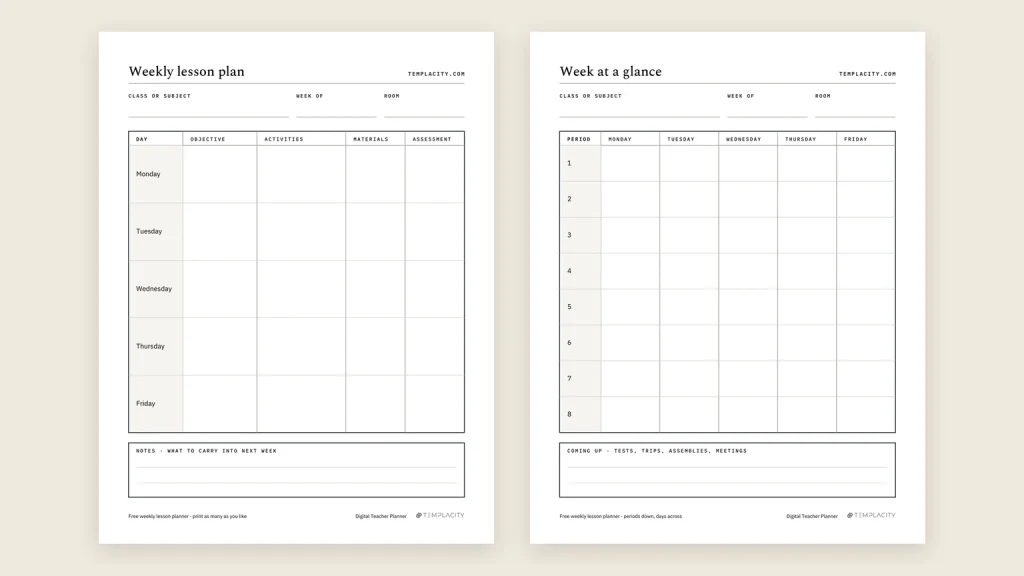
- The week: every day on one page, each with its objective, activities, materials and assessment, plus a line for what carries into next week.
- The lesson: room for one lesson in depth, for the days a row on the week page is not enough.
- The unit: the plan for three or four weeks of teaching, so a single lesson knows what it is building towards.
- The sub pages: what someone covering your class needs on a morning you cannot be there.
If you are still choosing between a planner for the whole school year and one for lessons, our best teacher planner comparison weighs paper, printables, software and tablets on that question.
Choice one
Days or Periods: pick the layout from your timetable
The first choice is about how your day is cut. An elementary teacher with one class all day plans by subject inside a day, and wants a full lesson page per day. A secondary or specialist teacher sees several groups a day and needs a grid with periods down one side and days across the top, so each class gets a row.
| Your timetable | Layout | Why |
|---|---|---|
| One class, all day | Days | A whole page per day holds every subject in order |
| Five to eight periods | Periods | One row per class, the week read across |
| Specialist, many groups | Periods | Each group’s thread stays on its own row |
| One prep, several sections | Days | Plan the lesson once; note where a section falls behind |
| Block or A/B days | Periods | Split the rows between A days and B days |
Paper planners make you pick once, at the till. Erin Condren’s Teacher Lesson Planner, for instance, offers its weekly spread in a vertical or a horizontal layout, and the choice is bound into the book. A digital file can carry both, and that matters more than it sounds: teachers change rooms, timetables and year groups, and a layout that fit in September can be wrong by January.
Choice two
Dated or undated: what a printed date costs you
A dated lesson planner has the school year printed in, so the first page you open is the right one and nothing needs writing at the top. Erin Condren’s is dated across 12 months, at 8.5 by 11 inches, and lists for $57.50 on its own site. If you start in late August with the same classes all year, a dated book costs you nothing.
The cost shows up when the year does not start on page one. A teacher hired in October opens a dated book to six weeks of blank pages. A school on a different calendar, a mid-year change of class, a long-term sub post or a second job tutoring in the summer all leave dated pages unused. An undated planner numbers its weeks instead, so week one is whichever week you begin, and the only price is writing the date in yourself.
An undated planner numbers its weeks instead, so week one is whichever week you begin.The undated case
Our own rule of thumb: if you want the calendar and the gradebook in the same place as the lessons, a dated system is the better buy, and our digital teacher planner guide covers that route. If what you want is the lessons themselves, kept and reusable, undated wins.
The pages
The lesson page, the unit plan and the sub binder
The lesson page earns its place on the days a row is too small: an observed lesson, a lab, the first lesson of a unit. Useful boxes are the objective, the standard it meets, the steps in order, how you will adapt it for students who need more or less, and a short reflection on what carries over. The reflection is the box most teachers skip and the one that pays back next year, because it is the only record of what did not work.
The order you fill those boxes in matters as much as the boxes. Our weekly lesson plan template walks through writing the objective first and the assessment second, then the activities, so each row lines up on its own.
The unit plan sits above the weeks. It names the outcome, the weeks it covers and the assessment at the end, so on a tired Thursday a single lesson still knows what it is for. In a paper book, units live on separate pages you flip back to. In a hyperlinked file, a unit can jump straight to each week it covers.
The sub binder is the page you hope not to need. It holds what does not change (bell times, routines, where things are, who to ask), a seating chart, and a few ready-made lessons for a day you could not plan. Keep it in the same planner as the lessons and it gets updated when the lessons do, rather than going stale in a drawer.
Format
Paper plan book or a digital lesson planner
Paper is quick. A coiled book lies flat on the desk, opens to the week in one move, and never runs out of battery during a fire drill. Erin Condren’s adds bell schedule pages and a communication log, which is the paperwork a lesson planner tends to collect anyway. Its weakness is next year: every unit you planned is on paper, and reusing it means copying it out again in August.
A digital lesson planner on a tablet trades a little speed for reuse. A hyperlinked PDF opens at an index; a tap goes to the week, another tap to the day’s lesson page, and back. You write with a pen as you would on paper, but the year is one file you can duplicate next summer and adjust rather than rewrite.
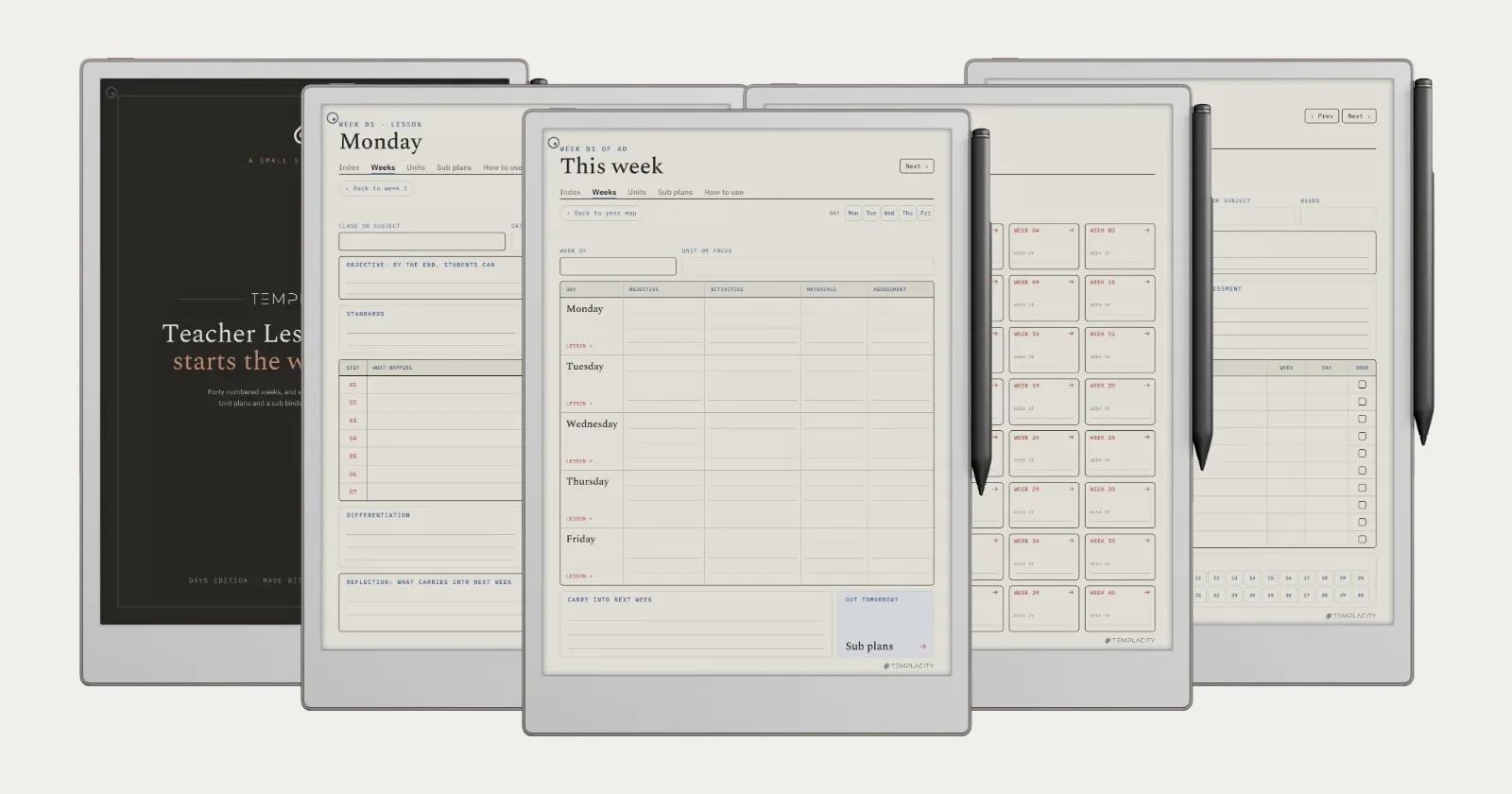
That second shape is the one we built. Our Teacher Lesson Planner is an undated, hyperlinked PDF: 40 numbered weeks with a year map, a lesson page for every day one tap from its week, 12 unit plans that link to their weeks, and a sub binder with a standing page, a seating chart and six sub days, linked from every week. Days and Periods (periods one to eight) are both in the one download, 271 pages each, and it is sized for 19 tablet models across reMarkable, Kindle Scribe, Boox, Supernote and Goodnotes on iPad.
Setting up
Setting up a teacher lesson planner in the first week
Whichever book or file you choose, the setup order is the same, and it is the reverse of how most people start.
- Units first. Write the outcome and the weeks for each unit you can see coming this term. Three or four is enough; the rest can wait.
- Number or date the weeks. In an undated planner, write the date beside each week number for the term ahead, and leave the rest blank until you get there.
- Fill the sub binder on a quiet Friday. Routines, the seating chart and one lesson that works with any class. It takes an hour and saves a bad morning later.
- Plan the week on Thursday or Friday. Objectives across all five days first, then activities. A week planned in one sitting holds together better than five days planned the night before.
- Write one reflection line after each lesson. Just what to change. Next year’s planner starts from these lines.
For what these pages look like with real plans written in, our teacher planner examples show a week, a lesson page and a unit filled in and explain what each box is doing.
FAQ
Common questions, answered briefly
What is a teacher lesson planner?
Should I get a dated or undated lesson planner?
What is the difference between a lesson planner and a lesson plan template?
Is a digital lesson planner better than paper?
Which layout suits a secondary teacher?
If yours isn’t above, drop the question in the comments and we’ll add it.
People also ask
Other questions, briefly answered
If your lesson planner has a page we have not mentioned, a behaviour log, a co-teaching column, a pacing guide, tell us in the comments what it is and how you use it. The pages teachers add themselves are usually the ones the next version should have had.