For the canonical buyer’s comparison covering hardware, writing, reading, ecosystem, and decision-matrix by use case, see our reMarkable vs iPad pillar.
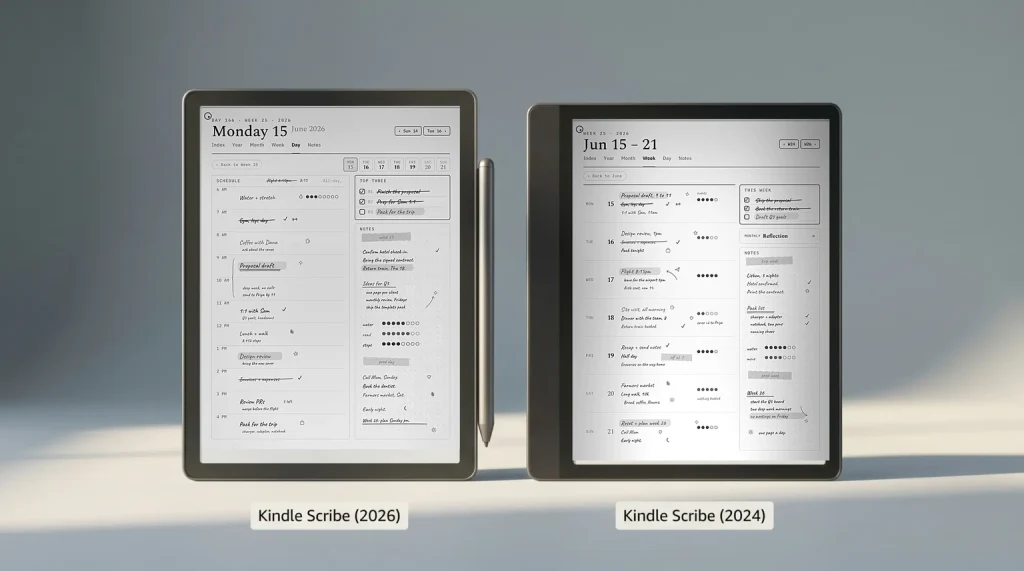
2026 update: The redesigned Kindle Scribe generation (11-inch panel, 5.4 mm body, faster chip) reached buyers on December 10, 2025 from $499.99, and the $429.99 no-front-light model followed on June 10, 2026. This page covers the models most owners have on their desks today; for the new lineup see our Kindle Scribe 2026 guide and the new vs old upgrade call. For what Amazon has not announced yet, we track the next Kindle release and the Kindle Paperwhite 13th generation separately.
Why this matters
Why Kindle Scribe Colorsoft vs iPad is a category fight, not a device fight
The Kindle Scribe Colorsoft and the iPad share a screen size class, a stylus workflow, and a $400-$700 buying decision. They do not share a category. The Scribe Colorsoft is a Kindle that writes: e-ink display, color Kaleido 3 panel, eight weeks of reading battery, a locked Amazon-only OS that runs the Kindle library and nothing else. An iPad is a general-purpose tablet: LCD display, hours-long battery, full iPadOS, every app from the App Store, and a stylus that arrived later as an accessory. The Scribe is best at one thing; the iPad is decent at many things.
So the Kindle Scribe Colorsoft vs iPad answer depends on a question we will keep coming back to: what is the verb that defines your week. If it is reading or writing, the Scribe is built for that verb and the iPad is built around it. If it is everything else (email, video, browsing, computing, photo editing) the iPad is the device. The price tiers overlap close enough that price alone does not pick the winner, so the honest answer needs the verb first.
Side by side
Kindle Scribe Colorsoft vs iPad, side by side
The two columns capture the actual decision in five rows. Pen latency is closer than buyers expect (Apple Pencil Pro at ~9 ms versus Scribe at ~12 ms is a difference most users will not feel during longhand notes). Battery is wildly different: weeks versus hours. Apps is binary: full ecosystem versus none. And the display is the most consequential: LCD glows at your eyes; e-ink reflects ambient light back to them.
| Price tier | Scribe option | iPad option | Closest fight |
|---|---|---|---|
| $399.99-$449 | Kindle Scribe (2024, 10.2″ mono) | iPad (A16, 11″ LCD) | Mono e-ink writing vs entry iPad |
| $499.99-$599 | Kindle Scribe (2026, 11″ mono) | iPad mini | New-generation Scribe vs the small iPad |
| $629.99-$749 | Kindle Scribe Colorsoft (11″ color) | iPad Air 11″ | Color e-ink vs full LCD, and the Air is now the dearer of the two |
| $999+ | (none) | iPad Pro M4 11″ or 13″ | iPad Pro tier, no Scribe match |
For the Kindle Scribe Colorsoft vs iPad question specifically, the right iPad to put across from it is the iPad Air 11-inch at $749. Same screen size, and the closest the two lineups come at the top, though Apple raised the Air past the Colorsoft: it is now $119 more rather than $30 less. The entry-level Scribe at $429.99 against an entry iPad at $449 is the cheaper version of the same question.
Pen feel
Writing feel and pen latency, head to head

Apple Pencil Pro is the fastest stylus in this comparison at roughly 9 ms latency on M-series iPads. Kindle Scribe’s stylus runs around 12 ms. On paper that is an Apple win; in practice the difference is below the perceptual threshold for most longhand writing and the actual experience is dominated by two other factors: surface texture and palm rejection. The Scribe writes on a textured e-ink surface tuned for paper feel; the iPad writes on glass that needs a matte screen protector or the Apple-applied “Nano-texture” option on the iPad Pro to feel anything like paper at all.
Pen latency by tier (ms, lower is better)
The number that matters more than latency is what the screen does to your eyes after an hour. LCD is a backlight pointed at your face; e-ink is reflective ink that behaves like paper. Heavy note-taking sessions feel longer on the iPad and end earlier than they should. Heavy reading-and-annotating sessions on the Scribe run the length of a flight without fatigue. Apple Pencil writes faster; Scribe writes longer.
Reading and battery
Reading library, battery, and library lock-in
The Scribe Colorsoft reads everything in the Kindle library natively, syncs progress across all Kindle devices, integrates Audible if you want the audiobook running alongside the text, and ships two AI reading features that rolled out across 2026 (Story So Far summarises where you are in a book; Ask This Book answers natural-language questions about content). PDF and DOCX flow through Send to Kindle. The iPad runs the Kindle app, the Kobo app, Libby, Pocket, Apple Books, and any reading app on the App Store, but it runs them on LCD with a 10-hour battery.
Battery is the loudest difference. Scribe Colorsoft lasts about eight weeks of reading or two weeks of mixed reading and writing. iPad Air lasts about ten hours of any use. For a tablet that lives in a backpack and gets pulled out on flights, in libraries, and in waiting rooms, the battery gap is decisive. For a tablet that lives plugged into a desk most of the day, it is irrelevant.
Scorecard
Templacity scorecard, both categories
Scribe Colorsoft, scored out of 10
iPad Air M3, scored out of 10
The Scribe wins reading, battery, and eye comfort outright. The iPad wins apps outright and edges pen feel on the M-series Pencil Pro models. The two categories are not interchangeable, and the scorecard makes that visible.
Apple Pencil writes better. The Scribe writes longer. Pick which discomfort hits first in your week.From this comparison
(If you’ve picked the iPad instead, our planner PDFs load cleanly in Notability, Goodnotes, and the iPad’s built-in Files app.)
By verb
The Kindle Scribe Colorsoft vs iPad call, by what your week is actually about
Mostly reading from a Kindle library, with notes. Scribe Colorsoft (or the original Scribe at $399 if the color and AI features are not the draw). Eight weeks of battery, eye comfort, and native Kindle integration. The iPad reads Kindle through the app, but it does not deliver the same hours-of-reading-without-fatigue experience.
Note-taking in meetings, lectures, journaling. Either, depending on app stack. Scribe gives you a clean writing canvas with the Templacity bundle or sideloaded PDF planners. iPad gives you Goodnotes, Notability, the audio recording features, the multitask-with-Zoom-open option. If notes need to live alongside other tools (Slack, Notion, Figma), iPad. If notes need their own quiet space, Scribe.
Mixed week including email, video, browsing, photo work. iPad, no contest. The Scribe is single-purpose. Choosing it for a mixed workflow puts you on a second device by week four.
Students with PDFs, slides, and reading lists. iPad Air or iPad with Pencil. The PDF markup ecosystem is deeper, slides open in Keynote and PowerPoint, course readers open in the Kindle app or Apple Books, and audio recording rounds out lecture capture. The Scribe handles PDFs well but the rest of the student workflow is not the device’s job.
You travel and want a tablet that survives a transatlantic flight on one charge. Scribe Colorsoft. The battery alone wins the trip. For deeper alternatives in the e-ink writing tablet category, see our Kindle Scribe alternatives roundup and the Colorsoft vs Paper Pro comparison for the e-ink-only decision.
FAQ
Common questions, answered briefly
Is the Kindle Scribe Colorsoft vs iPad decision really a tie?
Is the Kindle Scribe better than an iPad for note taking?
How much cheaper is the Kindle Scribe than an iPad with Apple Pencil?
Can the Kindle Scribe replace an iPad for students?
Is the iPad mini a Kindle Scribe Colorsoft alternative?
If yours isn’t above, drop it in the comments.
People also ask
Other questions, briefly answered
If you’ve owned both, the comments are open. We rebuild this comparison on every meaningful iPad refresh or Scribe spec bump.