The form
What a project charter template is for
Most projects that go wrong in month three went wrong in week one, when everybody agreed on a sentence and each of them heard a different project. A project charter template is the form that forces the disagreement out while it is still cheap. It asks what the work is for, what it leaves out, how you will know it worked, and who gets to say yes.
The formal part matters. Cleveland State University’s open project management textbook describes the charter as the document that formally recognizes a project and authorizes its leader to apply the organization’s resources. Once the sponsor signs, it becomes an agreement between the two of them, and approval is the signal that planning can begin. Some organizations call it a letter of agreement for exactly that reason.
Free download
Download the free project charter template
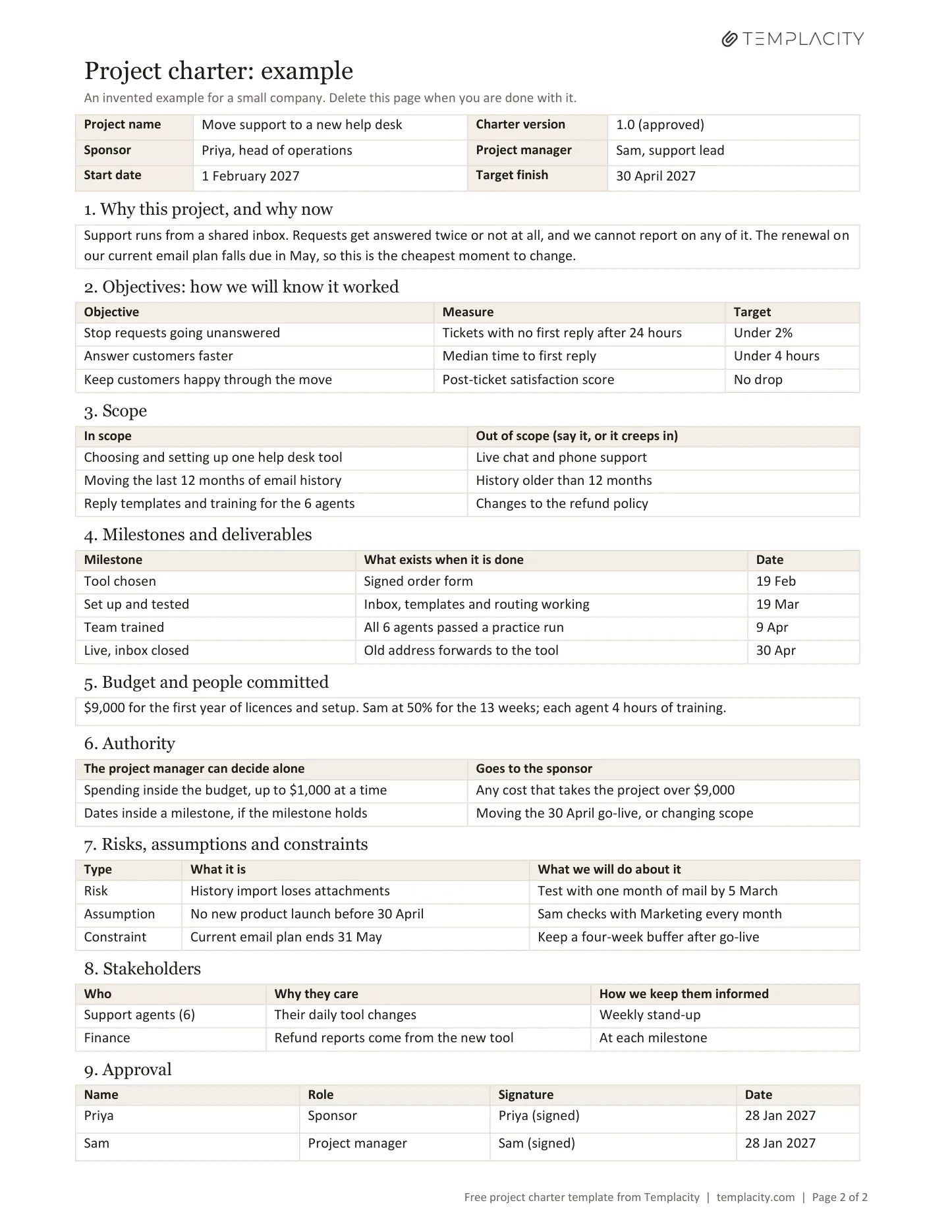
The file is two pages. Page one is the blank project charter template, and page two is the same form filled in for an invented small company moving its customer support out of a shared inbox. Read page two first to see how little each box wants, then delete it.
To use it as a Google Docs project charter, upload the file to Google Drive and double-click it. Google’s help page on Office files says that opens it in Docs, and the tables are plain, so there is nothing unusual to convert.
The sections
What goes in a project charter
Nine boxes fit on one page, and each one answers a question somebody will otherwise ask you in a meeting:
| Section | The question it answers |
|---|---|
| Why this project, and why now | What problem are we paying to fix, and what happens if we wait? |
| Objectives | How will we know it worked, in numbers we can check? |
| Scope | What are we doing, and what are we deliberately not doing? |
| Milestones and deliverables | What will exist, and roughly when? |
| Budget and people | What is being committed? |
| Authority | What can the project manager decide without asking? |
| Risks, assumptions and constraints | What could break this, and what are we taking for granted? |
| Stakeholders | Who is affected, and how do they hear about it? |
| Approval | Who said yes, and when? |
Two boxes do most of the work. Out of scope sits beside In scope because the requests that sink a project are reasonable ones nobody ruled out. The textbook’s template asks for what is included and excluded for the same reason. Authority splits decisions into two columns, what the project manager can settle alone and what goes to the sponsor, so nobody has to find out where the line is by crossing it.
Writing it
How to write a project charter in five steps
- Find the sponsor first. The sponsor is the person with the power to assign resources and to stop the project. If nobody fits that description, the charter has no one to sign it, and that is the first problem to solve.
- Write the why in two sentences. Name the problem and the reason it has to be now. If you cannot do it in two, the project is probably two projects.
- Turn hopes into measures. “Better support” cannot be checked. “Median first reply under four hours” can, and it tells the team when to stop.
- Fill in Out of scope with the things people will ask for. Go and ask them. The items you collect are the ones that would have arrived in month two.
- Walk the sponsor through it, in person, and get the signature. A charter sent by email gets approved by people who skimmed it. Reading the Authority box aloud tends to find the disagreements.
The stakeholders box only names who cares. When the question becomes who does each piece of work and who has the final word on it, our free RACI matrix template is the next file to open, and it takes its project name and milestones straight from this page.
Example
A project charter example: moving to a new help desk
The company in the file is invented, and deliberately small. Six support agents answer customers from a shared inbox, requests get answered twice or not at all, and the email plan is about to renew. This is what its scope and authority boxes say:
| Yes, or the project manager decides | No, or it goes to the sponsor |
|---|---|
| Moving the last 12 months of email history | History older than 12 months |
| Reply templates and training for the six agents | Changes to the refund policy |
| Spending inside the budget, in small amounts | Any cost that takes the project over budget |
| Dates inside a milestone, if the milestone holds | Moving the go-live date, or changing scope |
Notice that live chat, the obvious thing somebody will ask for in week four, is ruled out on page one. It may be a fine idea. It is a different project with a different budget, and now the answer already exists in writing.
The requests that sink a project are reasonable ones nobody ruled out.What goes in a project charter
Charter or plan
Project charter vs project plan
The charter comes first and answers whether we are doing this at all. The plan comes after and answers how. A charter holds a handful of milestones; a plan holds the tasks, owners and dependencies between them. Our project plan template guide picks up where this page stops. Length follows complexity, and the textbook notes that low-complexity projects may have very short charters while complex ones need longer ones. For most small and mid-sized work, one page is enough, and a page people will actually read beats ten they will not.
Afterwards
Keeping the charter useful once work starts
A signed charter should change rarely and visibly. If scope or budget has to move, change the charter, bump the version in the top box, and have the sponsor sign again, because a quiet edit is how the page stops meaning anything. Decisions that adjust it are worth catching in a line of the meeting minutes template, and any part of the work that will repeat after the project ends belongs in an SOP template rather than in someone’s memory.
If your projects run in OneNote, we also make a OneNote project management template with a brief, a scope page, a RACI and a risk register already built, and our guide to OneNote project templates helps you pick a shape first. The Word charter works fine without either. More of our notebook guides live under OneNote.
What is the one thing your last project should have ruled out on page one? Tell us in the comments; the best ones may end up in the example.
FAQ
Common questions, answered briefly
What is a project charter?
Is there a free project charter template for Word?
Can I use this project charter template in Google Docs?
Who writes and signs a project charter?
What is the difference between a project charter and a project plan?
If yours isn’t above, drop it in the comments and we’ll add it.
People also ask