The cut
What an excel personal budget template should drop
Almost every free budget workbook on the first page of results is built for a household, because that is where the money is and because a shared budget is the harder problem. Downloading one and using it alone works, but you inherit a set of columns that exist to answer questions you do not have, and every one of them is a small tax you pay on every row you ever enter.
Four things are usually worth deleting outright.
- The who column. Household files label each transaction with the person who made it, because the file has to settle up. Alone, it is a field you fill in identically several hundred times a year.
- Split percentages. Rent divided sixty-forty, bills halved, the shared pot. None of that exists when there is one account and one payer.
- Two income rows. A second salary line that stays empty is not harmless, because every summary underneath it is built to handle a case that never occurs, and that is what makes the formulas hard to read a year later.
- The joint versus personal distinction. Household templates often carry two parallel category lists so each person keeps some private spending. One list is enough, and one list is far easier to keep honest.
What replaces them is not more structure. It is fewer columns and a shorter list, which matters more here than in a household budget for a reason that has nothing to do with spreadsheets: nobody else is going to notice that you have stopped filling it in.
Categories
The category list when nobody else has an opinion
A shared budget tends to grow categories, because two people each want to see their own spending separated out and the compromise is always to add a row. Budgeting alone removes that pressure entirely, and the result is usually better. Eight to twelve categories covers almost any single person’s spending, and each one past that is a decision you have volunteered to make every time you log a coffee.
| Group | What goes in | Why it earns a row |
|---|---|---|
| Fixed | Rent or mortgage, council tax, utilities, phone, insurance, transport pass. | You cannot change these this month, so they are a floor rather than a decision. Keep them in one group and stop looking at them. |
| Flexible | Groceries, eating out, transport, personal, household bits. | This is the only group where a budget changes behaviour, so it is the one that deserves the detail. Four or five rows, no more. |
| Set aside | Savings, the annual pot for non-monthly bills, debt overpayment. | Money that leaves the account on purpose. Treated as spending, not as what survives. |
Two categories are worth adding specifically because you live alone, and they are the ones household templates never think to include. The first is food waste, which is a genuine single-person cost: packs are sized for two and the difference goes in the bin, so a grocery budget copied from a couple’s file will read as overspending when it is nothing of the sort. The second is a going-out or seeing-people line, held deliberately generous. It is the first thing people cut when a budget feels tight and the first thing that makes them abandon the budget a month later.
Ordering
Savings as a bill, not as what is left
Nearly every downloaded budget puts savings at the bottom, under the sums, as the gap between income and spending. It is arithmetically fine and behaviourally hopeless, because the gap is not a plan. It is a result, and results have a way of coming out at zero.
Move the savings line up into the category list, sitting between rent and groceries, with a planned amount against it like everything else. Nothing about the mathematics changes and everything about the reading changes: an underfunded savings row now looks like a missed bill rather than a slow month, which is exactly what it is.
The gap is not a plan. It is a result, and results have a way of coming out at zero.
The same logic applies to the annual pot described on our monthly budget page, and to any debt overpayment. If it only happens when there is money spare, it does not happen. In a single-log workbook all three are ordinary categories and every summary picks them up automatically, since SUMIFS only cares that a row has a category and an amount, and Microsoft describes it as adding “all of its arguments that meet multiple criteria” without any interest in what the criteria mean.
Privacy
Keeping the file on your own machine
A personal budget is one of the more revealing documents you will ever own. It has your salary, your rent, your debts and a dated record of where you were and what you bought. Plenty of people are entirely comfortable with that living in cloud storage, and plenty are not, and the useful thing about Excel is that it makes the choice yours rather than the application’s.
There is one concrete consequence, and it is documented rather than folklore. Microsoft states that “AutoSave is enabled by default in Microsoft 365 when a file is stored on OneDrive, OneDrive for Business, or SharePoint Online”, and that “if the file is saved to another location (or if it hasn’t been saved at all, yet), then AutoSave is disabled”, naming a local path as an example. So a budget kept on your own drive never syncs anywhere, and in exchange nothing saves it for you.
| Where the file lives | What you get | What you give up |
|---|---|---|
| Local drive only | The file exists in one place you control. It opens with no connection, and nothing about your salary or your spending leaves the machine. | AutoSave is off, so a crash costs you whatever you had not saved. And one failed drive is the whole history, so a backup is not optional. |
| Cloud storage | AutoSave, version history, the browser version, and the file surviving a dead laptop without any thought from you. | The document sits on someone else’s servers, which is a judgement call rather than a risk, and only you can make it. |
| Local, with your own backup | Most of both. The working file is local, and a copy goes to an external drive or an encrypted archive on a schedule you set. | It only works if you actually do it. Put the reminder in the same monthly sit-down where you review the budget. |
If you go local, build the save into the habit rather than trusting yourself to remember. Press Ctrl+S when you close the file, every time, and keep the backup step attached to the monthly review so it happens twelve times a year without a separate decision.
Later
When personal turns into household
Someone moves in, or a budget stops being yours alone, and the instinct is to go and find a household template and start again. Two or three years of history is a real asset and starting again throws it away, so it is worth knowing that the upgrade is smaller than it looks if the file was built as one log.
Add a single column labelled with who paid, leave it blank for every historical row, and every summary you already have keeps working untouched. Then add one more that filters on that column when you want to see the split. Nothing is rebuilt, nothing is migrated, and the year of data behind you stays readable. This is the payoff of the single-log structure, and it is why it is worth accepting on day one even though twelve tidy monthly tabs look friendlier.
The one genuine reason to switch files at that point is collaboration rather than structure. Two people editing the same workbook at the same time is the thing Google Sheets does better by a wide margin, and our Google Sheets budget template is the same system built for it.
The file
The free personal budget workbook we publish
Ours is a direct download with no email address, no account and no sign-up form standing in front of it. It is built as one log rather than twelve tabs, which is what makes every recommendation above possible, and it arrives with one category list rather than two.
One note on how it is made. The Transactions log is already a real Excel Table, so there is nothing to convert, and by Microsoft’s own account “to add a row at the bottom of the table, start typing in a cell below the last table row. The table expands to include the new row.” The totals use whole-column ranges on top of that, so a long year of entries still adds up.
You need no subscription to open it. Microsoft states that you get free access to Word, Excel and PowerPoint through Microsoft 365 for the web with a free account and 5 GB of storage, although that route does mean the file lives in cloud storage, which is the trade described above. For the platform question in general, the Excel budget template page covers fixed ranges, tables and where a workbook opens, and making a budget in Excel walks the build from an empty sheet. To see the same workbook filled in rather than described, the worked budget spreadsheet example reads every row straight off the file.
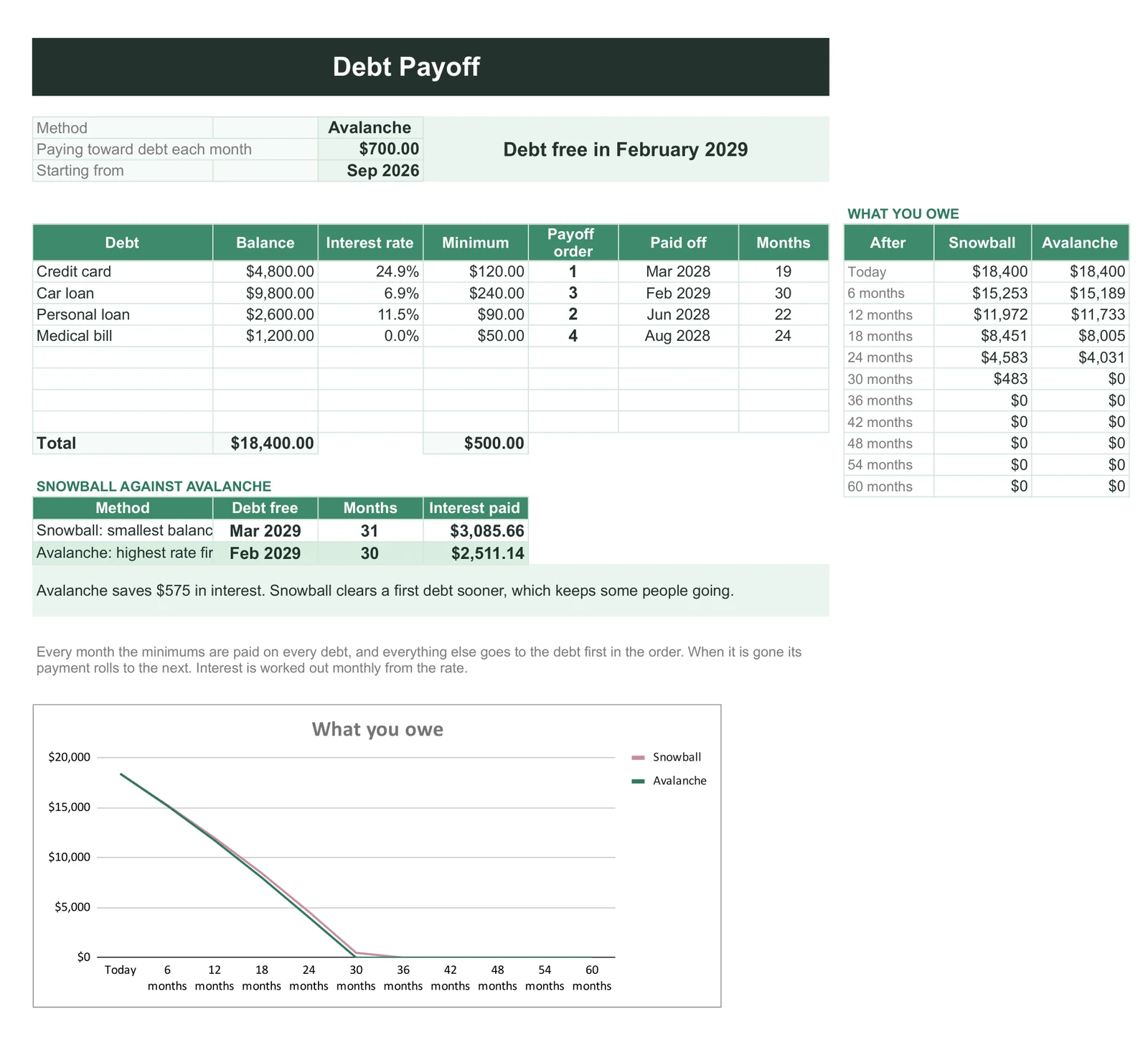
If the personal budget has debt in it, the free file stops short. Our Budget & Money Planner ($39, Google Sheets and Excel) adds a debt page that runs snowball and avalanche against each other on your own balances and says what each costs: on its example debts, avalanche finishes in February 2029 and pays $575 less interest. Savings goals, sinking funds, bills and net worth sit in the same file, reading the same category list.
FAQ
Common questions, answered briefly
How many categories should a personal budget have?
Can I keep a budget spreadsheet off the cloud entirely?
Where should savings go in a budget?
Can a personal budget become a household one without starting again?
People also ask
Other questions, briefly answered
If you cut ours down to something that suits you better, we would like to see it. The rest of our spreadsheet work, free files included, sits on the spreadsheets hub, and most of the better ideas in those files came from readers rather than from us.