The job
What zettelkasten apps have to do
A slip box asks four things of whatever holds it, and every roundup of zettelkasten apps skips straight past them to feature lists. The four are worth naming first, because they are the only basis on which one app beats another for this specific use.
A note needs an address that never moves. Every link you write is a promise that the address is still there, so software that derives the address from the title breaks that promise the first time you improve a title. A note needs links that survive a rename, which is the same requirement seen from the other end. It needs files you can still open in ten years, because a box that outlives its app is the entire point of the format. And it needs search that finds by idea rather than by filename, since past a few hundred notes browsing stops working entirely.
Notice what is not on that list. Nothing about graph views, daily notes, AI summaries, or plugin counts. Those are the things the apps compete on, and they are the things that have the least to do with whether the box works. If you want the method underneath all of this, our guide to the zettelkasten method covers the four rules in full.
The roster
Five zettelkasten apps, and what each one is for
All five clear the four requirements above. They differ in what they assume you are doing, which is a better way to choose than a feature grid. Every figure below was read off the vendor’s own page on 6 August 2026, and the pages are linked at the foot of this post.
| App | What you pay | Built around | Reach for it if |
|---|---|---|---|
| Obsidian | Free without limits. Sync is $4 per user per month billed annually | A folder of Markdown files, plus plugins | You want the largest community and the most escape hatches |
| Logseq | Open source, free forever for personal use | An outline where the block is the unit | You already think in nested bullets |
| Zettlr | Free and open source, funded by donations | Writing and citing, with export | What you are writing has a bibliography attached |
| The Archive | $19.99 after a 60 day trial, macOS only | Plain text and very little else | You want the app to get out of the way entirely |
| Anytype | Free tier with 100 MB of remote storage, Plus at $4 per month | Objects and relations rather than documents | You want structure without a plugin manager |
Obsidian is the default answer and mostly deserves to be. It is free without limits and needs no sign-up at all, with paid add-ons for syncing and publishing rather than a paywall across the app; Sync is $4 per user per month billed annually and Publish is $8 per site per month on the same terms. Builds exist for Windows, Mac and Linux plus both mobile platforms, so it is the only entry here you can assume will run on whatever you own. The risk is the plugin shelf: it is the reason the first month often produces a beautiful vault and eleven notes. We wrote up the version of it we would actually run in running a zettelkasten alongside Obsidian.
Logseq is open source and free forever for personal use by its own description, and its unit is the block rather than the page. If you already think in nested bullets that is a genuine advantage, because a block gets its own reference without you deciding it deserves a note. If you do not, the outline fights you, and you end up with a hierarchy instead of a box.
Zettlr is free and open source software supported by donations, built by academics for people writing things with citations attached. It runs on Windows, macOS and Linux, it does not force cloud sync, and it takes the writing end seriously in a way none of the others do. If your notes are heading for a thesis or a paper rather than an essay, start here.
The Archive comes from the people at zettelkasten.de, who have been writing about the method for longer than most of these apps have existed. It is macOS only, it costs $19.99 after a 60 day trial, and it is deliberately plain: text files, a search bar, and almost nothing to configure. That is either exactly what you want or completely wrong for you, and you will know which within an hour.
Anytype is the odd one out, built on objects and relations rather than a folder of documents. Its free tier includes 100 MB of remote storage and ten shared channels, with a Plus plan at $4 per month. Structure arrives without a plugin manager, which is a real advantage over Obsidian for anyone who knows they will fiddle. The trade is that you are modelling your notes rather than just writing them, and that is its own way to spend a first month.
The gap
The half none of them solve
Storage and retrieval are solved, and zettelkasten apps solved them years ago. Any of these five will hold a hundred thousand notes, keep the links pointing at the right things, and find a note by a phrase you half remember. That is genuinely better than a wooden box, and nobody should pretend otherwise.
The unsolved half is deciding what the passage actually said. A note is only worth filing if you compressed the idea into your own words first, and compression is not a storage problem. It is a thinking problem, and every app on this page is fast enough to let you skip it. You highlight, you paste, you add a link, and the vault grows while nothing is understood. Six months later there are four hundred notes and no argument anywhere in them.
Typing is fast enough to let you move a paragraph without ever deciding what it said.On the half no app solves
This is not an argument against software, and it is certainly not an argument that paper is magic. It is an argument about speed. Typing is fast enough to let you move a paragraph without ever deciding what it said, and the decision is the note. Everything else is filing. The test for whether a note survived that decision is in our piece on atomic notes: cover the title, read it cold, and see whether it still claims anything.
The setup
Ink for the note, app for the index
The boundary that has held up for us puts one slow step in the middle of an otherwise fast workflow. Read and capture however you like. Then write the permanent note by hand, on paper or on an e-ink page, because handwriting is too slow to transcribe with and therefore forces the compression that makes a note worth keeping. Then type that note, and only that note, into whichever of the zettelkasten apps you picked.
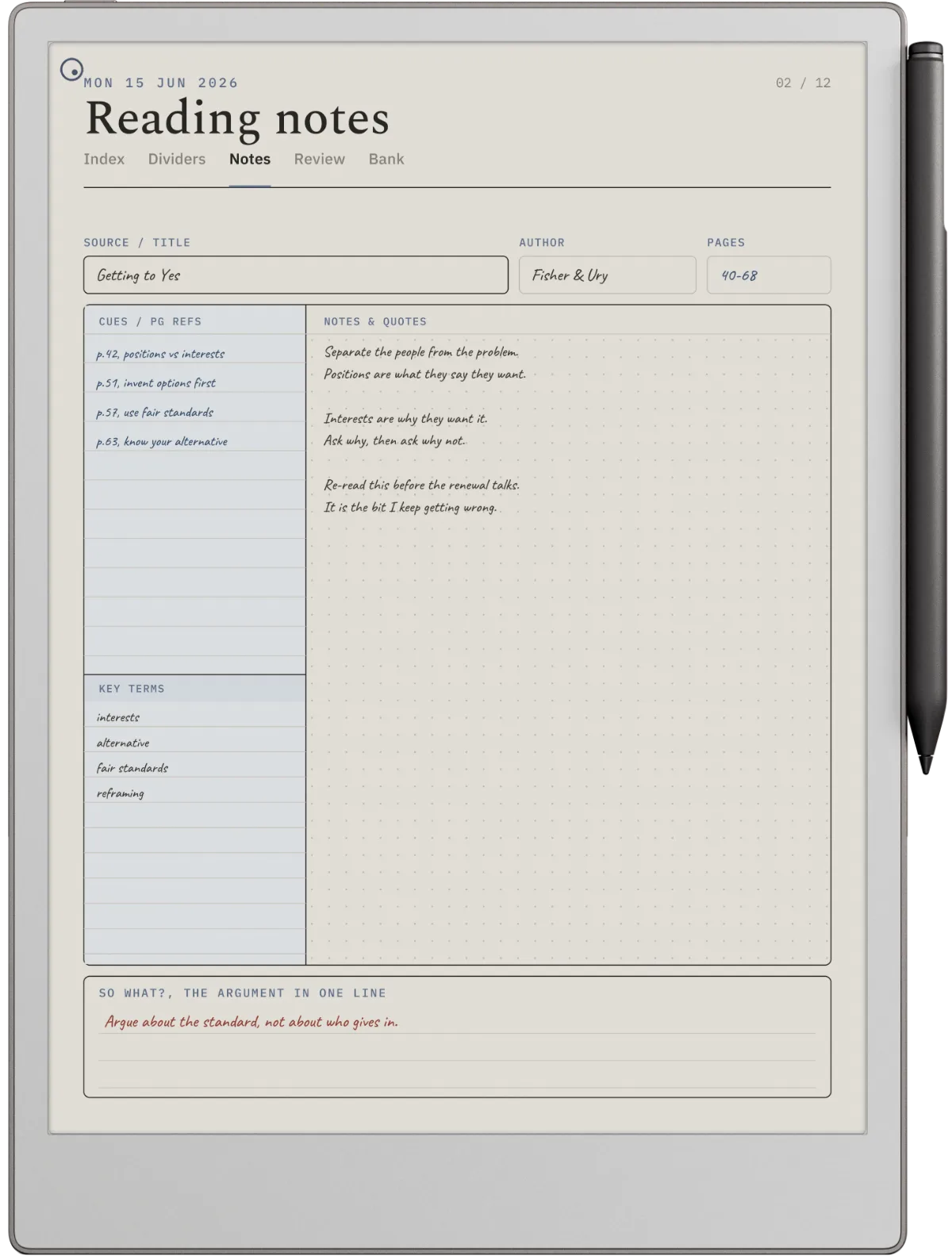
Typing it is a second pass, and second passes improve notes. The app then does the half it is good at: the index, the backlinks, the search, the maps of content. Nobody has to leave their vault, and no plugin is required to make this work.
The objection is that it is slower, and it is. That is the mechanism rather than a side effect. If you want the same argument worked through for one specific app, the Obsidian version covers the folder structure and the note IDs, and our wider look at note-taking apps covers the ones that are not built for a slip box at all.
Choosing
Which one to open first
Feature comparisons between zettelkasten apps stall because all five are capable. One question does not stall: what is actually stopping you right now. If it is the platform, Obsidian or Logseq run everywhere and The Archive does not. If it is a bibliography, Zettlr. If you know you will spend three weeks configuring, take the app with the smallest surface rather than the largest, which means The Archive on a Mac and Anytype elsewhere. If nothing is stopping you and you simply have not started, the app is not the decision.
FAQ
Common questions, answered briefly
What is the best zettelkasten app?
Is there a free zettelkasten app?
Do I need an app at all for a zettelkasten?
Can I use Notion or OneNote as a zettelkasten?
If you have run one of these for a year and the box actually works, tell us which and what you stopped doing to get there. The abandoned vaults are easy to find; the ones that survived are the interesting cases.
People also ask