Start here
The reMarkable Paper Pro accessories that actually matter
The honest truth about reMarkable Paper Pro accessories is that you need fewer than the store suggests. The device arrives ready to write, with the Marker included in the box, so the real question is not what you can buy but what is worth buying. For most owners that comes down to two things: a folio to protect the 11.8-inch color screen, and a supply of replacement Marker tips for later, though not on day one: nine spare tips ship on a tip card in the box. Everything after that is a considered upgrade, not a requirement.
This guide walks the Paper Pro accessories in rough order of how much they matter, flags what you can safely skip, and ends with the one upgrade that changes how the device feels for less than the price of a folio. The deep dives on cases and the keyboard live in their own guides and are linked where they fit, so this stays a map of the whole Paper Pro accessory landscape. For accessories that also fit the older reMarkable 2, our broader reMarkable tablet accessories guide covers the cross-device picture.
Protection
Cases and folios
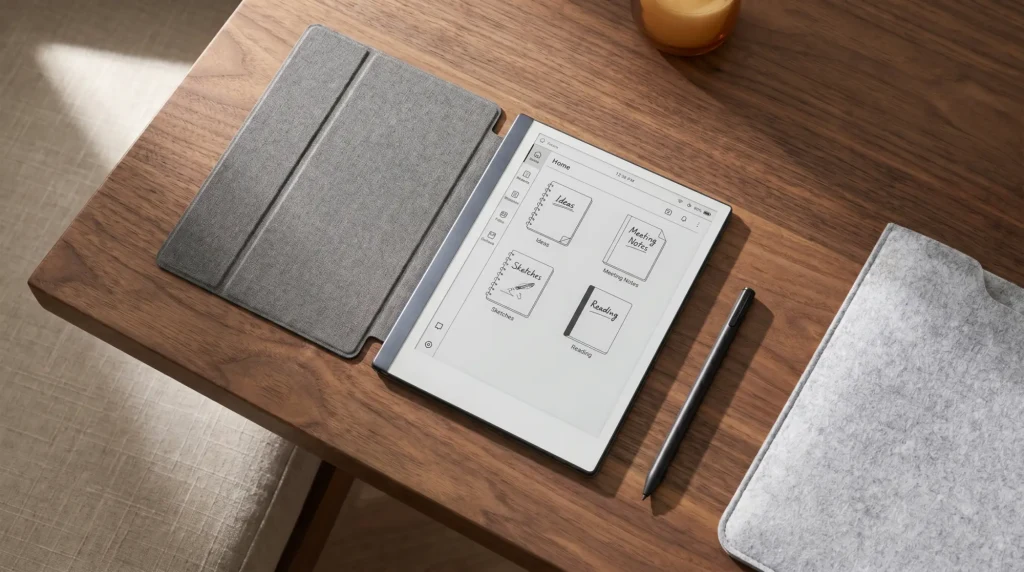
A folio is the one accessory we would call close to essential. The Paper Pro is a large, thin sheet of glass with a color layer you want to keep pristine, and it travels far better with a cover. reMarkable’s official Book Folio comes in a few materials, runs roughly $79 to $129, attaches magnetically, and holds the Marker on the side so it does not get lost. Some folios fold back into a stand for hands-free reading.
Third-party folios do the same job, often for less and in more colors, with the usual trade in fit and finish and how securely they hold the Marker. Because this is the accessory you handle every day, it is worth getting right rather than cheap. We compare the official folios against the better third-party options, and cover whether the color screen needs extra protection, in our guide to reMarkable Paper Pro cases.
The pen
The Marker, Marker Plus, and replacement tips
The Paper Pro ships with a Marker already, so the pen is less a purchase than a question of which one and what it needs over time. The standard Marker is in the box. Marker Plus is a $50 upgrade that adds a built-in eraser at the back end, which heavy note-takers like; both write identically, so the eraser is the only reason to step up.
The accessory you will actually re-buy is replacement tips, but not yet. Every Marker and Marker Plus ships with nine spare tips on a tip card, and reMarkable puts one tip at three to seven weeks for someone writing every day, so the card in the box covers roughly six months to a year before you buy anything. After that a pack runs around $15. They are quick to swap and cheap, so the smart move is to keep a pack on hand rather than write on a worn nib. A fresh tip restores the writing feel the Paper Pro is built around.
The keyboard
The Type Folio keyboard
The Type Folio is the accessory that changes what the Paper Pro can do. It is a folio cover with a built-in keyboard, so the tablet becomes a calm, distraction-free typing device on top of a writing one. It attaches magnetically with no charging or pairing, has backlit keys and a subtle reading light, and keeps the Marker in a strap. One thing to get right before you buy: the Type Folio for the Paper Pro fits the full-size Paper Pro only, not the smaller Paper Pro Move or the older reMarkable 2.
It is also the priciest accessory in the lineup, and it is a writer’s tool rather than a laptop replacement, so it is worth knowing exactly what you are buying. We cover the typing experience, the compatibility traps, and who should skip it in our full guide to the reMarkable Paper Pro keyboard.
The small stuff
Charging and the small extras

A few smaller accessories round things out. The one most people overlook is a charger: the Paper Pro ships with a USB-C cable but no wall adapter, so if you do not already have a spare plug, a basic USB-C charger is worth adding. Any standard one works, because a device that runs about two weeks on a charge does not need a fast-charging brick.
A microfiber cloth is the genuinely useful cheap extra, since a quick wipe keeps grit off the screen and helps the Marker tip last longer. A separate screen protector, on the other hand, is usually unnecessary on e-ink and can dull the color layer you paid for; the folio is the real protection. Beyond that, most add-ons solve problems the Paper Pro does not have, so it is fine to stop here.
The best upgrade
Digital accessories: templates and planners
The accessory that changes the Paper Pro most is not hardware at all. Out of the box the writing side gives you blank pages and a handful of basic templates, which sells the device short. Loading proper planners, habit trackers, and structured notebooks turns it from a digital legal pad into a real planning tool, and it costs a fraction of any folio or keyboard. For anyone who bought the Paper Pro to plan and not just read, this is the upgrade we would make first.
If you are still deciding whether the device fits you at all, our full reMarkable Paper Pro review covers who it suits and who should look elsewhere, and the templates sit ready once you commit.
| Accessory | What it does | Do you need it? |
|---|---|---|
| Folio cover | Protects the color screen, holds the Marker, often folds into a stand | Yes, for most owners |
| Replacement Marker tips | Restores writing feel as the soft tips wear down | Eventually, yes |
| Marker Plus | Adds a built-in eraser at the back of the pen | Optional, good for heavy note-takers |
| Type Folio keyboard | Turns the Paper Pro into a typing device (full-size only) | Only if you type long-form |
| USB-C wall charger | Charges the device (no adapter in the box) | Handy if you lack a spare plug |
| Templates and planners | Turns blank pages into a real planning setup | The cheapest high-impact upgrade |
The accessory that changes the Paper Pro most is not hardware at all.On digital accessories
Add it up and the reMarkable Paper Pro accessories worth your money are short: a folio to protect and prop it, a stock of Marker tips to keep writing, a spare USB-C charger if you need one, the Type Folio only if you type, and a set of templates to make the writing matter. Skip the rest until you find a real gap, and you will spend less and use what you buy. Tell us in the comments which accessory you reach for most, and which you wish you had skipped.
FAQ
Common questions, answered briefly
What accessories does the reMarkable Paper Pro really need?
Does the reMarkable Paper Pro come with a pen?
Does the reMarkable Paper Pro come with a charger?
Do I need a screen protector for the reMarkable Paper Pro?
Does the Type Folio keyboard fit every reMarkable?
If your question is not above, drop it in the comments and we will answer it.
People also ask
Other questions, briefly answered
Sources: reMarkable Paper Pro store, reMarkable support.