The field
What an eisenhower matrix template actually has to do
Finding an eisenhower matrix template is not the hard part. Two ruled lines make one, and the first page of search results is full of free downloads that will do the job for as long as you keep opening them. The hard part is the second week, and almost nothing in that search result is built for the second week.
So it is worth being clear about what the sheet is for before comparing sheets. The grid sorts what you already owe into four boxes by asking two separate questions, whether the task has a real deadline and whether finishing it would change anything. If that idea is new, the eisenhower matrix explainer covers the method, including the fact that Eisenhower quoted the famous line rather than writing it.
Sorting is where every template stops. But a sort produces four piles that all need somewhere to go: quadrant one needs doing today, quadrant two needs a slot in a real week, quadrant three needs a person and a date it comes back, and quadrant four needs striking through. A sheet that captures the sort and none of the destinations is a photograph of your week, not a plan for it.
Free options
The genuinely free templates, and where each one stops
Three shapes cover most of what is out there, and the differences that matter are what it costs you to get one and what happens after you have used it once.
| Where | Format | Cost to get it | Where it stops |
|---|---|---|---|
| eisenhowermatrix.com | Word, PowerPoint, PDF | Free, no email required | A blank grid. Print it again next week, and nothing carries over |
| Asana | A project template inside the tool | Free to use, sign up to create your own | Lives in a tool you open for other reasons, so it becomes a view you stop visiting |
| Levenger | Pads, refills, folders, index cards | Paid stationery | Consumable. When the pad runs out the system pauses until you reorder |
The honest recommendation for a first attempt is the free download, and specifically the one that does not want an address for it. eisenhowermatrix.com publishes its grid as Word, PowerPoint and PDF and states plainly that no email is required (eisenhowermatrix.com, checked August 2026). If you have never run a sort, spend nothing, print that, and find out whether the habit survives a fortnight before spending anything at all.
Asana is the incumbent at the top of this search and its template is free to use, with the same page inviting you to sign up to create your own (asana.com, checked August 2026). That is a reasonable trade if your work already lives there. It is a poor trade if you are opening a project tool purely to look at four boxes, because the ritual then depends on remembering to visit a screen that has no other reason to be in front of you.
Formats
PDF, printable, or living inside an app
The format question sounds like a preference and is actually a question about friction. Whichever one you pick, you are choosing how much has to go right on a Sunday evening for the sort to happen at all.
| Format | Friction to start | What carries forward | How it fails |
|---|---|---|---|
| Printed PDF | A printer, and paper in it | Only what you copy across by hand | The week you cannot print is the week the habit breaks |
| Editable Word or slide | None, if you already have the software | Whatever you remember to duplicate | Typing into boxes is slower than writing, so the sort gets deferred |
| Inside a project tool | An account, and your work already being there | Everything, automatically | Becomes a view you never switch to once the novelty passes |
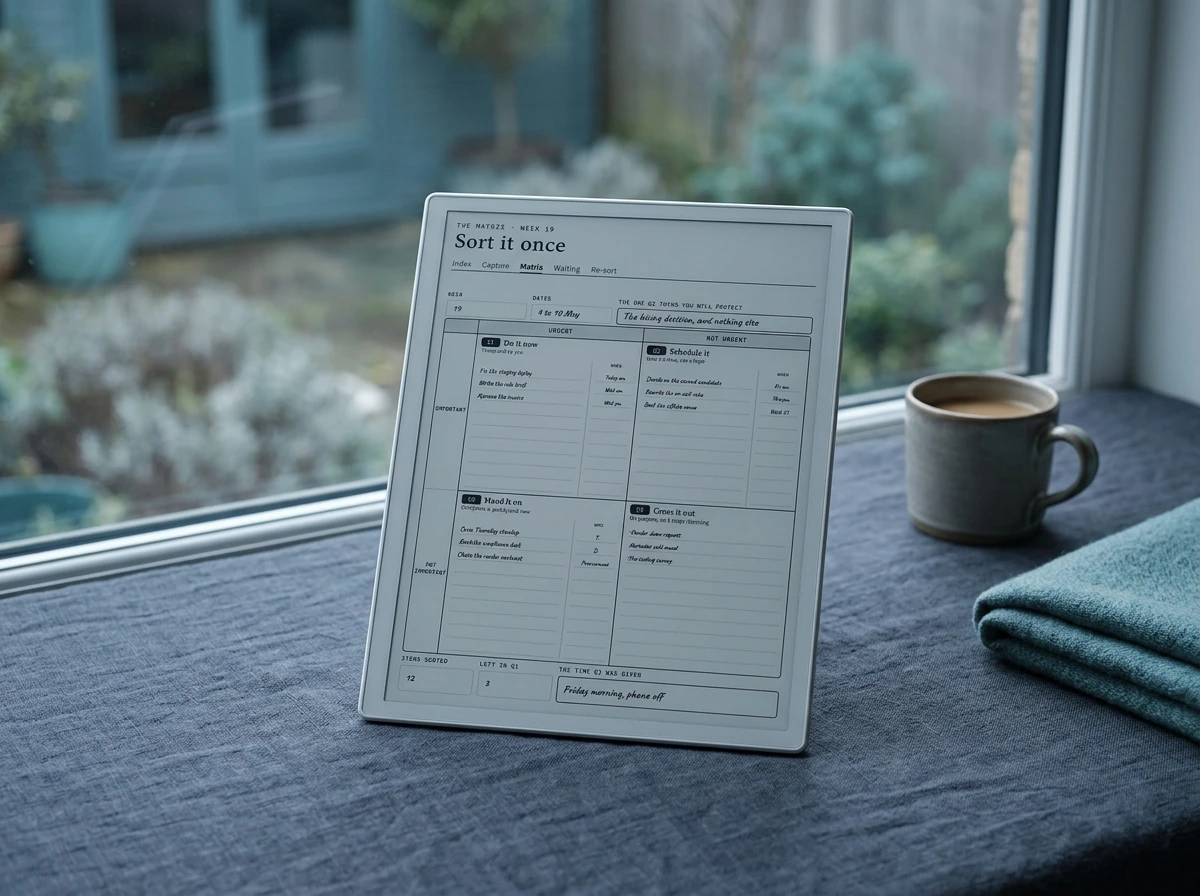
| Hyperlinked PDF on a tablet | A device you already write on | The pages themselves, and the sorts before this one | Recall depends on your own index, so a sloppy index loses last month |
There is no correct row. There is a correct row for you, and the test is boring: which of those four do you already touch on a Sunday. If you write on an e-ink tablet daily, a printed sheet is a detour. If you have never once opened a project tool at the weekend, the free Asana template is a lovely thing you will use twice. Pick the format that sits where the habit already is, which is the same reason our template roundup keeps coming back to what you actually open rather than what looks best.
The four columns
The four things a template needs to survive a month
Judge any eisenhower matrix template against these four and the field thins out very quickly. None of them are exotic and none of them cost anything to add with a pen.
First, a place to write down who asked. Quadrant three is entirely other people’s urgency, and you cannot see whose without a column for it. Second, a time slot against quadrants one and two, written as a day and a part of the day rather than a tick. Third, somewhere for a handover to live: a name, the date it left you, and the date you will chase it. Fourth, something that carries forward, so next week starts from last week’s grid rather than from a blank one.
The fourth one is the one worth insisting on, because it is what turns a sheet into a record. Two sorts side by side tell you something no single sort can: whether quadrant one is shrinking. If it never shrinks, the sorting is happening and the acting is not, and no template can fix that for you, but a template that hides it from you is actively unhelpful.
Where they fail
The two columns almost every template leaves out
Of the four above, two are missing from essentially every free grid we looked at, and they are the two that decide whether the method sticks.
The first is a time against quadrant two. Quadrant two is the box that makes next month lighter, and it is the only box with nobody chasing it, so it loses every afternoon it is put up against anything else. A tick does not defend it. A day and a part of the day does, because that is a thing you have to actively cancel rather than simply not get to.
Handing something over is not finishing it. It is a debt with somebody else’s name on it and a date it comes due, and almost no template has anywhere to write either.
The second is a name against quadrant three. Delegate is a comfortable word that assumes a team, and plenty of people running this grid have nobody to hand anything to. For them the verb is decline, which needs the same three things: a name, a date and a sentence. Either way, the item leaves your hands and acquires a return date, and a grid with no register for that is a grid that quietly recycles the same tasks into quadrant one a fortnight later.
You can add both with a pen in about four seconds a line. That is genuinely the fix, and it is why we would not tell anyone to buy something before trying it. But adding them by hand every week, on a fresh printout, on a page with no room ruled for them, is exactly the friction that ends the habit in week three.
What we would use
What we would use, and why
If your week already lives on an e-ink tablet, the argument for a printed grid gets thin. Writing the sort where the week is means quadrant two can point at a real band on a real day, and our notes on the digital work planner and on task management layouts both cover that handoff. If the difficulty is starting rather than choosing, the ADHD planner notes are the better read.
Rule your own
How to rule one yourself in five minutes
Nothing here needs a download. Take a blank page, landscape if you have the choice, and draw one vertical line down the middle and one horizontal line across it. Label the top edge urgent on the left half and not urgent on the right. Label the left edge important at the top and not important at the bottom. That is the grid, and it took about forty seconds.
Now add the parts the downloads leave out. Rule a narrow strip down the right edge of the top two boxes and head it when. Rule the same strip on the bottom left box and head it who. Leave the bottom right box plain, because the only thing that box needs is a line through each entry. Along the very bottom, leave four small squares and write Q1 to Q4 above them, for next week’s count.
Then use it once, properly, in one sitting. Write everything down before judging any of it, ask about the deadline first and the consequence second, give quadrants one and two a day and a part of the day, put a name and a chase date on quadrant three, and strike quadrant four through rather than leaving it blank. Next Sunday, fill the four squares along the bottom and set them beside last week’s before you read anything into them.
If you want a page already ruled that way rather than drawing it each time, the template roundup and the planner comparison cover what earns its space on a device.
FAQ
Common questions, answered briefly
Is there a free eisenhower matrix template with no email required?
Is a printable PDF or an app version better?
What should an eisenhower matrix template include beyond the four boxes?
Can you use the matrix without any template at all?
How is a priority matrix different from an eisenhower matrix?
If your question is not up there, leave it in the comments and we will add it. We would particularly like to hear from anyone who has kept a weekly sort going for more than six months, because that is rarer than the search volume suggests.
People also ask