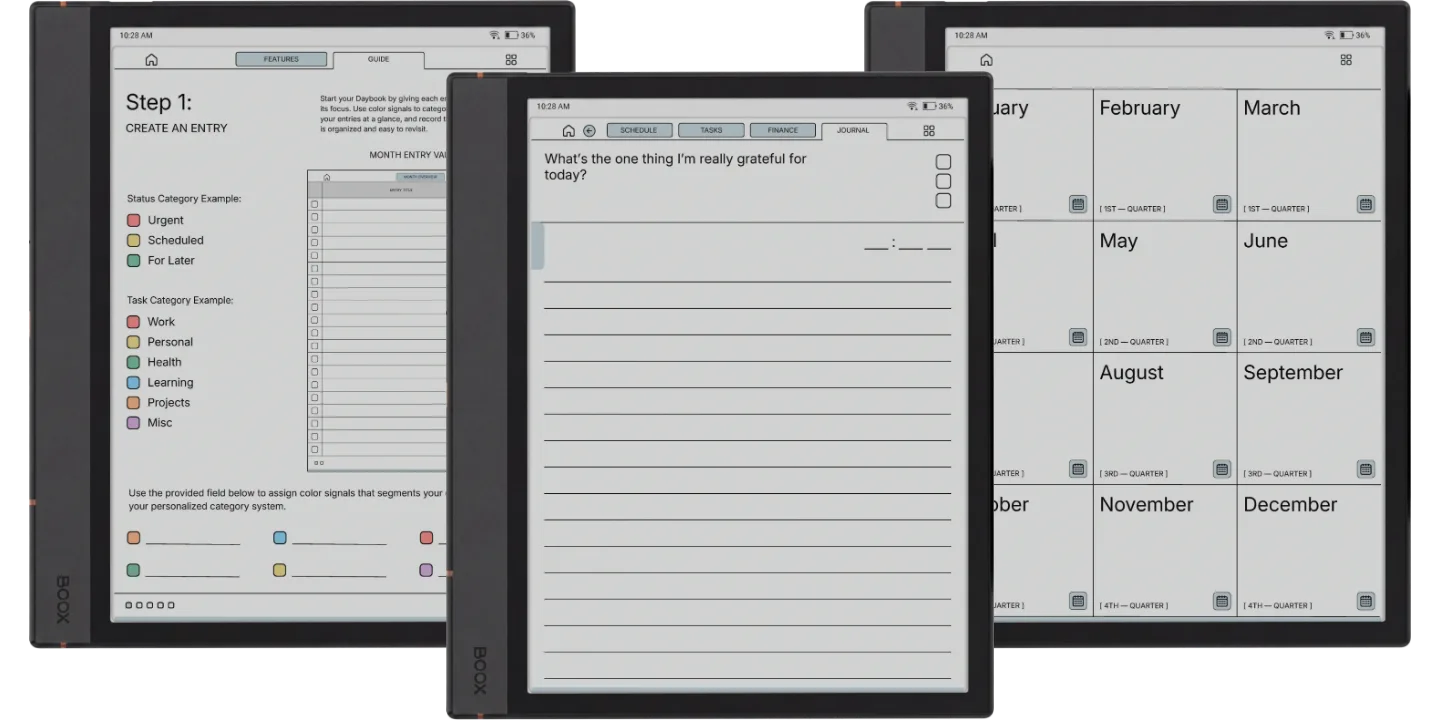
The Boox Note Max Daybook Planner is for people who want the Note Max’s large page for a daybook: schedule, tasks, spending and a journal line for each entry. Each entry is four linked pages, 40 a month and 480 a year, in a 2026 and a 2027 book with a Monday or Sunday start.
The four pages of an entry
- Schedule: every hour from 5am to 10pm.
- Tasks: one core task, three key tasks and five minor ones.
- Finance: a planned budget, each purchase with its category and amount, then the total spent and what you saved or went over.
- Journal: the one thing you are grateful for today, with the time you wrote it.
The calendars are dated; the entries are not. You title and date an entry when you start it, and each month opens with a two-page overview listing its entries, so a day you skip leaves no blank page behind.
On the Note Max
The Note Max’s 13.3-inch screen is 3:4, so the page scales up evenly to fill it with no borders; Boox describes the screen as A4-sized. It is a monochrome Carta 1300 screen, so the blue accent shows as grey, and the extra size goes to writing room. Send it with BooxDrop at push.boox.com or over USB and open it in NeoReader, the built-in PDF reader, where every tab and link works. A Quick Start guide for Boox comes in the download. For a dated hourly page every day instead, see the Note Max Daily Planner.
On a Palma it letterboxes: the phone-shaped screen shows the page across its width with bands above and below, so pick a 3:4 Boox for this one.