The job
What a PTO tracker is for
Most PTO trackers answer one question: how many hours does each person have? That matters when someone asks, but it is the least useful thing the sheet can do. A good PTO tracker also tells you who has leave booked that they cannot yet cover, and who is heading towards the end of the year with more hours than they are allowed to carry over.
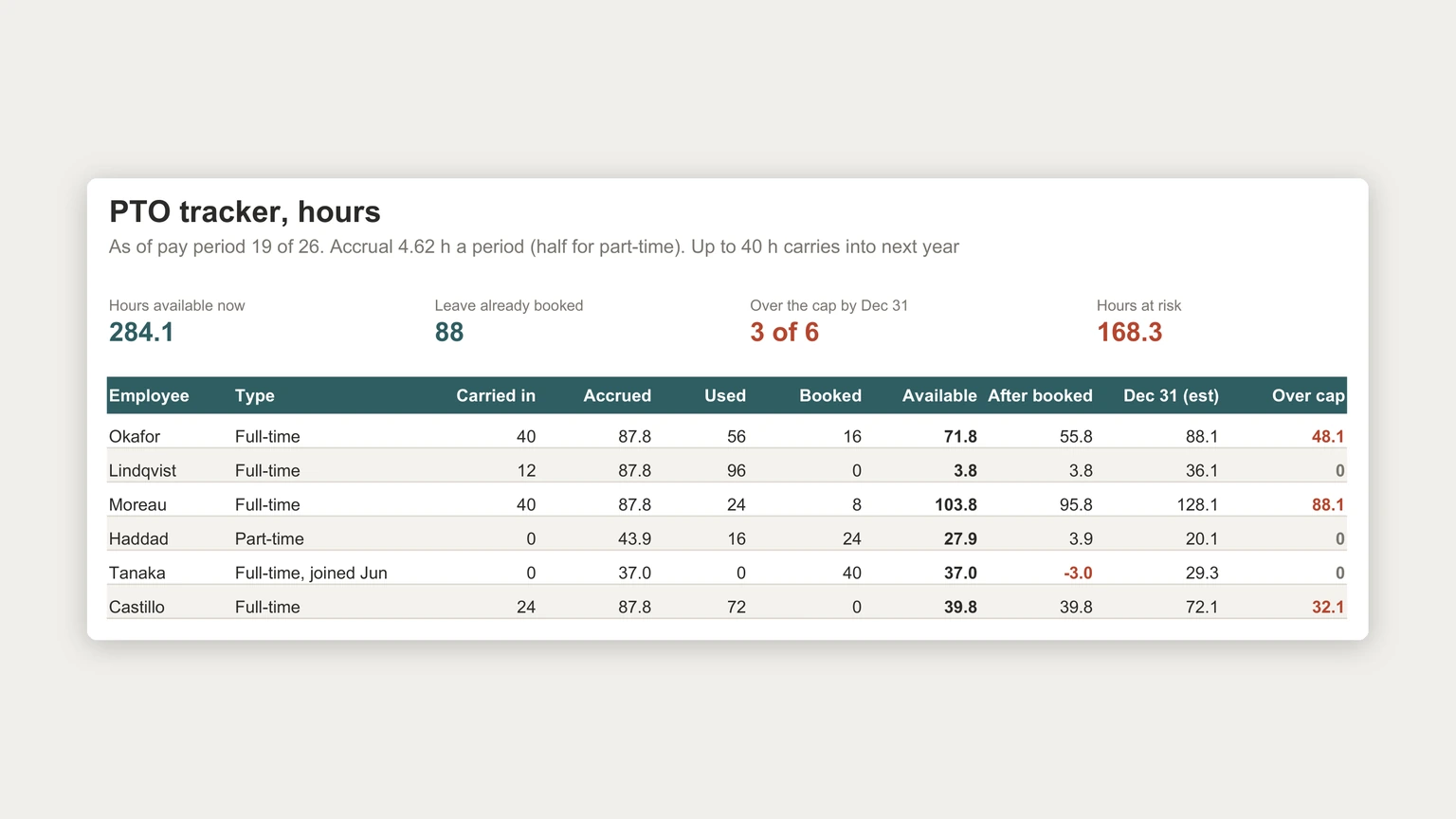
Those are the questions that turn into problems if nobody sees them in September. The example at the top of this page tracks six employees, fictional, at pay period 19 of 26, and every figure below comes from it.
The policy
Start from the policy, not the spreadsheet
The sheet can only follow rules that are written down. The US Department of Labor states that “the Fair Labor Standards Act (FLSA) does not require payment for time not worked, such as vacations, sick leave or federal or other holidays”, and that “these benefits are matters of agreement between an employer and an employee”. States and cities can add their own rules, so check the ones that apply to you before settling the numbers.
Whatever you decide, the tracker needs four inputs from the policy: how many hours accrue per pay period, whether part-time staff accrue at a different rate, how many hours can carry into the next year, and whether there is a ceiling on the balance. The example accrues 4.62 hours per biweekly pay period, which is about 120 hours a year, at half rate for part-time staff, with a 40-hour carryover cap.
The balance
The balance formula, one row per employee
Available hours are hours carried in from last year, plus hours accrued so far, minus hours used. Accrued is the number of pay periods worked times the accrual rate, which is why someone who joined in June, like Tanaka in the example, has 37 hours from eight periods rather than the 87.8 a full year would give.
Keep used and booked in separate columns. Used is leave already taken. Booked is leave approved but still in the future. Mixing them makes the balance look lower than it is today and hides whether the future leave is actually covered.
In the example Tanaka has 37 hours available and 40 booked, so the after-booked column shows minus 3. That is a flag, not necessarily a problem: if the leave falls late enough in the year, the accrual between now and then covers it. The sheet’s job is to raise the question early enough for someone to answer it.
Year end
The year-end forecast, and hours at risk
Add one more column: the estimated balance on December 31. It is the after-booked balance plus the accrual still to come, seven pay periods in the example. Compare it with the carryover cap and you have the hours each person would lose, or that you would have to pay out or extend, depending on your policy.
In the example, Moreau is on course for 128.1 hours against a 40-hour cap, Okafor for 88.1, and Castillo for 72.1. Together that is 168.3 hours at risk. Seeing it in September gives three people three months to plan time off. Seeing it in December gives everyone the same week.
Seeing it in September gives three people three months to plan time off. Seeing it in December gives everyone the same week.
The same column is also a cost figure. Hours owed are a liability if your policy or local law pays out unused leave, so the available-now sum, 284.1 hours in the example, is worth multiplying by pay rates once a quarter and carrying into the payroll side of the cash flow forecast template.
Building it
Building a PTO tracker in Excel
Put the policy numbers in labelled cells at the top, accrual rate, part-time factor, carryover cap and pay periods completed, and make every formula read from them. When the policy changes next year you edit four cells rather than six rows of formulas. Keep the employee list as an Excel table: Microsoft documents that “by entering a formula in one cell in a table column, you can create a calculated column in which that formula is instantly applied to all other cells in that table column”, so a new hire gets the right formulas automatically.
Log the leave itself on a second tab, one row per request with the employee, dates, hours and status, and sum it into the used and booked columns. That gives you an audit trail if a balance is ever questioned, and the hours can be checked against the Excel timesheet template each pay period. More small-business files, like the purchase order template, are on our Excel templates hub.
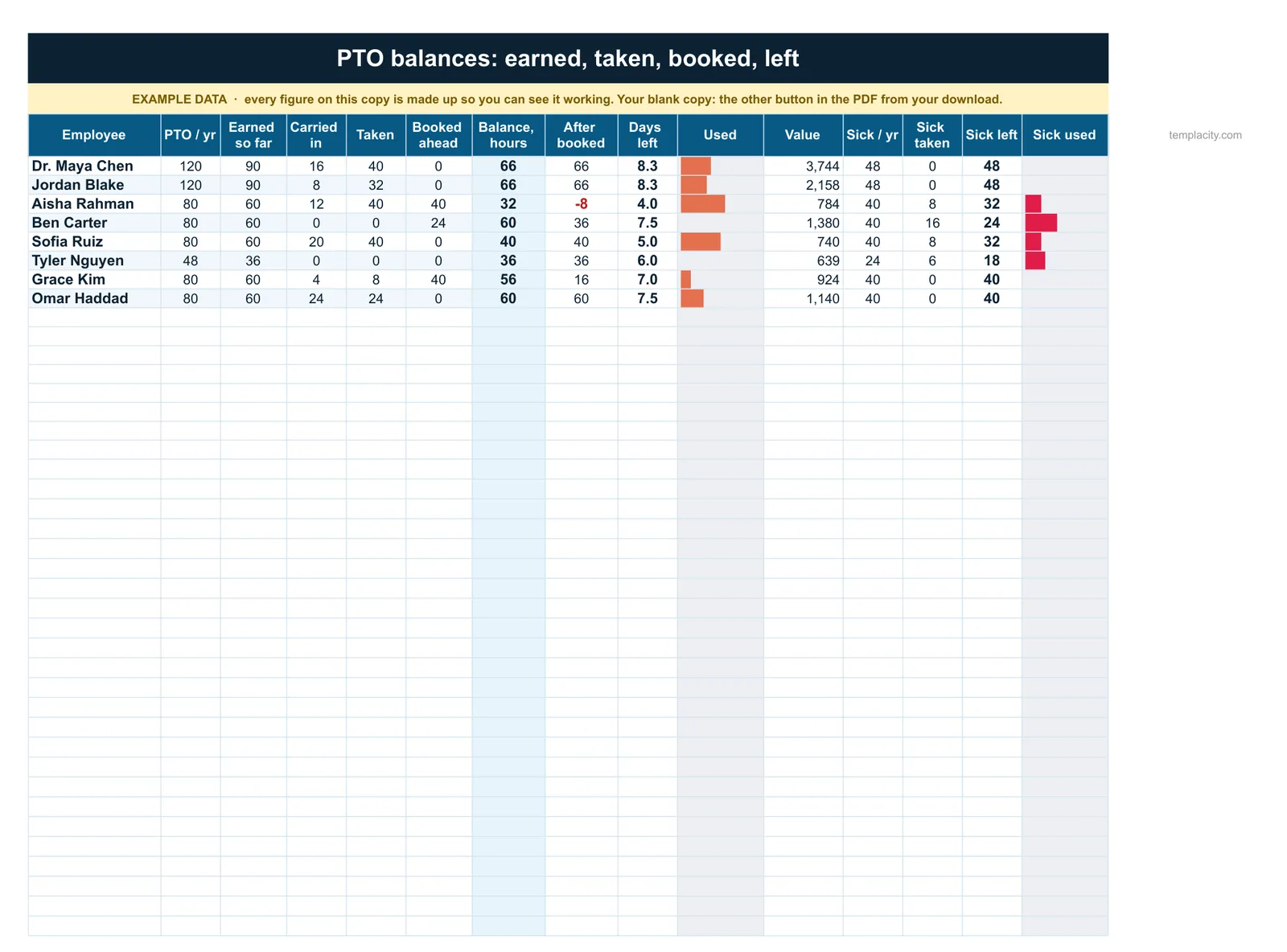
If you would rather start from a finished file, our PTO Tracker, Payroll & Employee Records Spreadsheet ($49, Google Sheets and Excel) tells you what the PTO you owe is worth as money, today and at the PTO year end, and who ends the year over a carry-over cap. It keeps the same leave log and works the rest out: earned, carried in, taken, booked and left for every person, sick leave kept apart. A leave calendar colours each day off by type, and a payroll register takes every pay run from gross to net.
A PTO tracker that forecasts the year end saves an awkward December for everyone. Tell us in the comments how your team handles carryover, and whether booked leave is tracked anywhere today; we read every reply.
FAQ
Common questions, answered briefly
How do you calculate a PTO balance?
How do you calculate PTO accrual per pay period?
Are employers required to offer paid vacation?
What should a PTO tracker show at year end?
People also ask