The grid
What a marketing budget template has to hold
Most marketing budget templates are one grid: channels down the side, months across, a planned figure in each cell. That is the right start. It forces a decision for every channel in every month, and it shows the seasons at a glance: the quiet January, the spring launch, the gift season in November.
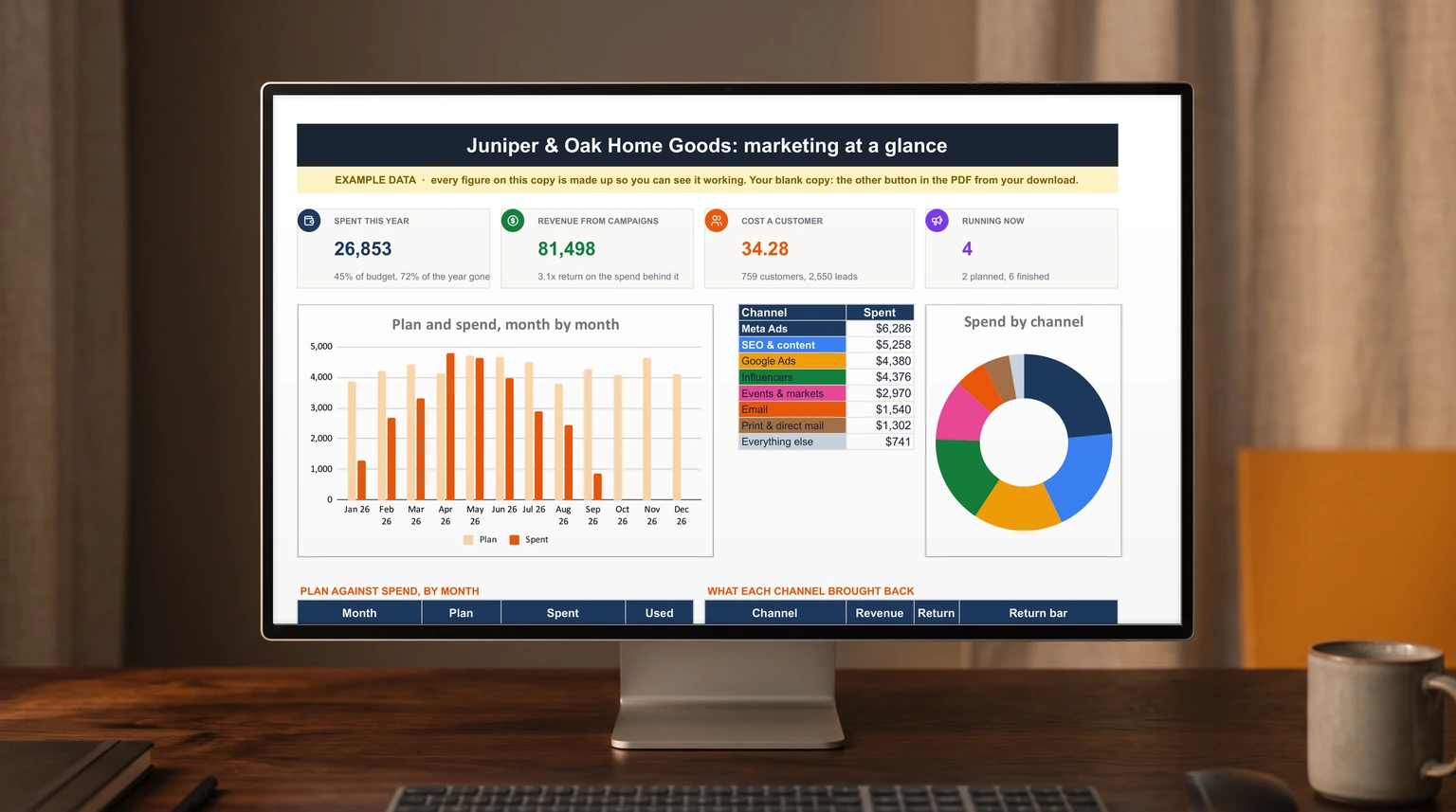
Our worked example is a fictional home goods shop with a $60,000 year. Eight channels are planned: Google Ads, Meta Ads, email, SEO and content, influencers, events and markets, print and direct mail, and affiliates. Between them they take $51,340, which leaves $8,660 unplanned. Keep that gap visible at the bottom of the grid, because unplanned money has a way of being spent on whatever is loudest in October.
The grid answers one question, where the money is meant to go. The US Small Business Administration’s guide to marketing plans asks a second one in the same breath: “Plan to compare your marketing and sales costs to the revenue it generates.” A marketing budget template that cannot answer that is a spending schedule, not a plan.
Pace
Plan against spend, month by month
Under the plan sits a spend log: every invoice and card charge on its own row, with a date, a channel and, where it belongs to one, a campaign. The grid then fills a second line under each month, spent against planned, and each channel gets a planned, spent and left figure on the right.
Two readings come out of that. The first is pace. By mid-September our example shop has spent $26,853, which is 45% of the budget with 72% of the year gone. That is not automatically good news. It can mean the plan was padded, or it can mean three expensive months are still to come and the money will go out in a rush. The second reading is the channel that broke its line: events and markets were planned at $1,800 and have cost $2,970, $1,170 over. The campaigns tab shows why: the market pop-ups were given a $2,400 budget against a channel line of $1,800 for the whole year, and nothing in a plan grid flags that.
Return
Judge every channel by what it brought back
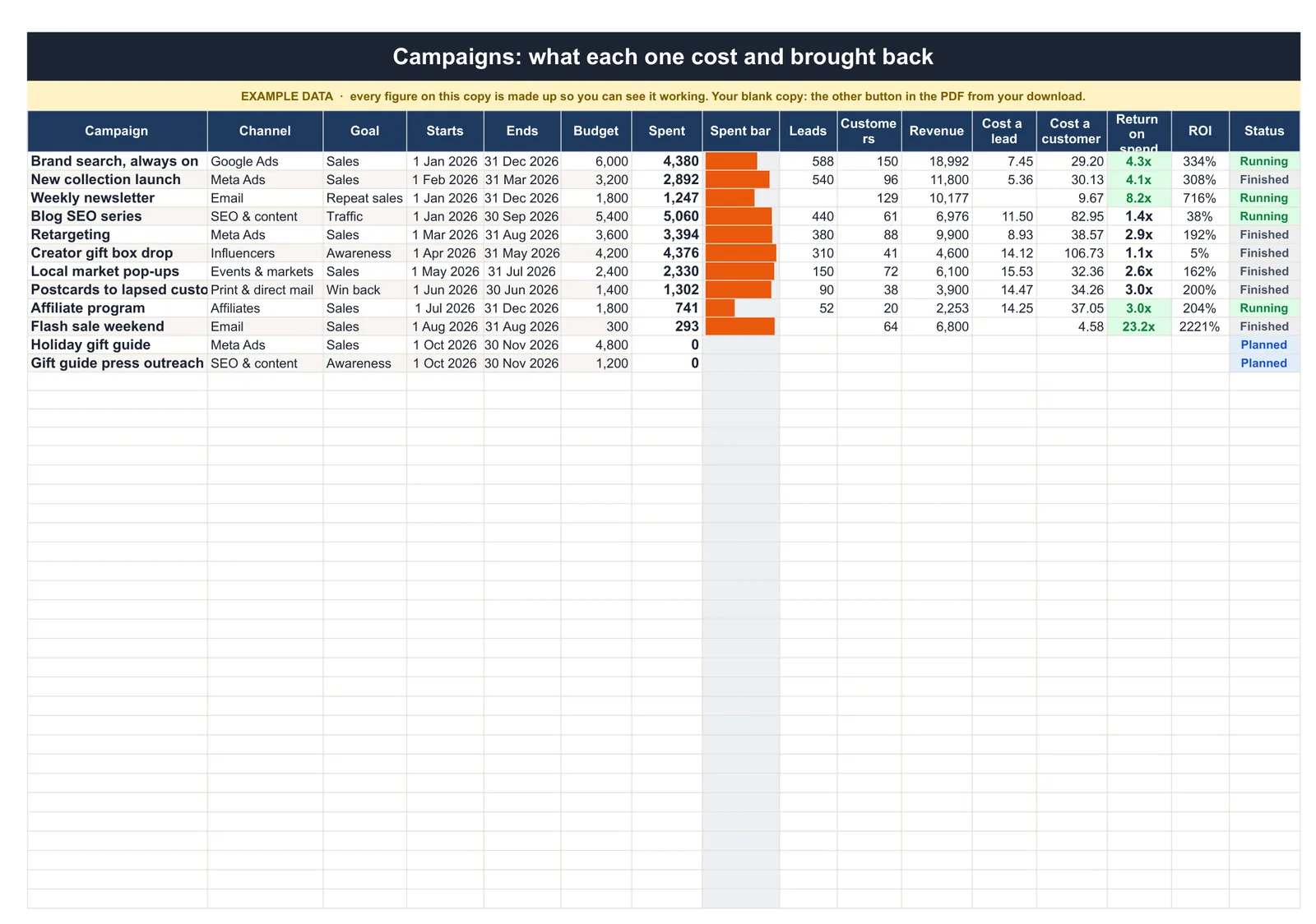
This is the half most templates leave out. Give every campaign a row with its budget, what it spent, and three results: leads, customers and revenue. From those come cost a lead, cost a customer and return on spend, which is revenue divided by spend.
Across our example’s ten campaigns, $26,015 of spend brought in $81,498 from 759 customers: a return of 3.1 and $34.28 a customer. The averages hide the spread. The weekly newsletter spent $1,247 and brought back $10,177, a return of 8.2 at $9.67 a customer. Always-on brand search returned 4.3 at $29.20 a customer. A creator gift box drop spent $4,376 and brought back $4,600, a return of 1.1 at $106.73 a customer.
A plan grid shows the newsletter and the gift box drop as money spent on schedule. The return column shows one paid back eight times and the other barely paid for itself.
A plan grid shows the newsletter and the gift box drop as money spent on schedule. The return column shows one paid back eight times and the other barely paid for itself. That is the number next year’s plan should be written from, rather than last year’s split with five percent added.
The slow channels
Channels a marketing budget template measures badly
Return on spend is a fair judge of an ad campaign that starts and stops. It is a harsh one for work that keeps paying after the campaign row closes. Our example’s blog SEO series shows a return of 1.4 and $82.95 a customer, the second most expensive customers in the file. But an article written in March still brings visitors in December, and the campaign row only counts what arrived while it was open.
The SBA guide says as much: “Some tactics are hard to measure,” naming print advertising and word of mouth, and it asks you to “be consistent in how you measure.” In a spreadsheet, that means two habits. Keep slow channels on their own rows so their numbers are never averaged into the fast ones, and give them a longer window before you cut them. And be careful with the flattering outliers too: our example’s flash sale weekend shows a return of 23.2, because it was one email to customers who already knew the shop.
In Excel
Building the marketing budget template in Excel
Three tabs carry it. A plan tab with channels down the side and months across. A spend log with a date, amount, channel and campaign on each row. A campaigns tab with budget, results and the three ratios. Make channel and campaign drop-downs on the spend log, so every row is spelled the same way; Microsoft’s guide to creating a drop-down list starts from the Data tab, then Data Validation.
Every spent figure is then a SUMIFS on the log, which Microsoft describes as a function that “adds all of its arguments that meet multiple criteria”: one criterion for the channel, two for the first and last day of the month. The campaign spend is the same formula with the campaign name as the criterion. Our Excel hub has the other business templates built the same way.
Marketing spend also lands in the wider books. If a big season means paying for ads two months before the sales arrive, our cash flow forecast template guide shows how to see that gap coming. Leads that turn into deals belong in a pipeline, which our sales tracker spreadsheet guide covers, and the posts behind an SEO channel fit a content calendar.
For the posting side of that calendar, our social media planner guide lays out a weekly content plan, batching days and a monthly review that reads what the spend above actually bought.
If you would rather start from a finished file, our Marketing Plan & Budget Spreadsheet ($39, Google Sheets and Excel) is the workbook every number on this page comes from. The plan runs by channel and month against the annual budget, the spend log fills it, and the campaigns tab works out cost a lead, cost a customer and return for each campaign. A campaign calendar draws the year as coloured bars, one colour per channel. Marketing for a nonprofit? It is one of four sheets in our Nonprofit Spreadsheet Kit, with a budget and grant tracker, an event budget and a staff and volunteer schedule: all four for $119, against $166 bought one by one.
Next year
Writing next year’s plan from this year’s numbers
At the end of the year, sort the campaigns by cost a customer. The cheapest channels earn the first claim on next year’s money, up to the point where you think they stop scaling; a newsletter can only be sent to the list you have. The expensive ones need a reason to stay, such as building something the return column cannot see yet, written next to the row.
Then set the new grid month by month, with the seasons from this year’s spend line in view, and leave an unplanned line on purpose. A reserve that is planned as a reserve beats a channel that quietly runs $1,170 over its line. The SBA guide’s own rule of thumb applies: “Marketing plans should be maintained on an annual basis, at minimum.” For one-off launches, our event budget template guide shows how a single event breaks even.
A marketing budget that records what came back turns next year’s plan from a guess into a sort. Tell us in the comments which channel surprised you most this year, in either direction; we read every reply.
FAQ
Common questions, answered briefly
What should a marketing budget template include?
How do you calculate return on marketing spend?
How do you track marketing spend against the budget?
Can a marketing budget template work in Excel and Google Sheets?
People also ask