The job
What a check register is actually for
A Google Sheets check register template is often treated as a slightly old-fashioned way of tracking spending, which sells it short. A budget answers where money should go and an expense tracker answers where it went. A register answers a narrower and more urgent question: what is genuinely available right now, given the things that have left your account in intent but not yet in fact.
That is why it survives online banking. The balance your bank shows you is the balance of what has cleared. The register holds what you have committed. Those two numbers are different on purpose, and the gap between them is the money you have already spent and can still see.
The break
The running balance formula everyone writes
Open any register template and the balance column will look roughly like this: the balance in this row equals the balance in the row above, plus this row’s deposit, minus this row’s withdrawal. Written out, =D2+B3-C3, dragged down the column.
It is the natural way to express a running balance and it works right up until you do the most ordinary thing possible with a register, which is realise you forgot a transaction from last Tuesday and insert a row for it in the middle.
This is the same family of failure as a sum written against a fixed range that stops counting new rows: the arithmetic is correct and the structure is not, so the output is plausible rather than obviously broken. Our Google Sheets expense tracker guide covers that sibling case.
The fix
The formula that survives an inserted row
Stop chaining. Compute each row’s balance from the top of the register rather than from the row above it, using two sums with an anchored start and a relative end.
=SUM($B$2:B3)-SUM($C$2:C3)
The balance for row 3, deposits in B and withdrawals in C. Drag it down and every row computes from the top.
With deposits in column B and withdrawals in column C, starting at row 2, the balance in row 3 is =SUM($B$2:B3)-SUM($C$2:C3). Dragged down, each row’s range grows by one. The dollar signs anchor the start of each range at row 2 while the end follows the row, which is the entire mechanism.
Every row now stands on its own, so a row inserted in the middle costs you one fill-down instead of a silently wrong column.
Two smaller benefits come with it. A blank row no longer poisons everything downstream, because a blank contributes zero to a sum rather than breaking a reference. And a single deleted row does not leave a gap in a chain, since there is no chain to break.
Order
Sorting, and the thing a running balance depends on
One honest caveat, and it applies to both versions of the formula. A running balance means something only in one order, which is the order the transactions happened. Sort the register by amount, or by payee, and the balance column becomes a sequence of numbers that describes nothing.
So a register is a document with a fixed sort, not a table you slice. If you want to look at everything paid to one payee, filter rather than sort, or do that analysis on a separate tab. Treat the register’s row order as part of its data and it stays trustworthy.
The practical shape that follows: newest entries go at the bottom here, which is the opposite of the advice for an expense log. A log is for capture and wants the newest row within reach; a register is a chronological record and wants the sequence intact.
Reconciling
Your balance is not the bank’s balance
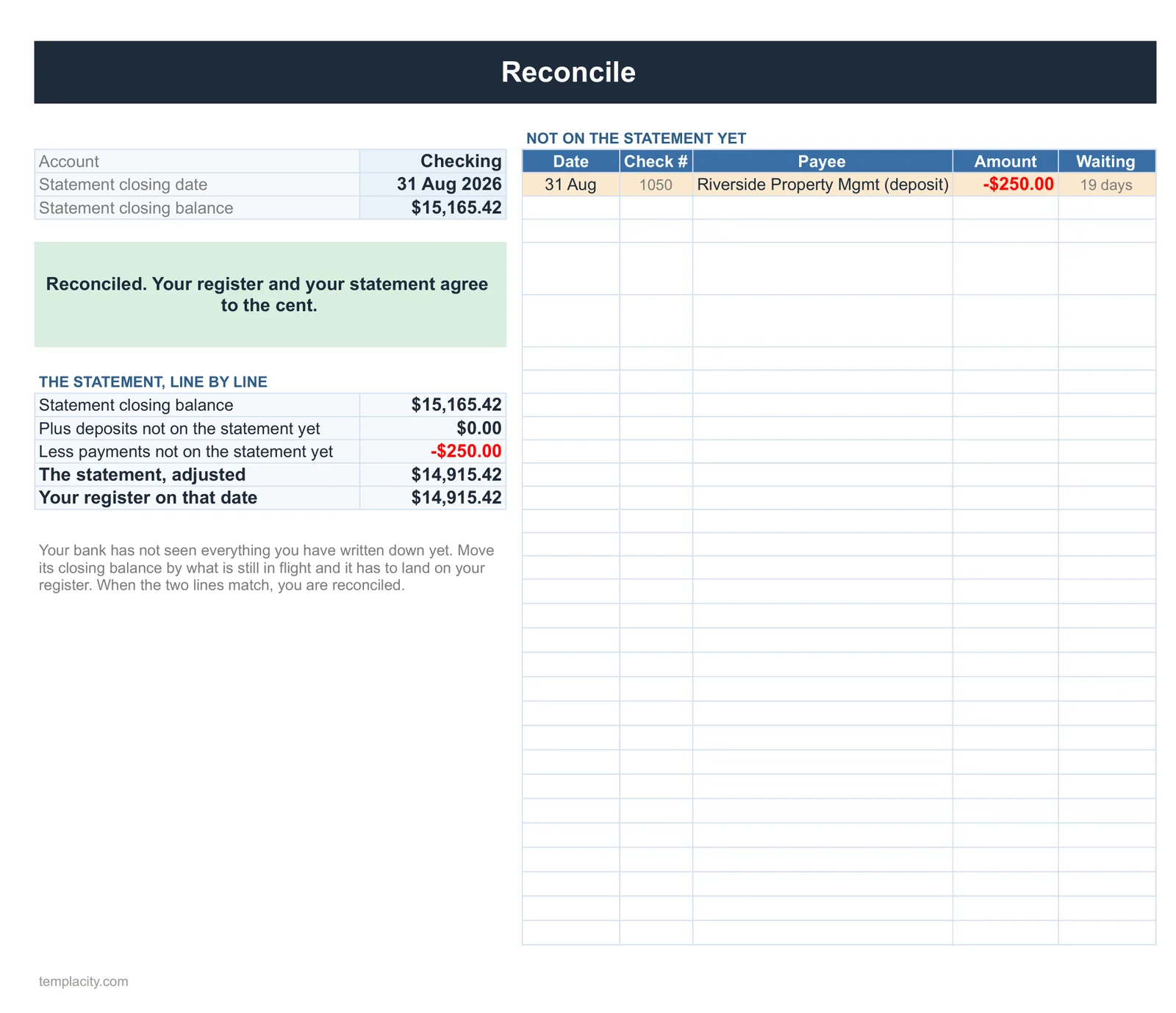
Here is the part templates ship a checkbox for and never explain. When your register says one number and the bank says another, that is usually correct rather than an error. The two should differ by exactly the transactions you have recorded that the bank has not yet processed.
The identity is worth writing into the sheet itself. Take your register balance, subtract any deposits you have recorded that have not cleared, and add back any withdrawals you have recorded that have not cleared. The result should equal the bank’s balance. If it does, everything is accounted for; if it does not, the difference is a real error and you now know its exact size, which is most of the work of finding it.
-
1
Mark what has cleared
One column, one mark per transaction that has appeared on the bank’s side. Do this against the statement rather than from memory.
-
2
Sum the uncleared, both directions separately
Uncleared deposits and uncleared withdrawals are two different numbers and they move the reconciliation in opposite directions. Keep them apart.
-
3
Compute the expected bank balance
Register balance, minus uncleared deposits, plus uncleared withdrawals. Put it in a labelled cell rather than working it out on paper each month.
-
4
Show the difference, and make zero look like zero
A cell holding expected minus actual, with a conditional format so anything other than zero is visible. Google puts that under Format, then Conditional formatting.
Google documents conditional formatting as changing “text or background color if they meet certain conditions”, with the advanced version under “Custom formula is”, and notes that rules are evaluated in the order listed with the first true rule defining the format. One rule is enough here.
Cleared
What the cleared column should hold
Use something the sheet can count rather than a character you type. A tick typed as an x is a string, and counting strings works until somebody uses a capital X or a different symbol. A checkbox produces a true or false value, which sums and filters without anybody having to agree on a convention.
Resist adding a third state. Templates sometimes offer cleared, pending and reconciled, which sounds more rigorous and means the reconciliation formula has to know which of three values counts as cleared. Two states, and the arithmetic above stays one line.
While you are setting the sheet up, format the amount columns once via Format, then Number, and set any check-number column to plain text, because check numbers with leading zeros lose them silently in a numeric cell.
Habits
What keeps a register honest
Three things, and only one of them is about the spreadsheet. Record at the moment of commitment rather than when the money moves, because that is the whole reason the document exists. Reconcile on a fixed day each month, since a register that has not been reconciled in three months is a list rather than a record. And never correct a mistake by editing history: add a correcting row so the reconciliation still explains itself.
It also pairs naturally with the two documents either side of it. Our bill tracker in Google Sheets guide covers what is coming, and the Google Sheets budget template guide covers the plan the register reports against. Google states that anyone with a Google Account can create in Sheets, with offline editing available, which is a real advantage for a document you may want open while the connection is not.
For the paper side of what is coming, our bills tracker printable gives you a monthly checklist with bill, due, amount and paid columns, and a 1 to 31 bill calendar.
Compute each balance from the top, keep the register in date order, and write the reconciliation identity into a cell rather than into your head. Tell us in the comments whether an inserted row has ever quietly broken your balance column, because it is the most common spreadsheet defect nobody notices at the time.
If you keep more than one account, our Check Register Spreadsheet ($29, Google Sheets and Excel) is the finished version: a running balance per account, a month view, and a Reconcile tab that matches your bank statement in one step.
FAQ
Common questions, answered briefly
Why did my running balance go wrong after I inserted a row?
=SUM($B$2:B3)-SUM($C$2:C3).Why does my register disagree with my bank balance?
Can I sort a check register?
Should the cleared column be a checkbox or a typed mark?
People also ask