Why they fail
Why most bill tracker spreadsheets die in month two
Nearly every free bill tracker Google Sheets template is a grid of twelve columns, one per month, with your bills typed down the side. It works beautifully in January, when you built it and you were interested. By March you are copying last month’s block, editing the dates, and wondering why you are doing data entry for your own money.
That design has a second failure that is worse because it is quiet. When the month is typed rather than generated, a bill you forgot to carry forward simply is not there. Nothing is highlighted, nothing fails to add up, and the first sign is a late fee. A tracker that can silently omit a bill is not doing the one job you keep it for.
The rollover
The one feature that decides a bill tracker
Split the file in two and everything else gets easier. One tab holds what is true about a bill: its name, the day of the month it lands on, the amount, and how often it repeats. That tab changes perhaps twice a year. A second tab holds what happened: the date you actually paid and how much.
The dashboard then generates this month’s schedule from the first tab and ticks off anything the second tab says is already paid. You never write a month by hand again, and a bill cannot go missing, because the schedule is derived rather than remembered.
Build it
Building the rollover yourself
Google states that anyone with a Google Account can create in Sheets, and that files can be edited without an internet connection, so the only cost here is twenty minutes.
- Recurring tab. Columns for name, day of month, amount, frequency (monthly, quarterly, yearly), and the first month it applies from. One row per bill, and you are done with it.
- One cell drives the view. Put the first of the month you are looking at in a single cell, say
B1. Everything downstream reads it, so moving to next month is one edit. - Turn a day number into this month’s date with
=MIN(DATE(YEAR($B$1),MONTH($B$1),A2), EOMONTH($B$1,0)). TheMINis the important half, and the next section explains why. - Mark the state with a nested test against
TODAY(): paid if the log has it, overdue if the due date has passed, due soon inside seven days, upcoming otherwise. Conditional formatting on the same test colours the row. - Sum what is left with
=SUMIF(Status:Status,"Overdue",Amount:Amount)and the same for Upcoming, using whole columns so new bills always count.
=MIN(DATE(YEAR($B$1),MONTH($B$1),A2), EOMONTH($B$1,0))
This month’s due date for the day number in A2, clamped to the last day of the month in B1.
Edge cases
The 31st, and the bills that only show up sometimes
Two cases break almost every home-made bill tracker, and both are small once you have seen them.
- A bill due on the 31st, in a month with 30 days. Written naively,
DATE(2026,4,31)does not error; it rolls forward and quietly becomes the 1st of May, so your April sheet shows the bill in the wrong month. Wrapping it inMIN(..., EOMONTH($B$1,0))clamps it to the last day of the actual month instead, which is also how most billers behave. - Quarterly and yearly bills. They should appear only in the months they land in, not every month at a twelfth of the value. Gate the row on the month number: a quarterly bill starting in February shows when
=MOD(MONTH($B$1)-2,3)=0. Averaging them instead is how people end up short in the month the real bill arrives.
A tracker that can silently omit a bill is not doing the one job you keep it for.
Get those two right and the sheet stops needing you. That is the whole difference between a tracker you maintain and a tracker that maintains itself. If you want the same discipline applied to where the money goes rather than when it leaves, our Google Sheets budget template guide is the companion, and the weekly schedule build uses the same generate-do-not-type principle.
Off the screen
When a bill tracker should not be a spreadsheet
A spreadsheet is the right tool when you want the arithmetic: what is still outstanding, what the year actually cost, which subscription crept up. It is a poor tool for remembering, because it only exists when you go looking for it, and the whole point of a bill tracker is the looking.
So pair it with something that interrupts you. A calendar reminder on the two days a month most bills cluster does more than any layout. If you would rather the list lived somewhere with nothing else on it, our digital bill tracker covers the e-ink version of the same idea.
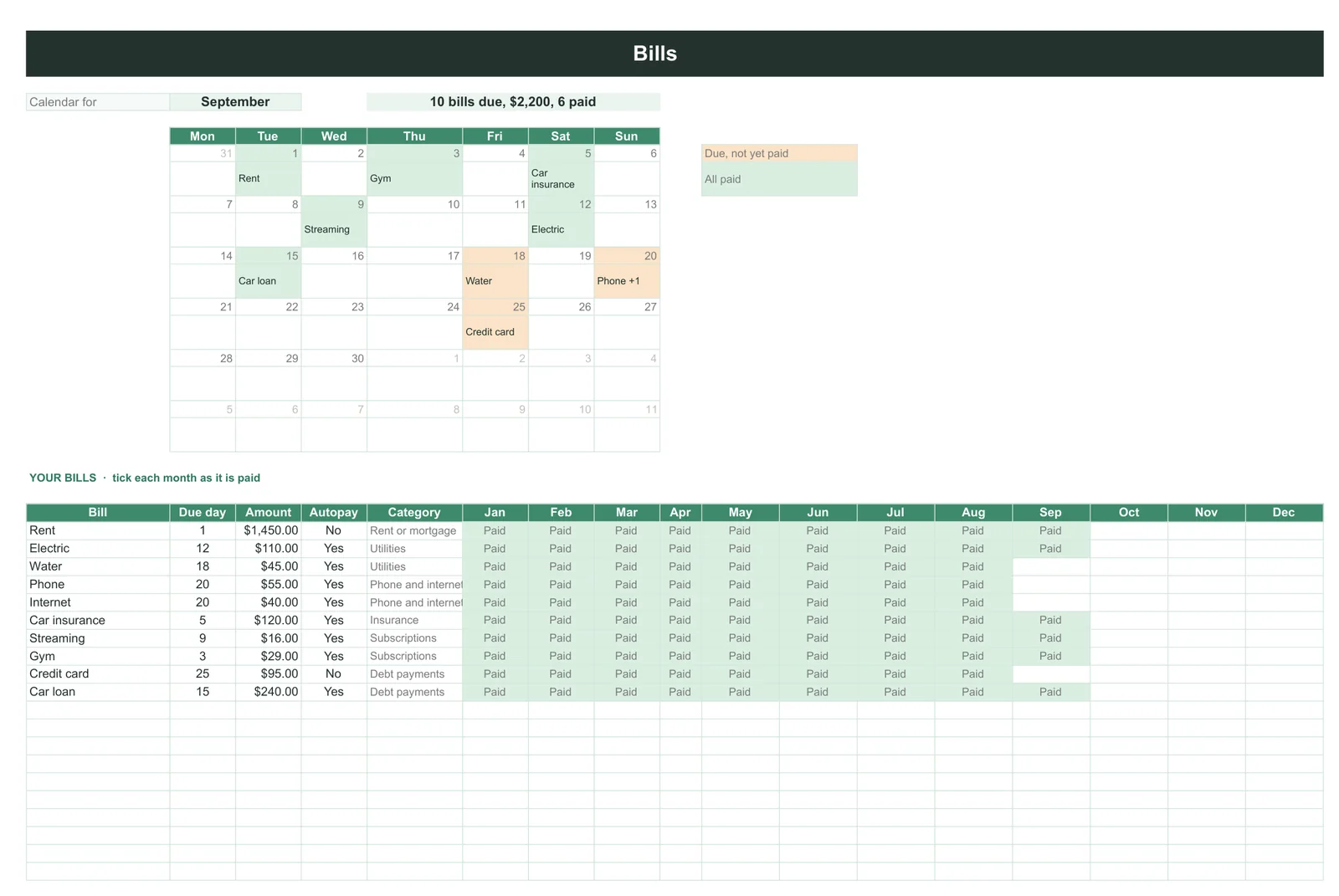
Our Budget & Money Planner ($39, Google Sheets and Excel) builds the list this page describes. Each bill is stored once with its due day, amount and autopay flag, you tick the month as it is paid, and a calendar for the month you pick shows what is due and what is still unpaid, with a count at the top (on its example September: 10 bills due, $2,200, 6 paid). The bills feed its monthly budgets, so the list is not a separate file to keep in step.
Whichever you use, store each bill once and let the month build itself. Tell us in the comments which bill is the one that always catches you out, because for most people it is the same annual renewal every year.
FAQ
Common questions, answered briefly
Does Google Sheets have a bill tracker template?
How do I handle a bill due on the 31st?
=MIN(DATE(YEAR(month),MONTH(month),31), EOMONTH(month,0)). Without the MIN, Sheets rolls the 31st of a 30-day month forward into the next month rather than erroring, so the bill silently appears in the wrong place.How do I show quarterly bills only in the right months?
=MOD(MONTH(month)-2,3)=0. Spreading it evenly across twelve months makes every month look tidy and leaves you short in the month the real payment lands.Is a spreadsheet better than a bill reminder app?
People also ask