You ask, we build it. Missing a template? Request it in the Hall and back what we build next.
reMarkable 2 Daybook Planner
reMarkable template

reMarkable 2 Daybook Planner

A daybook for the reMarkable 2: 480 entries a year, each a schedule, task, spending and journal page. 2026 and 2027, Monday or Sunday start, in Blue or Blush.

$29.00
Cover colour
  • Made for the reMarkable 2
  • Instant digital download
  • Re-download any time from your account

What you’re getting

Sized to the paper

Drawn for the reMarkable writing surface, weighted for the Marker.

Hyperlinked navigation

Tap any section to jump. No menu paging.

Distraction-free design

Quiet typography, no decoration. Fits the reMarkable focus mode.

Instant download

PDF in your account the moment payment clears.

The Daybook 1,965 pages

One day, four tabs.

An hourly schedule from 5am to 10pm, then a tasks page, a finance page and a journal page for the same day, one tap apart. Plan it in the morning, write it down at night.

  • i. Hourly schedule from 5am to 10pm
  • ii. Tasks, finance and journal for every day
  • iii. Four tabs, one tap apart
reMarkable 2 Daybook Planner The Daybook page 1
reMarkable 2 Daybook Planner The Daybook page 2
reMarkable 2 Daybook Planner The Daybook page 3
reMarkable 2 Daybook Planner The Daybook page 4
reMarkable 2 Daybook Planner The Daybook page 5
reMarkable 2 Daybook Planner The Daybook page 6

About this template

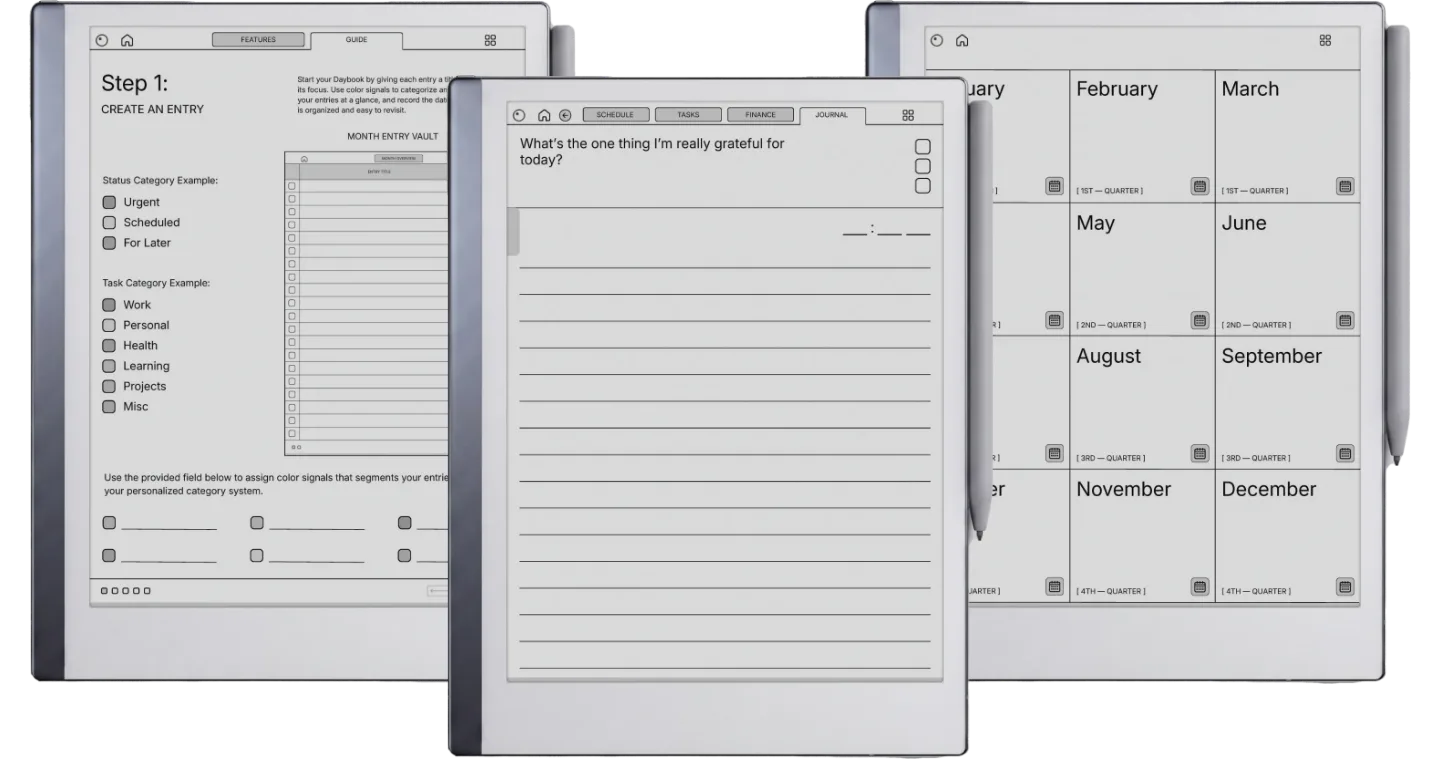
The reMarkable 2 Daybook is for people who still write on a reMarkable 2 and want one book that holds the plan for a day, what it cost and a line about how it went. Each entry is four linked pages, schedule, tasks, spending and a journal question, with 40 entries a month and 480 a year. You get the 2026 and the 2027 book, each with weeks starting Monday or Sunday.

The four pages of an entry

  • Schedule: every hour from 5am to 10pm.
  • Tasks: one core task, three key tasks and five minor ones.
  • Finance: a planned budget, each purchase with its category and amount, then the total spent and what you saved or went over.
  • Journal: the one thing you are grateful for today, with the time you wrote it.

The calendars are dated; the entries are not. You title and date an entry when you start it, and each month opens with a two-page overview listing its entries, each a tap from its pages, so a skipped day leaves no blank page behind.

On the reMarkable 2

The page is drawn at 3:4, the shape of the reMarkable 2’s 10.3-inch screen, so it fills the display at full size rather than sitting in a letterbox. The tablet is greyscale, so the Blue or Blush accent shows as a soft grey; pick whichever cover you like. Import it with the reMarkable desktop app, which is free and needs no Connect plan, and tap the tabs with a fingertip. If you later move to a Paper Pure or Paper Pro, the same file fits them; the Paper Pro Move has its own.
Tuned for reMarkable

reMarkable templates fit the paper-like writing surface exactly. Every line, every margin, every link is built for the reMarkable focus mode: quiet typography, no decoration, just the structure you need.

№ · Bought together

Add the rest of the set.

Daybook Planner This item · $29
All four, the full set $39 was $116

All four goes in as the Set at $39, not four separate items. You keep $77.

№ · Questions

Common questions.

Is every day of the year printed in it?
No. The calendars are dated for 2026 and 2027, but the 480 entries (40 a month) are titled and dated by you when you start one, so you never page past blank days.
Which reMarkable is it for?
This listing is for the reMarkable 2, and the same file also fits the Paper Pure and the Paper Pro: all three have a 3:4 screen, so if you change tablets the Daybook comes with you. The Paper Pro Move has a narrower 9:16 screen and its own Daybook.
What is in the download?
Four PDFs in the colour you pick: 2026 and 2027, each with weeks starting Monday or Sunday, plus a Quick Start guide for reMarkable. Each planner is 1,965 pages.
How do I get it onto my reMarkable?
Download it from your Templacity account, then import the PDF in the reMarkable desktop app with the Import button or by dragging it in. Importing is free, with no Connect subscription, and the file syncs to the tablet once it is paired.
How do I follow the links?
Tap them with a fingertip. On a reMarkable the Marker writes rather than navigates, so a tab touched with the pen leaves a mark instead of turning the page.
Will it show up in my reMarkable's Templates menu?
No. reMarkable does not support custom templates, so it opens as a PDF document, which is also what keeps the tabs and links working.
Is this a one-time purchase?
Yes. You pay once and keep the files, with no subscription. They appear in your Templacity account as soon as payment clears, and we email a backup link.
What if it doesn't work for me?
Digital downloads are non-refundable once delivered, but if you have any problem with the file itself, email us and we'll make it right.
№ · Reviews

Be the first to say something.

Nobody has written about this one yet. If it is on your device, yours is the first thing the next person reads.

Read by a person before it goes up, usually within a day. Your email stays with us and never appears on the page.

Instant download.

Your file is in your account the moment you check out, yours to re-download any time. A receipt lands in your inbox, too.

One-time purchase.

No subscription, no annual renewal, no upgrade nags. Pay once and the file is yours.

Quiet, secure checkout.

Stripe. Apple Pay. No spam, no “partners,” no reselling your details. Receipt, file, done.