The difference
Why a nonprofit budget template is not a business budget
In a business, a dollar is a dollar. Revenue goes into one pot and pays for whatever needs paying. A nonprofit budget template has to handle money that arrives with instructions attached: a foundation grant for one program, a city contract for another, a gift for a named purpose. That money can only be spent on what the donor said, and it usually covers only part of what the program costs.
So the question a nonprofit budget answers is not only “do we have enough?” but “do we have enough of the right kind?” Most free templates are business budgets with the word “donations” typed into the income rows, and they answer only the first question.
The example
A worked example: a $9,000 surplus that is $6,000 short
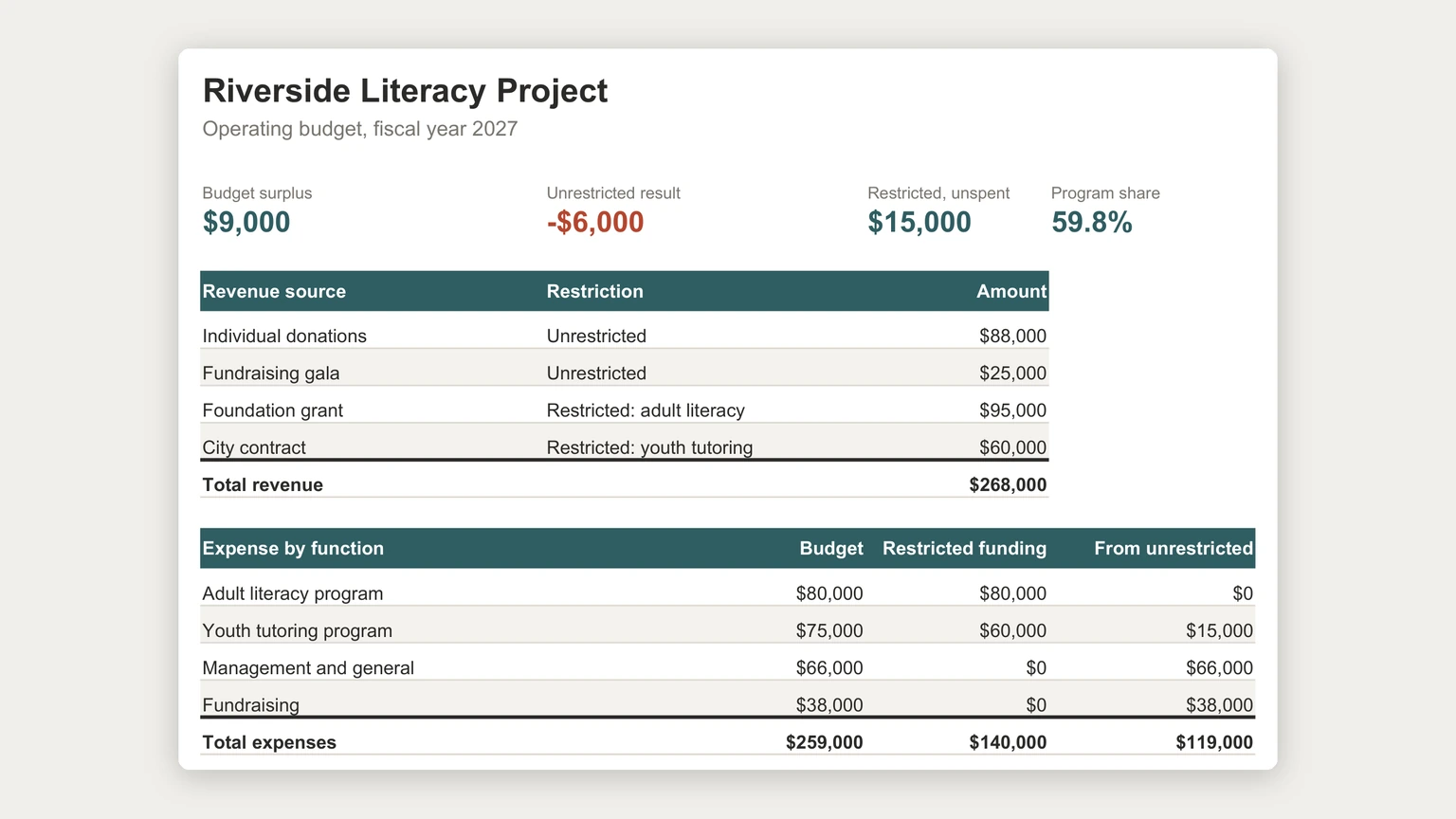
The budget at the top of this page belongs to a fictional literacy charity. It expects $268,000 of revenue and plans $259,000 of spending, so the bottom line reads a $9,000 surplus. A board looking at that line alone would approve it.
Now split the money. A $95,000 foundation grant is restricted to adult literacy, and the adult literacy program only plans to spend $80,000 this year. A $60,000 city contract is restricted to youth tutoring, which costs $75,000. Everything else, the $66,000 of management and general and the $38,000 of fundraising plus the $15,000 youth tutoring gap, has to come from unrestricted money: $119,000 in all. Unrestricted revenue, from individual donations and the gala, is $113,000.
That is a $6,000 shortfall in exactly the money that pays the rent and the finance manager, sitting inside a budget that shows a surplus. The $15,000 of foundation money the adult program will not spend is real, and the organisation cannot use it for either.
Functions
Budget by function: programs, management and general, fundraising
A business budget lists expenses by type: salaries, rent, supplies. A nonprofit budget also needs them by function, meaning what the money is for. The IRS Form 990 instructions use three functional columns in the statement of functional expenses: program services, management and general, and fundraising. Building the budget in the same three columns means the numbers you plan are the numbers you will later report, with no translation at year end.
Program services is worth splitting further, one column or row per program, because that is the level grants attach to. In the example, adult literacy and youth tutoring are separate lines precisely because they are funded by different restricted sources.
Shared costs are where most of the work is. A coordinator who spends most of the week tutoring and the rest on admin belongs mostly in the program line and partly in management and general. Split salaries by a simple time estimate, and rent by the space each function uses, then write the split percentages into the sheet so next year’s budget uses the same method rather than a fresh guess.
Restrictions
Restricted and unrestricted money, in two columns
The layout that makes the shortfall visible is small. Against every function, add two columns: how much restricted money pays for it, and how much must come from unrestricted money. Restricted funding can never exceed the budget of the thing it is restricted to, and anything it does not cover lands in the unrestricted column automatically.
On the revenue side, give every restricted source its own row with a restriction column naming the program it funds. The Form 990 balance sheet uses the same split for what is left over, with separate lines for net assets without donor restrictions and net assets with donor restrictions. That $15,000 of unspent grant money in the example is the second kind, and it carries forward to next year’s adult literacy budget rather than disappearing into the surplus.
The question a nonprofit budget answers is not only “do we have enough?” but “do we have enough of the right kind?”
Two quick checks catch most errors. The restricted funding column should add up to no more than restricted revenue; if it is higher, some grant is being spent twice. And the unrestricted column should be compared with unrestricted revenue every time a number changes, since that comparison is the result the board needs to see first.
Program share
Program share, and why not to game it
Program share is program spending divided by the whole budget: $155,000 of $259,000 in the example, 59.8 percent. Donors and boards look at it, so it belongs in the summary. The temptation is to push shared costs into the program lines to make it look higher.
Resist that. Underfunding management and general is how organisations end up with good programs and no one to keep the books, and an allocation method written into the sheet is much easier to defend than a percentage that drifted upward. If the share looks low, the honest fixes are raising more unrestricted money or asking funders to cover a share of overhead in the grant itself.
Grants
Tracking grants alongside the budget
Each restricted source needs a little more than an amount. Keep a grant list beside the budget with the funder, the program it is restricted to, the grant period, the amount, what has been spent so far, and the dates reports are due. A grant whose period ends before the money is spent is a conversation to have with the funder months ahead, not a surprise at the final report.
Money timing matters here too. A grant paid in arrears or a city contract that reimburses quarterly can leave a program paying staff before the funding lands. Our cash flow forecast template guide shows how to lay those receipts out by the month they actually arrive.
Reporting
The one-page view a board actually reads
Put four numbers at the top of the sheet, above any table: the budget surplus, the unrestricted result, restricted money still unspent, and program share. Everything below is support for those four. During the year, add an actual column next to each budget column and compare them quarterly, the same plan-versus-actual shape our Excel budget template guide uses for households.
Keep the tables as Excel tables so the totals follow new rows. Microsoft documents that “by entering a formula in one cell in a table column, you can create a calculated column in which that formula is instantly applied to all other cells in that table column”, which is what keeps a new grant row from quietly falling outside a sum. More files in the same shape are on our Excel templates hub.
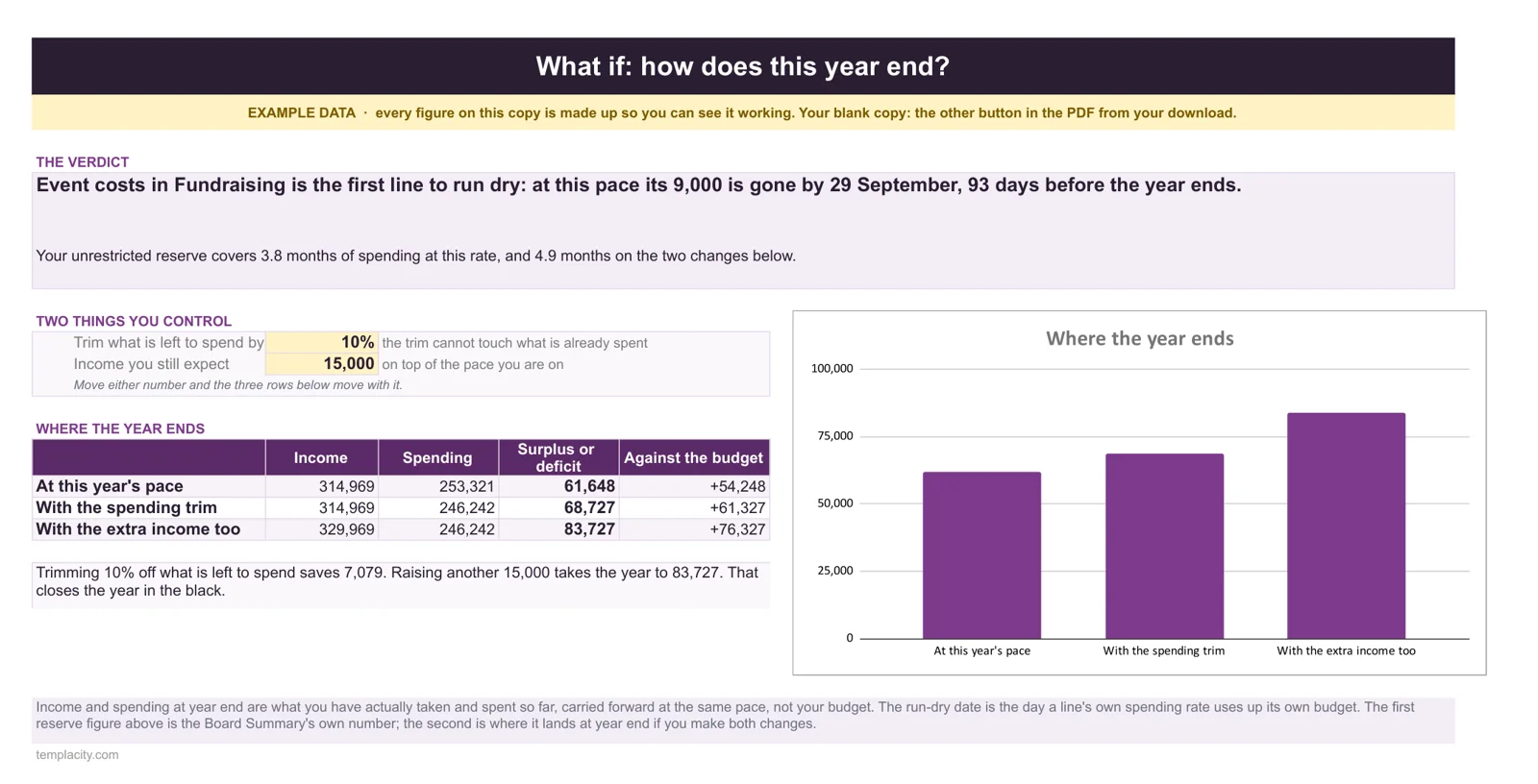
Our Nonprofit Budget & Grant Tracker ($49, Google Sheets and Excel) tells you the first budget line to run dry and the day it does, and how many months of reserve you are holding. Underneath sit a budget by program and fund, every grant from research to final report, and a one-page board summary with the program expense ratio.
A nonprofit budget that shows the unrestricted result next to the surplus will have a harder board meeting once and easier ones after that. Tell us in the comments how your organisation splits shared costs, and which grant report catches you out every year; we read every reply.
FAQ
Common questions, answered briefly
What should a nonprofit budget template include?
How do restricted funds work in a nonprofit budget?
What are functional expenses?
How can a nonprofit have a surplus and still be short of money?
People also ask