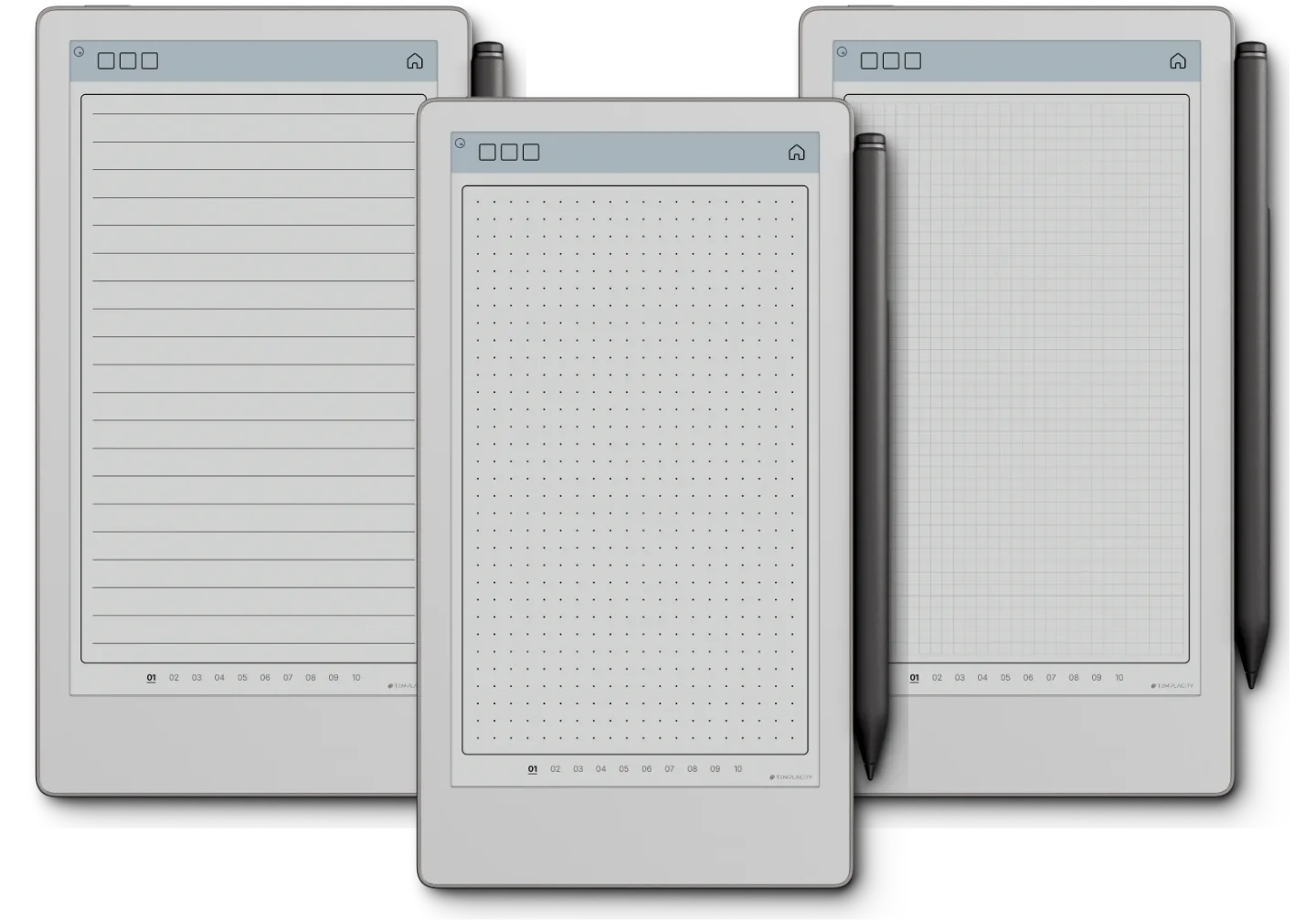
Move Notes is for people who take notes on a reMarkable Paper Pro Move and want ruling drawn for its narrow 7.3-inch page rather than a 10-inch template squeezed onto it. You get three notebooks as three PDFs, dot grid, square grid and lines, in Blue or Blush, undated so they never run out of year.
How each notebook is laid out
Each file is 122 pages: a cover, an index and twelve numbered sets of ten writing pages. The index has a tab for each set, and every writing page carries tabs to the other nine in its set and one back to the index, so a class, a client or a project gets a set of its own and any page is two taps away.
Which ruling for what
- Lines for meeting notes, drafts and anything written in sentences.
- Dots for bullet journaling, lists and layouts you draw yourself.
- Grid for tables, diagrams and sums that need to line up.
Cut for the Move
The ruling is spaced for the Move’s tall 9:16 screen and shows in colour on it. Import the PDFs with the reMarkable desktop app, tap the index with a fingertip, and export pages back to PDF from the desktop app when you want a copy off the tablet. A Quick Start guide for reMarkable comes with them. On another reMarkable, the reMarkable 2, Paper Pure and Paper Pro each have their own Notes.