Which models
Which Kindles play audiobooks, and which do not
You tap Play on an audiobook and the Kindle asks for headphones instead of making a sound. That is how Kindle audiobooks work on every model: Amazon’s user guide for the 2026 Kindle says that to listen to Audible books you must first pair a Bluetooth audio device, such as headphones, speakers or earbuds, and that pressing Play with nothing paired brings up the pairing prompt. So the real question is which Kindles can pair at all.
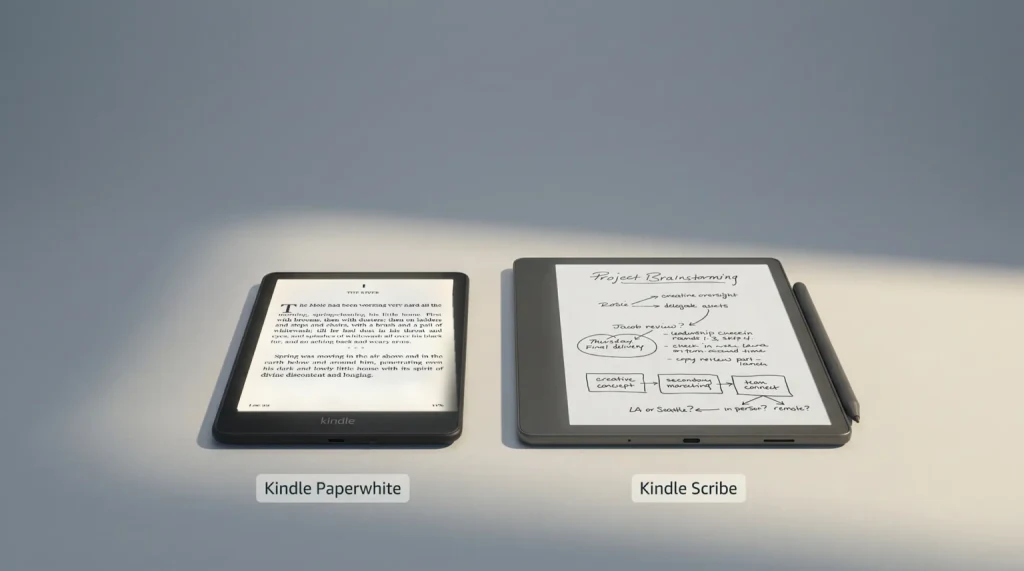
The line is 2016. Amazon’s Bluetooth help page says only Kindles released during or after 2016 support Bluetooth connectivity, and Audible’s device list draws the same line: the Kindle from the 8th generation on, the Kindle Oasis from the 8th generation on, the Paperwhite from the 10th generation on, and every Kindle Scribe and Colorsoft. Amazon’s user guide for each of those generations carries the same Audible pairing section.
Model by model
Kindle audiobooks and read-aloud, by generation
The Bluetooth line is 2016. What each model does with it differs.
Works Partly, see the note Does not
Every tick needs a paired Bluetooth audio device. Amazon’s newer guides list A2DP and AVRCP support, and say play, pause and volume also work from the headphones when they support it.
Verified 17 November 2026 against Audible’s device list and Amazon’s user guide for each generation Every current Kindle, compared
Two rows need a word. The 2016 to 2019 models play Audible, but Assistive Reader does not appear in their user guides, so do not count on it there. And Audible’s help page lists Read & Listen, the switch between a Kindle book and its audiobook, for Kindle e-readers from 2022 on, even though the older guides describe the same headphone icon. Older still, the 2010 Kindle Keyboard and the 2011 Kindle Touch play sound without Bluetooth: Amazon’s identify page lists a headphone jack on the Keyboard and audio capabilities on the Touch, and Audible says you can keep listening on both, though it no longer supports them.
Not sure which one you have? On select models, All Settings, Device Options, Device Info shows the name, and Amazon’s identify page lists every generation with its release year. If you are buying, our Kindle comparison chart has every current model and price.
The steps
How to listen to Kindle audiobooks over Bluetooth
There are two ways in: pair first in Settings, or open the audiobook and pair when the Kindle asks. Amazon’s current guides for the Kindle, Paperwhite, Colorsoft and Scribe give the same steps, and its Bluetooth help page adds the Connect and PIN screens.
Put the headphones or speaker in pairing mode.
Keep them close to the Kindle, and disconnect them from your phone, TV or tablet first: Amazon’s pairing checklist says they should not be paired to another device nearby.
Open the Bluetooth list on the Kindle.
Swipe down from the top of the screen for Quick Actions, tap All Settings, then Wi-Fi & Bluetooth, then Bluetooth Devices. Turn Bluetooth on if it is off, and the Kindle scans for nearby devices.
Tap your device, then Connect.
If the headphones show a PIN code, tap Confirm, then Yes. To remove a pair later, use Forget on its name in the same list.
Open the audiobook and press Play.
Tap Your Library, then Downloaded, and tap the audiobook. With nothing paired, Play brings up the same pairing list, which is the second way in.
The Audible Player then gives you a slider through the downloaded part, 30-second rewind and skip, a speed setting, a chapter list, bookmarks and volume. It also names the Bluetooth device that is connected, and tapping that line connects another device you paired before. Download over Wi-Fi: Amazon calls Audible books large files, and says an audiobook is ready to play once 5% of it has downloaded.
One library detail saves confusion. When you own a Kindle book and its audiobook, they show as one item with a small pair of headphones on the cover; an audiobook you own on its own carries an Audible banner instead, and the library filter can show Audible books only. Deleting the Kindle book of a pair deletes the audiobook with it.
The audio
Where Kindle audiobooks come from: Audible, Kindle+ and Prime
The Kindle plays what is in your library, and there are four ways to put an audiobook there. The first is to buy it. On the Kindle, tap Store: the guides list the Kindle Store and the Audible Store as menu options, and the 2026 Paperwhite guide says the Audible store is only available in the US, UK and Germany. On a Kindle book’s page you can also buy the audiobook as a pair with the ebook. Audible calls that the Add Narration offer, a lower price on the audiobook when you buy it with the matching ebook, and if you make an eligible return of the ebook, Audible refunds the audiobook and removes it.
The second is an Audible membership, which is optional. On Audible’s US plans page today, Standard is $8.99 a month and lets you pick one audiobook a month, yours to listen to while you stay a member. The $14.95 plan is the one where the books stay yours: one credit a month for a title you keep even if you cancel (credits expire 12 months after they are issued), plus the Plus Catalog: thousands of included titles to stream or download in the Audible app. Both plans auto-renew after the 30-day trial.
The third is Kindle+. It costs $11.99 a month plus tax in the US, per Amazon’s explainer, updated on October 22 when the service took its new name, and Amazon says thousands of its ebooks come with a companion audiobook you can switch to at no additional cost. Look for the headphone icon next to the Kindle+ logo, or filter the Kindle+ store by audiobooks; a borrowed title counts toward your 20 at a time. Our Kindle Plus guide covers the rest of the plan.
The fourth comes with Prime. Prime Reading lends up to 10 titles at a time, and Amazon says the selection includes books with Audible Narration. If audiobooks are the reason you are choosing an e-reader at all, our Kobo vs Kindle comparison weighs the Audible link against what Kobo offers.
Read or listen
Switch between reading and listening, or let the Kindle read aloud
Own both versions of a book and you can swap between them without losing your place. While reading, tap the top of the screen, tap the headphone icon and choose Play: Amazon’s help page says the audiobook starts from your last reading page. To go back, tap the screen and tap the book icon or Switch to Reading, and the book opens where you stopped listening. Audible calls this Read & Listen; it used to be called Whispersync for Voice.
No audiobook? Assistive Reader reads the book to you instead, using the Kindle’s own text-to-speech with a synchronized underline. It needs the same paired Bluetooth device, and a book with Enhanced Typesetting (the store page lists it under features) that you bought, borrowed through Kindle+ or Prime Reading, or got through Family Library in your Amazon Family (formerly Amazon Household), in a language the text-to-speech supports. Turn it on inside the book: tap the top center of the screen, then Aa, then More, then Assistive Reader. The player sits at the bottom of the screen, with a speed control and a 30-second rewind.
On a phone or tablet it works differently. Audible’s help page says the Kindle app can play a title’s audio when you own both formats, and the three-dot More menu in a Kindle book has Listen on Audible, which hands you to the Audible app.
Not playing?
Audiobook not playing on your Kindle? What to check
When Kindle audiobooks will not play, the cause is usually the pairing, and Amazon’s guide lists the checks in order. The headphones are on, in pairing mode, close to the Kindle and not paired to a phone, TV or tablet nearby. If all of that is true, tap Rescan, close and reopen the Bluetooth dialog, turn Bluetooth off and on, then restart the Kindle or the headphones. Amazon’s Bluetooth help page adds the latest software update and, as a last step, a factory reset; read our Kindle factory reset guide before you run one.
Some devices will not pair at all: Amazon says pairing a Bluetooth phone, keyboard or mouse is not supported. If the audiobook opens but will not play, it may not be on the device yet. From the library, tap the menu on its cover and choose Download Audible book, or open the Kindle book, tap the headphone icon and tap Download on the cover. And if there is no Audible store at all, check where you are: Amazon’s guides say Audible is not available in all countries, including China.
Which Kindle do you listen on, and what did you pair it with? Tell us in the comments; we add what readers run into to this guide, and the Kindle hub collects the rest of our Kindle guides.
FAQ
Common questions, answered briefly
Can you listen to audiobooks on a Kindle?
Can a Kindle play audiobooks without headphones?
Do I need an Audible membership to listen on a Kindle?
Does Kindle+ include audiobooks?
Why will my Kindle not connect to my headphones?
Stuck on a step we did not cover? Ask in the comments and we will add it.
People also ask