Type the tasks. The Gantt chart draws itself.
Bars shaded by how much is done, late work in red, milestones and a line for today, for one project or all of them. The Tasks tab is the only place you type.
Google Sheets · Excel .xlsx · Blank + filled example
Language
Instant download. Permanent link in your account.
Instant download. Permanent link in your account. Yours forever, no subscription.
You list the work. It draws the plan.
Everything on the right is a formula you never have to touch, in Google Sheets and in Excel alike.
You type
- Each task with its dates and owner
- How far along it is
- What it depends on
It works out
- The Gantt chart, by day or by week
- Late work, flagged in red
- Progress per project
- Milestones in date order
Open any tab. These are the real ones.
Tap a tab, then the picture to read every figure full size.
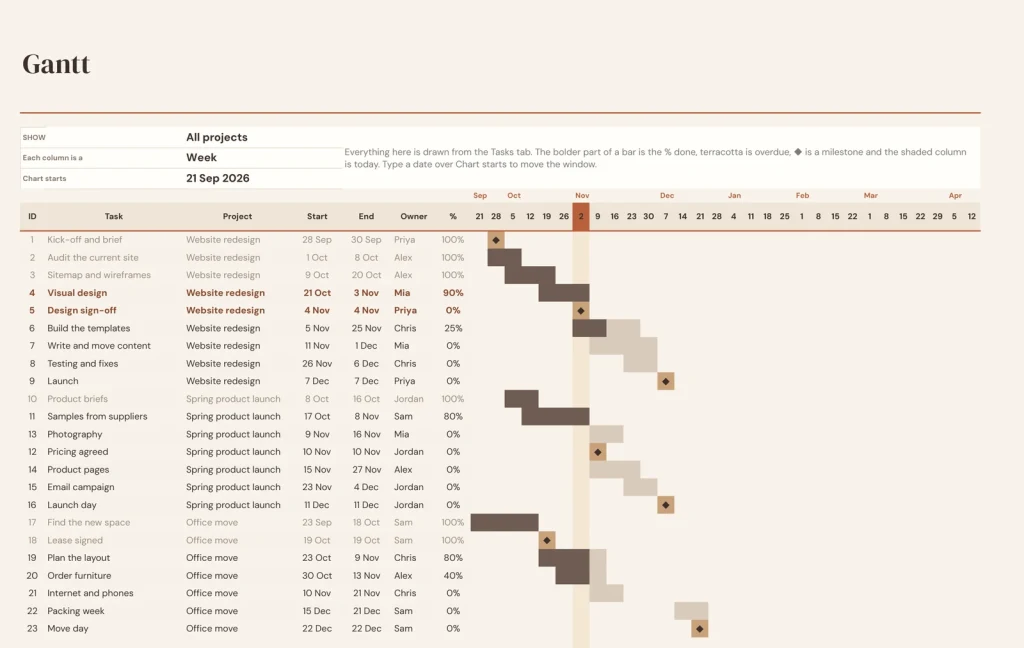
Gantt
The Gantt tab.
The Gantt chart: bars, % done, late work in red, milestones and today.
Tasks
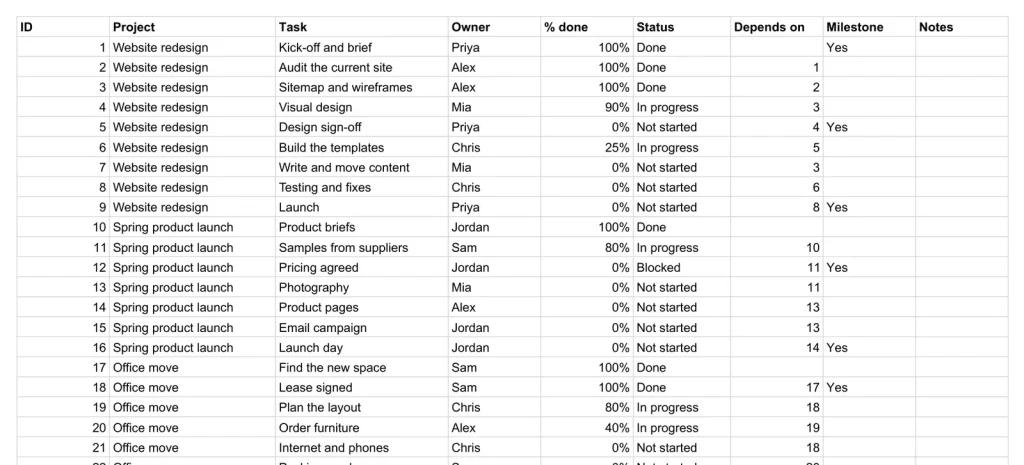
One list runs everything.
Project, owner, start and end dates, % done, status, a dependency and a milestone flag. Health and dependency checks sit beside each row, so a task that starts before the one it waits on is caught. A task with no project, a date typed as words or an end before its start turns red where you typed it, and the Check column says what is missing.
Dashboard
Every project on one page.
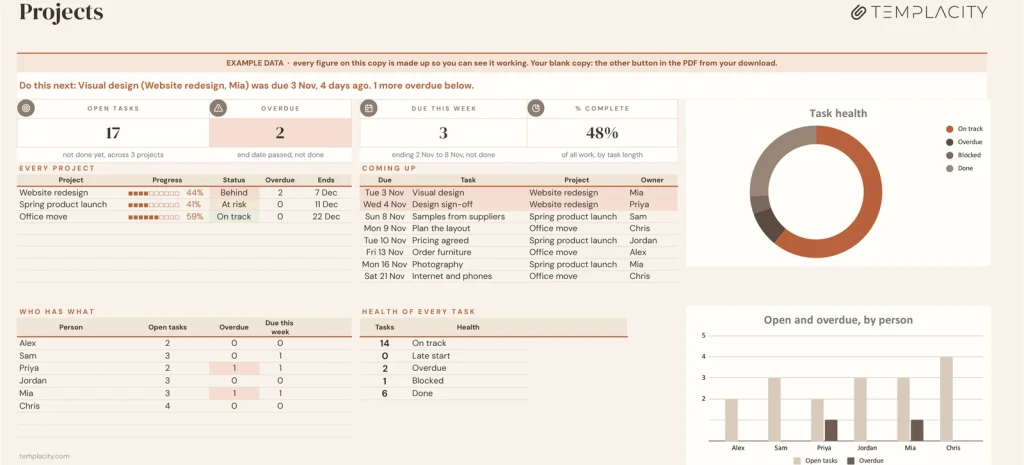
One line at the top says what to do next: the oldest overdue task, then what is blocked and how many tasks wait on it. What is open, what is overdue, what is due this week, % complete, what is coming up and who has what.
Projects
Each project, summed up.
Dates, progress, the overdue count, status and the next milestone for every project, worked out from the task list.
The dates that matter, in order.
The dates that matter, in order..
Every milestone sorted by date, with how far off it is, or how overdue.
Who has what
Who has what.
Open tasks, overdue and due this week for each person, with a row for tasks nobody owns yet.
Light or Night
Light or Night.
Every Google Sheets copy comes twice: a light edition and a Night edition for dark screens. Same tabs, same formulas; keep the one you like looking at. The Excel files are light only.
A plain spreadsheet, and this one.
On the left, the plain tasks list most people keep. On the right, the Dashboard tab. Drag the line.
Google Sheets or Excel. You do not have to choose.
The download carries both: the Sheets copy link and the native .xlsx. Every formula is chosen to work identically in the two, and we test the round trip on every build.
Your first five minutes.
-
1
Buy it once.
¥258, no subscription. Your order email and your account both carry the download, permanently.
-
2
Copy it into your Drive.
One click and it is yours, in your own Google account, forever. We keep no access to your copy and nothing in it phones home.
-
3
Start in the example.
The filled copy shows every tab already working. Poke it, break it, then open your blank and type your own.
Add the rest of the set.
All five goes in as the Freelancer & Solopreneur Kit at ¥868, not five separate items. You keep ¥432.
Also in the Small Business Operations Kit: all four for ¥868, you keep ¥374.
№ · One task list, every project
A project tracker spreadsheet with a Gantt chart that draws itself
The Project Tracker with Gantt is for anyone running several projects at once, a small team, an agency or a busy freelancer, who wants a Gantt chart without project management software. Put your people on Settings and your projects on Projects: a name and a lead is enough.
The only tab you type into
Every task is a row on Tasks: project, owner, start, end, % done, status, the task it depends on and whether it is a milestone. Health fills itself in: Done, Overdue when the end date has passed, Late start when it should have started and is still at 0%, or On track. A task that starts before the one it depends on has ended is flagged in the Check column, so a slipped date shows you what it knocks on.
What it draws from that
- Gantt: bars with % done, late work in red, milestones and today, for one project or all of them, by day or by week.
- Projects: each project’s dates, progress, overdue count, status and next milestone. Progress is weighted by each task’s length, so a month of work counts for more than a one-day task.
- Dashboard: open, overdue and due this week, % complete, milestones in the next 30 days, and who has what.
The download is a short PDF with two Google Sheets buttons, one for a blank copy in your own Drive and one for a copy filled with an example, the same workbook as blank and example Excel files, and a one-page Quick Start for each.
Planning on a tablet or on paper instead? Find your planner in 60 seconds.
The questions we actually get
Do I have to draw the Gantt chart?
No. It is drawn from the start and end dates on Tasks. Pick a project or all of them, and days or weeks.
Does it handle task dependencies?
Yes. Point Depends on at another task's ID. If a task starts before the one it depends on has ended, the Check column flags it.
How is project progress calculated?
Weighted by each task's length, so a month-long task counts for more than a one-day task.
Can I track more than one project?
Yes. Every task belongs to a project on the Projects tab, and the Dashboard and Gantt show one or all of them.
Does it work in Excel?
Yes. The download carries native .xlsx files, one blank and one filled with an example, for Excel 2010 and later, Excel for Mac and Microsoft 365. Every formula is ordinary Excel, with no macros to enable.
Is there a year printed in it?
No. No year is printed anywhere in the files, so it starts the day you do and keeps working next year.
The plan, drawn from the list.
A Gantt chart that keeps itself, in Google Sheets and Excel, with a Night edition in Google Sheets, no subscription, no year baked in.
Get the tracker · ¥258Still deciding? Open it live, read‑only. Not the sheet you need? See every spreadsheet template or ask at Templacity Hall.
Be the first to say something.
Nobody has written about this one yet. If it is on your device, yours is the first thing the next person reads.
Instant download.
Your file is in your account the moment you check out, yours to re-download any time. A receipt lands in your inbox, too.
One-time purchase.
No subscription, no annual renewal, no upgrade nags. Pay once and the file is yours.
Quiet, secure checkout.
Stripe. Apple Pay. No spam, no “partners,” no reselling your details. Receipt, file, done.


