
Missing a template? Request it →
Amazon Kindle ScribeAmazon Kindle Scribe
Kindle Scribe Notes
Kindle Scribe template

Kindle Scribe Notes

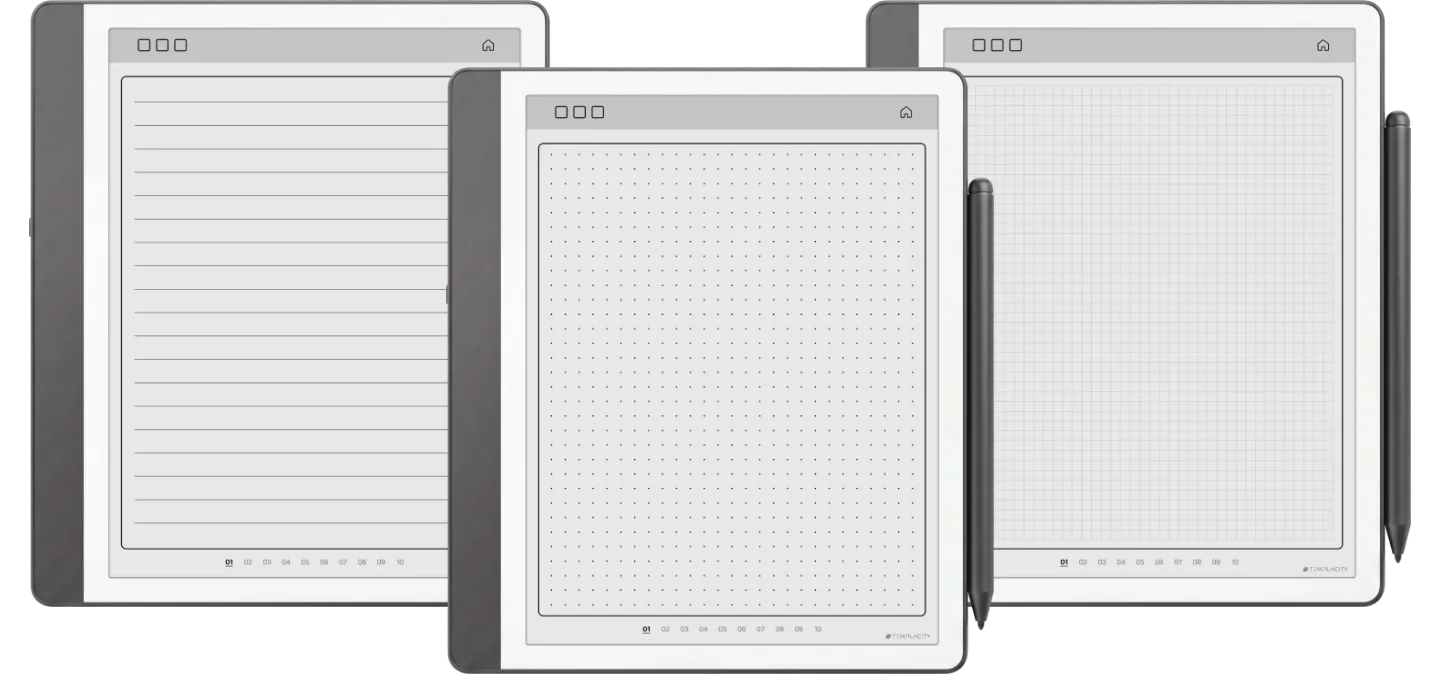
Three notebooks for the Kindle Scribe: dots, grid and lines, 122 pages each, with an index to twelve sets of ten. Undated, in Blue or Blush.

$29.00
Cover colour
  • Made for the Kindle Scribe
  • Instant digital download
  • Re-download any time from your account

What you’re getting

Sized to the Scribe

Drawn for the Scribe writing surface, not the device bezel.

Hyperlinked PDF

Every section header links to the page it names.

Pen-tuned rule lines

Weights and spacing chosen for the Premium Pen.

Instant download

PDF in your account the moment payment clears.

Endless Notebooks Lines, dots, grid

Open notebook, ready when you are.

Three infinite notebooks, one purchase: lines for prose, dots for bullet journaling, grid for sketches and tables. Each is a separate 122 page file, split into twelve sets of ten you title yourself, with an index to every set, so any page is two taps away.

  • i. 122 pages, in twelve sets of ten you name yourself
  • ii. An index to every set, any page two taps away
  • iii. Lines, dots and grid, as three separate files
Kindle Scribe Notes Endless Notebooks page 1

About this template

Kindle Scribe Notes is for people who fill a Scribe with handwritten notes and have lost pages in one long notebook. You get three notebooks as three PDFs, dot grid, square grid and lines, in Blue or Blush, undated so they never run out of year.

Twelve sets of ten

Each file is 122 pages: a cover, an index and twelve numbered sets of ten writing pages. The index has a tab for each set and every writing page has tabs to its set and back to the index, so any page is two taps away.

Give a set to a class, a client or a project and write its name on the index line beside its number.

Which ruling for what

  • Lines for meeting notes, lectures and drafts.
  • Dots for bullet lists and layouts you draw yourself.
  • Grid for tables, diagrams and sums that need to line up.

On a Kindle Scribe

The page is 3:4, the shape of every Scribe screen, so the ruling shows at its intended spacing on a 10.2-inch or an 11-inch model. Send it with Send to Kindle rather than a USB cable: Amazon’s help page says the Scribe cannot write on PDF pages loaded via USB-C.

Tuned for Kindle Scribe

Kindle Scribe templates are drawn for the writing surface, not the device shell. Rule lines are weighted for the Premium Pen, sections are spaced for one-handed reading-then-writing, and the file is hyperlinked throughout, so every section header points at the page it names.

№ · Bought together

Add the rest of the set.

Infinite Notes This item · $29
All four, the full set $39 was $116

All four goes in as the Set at $39, not four separate items. You keep $77.

№ · Questions

Common questions.

How many pages does each notebook have?
122: a cover, an index and twelve numbered sets of ten writing pages. Each ruling is its own file, so the three together give you 360 writing pages.
Which Kindle Scribe does it fit?
Every one. The 10.2-inch Scribes and the 11-inch models from December 2025 all have a 3:4 screen, the shape of the page, so it fills the display with nothing cropped. On a Kindle Scribe Colorsoft the same file shows its accent in colour.
What is in the download?
Three PDFs in the colour you pick, lines, dots and grid, plus a Quick Start guide for Kindle Scribe. They are undated.
What happens when a notebook is full?
Keep the download as your master copy. A Kindle Scribe cannot duplicate PDF pages on the device, so send a renamed copy with Send to Kindle and start a fresh index. The notebooks are undated, so a new copy never runs out of year.
How do I get it onto my Kindle Scribe?
Download it from your Templacity account, then send the PDF with Send to Kindle, from the Send to Kindle web page or app. Do not copy it over a USB cable: Amazon says the Kindle Scribe cannot write directly on PDF pages loaded via USB-C, so a planner copied that way opens but will not take the pen.
Will it show up under Templates on my Scribe?
No, and no bought file can: the Templates list on a Kindle Scribe is closed to files you add. It lives in your Library as a PDF document, which is what keeps its links working.
Is this a one-time purchase?
Yes. You pay once and keep the files, with no subscription. They appear in your Templacity account as soon as payment clears, and we email a backup link.
What if it doesn't work for me?
Digital downloads are non-refundable once delivered, but if you have any problem with the file itself, email us and we'll make it right.
№ · Reviews

Be the first to say something.

Nobody has written about this one yet. If it is on your device, yours is the first thing the next person reads.

Read by a person before it goes up, usually within a day. Your email stays with us and never appears on the page.

Instant download.

Your file is in your account the moment you check out, yours to re-download any time. A receipt lands in your inbox, too.

One-time purchase.

No subscription, no annual renewal, no upgrade nags. Pay once and the file is yours.

Quiet, secure checkout.

Stripe. Apple Pay. No spam, no “partners,” no reselling your details. Receipt, file, done.