Leave that accrues itself. Payroll that adds up.
Log leave requests and pay runs; workdays, balances, what unused PTO is worth and gross to net work themselves out, with a colour-coded leave calendar for the whole team.
Google Sheets · Excel .xlsx · Blank + filled example
Language
Instant download. Permanent link in your account.
Instant download. Permanent link in your account. Yours forever, no subscription.
You log the requests. It keeps the balances.
Everything on the right is a formula you never have to touch, in Google Sheets and in Excel alike.
You type
- Your people and their allowances, once
- Each leave request
- Each pay run
It works out
- Workdays, skipping weekends and holidays
- PTO balances, accrued
- Gross to net, with overtime
- What unused PTO is worth
Open any tab. These are the real ones.
Tap a tab, then the picture to read every figure full size.
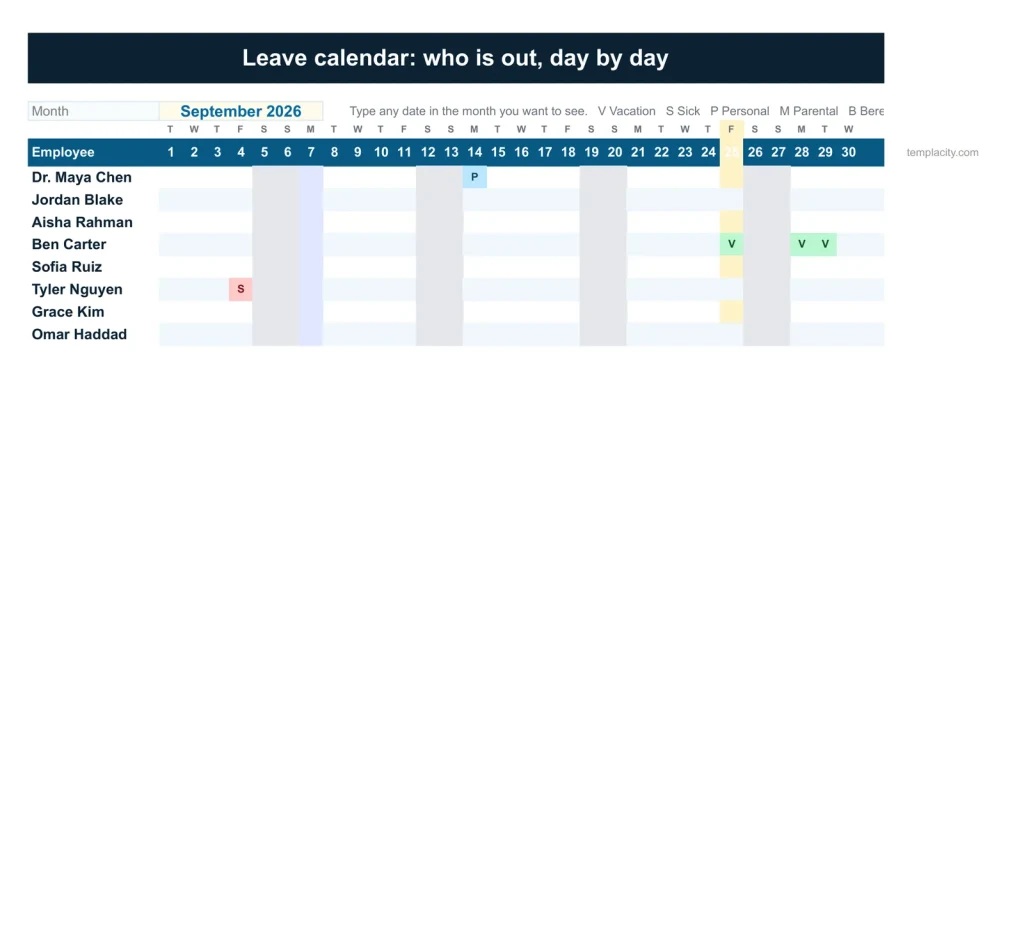
Leave Calendar
The Leave Calendar tab.
The leave calendar: any month, everyone, each day of leave coloured by type.
What If
What does the owed leave cost?
The PTO still owed, as money, today and at the PTO year end, and who ends the year over a carry-over cap. Move the share taken before year end, or the cap.
PTO Balances
Earned, taken and left.
Earned, carried in, taken, booked and left for every person, with sick leave kept apart.
Payroll Register
Every pay run, gross to net.
Hours, overtime, bonus, deductions, gross and net for each person on each run.
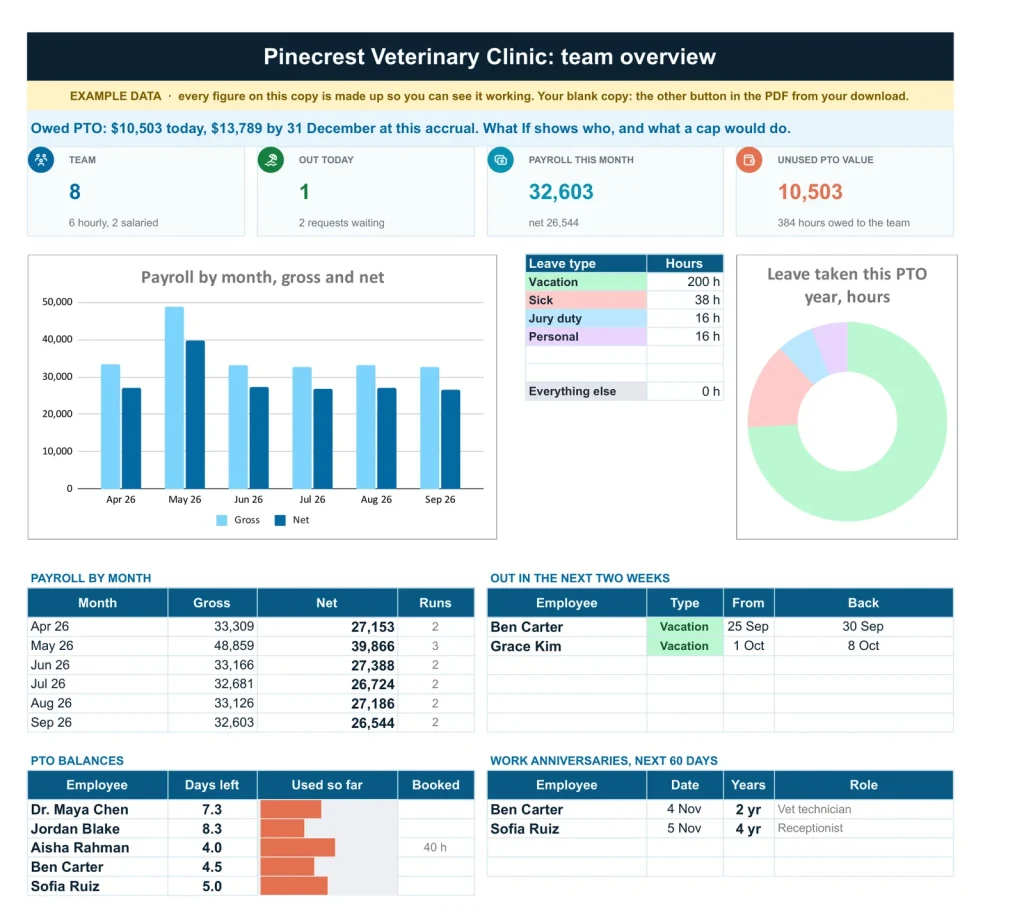
Team overview
Team overview.
Headcount, who is out today, payroll this month, unused PTO value and anniversaries.
Employee records
Employee records.
Role, department, hire date, pay, allowances and cost an hour.
Start here
Start here.
Every tab in one line, then the order to fill it in. The first tab you open, and the only instructions you need.
A plain spreadsheet, and this one.
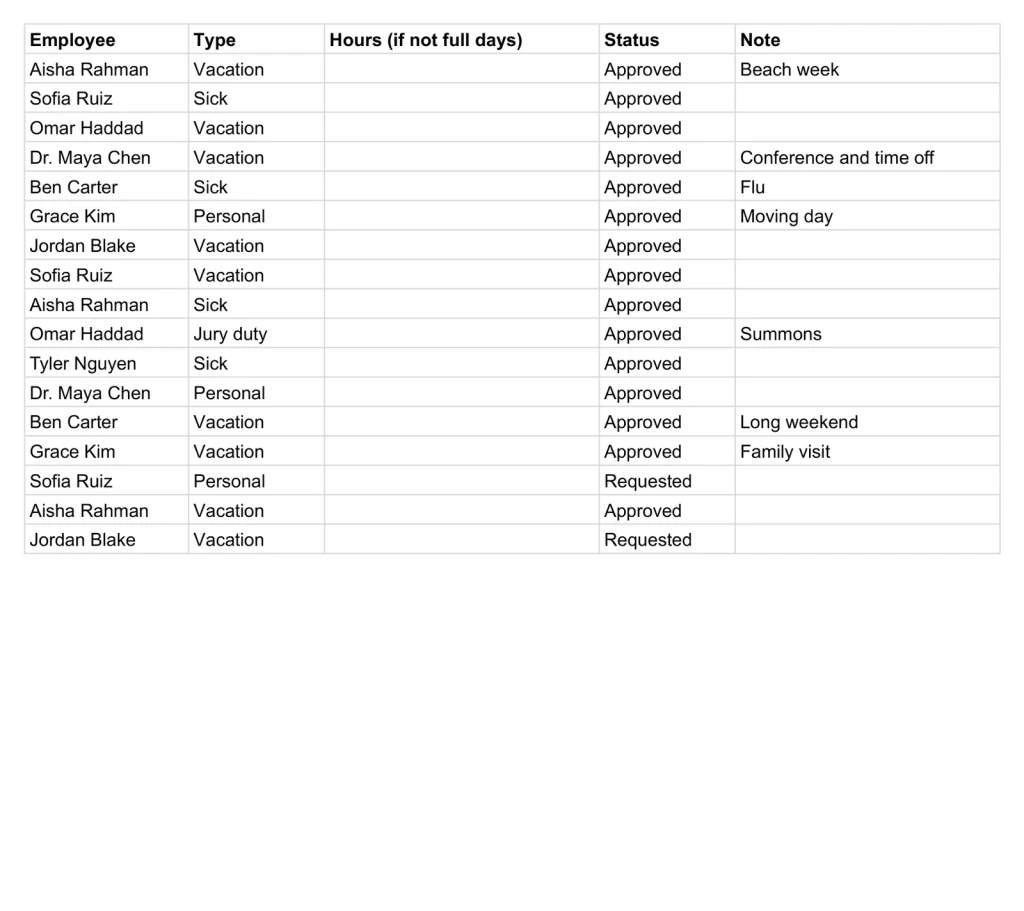
On the left, the plain leave list most people keep. On the right, the Team Overview tab. Drag the line.
Google Sheets or Excel. You do not have to choose.
The download carries both: the Sheets copy link and the native .xlsx. Every formula is chosen to work identically in the two, and we test the round trip on every build.
Your first five minutes.
-
1
Buy it once.
$49, no subscription. Your order email and your account both carry the download, permanently.
-
2
Copy it into your Drive.
One click and it is yours, in your own Google account, forever. We keep no access to your copy and nothing in it phones home.
-
3
Start in the example.
The filled copy shows every tab already working. Poke it, break it, then open your blank and type your own.
№ · Who is in, who is owed
A PTO tracker and payroll register spreadsheet for a team of up to forty
The PTO Tracker, Payroll & Employee Records is for a small business owner or office manager who runs leave and pay runs without HR software. On Settings, choose when the PTO year starts, whether PTO is given monthly or all at once, your pay frequency (biweekly to start) and overtime multiplier (1.5), and your holidays. Then one row per person on Employees: hire date, pay type and rate, hours a day, and their PTO and sick hours a year.
Leave that counts itself
Log every request on Leave Log with its type. Workdays are counted for you, skipping weekends and your holidays; type hours only for a part day. Set a request to Approved and it comes off the right balance and shows on the Leave Calendar, colour-coded by type. PTO and sick leave have their own balances; parental leave, jury duty and unpaid leave are recorded but never counted against one.
Pay runs and what the owed time is worth
Payroll Register takes one line per person per pay run: hours, overtime at your multiplier, bonus and deductions to gross and net. Salaried pay fills in from the pay frequency. What If says what the owed PTO is worth if paid out today, what it grows to by the end of the PTO year, and who ends the year over a carry-over cap. The file keeps records and does sums; withholding comes from your payroll provider or official tables.
The download is a short PDF with two Google Sheets buttons, one for a blank copy in your own Drive and one for a copy filled with an example, the same workbook as blank and example Excel files, and a one-page Quick Start for each.
The questions we actually get
How does PTO accrue?
Your choice on Settings. Monthly: each person earns a twelfth of their yearly hours at the start of every month, from their hire date if they joined this year. At year start: the whole year on day one, prorated for new hires.
Does it calculate tax withholding?
No. It keeps records and does the sums. Type withholding and other deductions from your payroll provider or the official tables.
How many employees does it hold?
Up to forty.
What happens at the end of the PTO year?
Balances reset with the new PTO year. Type what each person carries over into PTO carried in, and What If shows beforehand who would end the year over a carry-over cap.
Does it skip public holidays?
Yes. Leave days are counted without weekends and the holidays on Settings. The list works out this year's dates, and you can add your own.
Does it work in Excel?
Yes. The download carries native .xlsx files, one blank and one filled with an example, for Excel 2010 and later, Excel for Mac and Microsoft 365. Every formula is ordinary Excel, with no macros to enable.
Is there a year printed in it?
No. No year is printed anywhere in the files, so it starts the day you do and keeps working next year.
Leave and pay, kept straight.
PTO, payroll and records, in Google Sheets and Excel, no subscription, no year baked in.
Get the tracker · $49Still deciding? Open it live, read‑only. Not the sheet you need? See every spreadsheet template or ask at Templacity Hall.
Be the first to say something.
Nobody has written about this one yet. If it is on your device, yours is the first thing the next person reads.
Instant download.
Your file is in your account the moment you check out, yours to re-download any time. A receipt lands in your inbox, too.
One-time purchase.
No subscription, no annual renewal, no upgrade nags. Pay once and the file is yours.
Quiet, secure checkout.
Stripe. Apple Pay. No spam, no “partners,” no reselling your details. Receipt, file, done.


