Log the sets. Watch the lifts climb.
One row per set, and each lift's estimated one-rep max, weekly volume, sets per muscle group and new records fill themselves in.
Google Sheets · Excel .xlsx · Blank + filled example
Language
Instant download. Permanent link in your account.
Instant download. Permanent link in your account. Yours forever, no subscription.
You lift and log. It keeps score.
Everything on the right is a formula you never have to touch, in Google Sheets and in Excel alike.
You type
- Each set: reps, weight and effort
- Your program
- Your weigh-ins
It works out
- Estimated one-rep max, lift by lift
- Weekly volume and sets per muscle group
- New personal records, flagged
- Your record board
Open any tab. These are the real ones.
Tap a tab, then the picture to read every figure full size.
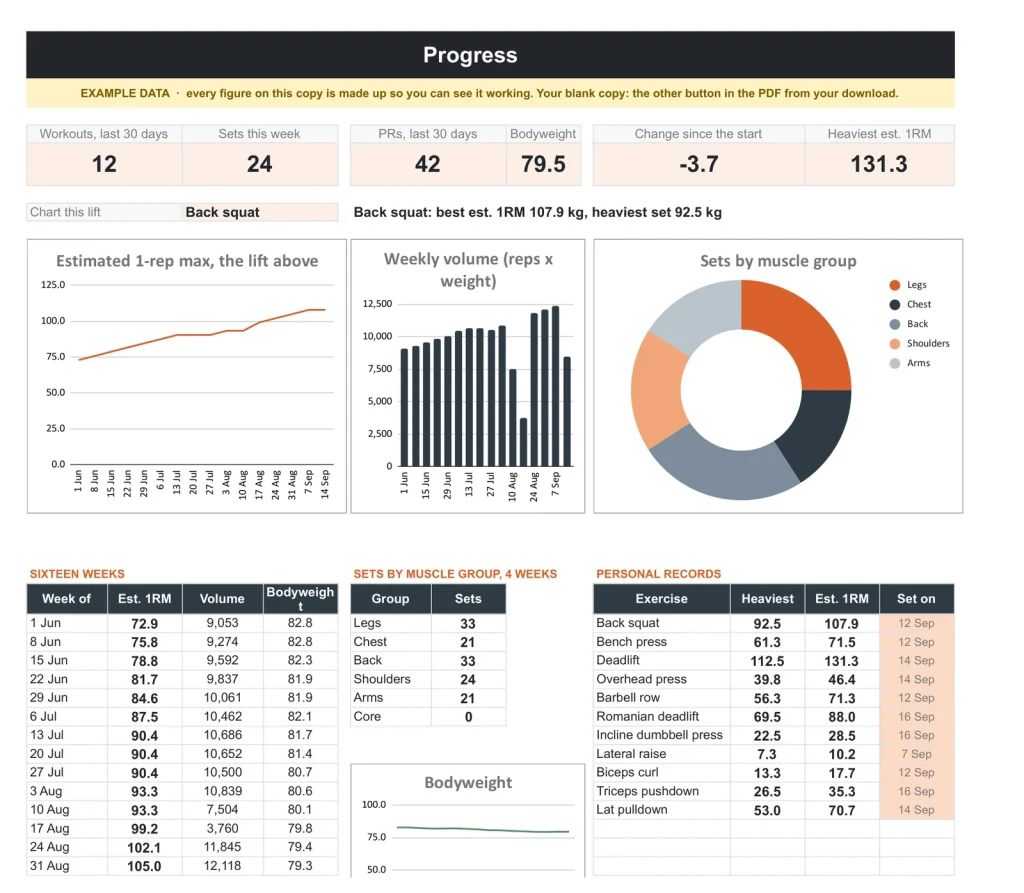
Progress
The Progress tab.
Progress: a lift's estimated one-rep max over time, weekly volume and your records.
Log
One row per set.
Date, exercise, reps, weight and effort. Estimated one-rep max, volume and a new-record flag work themselves out.
Program
Your program by training day.
Each exercise with the last date you did it and your best lift beside it, so you know what to beat.
Body
Weigh-ins and measurements.
Bodyweight and measurements over time, against the goal you set.
Exercises
Your exercise library.
Every exercise with its muscle groups, the sets you have logged and your best.
A plain spreadsheet, and this one.
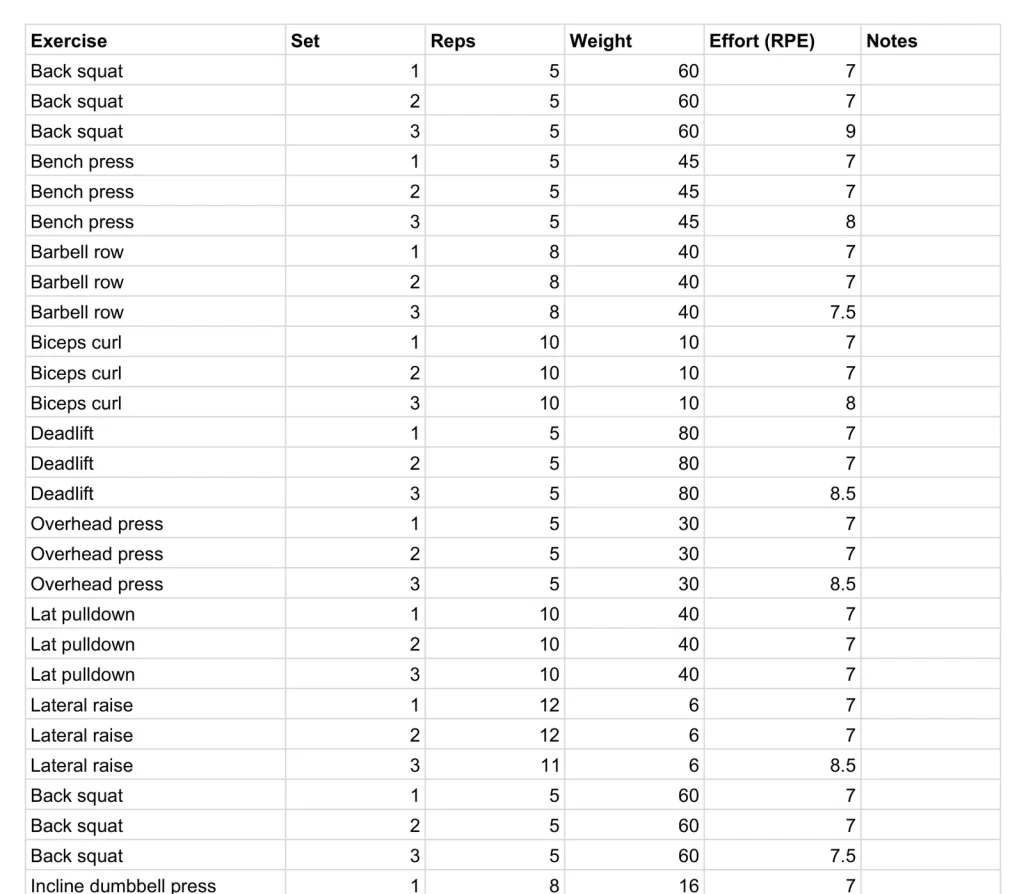
On the left, the plain sets and reps list most people keep. On the right, the Progress tab. Drag the line.
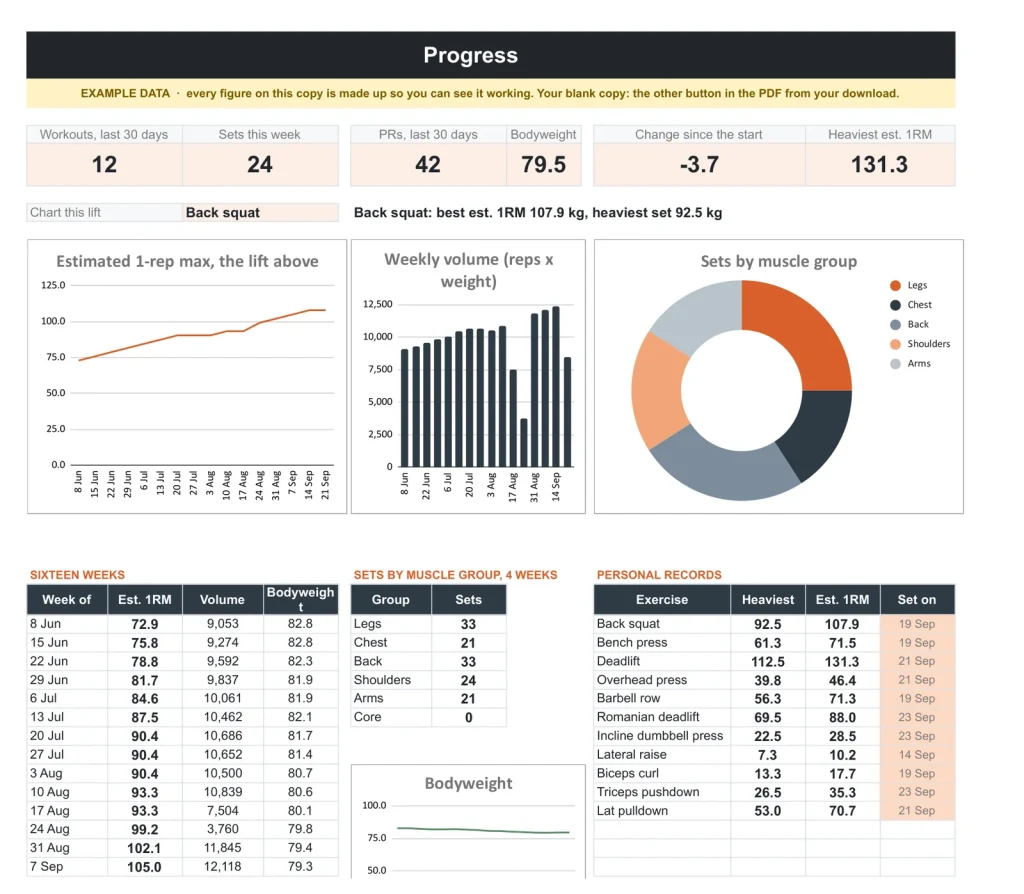
Google Sheets or Excel. You do not have to choose.
The download carries both: the Sheets copy link and the native .xlsx. Every formula is chosen to work identically in the two, and we test the round trip on every build.
Your first five minutes.
-
1
Buy it once.
$29, no subscription. Your order email and your account both carry the download, permanently.
-
2
Copy it into your Drive.
One click and it is yours, in your own Google account, forever. We keep no access to your copy and nothing in it phones home.
-
3
Start in the example.
The filled copy shows every tab already working. Poke it, break it, then open your blank and type your own.
№ · Every set, compared
A workout tracker spreadsheet that compares every set by estimated one-rep max
The Workout Tracker is for people who lift with a plan and want to know whether they are getting stronger, not just busier. Log one row per set: the date, the exercise, the set, reps, weight and effort (RPE). Estimated one-rep max, volume and a new-record flag fill themselves in.
Why estimated 1RM
A set of 8 and a set of 3 cannot be compared by weight alone. The tracker uses the Epley formula, weight times one plus reps over 30, so every set lands on the same line on Progress, with weekly volume, sets per muscle group, bodyweight and your record board beside it. It is an estimate, not a number to test on a whim. Miss a week and the line carries your last numbers through it instead of dropping to zero.
Ready to start
Program comes with a three-day starter plan (Day A, B and C around the squat, bench press, deadlift and overhead press) that you can keep or replace, and shows the last date and best lift beside each exercise. Exercises starts with fifteen common lifts, each with its muscle group, and takes your own. Weights are in kg or lb, and Body keeps weigh-ins and waist, chest, arm and hip measurements. To log fast, copy the last session’s rows, paste them at the bottom and change the date and weights.
Prefer to plan training by hand on a tablet? That is the Digital Workout Planner.
The download is a short PDF with two Google Sheets buttons, one for a blank copy in your own Drive and one for a copy filled with an example, plus the same workbook as blank and example Excel files.
The questions we actually get
How is the one-rep max estimated?
With the Epley formula: weight x (1 + reps / 30). It lets a set of 8 and a set of 3 be compared on one line. It is an estimate, not a target to test.
Kilograms or pounds?
Either. Pick kg or lb on Settings and type every weight in that unit.
Does it come with a program?
Yes, a three-day starter program, Day A, B and C, with sets, reps, targets and rest times. Replace it with your own; training days can also be named Monday to Sunday.
Can I add my own exercises?
Yes. Exercises starts with fifteen common lifts and their muscle groups. Add any lift you do and it appears in the Log and Program dropdowns.
Does it track bodyweight?
Yes. Body keeps weigh-ins, waist, chest, arm and hip measurements and body fat, and Progress shows your bodyweight beside your lifts. Set a goal bodyweight on Settings.
Does it work in Excel?
Yes. The download carries native .xlsx files, one blank and one filled with an example, for Excel 2010 and later, Excel for Mac and Microsoft 365. Every formula is ordinary Excel, with no macros to enable.
Is there a year printed in it?
No. No year is printed anywhere in the files, so it starts the day you do and keeps working next year.
Every set, counted.
A lifting log that shows progress, in Google Sheets and Excel, no subscription, no year baked in.
Get the tracker · $29Still deciding? Open it live, read‑only. Not the sheet you need? See every spreadsheet template or ask at Templacity Hall.
Be the first to say something.
Nobody has written about this one yet. If it is on your device, yours is the first thing the next person reads.
Instant download.
Your file is in your account the moment you check out, yours to re-download any time. A receipt lands in your inbox, too.
One-time purchase.
No subscription, no annual renewal, no upgrade nags. Pay once and the file is yours.
Quiet, secure checkout.
Stripe. Apple Pay. No spam, no “partners,” no reselling your details. Receipt, file, done.


