You ask, we build it. Missing a template? Request it in the Hall and back what we build next.
№ · The Boox Set

Your Boox, your year.

5 (1 review)
Your Boox
Colour
Add to cart, $39

Instant download. Permanent link in your account.

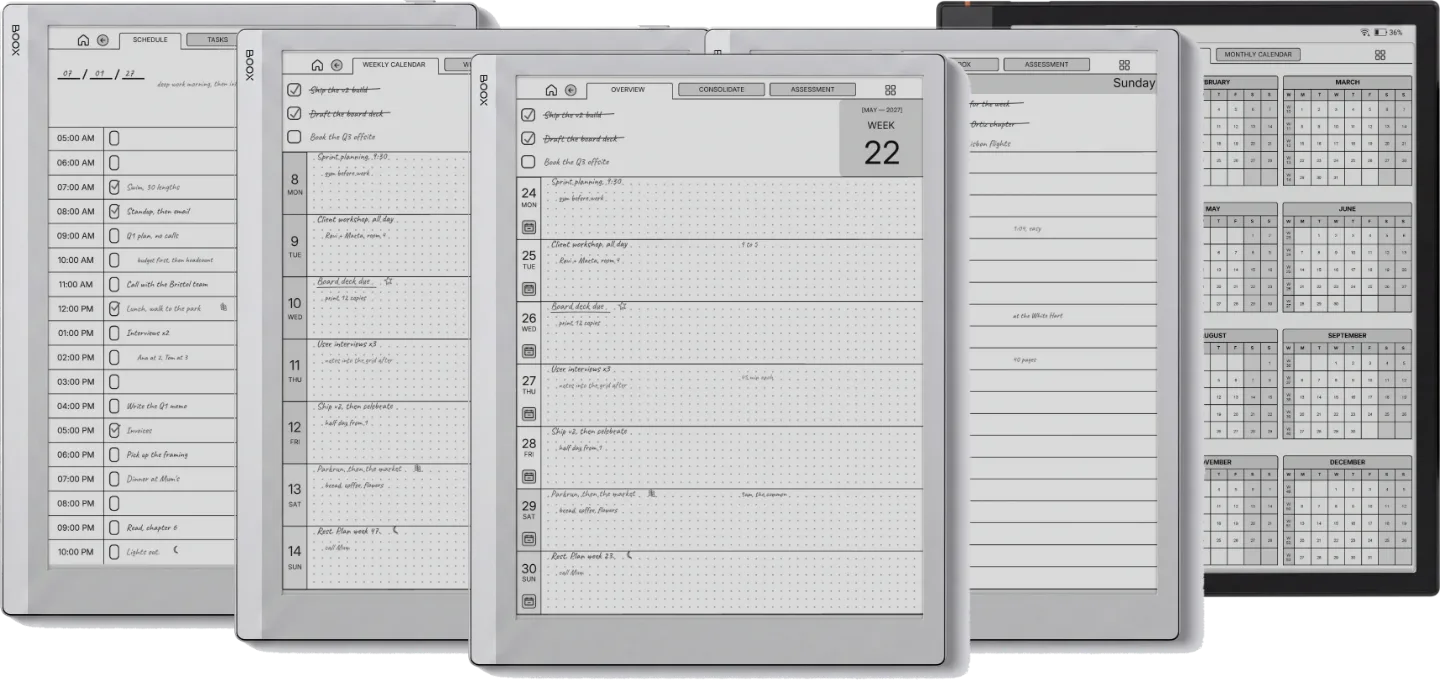
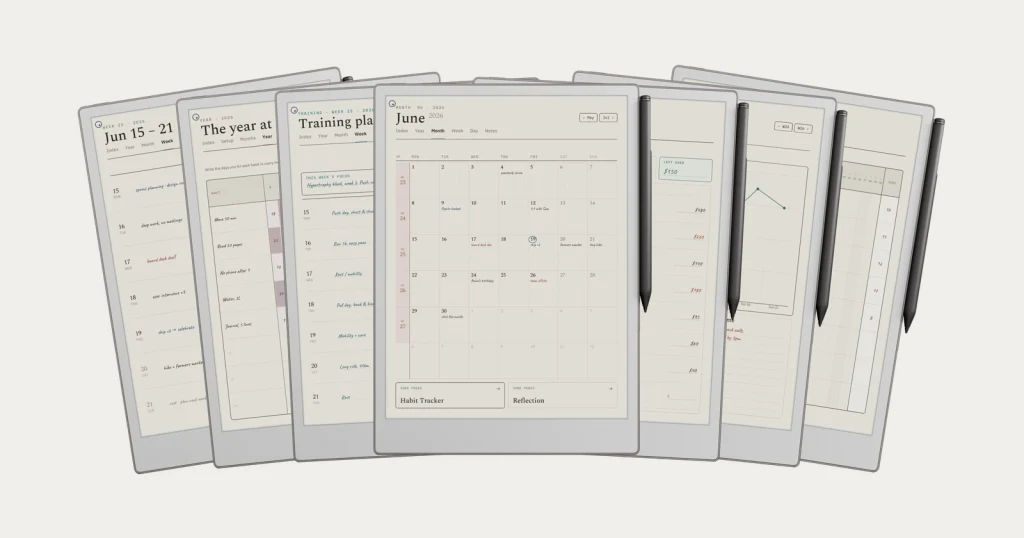
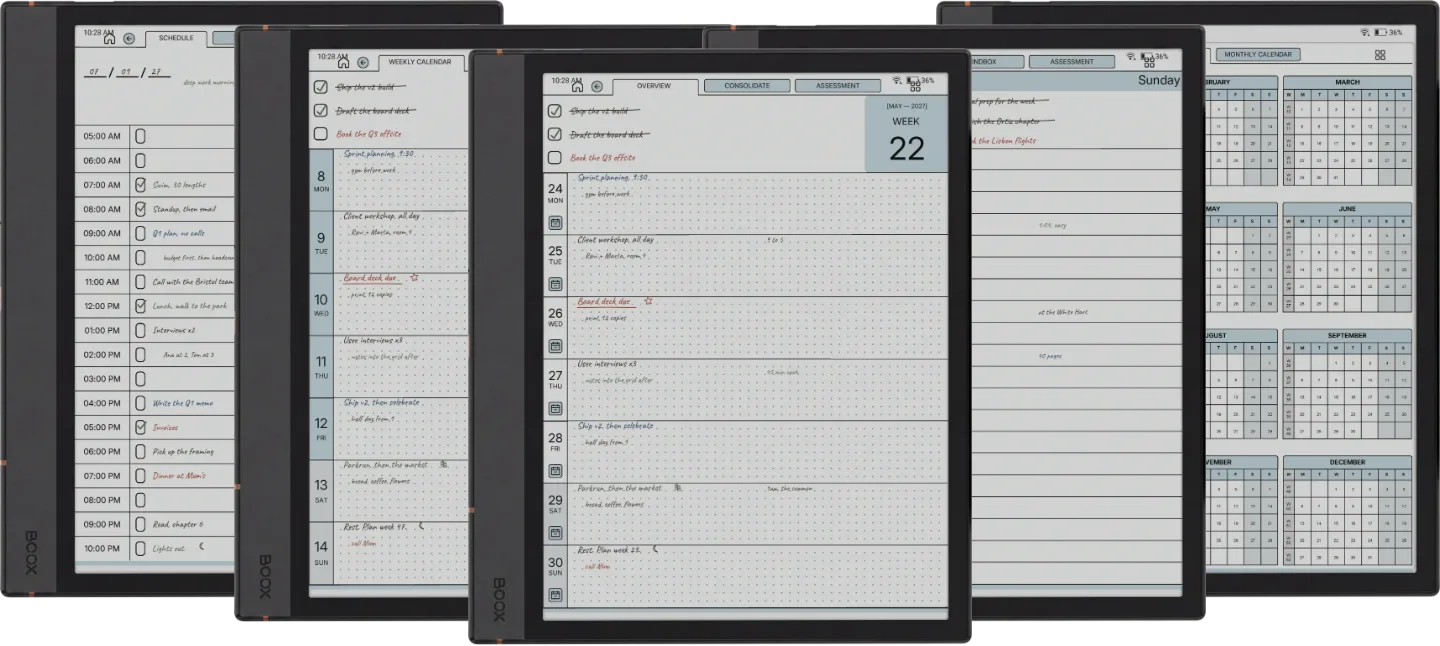
Six templates for a full year of weekly, daily and daybook planning, plus three infinite notebooks: grid, lines, dots. Dated 2026 and 2027, each one its own hyperlinked PDF, sized for 3:4 Boox screens.

  • i. Hyperlinked PDF: taps work between every section
  • ii. Dated 2026 + 2027, no annual re-buy
  • iii. Drawn for your Boox, not a generic stylus
  • iv. Permanent link in your account, no subscription
№ 01 · Why this exists

Most planner PDFs look fine on a monitor and feel wrong on the device.

Generic templates assume a tablet, a finger, and a glossy panel. Boox is none of those things. The refresh is slower; the contrast narrower; the pen feels like a pencil on cartridge. So the layout that looks elegant in a Behance preview can feel laboured at 8am on a Tuesday: letters too thin, taps half a beat behind, scrolling that fights the page.

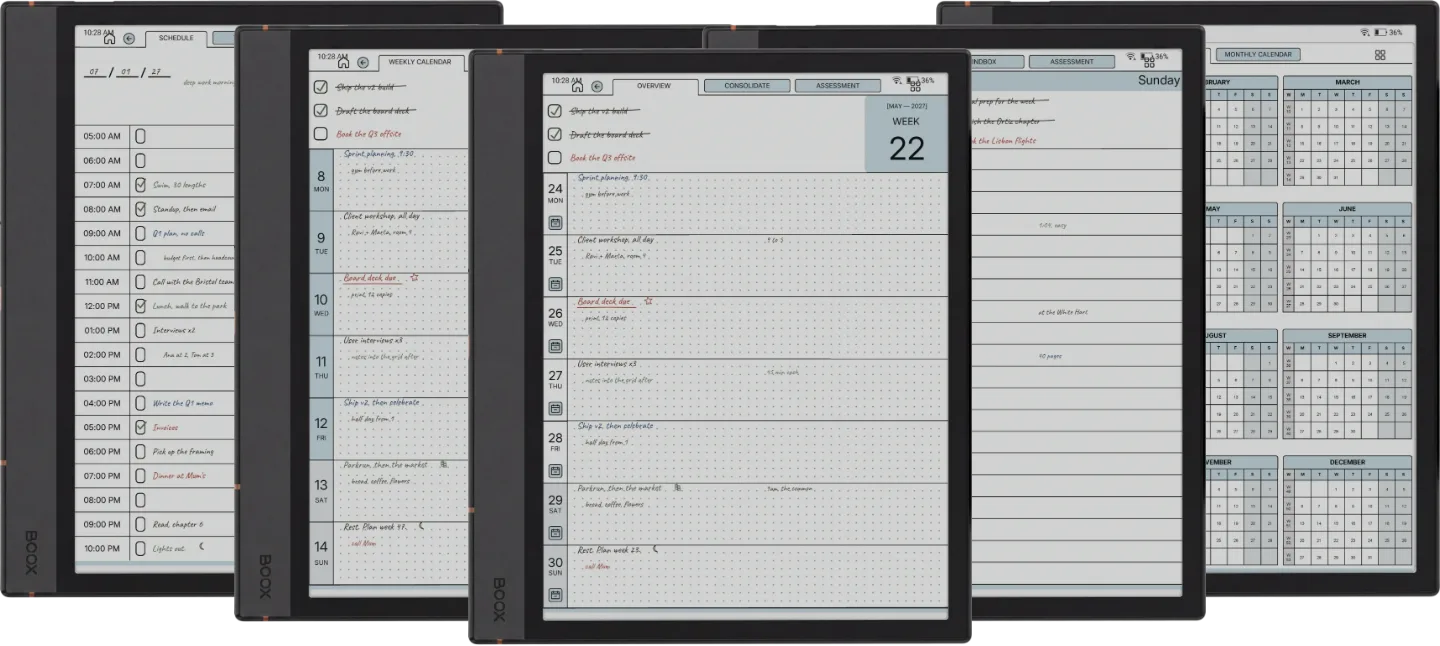
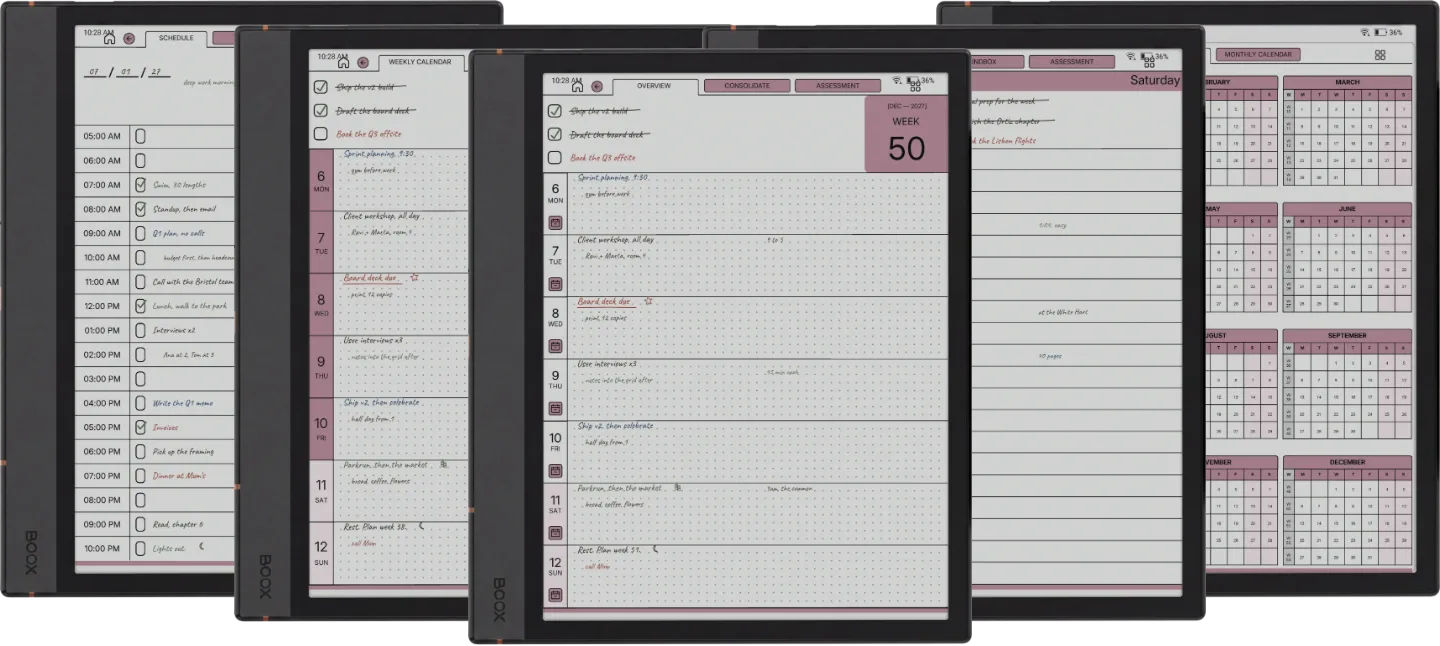
We’ve built the Set with the device on the desk, not the monitor. Six templates, four Boox variants (Note Air4 C, Note Air 3, Go 10.3, Note Max), each tuned to its screen. Same set, drawn for colour or mono. The right one for the Boox you’re looking at.

№ 02 · Inside the bundle

Three planners, drawn together.

The Weekly Planner 554 pages

The week, at a glance.

Dated 2026 + 2027, Monday or Sunday start. One page per week, seven dot-grid day rows, hyperlinked across months. Built so the year doesn’t disappear behind the day.

  • i. One page per week, seven day rows
  • ii. Monday or Sunday start
  • iii. Hyperlinked across months and years
Weekly Planner Boox Note Air4 C page 1Weekly Planner Boox Note Air4 C page 1
Weekly Planner Boox Note Air4 C page 2Weekly Planner Boox Note Air4 C page 2
Weekly Planner Boox Note Air4 C page 3Weekly Planner Boox Note Air4 C page 3
Weekly Planner Boox Note Air4 C page 4Weekly Planner Boox Note Air4 C page 4
Weekly Planner Boox Note Air4 C page 5Weekly Planner Boox Note Air4 C page 5
Weekly Planner Boox Note Air4 C page 6Weekly Planner Boox Note Air4 C page 6
Weekly Planner Boox Note Air 3 page 1
Weekly Planner Boox Note Air 3 page 2
Weekly Planner Boox Note Air 3 page 3
Weekly Planner Boox Note Air 3 page 4
Weekly Planner Boox Note Air 3 page 5
Weekly Planner Boox Note Air 3 page 6
Weekly Planner Boox Go 10.3 page 1
Weekly Planner Boox Go 10.3 page 2
Weekly Planner Boox Go 10.3 page 3
Weekly Planner Boox Go 10.3 page 4
Weekly Planner Boox Go 10.3 page 5
Weekly Planner Boox Go 10.3 page 6
Weekly Planner Boox Note Max page 1Weekly Planner Boox Note Max page 1
Weekly Planner Boox Note Max page 2Weekly Planner Boox Note Max page 2
Weekly Planner Boox Note Max page 3Weekly Planner Boox Note Max page 3
Weekly Planner Boox Note Max page 4Weekly Planner Boox Note Max page 4
Weekly Planner Boox Note Max page 5Weekly Planner Boox Note Max page 5
Weekly Planner Boox Note Max page 6Weekly Planner Boox Note Max page 6
The Daily Planner 1,330 pages

The page you’ll open first thing.

Three-thing day at the top, an hourly column from 5am to midnight with a tick box on every hour. A priority matrix and a quarter review are one tap away. The default for a reason.

  • i. Three-thing day, what you’ll be glad you did
  • ii. Hourly rows from 5am to midnight
  • iii. A priority matrix: do now, schedule, delegate, later
Daily Planner Boox Note Air4 C page 1Daily Planner Boox Note Air4 C page 1
Daily Planner Boox Note Air4 C page 2Daily Planner Boox Note Air4 C page 2
Daily Planner Boox Note Air4 C page 3Daily Planner Boox Note Air4 C page 3
Daily Planner Boox Note Air4 C page 4Daily Planner Boox Note Air4 C page 4
Daily Planner Boox Note Air4 C page 5Daily Planner Boox Note Air4 C page 5
Daily Planner Boox Note Air4 C page 6Daily Planner Boox Note Air4 C page 6
Daily Planner Boox Note Air 3 page 1
Daily Planner Boox Note Air 3 page 2
Daily Planner Boox Note Air 3 page 3
Daily Planner Boox Note Air 3 page 4
Daily Planner Boox Note Air 3 page 5
Daily Planner Boox Note Air 3 page 6
Daily Planner Boox Go 10.3 page 1
Daily Planner Boox Go 10.3 page 2
Daily Planner Boox Go 10.3 page 3
Daily Planner Boox Go 10.3 page 4
Daily Planner Boox Go 10.3 page 5
Daily Planner Boox Go 10.3 page 6
Daily Planner Boox Note Max page 1Daily Planner Boox Note Max page 1
Daily Planner Boox Note Max page 2Daily Planner Boox Note Max page 2
Daily Planner Boox Note Max page 3Daily Planner Boox Note Max page 3
Daily Planner Boox Note Max page 4Daily Planner Boox Note Max page 4
Daily Planner Boox Note Max page 5Daily Planner Boox Note Max page 5
Daily Planner Boox Note Max page 6Daily Planner Boox Note Max page 6
The Daybook 1,965 pages

One day, four tabs.

An hourly schedule from 5am to 10pm, then a tasks page, a finance page and a journal page for the same day, one tap apart. Plan it in the morning, write it down at night.

  • i. Hourly schedule from 5am to 10pm
  • ii. Tasks, finance and journal for every day
  • iii. Four tabs, one tap apart
Daybook Boox Note Air4 C page 1Daybook Boox Note Air4 C page 1
Daybook Boox Note Air4 C page 2Daybook Boox Note Air4 C page 2
Daybook Boox Note Air4 C page 3Daybook Boox Note Air4 C page 3
Daybook Boox Note Air4 C page 4Daybook Boox Note Air4 C page 4
Daybook Boox Note Air4 C page 5Daybook Boox Note Air4 C page 5
Daybook Boox Note Air4 C page 6Daybook Boox Note Air4 C page 6
Daybook Boox Note Air 3 page 1
Daybook Boox Note Air 3 page 2
Daybook Boox Note Air 3 page 3
Daybook Boox Note Air 3 page 4
Daybook Boox Note Air 3 page 5
Daybook Boox Note Air 3 page 6
Daybook Boox Go 10.3 page 1
Daybook Boox Go 10.3 page 2
Daybook Boox Go 10.3 page 3
Daybook Boox Go 10.3 page 4
Daybook Boox Go 10.3 page 5
Daybook Boox Go 10.3 page 6
Daybook Boox Note Max page 1Daybook Boox Note Max page 1
Daybook Boox Note Max page 2Daybook Boox Note Max page 2
Daybook Boox Note Max page 3Daybook Boox Note Max page 3
Daybook Boox Note Max page 4Daybook Boox Note Max page 4
Daybook Boox Note Max page 5Daybook Boox Note Max page 5
Daybook Boox Note Max page 6Daybook Boox Note Max page 6
Plus three Endless Notebooks

Infinite-paging, hyperlinked: lines for prose, dots for diagrams, grid for sketches.

Lines

Prose, meeting notes, anything written long.

Dots

Diagrams, wireframes, bullet journaling.

Grid

Sketches, tables, quiet maths.

Boox Note Air4 C Daily PlannerBoox Note Air4 C Daily Planner
№ 04 · Tuned for the Note Air4 C

Drawn at 3:4, the shape of the Boox Note Air4 C.

10.3″ Kaleido 3 colour e-ink · 300 DPI mono / 150 DPI colour · Pen Plus

Note Air4 C is the colour Boox most people buy. Kaleido 3 is gentler than LCD colour and louder than other colour e-ink, so a saturated file reads wrong on it. These files keep to a warm paper tone and soft accents that sit right on the Kaleido palette, with tap zones sized for the Pen Plus.

Hyperlinked navigation across the six templates. Tap targets sized for the device’s pen, not a generic stylus. Every Boox here shares one 3:4 screen shape, so one set of files fits all four.

Boox Note Air 3 Daily Planner
№ 04 · Tuned for the Note Air 3

Drawn at 3:4, the shape of the Boox Note Air 3.

10.3″ Carta 1200 monochrome e-ink · 300 DPI · BOOX Pen

Note Air 3 is the monochrome Note Air: same 10.3" body as the 4C, but a pure Carta panel instead of the colour Kaleido layer, so contrast is higher and the refresh is quicker. The same 3:4 files read crisp on it: hairline rules that don't shout, tap targets sized for the pen, and soft accents that fall to clean greys. Same six templates, same two years, without a drop of colour.

Hyperlinked navigation across the six templates. Tap targets sized for the device’s pen, not a generic stylus. Every Boox here shares one 3:4 screen shape, so one set of files fits all four.

Boox Go 10.3 Daily Planner
№ 04 · Tuned for the Go 10.3

Drawn at 3:4, the shape of the Boox Go 10.3.

10.3″ Carta 1200 monochrome e-ink · 300 DPI · Pen Plus

Go 10.3 is the mono Boox: Carta 1200 contrast, faster refresh. The rules and headings were drawn light to begin with, so they don't shout on the higher-contrast screen, and the screen carries the detail. The Pen Plus writes a closer-to-pencil line, which suits the hairline grids.

Hyperlinked navigation across the six templates. Tap targets sized for the device’s pen, not a generic stylus. Every Boox here shares one 3:4 screen shape, so one set of files fits all four.

Boox Note Max Daily PlannerBoox Note Max Daily Planner
№ 04 · Tuned for the Note Max

Drawn at 3:4, the shape of the Boox Note Max.

13.3″ Carta 1300 monochrome e-ink · 300 DPI · Pen Plus 2

Note Max is the big-canvas Boox: 13.3", letter-paper feel. Its screen is the same 3:4 shape as the Note Air, so the same files fill it edge to edge with no dead margin, and every page simply gets bigger. The Daybook in particular earns the larger page; morning prompts get room to think, not fill.

Hyperlinked navigation across the six templates. Tap targets sized for the device’s pen, not a generic stylus. Every Boox here shares one 3:4 screen shape, so one set of files fits all four.

№ 05 · How it lands on your device

Three steps, less than a minute.

i.

Download.

Instant download after purchase. Also in your account, forever.

ii.

Send to device.

BooxDrop in the browser, plug in over USB, or sync via the cloud app you already use.

iii.

Open and write.

Opens at the current week, because that’s the week you’re in.

№ 06 · What you actually get

Every file drawn for your device.

Format
Hyperlinked PDF
Pages
3,849 across the three planners · three Endless Notebooks
Years dated
2026 + 2027, both included
Devices
Note Air4 C, Note Air 3, Go 10.3, Note Max, all included
Access
Re-download from your account
Delivery
Instant download · permanent link in your account
№ 07 · Last word

Get the Set.

Six templates, two years, drawn for the Boox on your desk.

$39 $174 separately
Add to cart

We build for the kind of person who’d rather configure something themselves than be told how. Who reads in one app, writes in another, drops files in over a cable. The reason you bought a Boox.

From the studio, on who this is for
№ 99 · Questions

Things you’ll want to know.

What is in the Set?
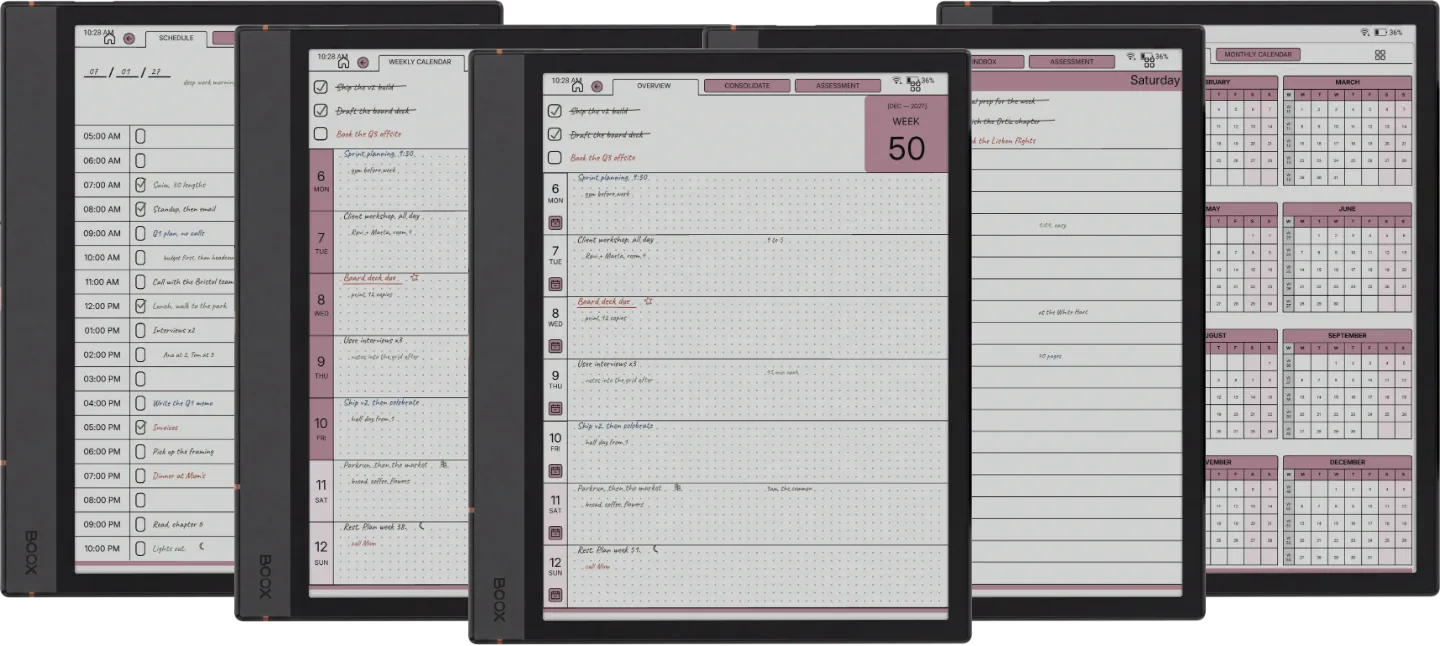
A Weekly Planner, a Daily Planner and a Daybook, each for 2026 and 2027 with a Monday or Sunday start, and three notebooks in lines, dots and grid. Every template is its own PDF, in both Blue and Blush, plus a Quick Start guide for Boox.
Which Boox tablets does it fit?
Any Boox with a 3:4 screen: the Note Air and Go 10.3 models, the Tab Ultra C, the Note Max and Tab X, and the Go 7 and Go Color 7. The device you pick at checkout gets the same files. The Palma, Palma 2 and Palma 2 Pro have phone-shaped screens, so the page letterboxes there.
Is it dated?
The Weekly and Daily planners date every week and day of 2026 and of 2027, each year in its own file. The Daybook's calendars are dated but you date each entry as you start it, and the notebooks are undated.
How do I get it onto my Boox, and which app opens it?
Download it from your Templacity account, then send it with BooxDrop at push.boox.com, copy it over USB, or sync it with a cloud app you already use. Open it in NeoReader, the built-in PDF reader, where the links work. A buyer also confirmed the links work in the Boox Notes app on a Note Air5 C on firmware 4.2.1: find the file in Storage, long-press, then Open With and Notes App.
Can I buy just one template?
Yes. The Weekly, Daily, Daybook and Notes are each sold on their own. The Set costs less than two of them bought separately.
Is this a one-time purchase?
Yes. You pay once and keep the files, with no subscription and no renewals. The download appears in your Templacity account as soon as payment clears, and we email a backup link.
№ · Bundle, or single

Take all six, or one.

Single template
$29
  • i. One template of your choice
  • ii. Hyperlinked PDF
  • iii. Permanent link in your account
  • iv. Drawn for your Boox
Browse single templates
One step up

The Complete System

The Planner, Budget Planner, Habit Tracker, Wellness Planner, Workout Planner and Work Planner, for $99.00. Bought separately the same files come to $213.00.

See what is inside →

№ · The Set, in brief

Boox templates for a dated week, a daily page and a daybook, plus three notebooks

The Boox Set is every Templacity Boox template in one download: a Weekly Planner, a Daily Planner and a Daybook, each for 2026 and for 2027 with a Monday or Sunday start, plus three notebooks in lines, dots and grid. Each one is its own hyperlinked PDF, and every file comes in both accents, Blue and Blush, so you choose on the tablet rather than at checkout.

What each template is

  • Weekly Planner: the week on one page with three goals and a row per day, a memo page behind every day and a weekly review. 554 pages per year.
  • Daily Planner: three goals and an hourly schedule for every day, a notes page and an evening question, under quarter, month and week reviews. 1,330 pages per year.
  • Daybook: entries you title and date yourself, each a schedule, a task list, a spending log and a journal line, 40 a month. Its calendars are dated. 1,965 pages per year.
  • Notes: three undated notebooks of 122 pages, an index to twelve sets of ten.

Which Boox it fits

Every file is drawn at 3:4, the shape of nearly every Boox screen: the 10.3-inch Note Air and Go 10.3, the Tab Ultra C, the 13.3-inch Note Max and Tab X, and the 7-inch Go 7 and Go Color 7, where it scales down. The device you pick at checkout does not change the download: every choice gets the same 3:4 pages. On a colour Boox the accent shows in colour, on a monochrome one in grey. The Palma family is the exception: its phone-shaped screen shows the page with empty bands above and below.

Getting it onto the tablet

Send it with BooxDrop at push.boox.com, copy it over USB, or sync it with a cloud app you already use, then open it in NeoReader, the built-in PDF reader, where the links work. Want one full dated year system with an index, month and day pages in six languages? That is The Planner for Boox, a separate book.
№ · Reviews

What it has been like, in other people’s weeks.

We publish them as written, the three-star ones included. Reviews from a confirmed order carry a verified mark.

5 out of 5

Based on 1 verified purchase.

Used it, and have something to say?

A sentence helps the next person more than anything we could write about our own work.

Write a review
  1. Sudhanva S Kashyap S Kashyap Verified purchase

    5 out of 5.

Add a review

Read by a person before it goes up, usually within a day. Your email stays with us and never appears on the page.

Instant download.

Your file is in your account the moment you check out, yours to re-download any time. A receipt lands in your inbox, too.

One-time purchase.

No subscription, no annual renewal, no upgrade nags. Pay once and the file is yours.

Quiet, secure checkout.

Stripe. Apple Pay. No spam, no “partners,” no reselling your details. Receipt, file, done.