Price the job. Print the quote. Track what it really costs.
Build the estimate once from crew hours and unit costs; the client quote prints from it, and every hour and bill logged afterwards shows whether the job is on budget.
Google Sheets · Excel .xlsx · Blank + filled example
Language
Instant download. Permanent link in your account.
Instant download. Permanent link in your account. Yours forever, no subscription.
You price and log. It watches the margin.
Everything on the right is a formula you never have to touch, in Google Sheets and in Excel alike.
You type
- Your rates and markups, once
- Each job's estimate lines
- Crew hours and bills as they happen
It works out
- A clean client quote, ready to print
- Estimate against actual, per job
- Projected profit and a pace flag
- The price that hits your margin
Open any tab. These are the real ones.
Tap a tab, then the picture to read every figure full size.
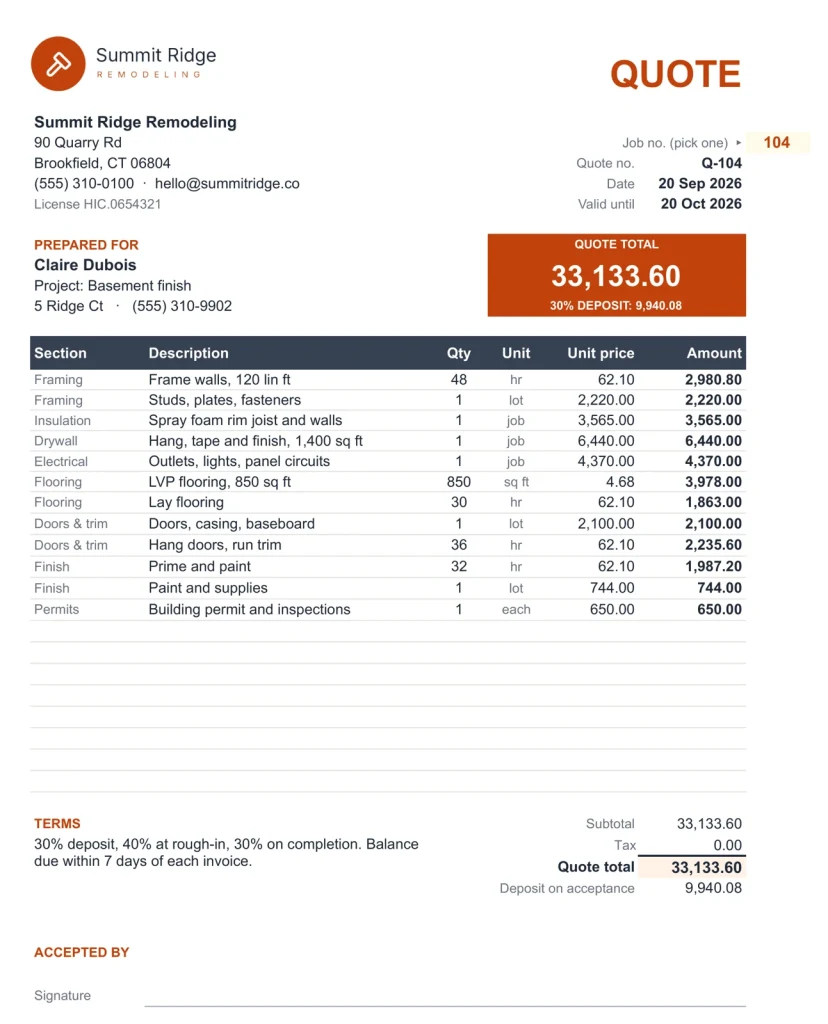
Client Quote
The Client Quote tab.
The client quote: your logo, every line at its price, never your cost or markup.
What If
What the job clears, per day on site.
Pick a job and it says what it clears, what that is per day your crew is on site, and the day its budget runs out. Set the margin you need and it prices the job to hit it.
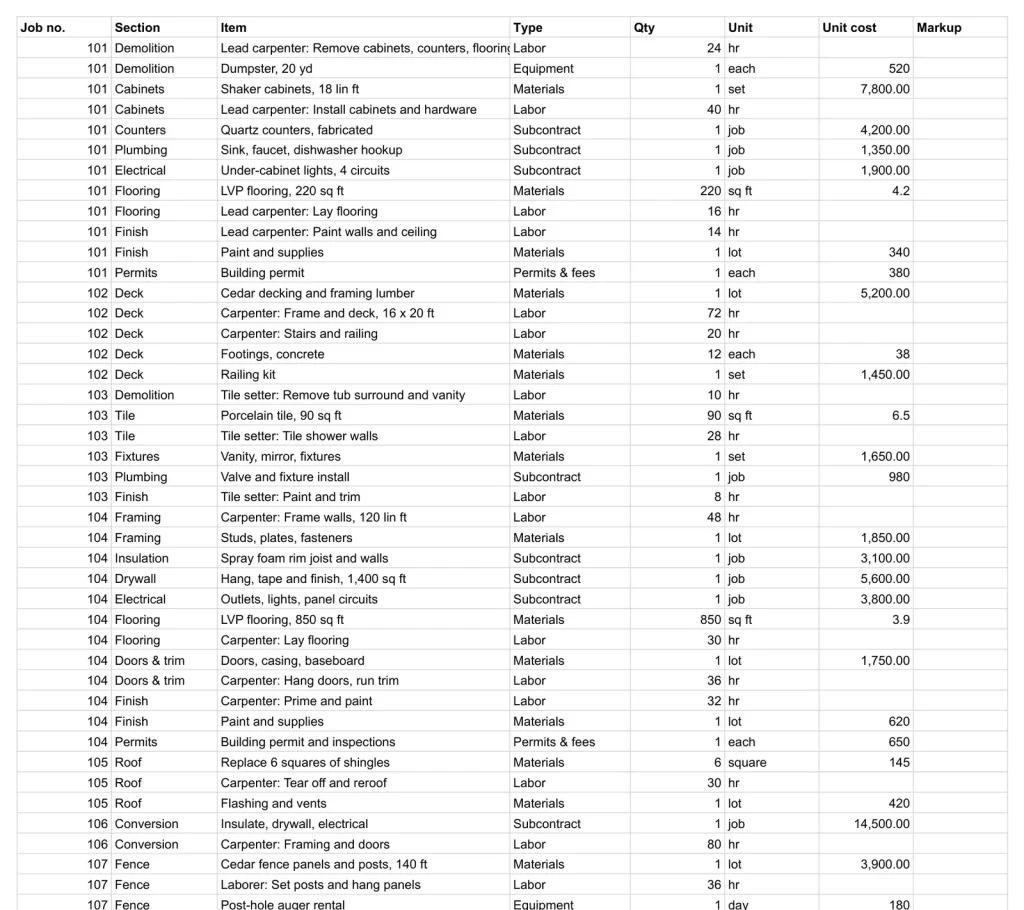
Estimates
Line by line, at your cost and your price.
Each job's lines: section, item, quantity, your cost, markup and price. The quote is built from these.
Job Costing
Estimate against actual.
For any job, the estimate against what it has really cost so far, by cost type.
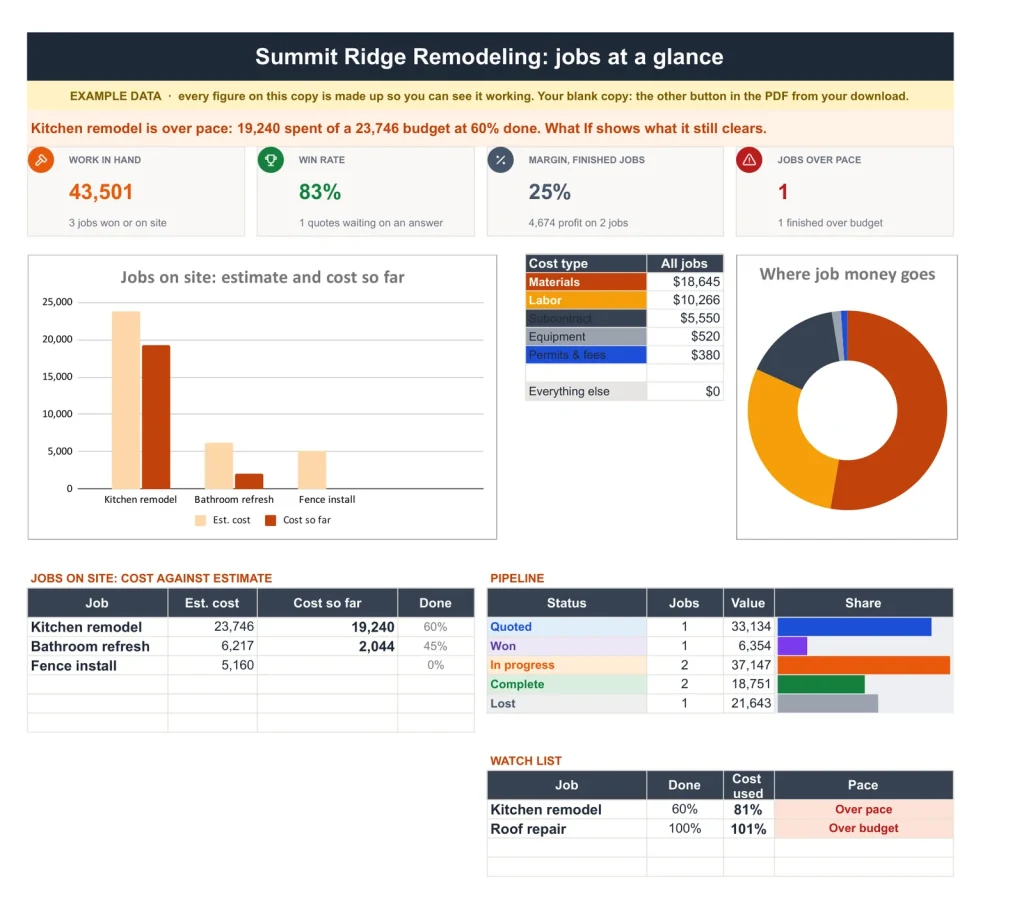
The dashboard
The dashboard.
Work in hand, win rate, margin on finished jobs, jobs over pace and a watch list.
Every job
Every job.
Status, contract, estimated and actual cost, projected profit and a pace flag.
Start here
Start here.
Every tab in one line, then the order to fill it in. The first tab you open, and the only instructions you need.
A plain spreadsheet, and this one.
On the left, the plain job cost list most people keep. On the right, the Dashboard tab. Drag the line.
Google Sheets or Excel. You do not have to choose.
The download carries both: the Sheets copy link and the native .xlsx. Every formula is chosen to work identically in the two, and we test the round trip on every build.
Your first five minutes.
-
1
Buy it once.
$59, no subscription. Your order email and your account both carry the download, permanently.
-
2
Copy it into your Drive.
One click and it is yours, in your own Google account, forever. We keep no access to your copy and nothing in it phones home.
-
3
Start in the example.
The filled copy shows every tab already working. Poke it, break it, then open your blank and type your own.
Add the rest of the set.
All four goes in as the Contractor & Trades Kit at $129, not four separate items. You keep $47.
№ · Price it right, build it on budget
A contractor estimate and job costing spreadsheet that flags a job going over while you can still fix it
The Contractor Estimate & Job Costing is for a builder, remodeler or trade contractor who prices from their own crew costs and wants to know mid-job whether the money is holding. On Rates & Settings, type your company details, a markup for each cost type (labor 35%, materials 20%, subcontract 15% to start) and what an hour of each crew costs you: wage plus payroll costs, not what you charge.
From estimate to quote
Add the job on Jobs, then its lines on Estimates: section, item, type, quantity and your cost. For crew time, start the item with the crew name and a colon, “Carpenter: frame walls”, and it picks up that crew’s rate. Client Quote prints the job with your logo, every line at its price, the total, deposit (30% to start), terms and a signature block. Your cost and markup never show.
While the job runs
Log crew hours and bills on Job Costs, approved change orders join the contract and the budget, and update % done on Jobs. Cost at finish projects from % done, so a job 40% done that has used 55% of its budget is flagged Over pace while there is time to act. What If says what a job clears per day your crew is on site, which can make a short job at 8% beat a long one at 12%.
Running the office too? The Contractor & Trades Spreadsheet Kit adds quotes and POs, crew scheduling and bookkeeping.
The download is a short PDF with two Google Sheets buttons, one for a blank copy in your own Drive and one for a copy filled with an example, the same workbook as blank and example Excel files, and a one-page Quick Start for each.
The questions we actually get
Does the client see my cost or markup?
No. The Client Quote shows unit prices and totals only.
How is labor priced?
Put each crew's hourly cost, wage plus payroll costs, on Rates & Settings. A Labor line on an estimate that starts with that crew's name and a colon picks the rate up, and the labor markup is added to give the price.
How does it know a job is going over?
It projects the cost at finish from % done. A job 40% done that has used 55% of its budget is flagged Over pace on Jobs and the Dashboard.
Does it handle change orders?
Yes. Each has a price to the client and your cost. Approved ones join the contract and the budget, and their margin is shown.
Does it work in Excel?
Yes. The download carries native .xlsx files, one blank and one filled with an example, for Excel 2010 and later, Excel for Mac and Microsoft 365. Every formula is ordinary Excel, with no macros to enable.
Is there a year printed in it?
No. No year is printed anywhere in the files, so it starts the day you do and keeps working next year.
Every job, priced and watched.
Estimates, quotes and job costing, in Google Sheets and Excel, no subscription, no year baked in.
Get the estimator · $59Still deciding? Open it live, read‑only. Not the sheet you need? See every spreadsheet template or ask at Templacity Hall.
Be the first to say something.
Nobody has written about this one yet. If it is on your device, yours is the first thing the next person reads.
Instant download.
Your file is in your account the moment you check out, yours to re-download any time. A receipt lands in your inbox, too.
One-time purchase.
No subscription, no annual renewal, no upgrade nags. Pay once and the file is yours.
Quiet, secure checkout.
Stripe. Apple Pay. No spam, no “partners,” no reselling your details. Receipt, file, done.


