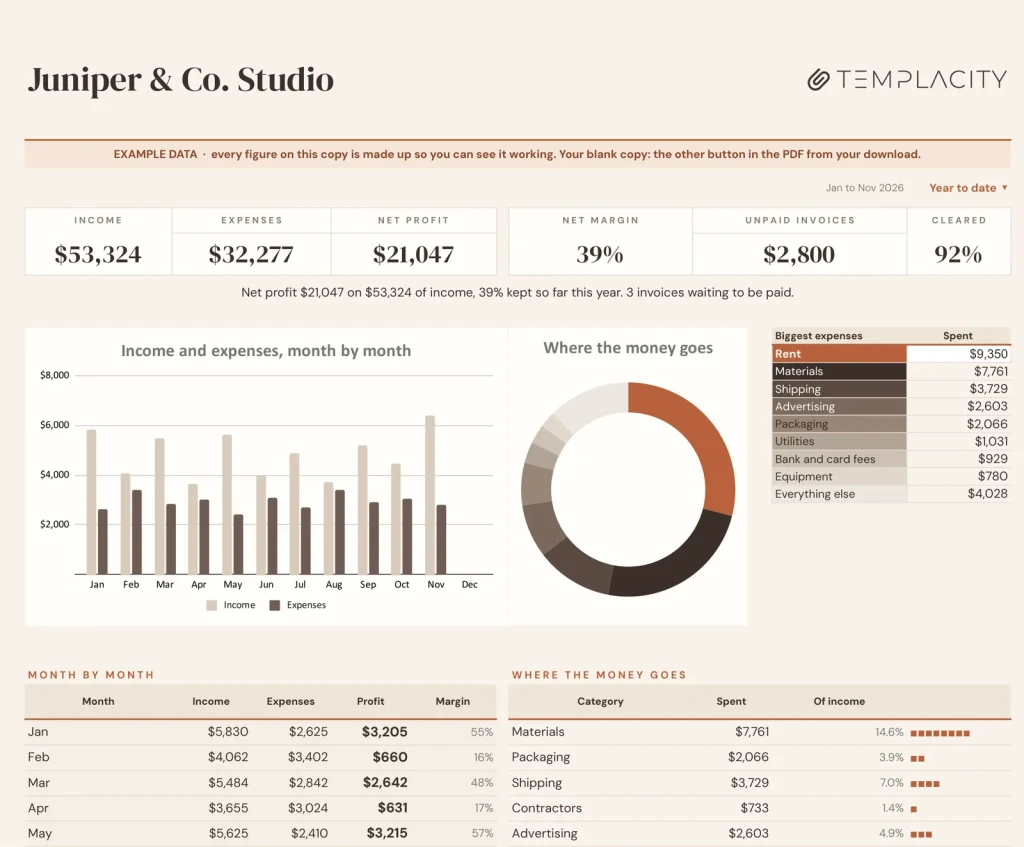
Two logs in. A profit and loss statement out.
Log what comes in and what goes out, and the monthly profit and loss writes itself, with margin, unpaid invoices and where the money goes.
Google Sheets · Excel .xlsx · Blank + filled example
Language
Instant download. Permanent link in your account.
Instant download. Permanent link in your account. Yours forever, no subscription.
You log the money. It does the books.
Everything on the right is a formula you never have to touch, in Google Sheets and in Excel alike.
You type
- What comes in, as it comes in
- What goes out, as it goes out
- Your categories, once
It works out
- Profit and loss, month by month
- Margin, year to date and this month
- Unpaid invoices
- Results by quarter, with two charts
Open any tab. These are the real ones.
Tap a tab, then the picture to read every figure full size.
Dashboard
The Dashboard tab.
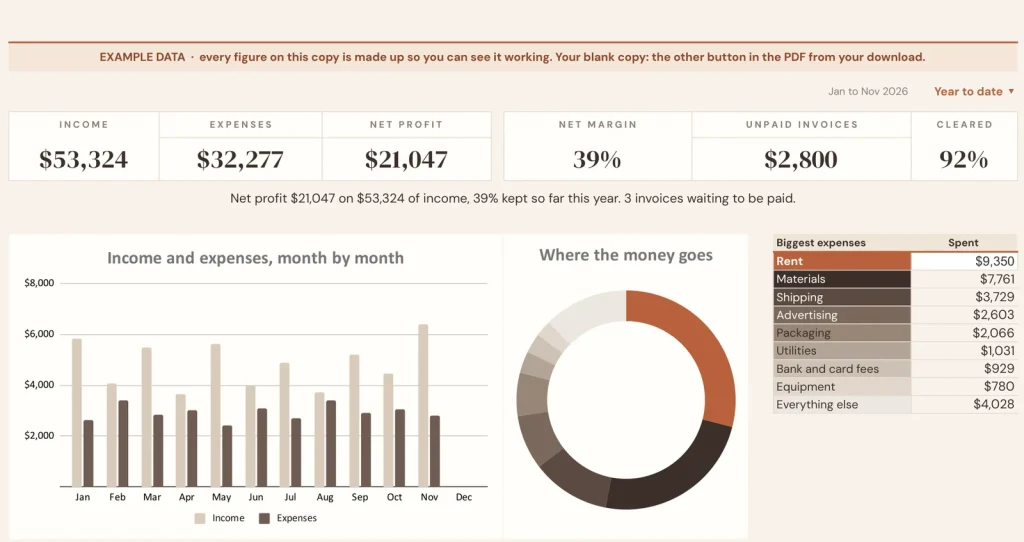
The dashboard: income, expenses, profit and margin, year to date and this month.
Monthly P&L
The statement you would pay someone to write.
Income, cost of sales, gross profit, operating expenses, net profit and margin, month by month, straight from your two logs.
Income
Every payment you receive.
Customer, category, amount, and whether the invoice is paid, so the unpaid ones are one glance away.
Expenses
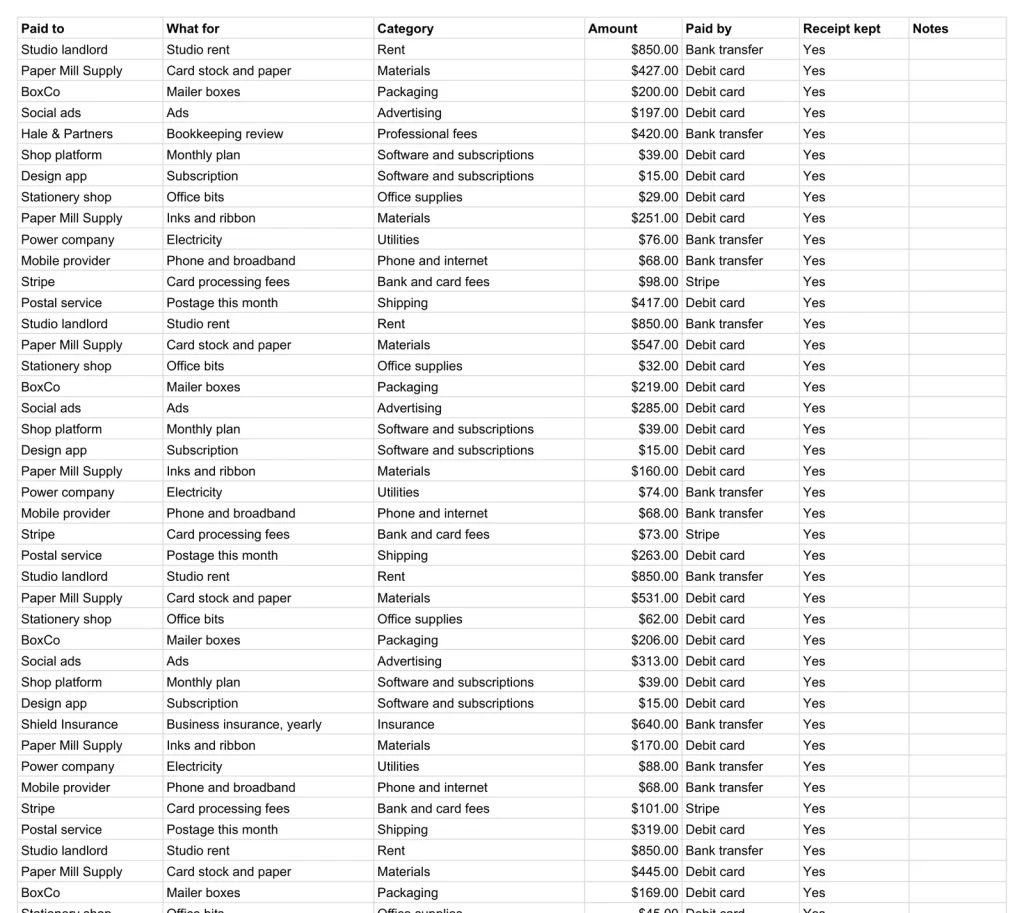
Every payment you make.
Who it went to, the category, the amount, how you paid, and whether the receipt is kept.
Every business mile, priced
Every business mile, priced.
Date, where to, why and the miles. Set your rate per mile once and every trip shows what it is worth.
Where the money goes
Where the money goes.
Every cost ranked by what it takes, in a chart that redraws as you log.
Light or Night
Light or Night.
Every Google Sheets copy comes twice: a light edition and a Night edition for dark screens. Same tabs, same formulas; keep the one you like looking at. The Excel files are light only.
A plain spreadsheet, and this one.
On the left, the plain expenses list most people keep. On the right, the Dashboard tab. Drag the line.
Google Sheets or Excel. You do not have to choose.
The download carries both: the Sheets copy link and the native .xlsx. Every formula is chosen to work identically in the two, and we test the round trip on every build.
Your first five minutes.
-
1
Buy it once.
$39, no subscription. Your order email and your account both carry the download, permanently.
-
2
Copy it into your Drive.
One click and it is yours, in your own Google account, forever. We keep no access to your copy and nothing in it phones home.
-
3
Start in the example.
The filled copy shows every tab already working. Poke it, break it, then open your blank and type your own.
Add the rest of the set.
All five goes in as the Freelancer & Solopreneur Kit at $129, not five separate items. You keep $66.
Also in the Small Business Operations Kit: all four for $129, you keep $57.
Also in the Contractor & Trades Kit: all four for $129, you keep $47.
Also in the Content Creator Kit: all three for $85, you keep $32.
№ · Two lists in, a P&L out
A small business bookkeeping spreadsheet that writes the monthly profit and loss for you
The Small Business Bookkeeping workbook is for the self-employed, freelancers and small shops who want clean books without accounting software. On Settings, type your business name and check the categories fit your business: income such as product sales, services and wholesale orders; expenses from materials and packaging to software, rent and bank fees. Rename any of them and the logs and the P&L follow.
How it works
Log money in on Income and money out on Expenses, one row per payment, with the category and how it was paid. Mark an invoice Unpaid until the money arrives and the Dashboard lists what is still owed. Monthly P&L fills itself from the two logs: income, cost of sales, gross profit, operating expenses, net profit and margin, month by month and year to date.
Gross profit, then net
Each expense category is set as Cost of sales, what it takes to make or deliver what you sell, or Operating, everything else. That split turns income into gross profit and then net profit. The logs keep every year: type last year on Settings and the P&L and Dashboard show it. The workbook keeps your books and files nothing; an accountant can work straight from the P&L and the two logs.
The download is a short PDF with two Google Sheets buttons, one for a blank copy in your own Drive and one for a copy filled with an example, the same workbook as blank and example Excel files, and a one-page Quick Start for each.
The questions we actually get
Do I need to know accounting to use it?
No. You log each payment in or out with a category. The profit and loss statement, margin and charts are worked out from the two lists.
What is the difference between cost of sales and operating expenses?
Cost of sales is what you spend to make or deliver what you sell: materials, packaging, shipping, contractors who do the work. Everything else is operating. You set which is which per category on Settings.
Can I look at last year?
Yes. The year follows today's date; type last year over it on Settings and the P&L and Dashboard show that year. The logs keep every year you enter.
Does it file my taxes?
No. It keeps the books; it does not file anything. Your accountant can work straight from the P&L and the two logs.
Does it work in Excel?
Yes. The download carries native .xlsx files, one blank and one filled with an example, for Excel 2010 and later, Excel for Mac and Microsoft 365. Every formula is ordinary Excel, with no macros to enable.
Books that keep themselves.
Two logs and a statement, in Google Sheets and Excel, with a Night edition in Google Sheets, no subscription, no year baked in.
Get the bookkeeping · $39Still deciding? Open it live, read‑only. Not the sheet you need? See every spreadsheet template or ask at Templacity Hall.
Be the first to say something.
Nobody has written about this one yet. If it is on your device, yours is the first thing the next person reads.
Instant download.
Your file is in your account the moment you check out, yours to re-download any time. A receipt lands in your inbox, too.
One-time purchase.
No subscription, no annual renewal, no upgrade nags. Pay once and the file is yours.
Quiet, secure checkout.
Stripe. Apple Pay. No spam, no “partners,” no reselling your details. Receipt, file, done.


