A whole year of money, in one quiet spreadsheet.
Log what comes in and what goes out. The plan against actual, the paycheck budget, the bill calendar, your debt-free date and your net worth all work themselves out.
- Google Sheets
- Excel .xlsx
- Blank + filled example
Instant download. Permanent link in your account.
Instant download. Permanent link in your account. Yours forever, no subscription.
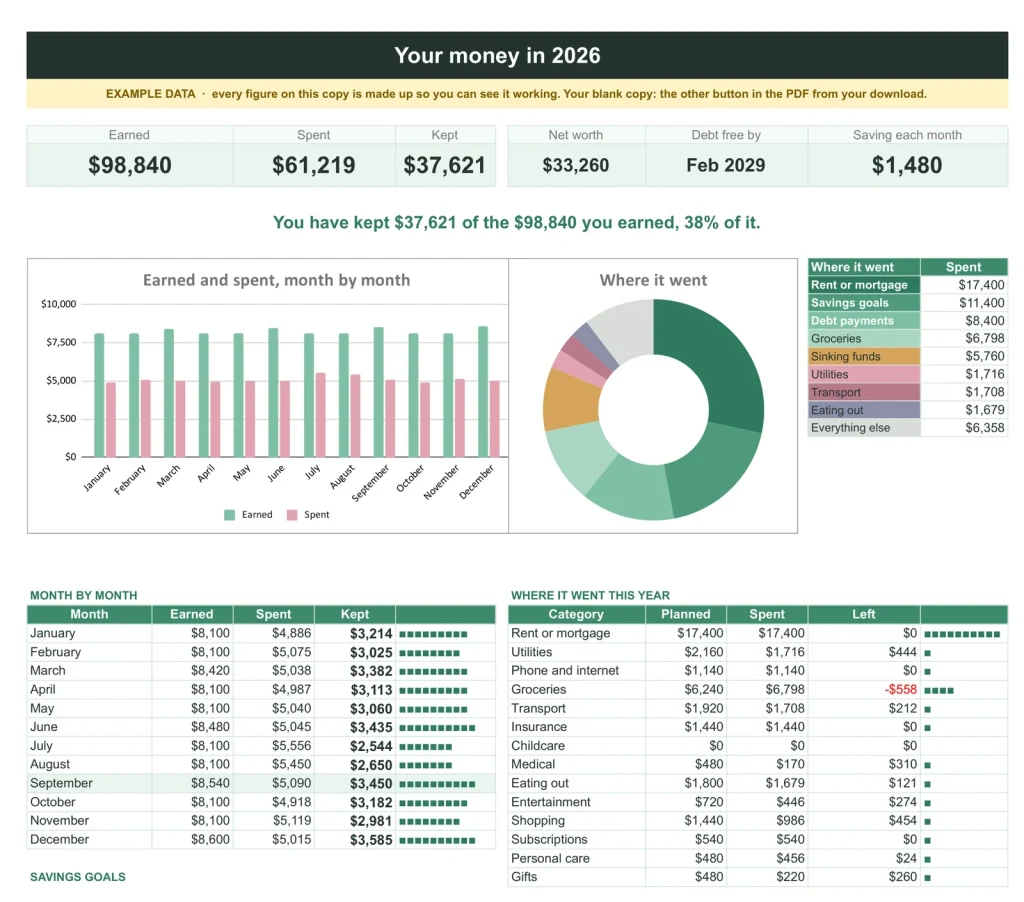
Twenty-one tabs, one workbook. This is the Year tab as it arrives; the filled example copy lets you see every one working before you type a number.
A plain spreadsheet, and this one.
On the left, the budget most people build for themselves. On the right, the planner's Year tab. Drag the line.
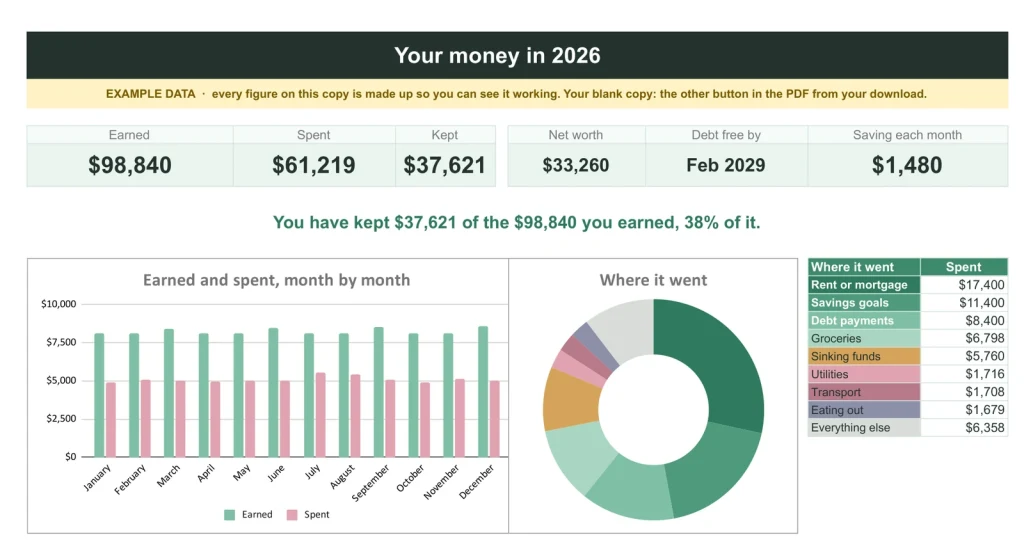
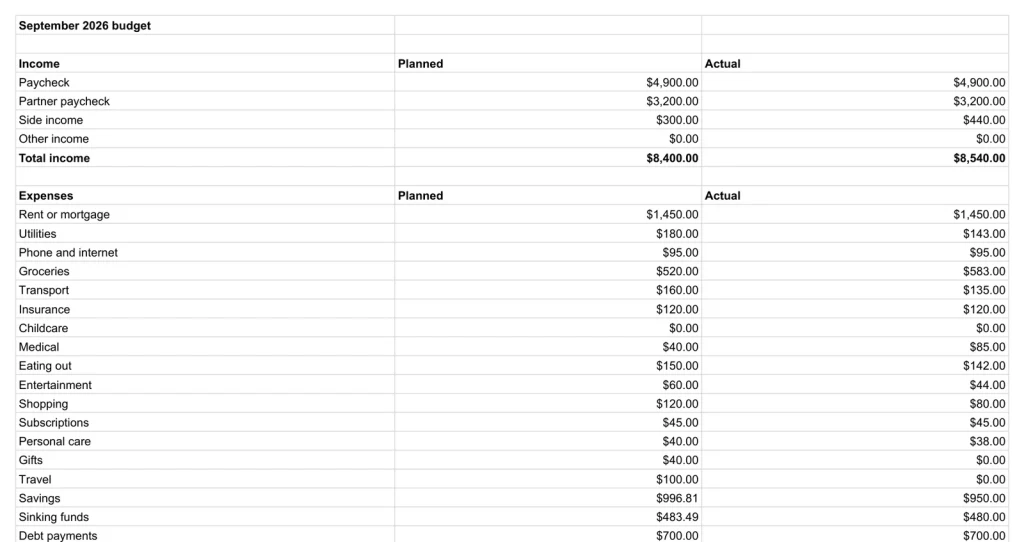
Rows and totals on one side. Where the whole year went, at a glance, on the other.
The Months
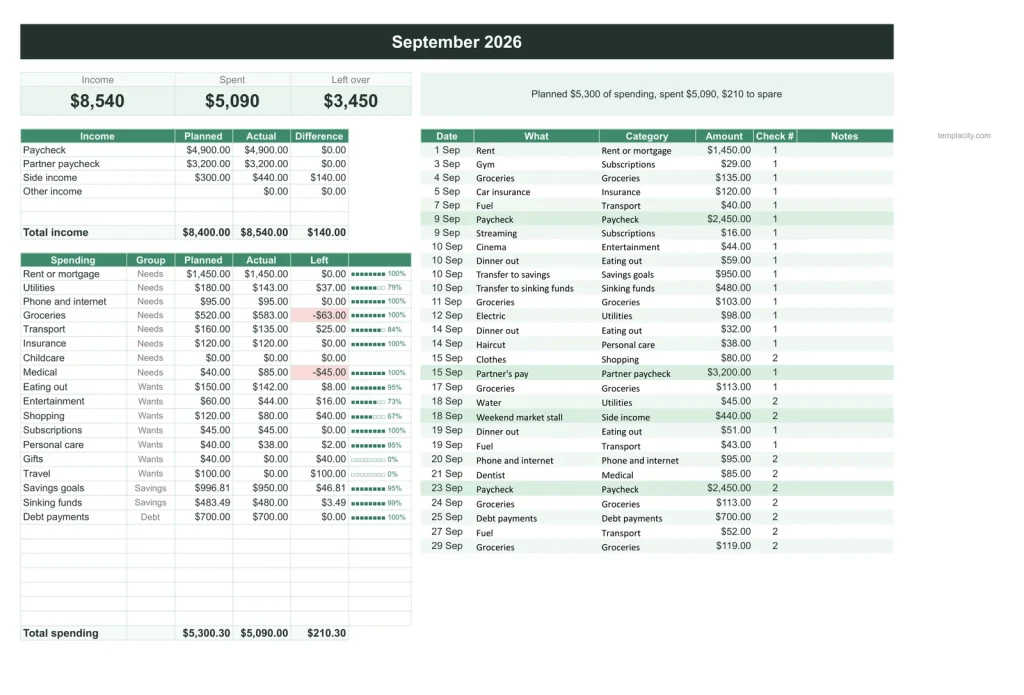
Twelve honest tabs, one month each.
Type a transaction on the right of the page and the left side answers: plan against actual per category, the needs, wants and savings split, and what this month kept. January to December are already there, and the year rolls over by itself.
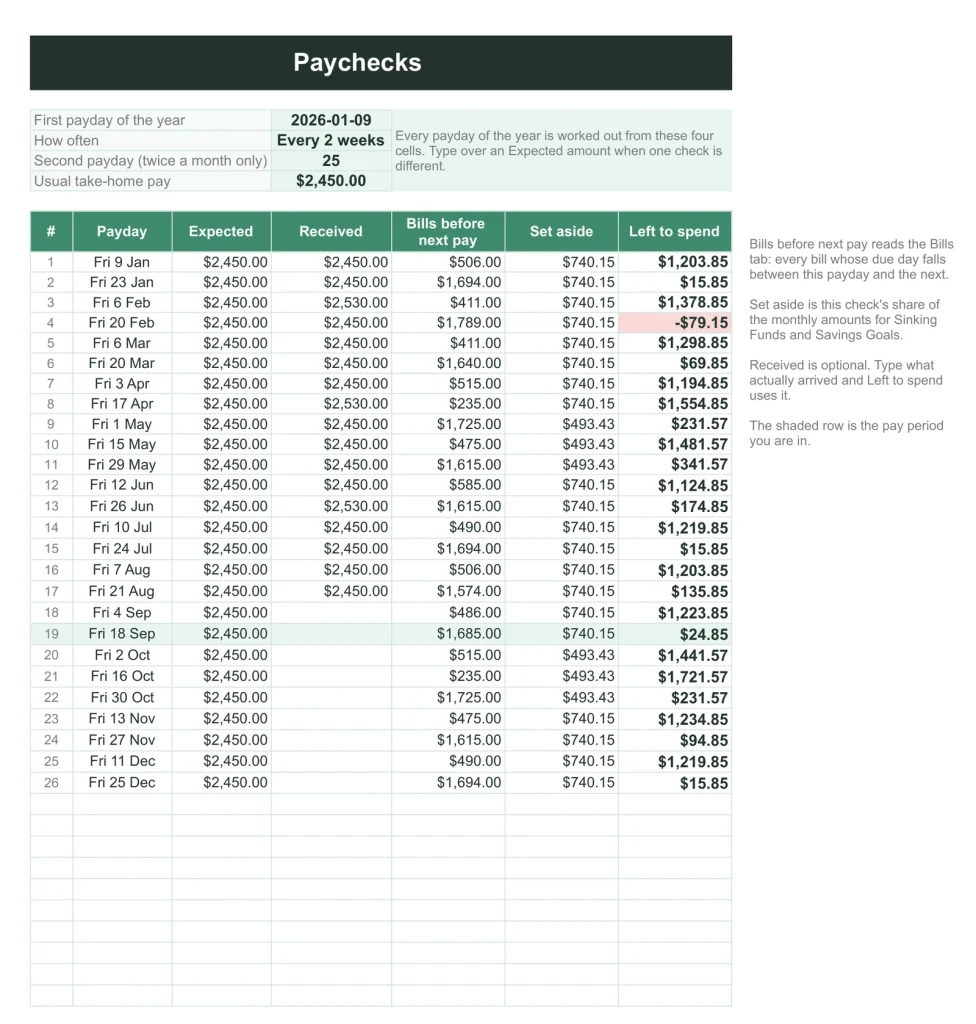
Paychecks
Budget by payday, not by calendar.
Give it one payday and a frequency and it writes out every paycheck of the year: the bills that fall before the next one, what each check needs to cover, and what is actually left to spend. The month is how banks think. This tab is how you get paid.
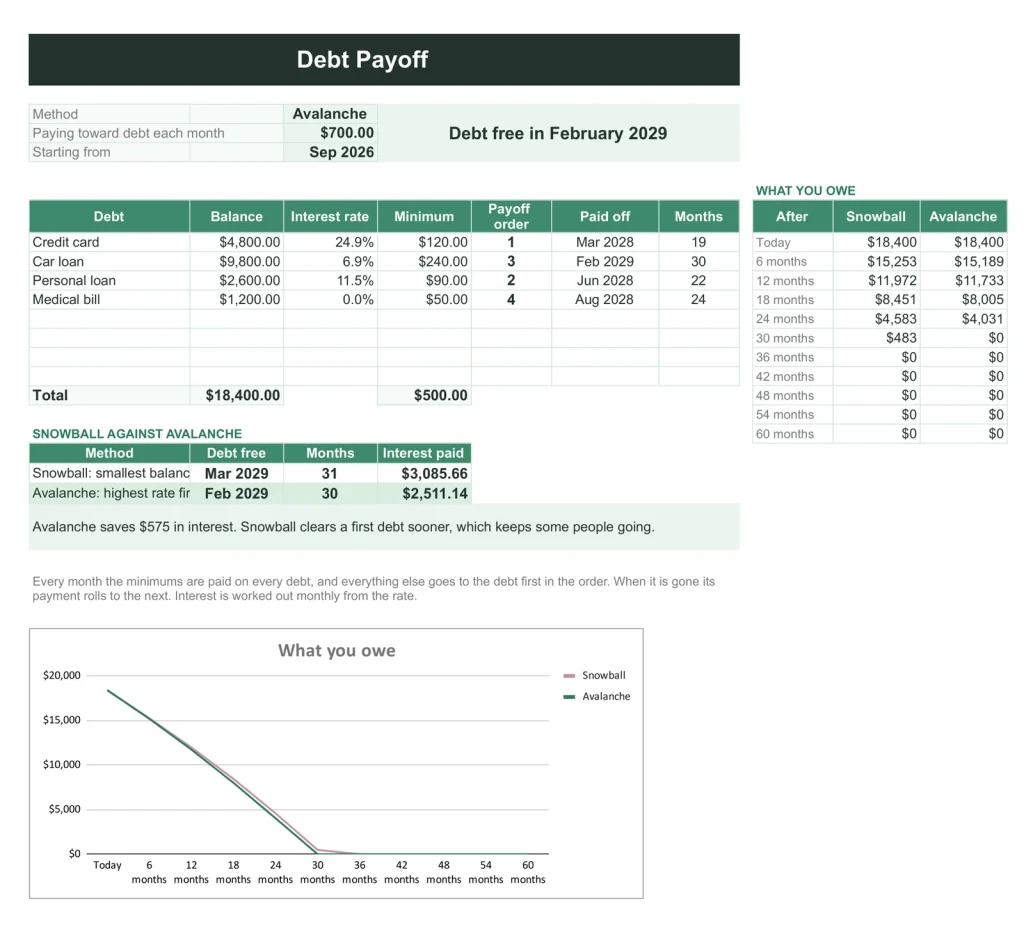
Debt Payoff
Snowball and avalanche, raced side by side.
List your debts once. Both methods are simulated month by month against your real budget: the payoff order, what each debt costs you in interest, and the date you are free under each. Pick the line you like and every month tab budgets for it automatically.
And the quiet ones
Bills, goals, funds and your net worth keep themselves.
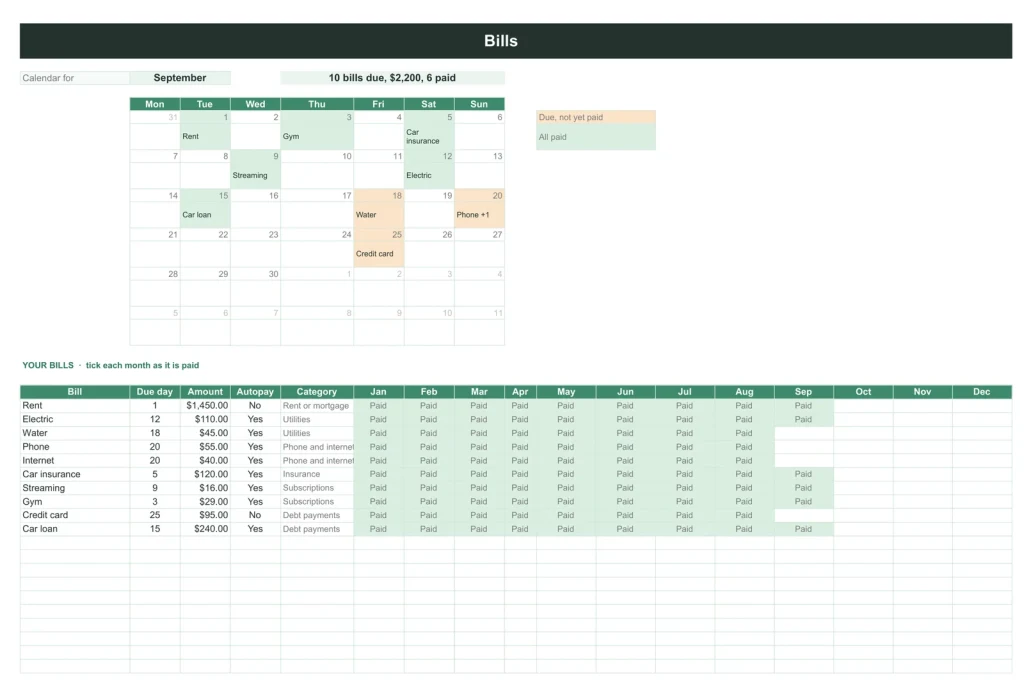
The bill calendar
Every bill, its day, and a paid grid for the whole year. Late fees come from forgetting, not from lacking.
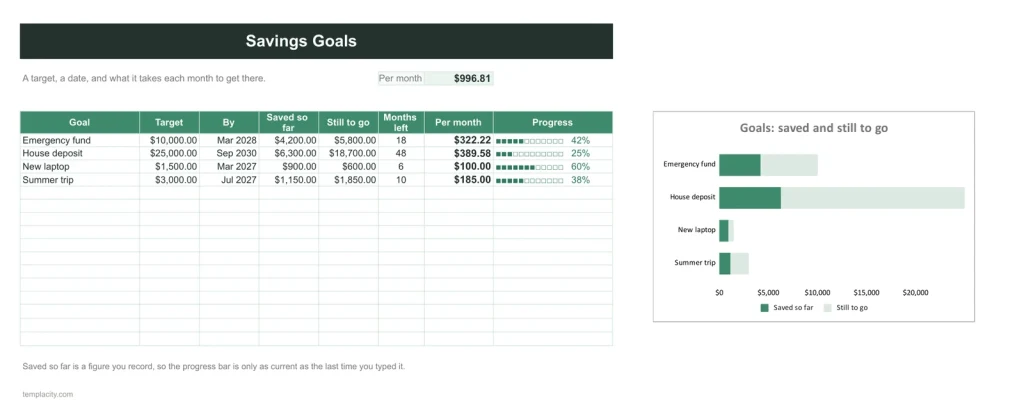
Goals that budget themselves
Set a goal and its monthly amount appears in every month's plan on its own. Sinking funds work the same way.
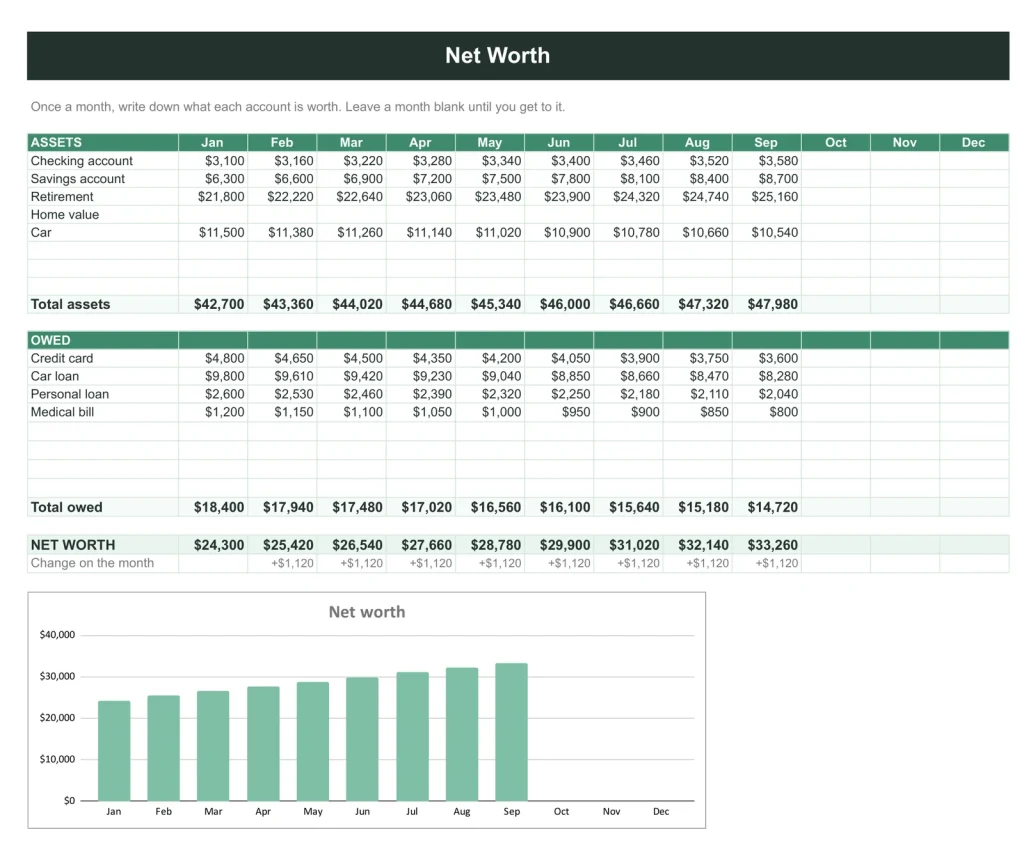
The line that should go up
One entry a month and the year draws itself: what you own, what you owe, and which way it is moving.
You type five things. It works out the rest.
You type
- What you earn and what you spend, as it happens
- Your bills, once
- Your debts, once
- Your goals and their target dates
- One payday and how often it repeats
It works out
- Plan against actual, every category, every month
- Every paycheck of the year and what is left to live on
- Snowball against avalanche and your debt-free date
- The needs, wants and savings split
- Your net worth, month by month
Google Sheets or Excel. You do not have to choose.
The download carries both: the Sheets copy link and the native .xlsx. Every formula is chosen to work identically in the two, and we test the round trip on every build, so the file you hand your accountant still calculates.
A link, not a file to babysit.
Buy it once
$39, no subscription. Your order email and your account both carry the download, permanently.
Copy it into your Drive
One click and it is yours, in your own Google account, forever. We keep no access to your copy and nothing in it phones home.
Start in the example
The filled copy shows a whole year already working. Poke it, break it, then open your blank and type your first paycheck.
The questions we actually get
Is this dated 2026? Will I need a new one in January?
No. There is no year in any tab. The year sits in one cell, defaults to today, and the whole workbook rolls over on its own every January. The copy you make today is still right in five years.
I get paid every two weeks. Does the budget follow that?
Yes, that is what the Paychecks tab is for. Give it one payday and a frequency, weekly, fortnightly or monthly, and it writes out every check of the year with the bills that fall before the next one.
Does the debt payoff need scripts or add-ons?
No. The snowball and avalanche simulations are plain formulas, month by month. Nothing in the workbook asks for permissions, runs a script, or phones anywhere.
What exactly do I receive?
A small PDF with your links: the Google Sheets copy links, blank and filled example, and the native Excel files of both. Buying once covers your personal use in both apps, forever.
Your whole year of money, worked out.
Twenty-one tabs, both apps, no subscription, no year baked in. Log what happens; it does the thinking.
Get the planner · $39Still deciding? Open it live, read‑only. Not the sheet you need? See every spreadsheet template or ask at Templacity Hall.
Be the first to say something.
Nobody has written about this one yet. If it is on your device, yours is the first thing the next person reads.
Instant download.
Your file is in your account the moment you check out, yours to re-download any time. A receipt lands in your inbox, too.
One-time purchase.
No subscription, no annual renewal, no upgrade nags. Pay once and the file is yours.
Quiet, secure checkout.
Stripe. Apple Pay. No spam, no “partners,” no reselling your details. Receipt, file, done.


