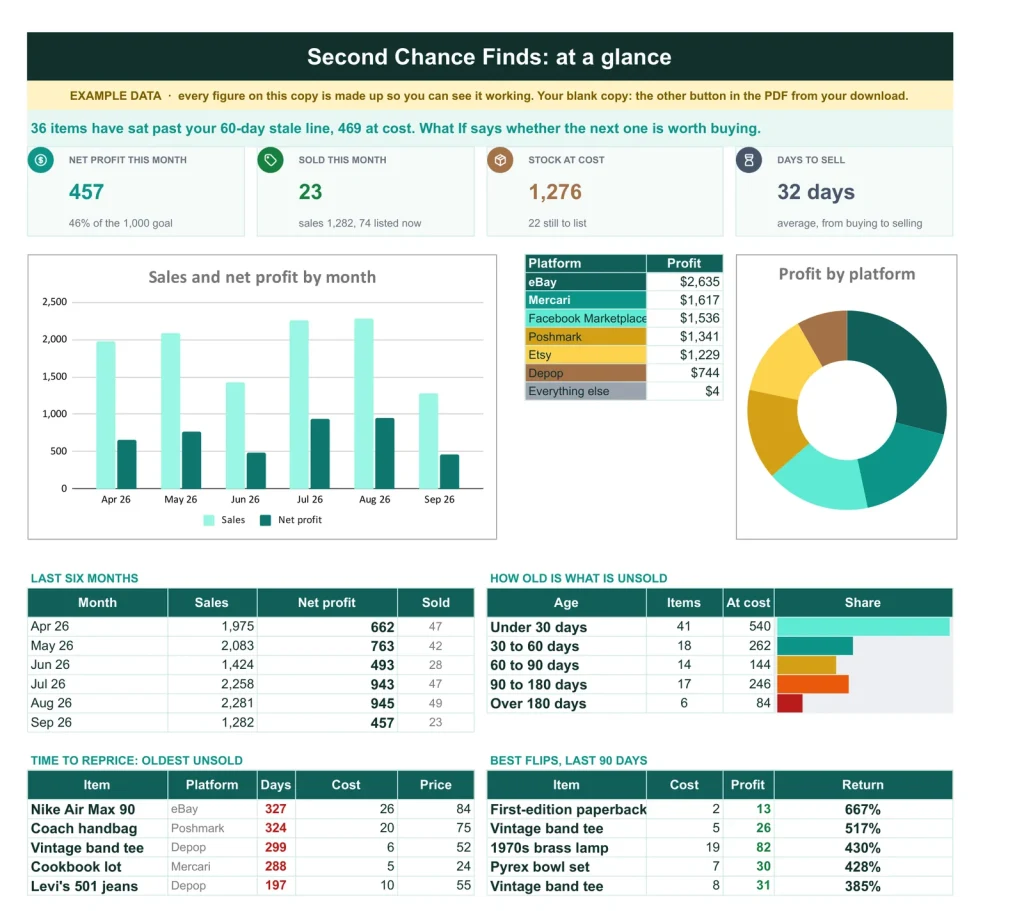
The dashboard: profit against your goal, stock at cost and what to reprice.
The true profit on every flip.
One row per item from the day you buy it: fees, profit, return and days to sell worked out when it sells, with profit by platform and a reprice list for stale stock.
- Google Sheets
- Excel .xlsx
- Blank + filled example
Language
Instant download. Permanent link in your account.
Instant download. Permanent link in your account. Yours forever, no subscription.
A plain spreadsheet, and this one.
On the left, the plain inventory list most people keep. On the right, the Dashboard tab. Drag the line.
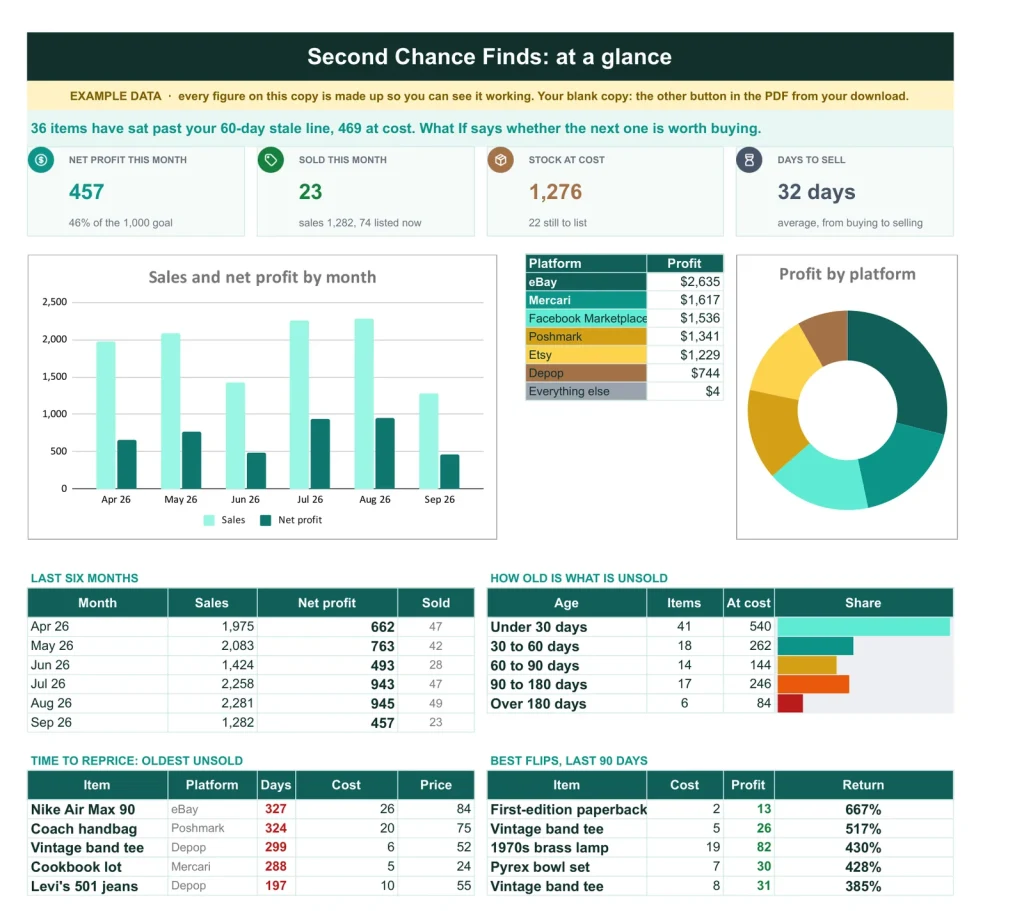
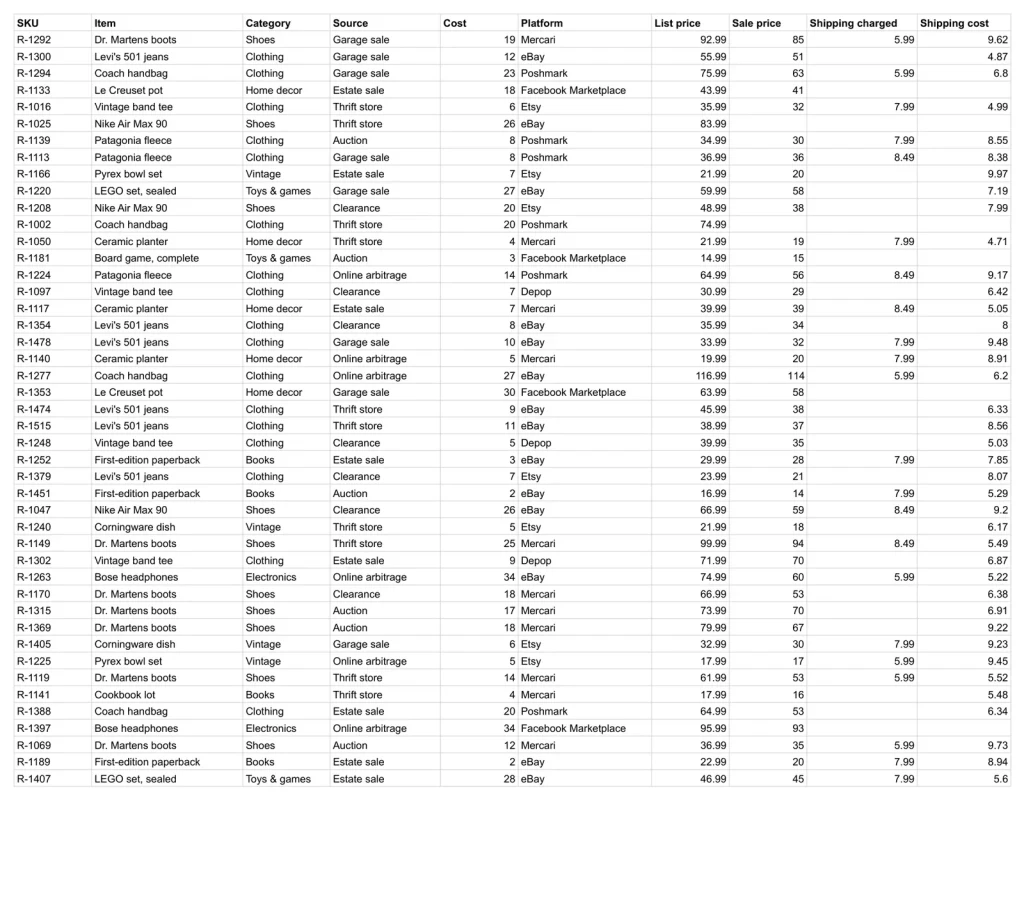
Items and prices on one side. Sales and profit by platform, on the other.
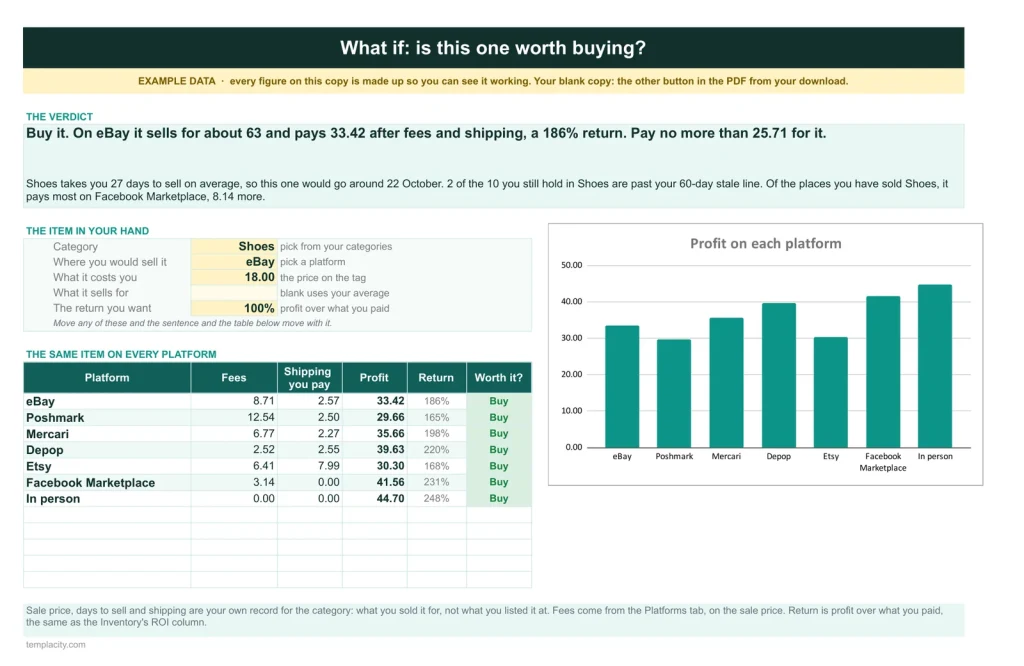
What If
Buy it or pass?
For the item in your hand: your sale price, the fees and shipping for its category, and the most to pay for the return you want, plus when it would sell and how much of that category is already sitting stale.
Inventory
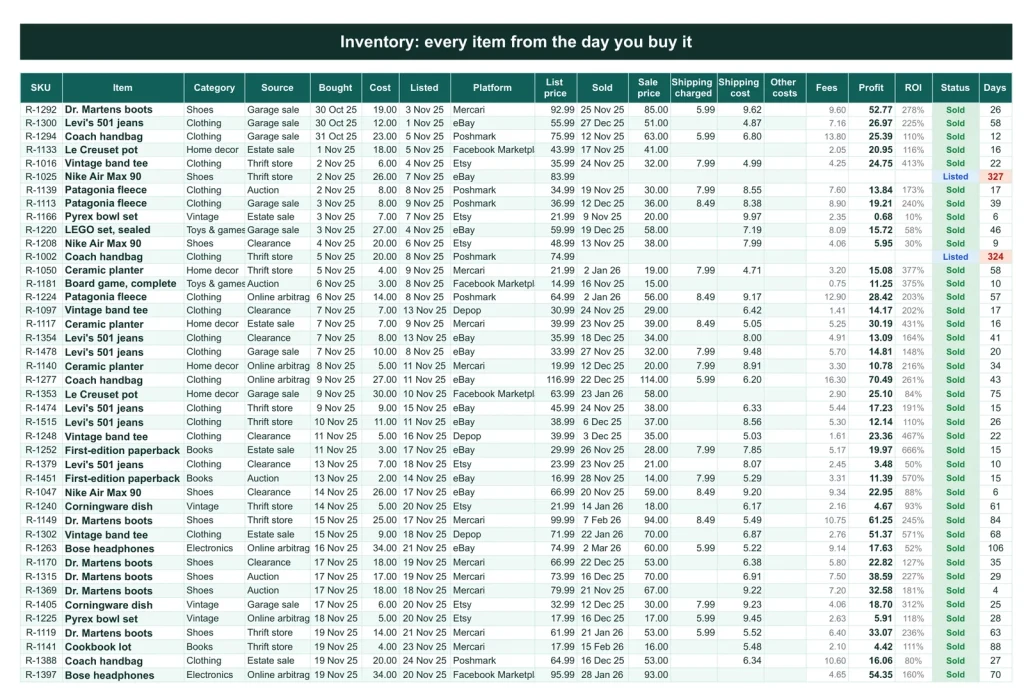
One row, purchase to sale.
Each item from the day you buy it. When it sells, the fees, profit, return and days to sell fill themselves in.
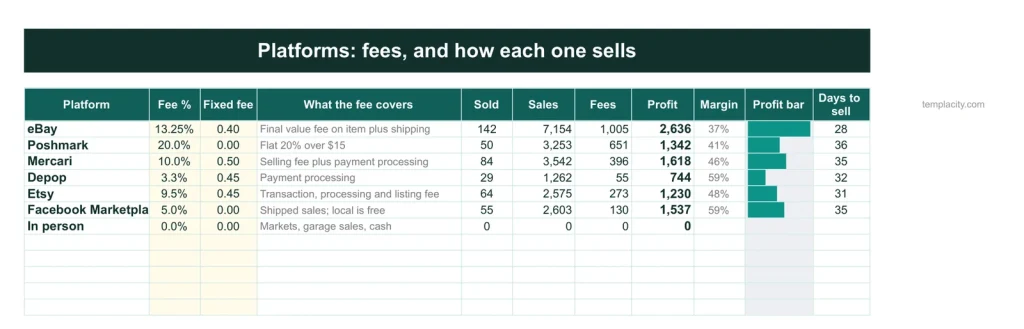
Platforms
What each marketplace really takes.
Fee percent and fixed fee per platform, which you edit to current rates, and how each one performs for you.
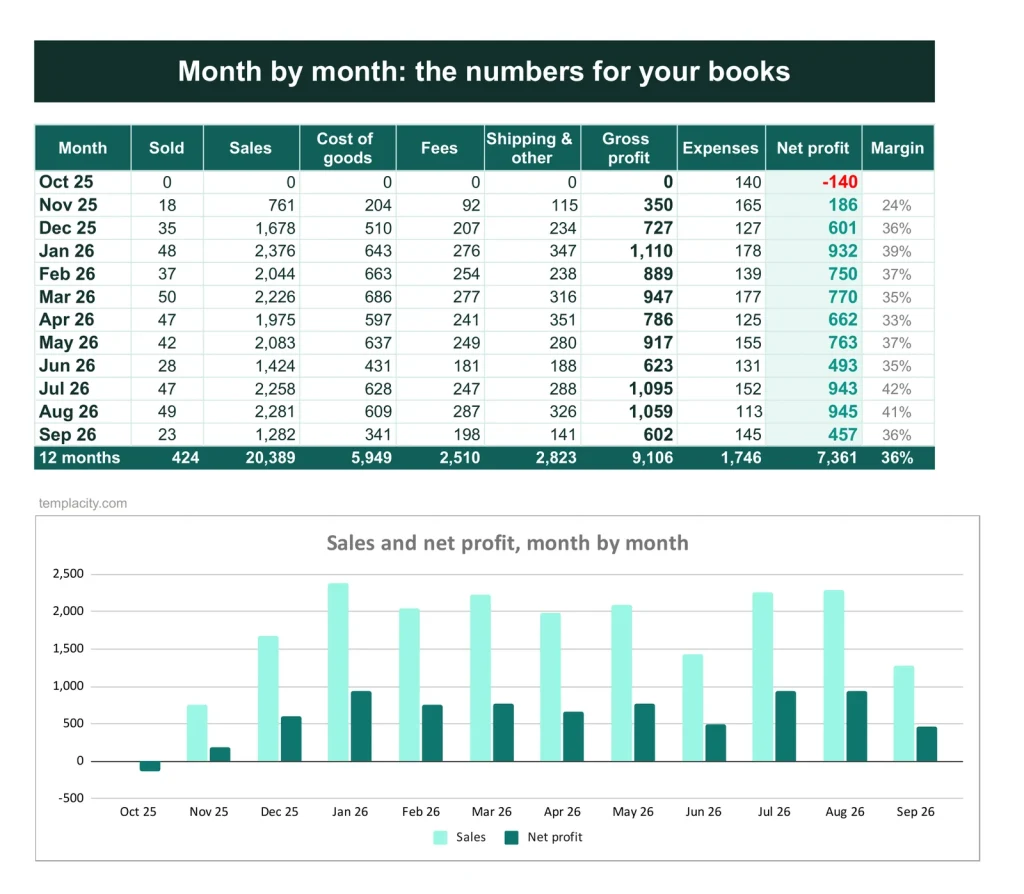
Monthly
Twelve months of results.
Sales, cost of goods, fees, shipping and net profit, month by month.
You buy and sell. It counts the profit.
You type
- Your platforms and fee rates, once
- Each item and what you paid
- The sale price and shipping
It works out
- Profit after fees and shipping
- Profit by platform
- Days to sell
- A reprice list for stale stock
Google Sheets or Excel. You do not have to choose.
The download carries both: the Sheets copy link and the native .xlsx. Every formula is chosen to work identically in the two, and we test the round trip on every build.
A link, not a file to babysit.
Buy it once
$39, no subscription. Your order email and your account both carry the download, permanently.
Copy it into your Drive
One click and it is yours, in your own Google account, forever. We keep no access to your copy and nothing in it phones home.
Start in the example
The filled copy shows every tab already working. Poke it, break it, then open your blank and type your own.
№ · Real profit, item by item
A reseller inventory spreadsheet that works out profit after fees and shipping
The Reseller Inventory & Profit Tracker is for people who flip clothing, shoes, books, electronics or vintage across more than one platform and want to know what each item really made. Start on Platforms: each place you sell with its fee percentage and fixed fee. Check them against each platform’s own fee page and edit them, because platforms change their fees.
From the shop aisle to the sale
- Give each item a row on Inventory the day you buy it, with its category, source and what you paid.
- When you list it, add the date, platform and price. When it sells, add the sale price and shipping: fees, profit, return and days to sell are worked out.
- Put supplies, mileage, subscriptions and storage on Expenses. Monthly takes them off for net profit over the last twelve months.
Anything unsold for 60 days, or the number you set, lands on the Dashboard’s reprice list. Before you pay for the next one, What If takes the category, the platform and the price on the tag and says whether to buy, the most to pay and when it would sell, from your own record.
The download is a short PDF with two Google Sheets buttons, one for a blank copy in your own Drive and one for a copy filled with an example, the same workbook as blank and example Excel files, and a one-page Quick Start for each.
The questions we actually get
Are the platform fees already filled in?
eBay, Poshmark, Mercari, Depop, Etsy, Facebook Marketplace and In person start with a fee percentage and a fixed fee. Check each against the platform's current fee page and edit it: fees change, and the profit is only as right as they are.
What counts in the profit?
The sale price less the item's cost, the platform fees and shipping. Net profit on Monthly also takes off your expenses: supplies, mileage, subscriptions and storage.
I sold something in person. What platform do I pick?
In person. It has no fees.
When does an item count as stale?
After 60 days unsold, or whatever you set on Settings. Stale items appear on the Dashboard's reprice list.
Does it work in Excel?
Yes. The download carries native .xlsx files, one blank and one filled with an example, for Excel 2010 and later, Excel for Mac and Microsoft 365. Every formula is ordinary Excel, with no macros to enable.
Is there a year printed in it?
No. No year is printed anywhere in the files, so it starts the day you do and keeps working next year.
Know what every flip made.
Inventory and profit, in Google Sheets and Excel, no subscription, no year baked in.
Get the tracker · $39Still deciding? Open it live, read‑only. Not the sheet you need? See every spreadsheet template or ask at Templacity Hall.
Be the first to say something.
Nobody has written about this one yet. If it is on your device, yours is the first thing the next person reads.
Instant download.
Your file is in your account the moment you check out, yours to re-download any time. A receipt lands in your inbox, too.
One-time purchase.
No subscription, no annual renewal, no upgrade nags. Pay once and the file is yours.
Quiet, secure checkout.
Stripe. Apple Pay. No spam, no “partners,” no reselling your details. Receipt, file, done.